



Plain Text to HTML without Losing Formatting

Developers work with the plain text format almost everywhere, from API responses to logs and user input fields. Storing and processing plain text is simple; however, this format doesn’t carry much layout or structure. This introduces a problem when plain text needs to appear in an HTML page.
Users expect line breaks to stay in place and spacing to remain readable, but browsers treat raw text very differently. For example, a user copies some paragraphs and log data from a text editor like Notepad into a browser-based editor. The paragraphs could merge together, since HTML doesn’t treat line breaks as structure, and log data might collapse into one long line.
These issues are everywhere, as you might have experienced firsthand before. They commonly appear in content-rich platforms, like documentation tools and project management systems. Hence, it’s crucial that your text editor preserves plain text even after your users paste it.
This article explores why formatting breaks during conversion, how HTML interprets plain text, and which techniques you can use to protect structure.
Key Takeaways
- Plain text format is simple and universal, but it lacks structure, making HTML conversion challenging.
- Browsers collapse whitespace by default, causing plain text spacing and alignment to break.
- HTML requires structural elements like <p>, <br>, and <pre> to preserve readable formatting.
- Manual parsing gives full control over how plain text becomes HTML but requires more development effort.
- WYSIWYG editors automate most basic conversion tasks by detecting structure during paste, reducing manual work.
Understanding the Plain Text Format
Plain text offers a simple and transparent way to store content. This is because it contains only characters and doesn’t include metadata about fonts, styling, or layout. This simplicity helps developers and end users process it with many tools, but it also creates challenges during HTML conversion.
What Plain Text Format Can (and Can’t) Represent
The plain text format stores letters, numbers, symbols, spaces, tabs, and line breaks. These characters appear exactly as written because plain text doesn’t support styling or layout. As there are no rules for headings or alignment, a plain text file contains only the characters the author typed.
Plain text may use either ASCII or Unicode. ASCII covers basic English characters, while Unicode supports many writing systems, emojis, and symbols. Unicode matters during conversion because browsers must interpret each code point correctly.
When it comes to spacing, plain text is literal. For instance, if the file shows four spaces, it contains four space characters. HTML will not preserve those characters unless developers enforce whitespace rules.
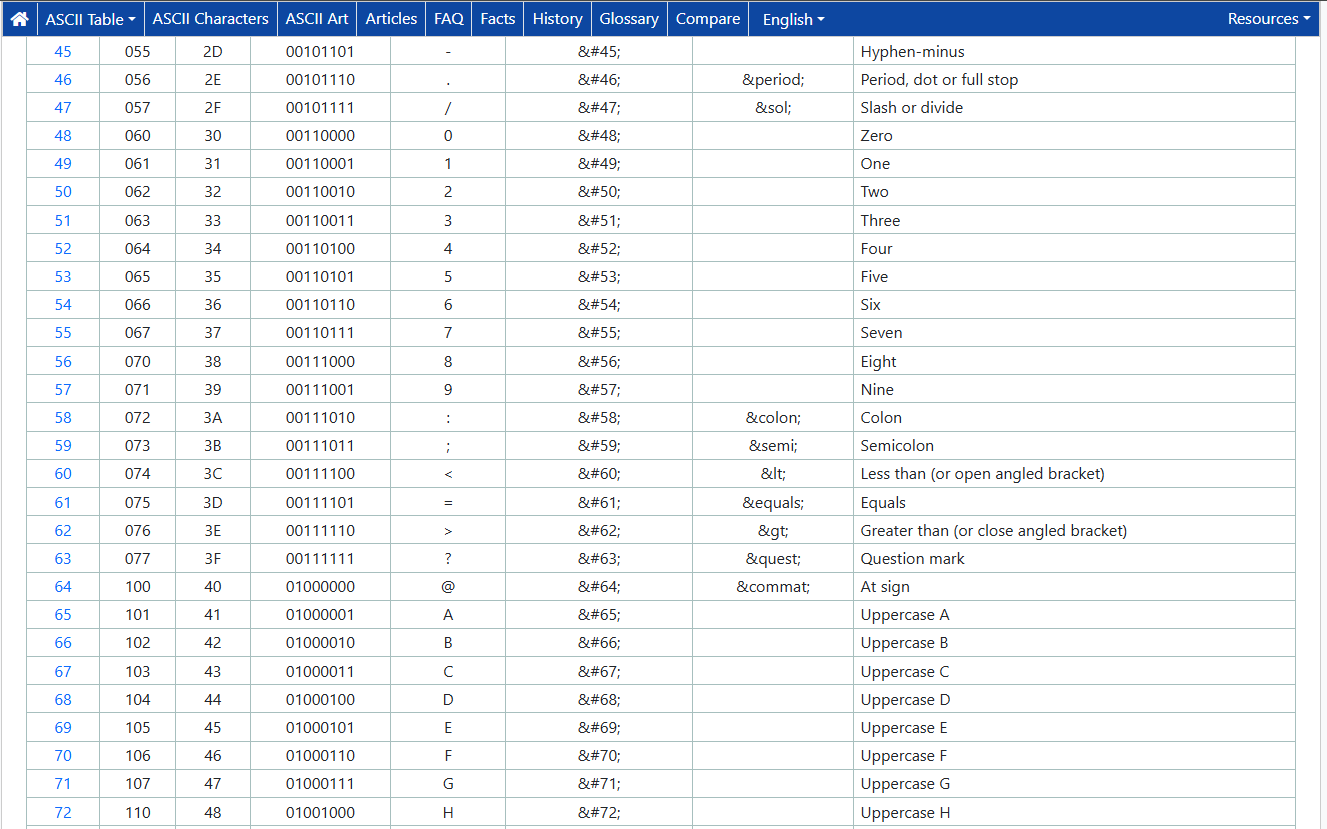
Note: ASCII, or the American Standard Code for Information Interchange, is a character encoding standard that assigns unique numbers (0-127) to English letters, digits, punctuation, and control codes (tab, new line). In short, it’s responsible for converting text into numbers that computers can understand (e.g., ‘A’ is 65 and ‘a’ is 97).
Note: On the other hand, Unicode is a character encoding standard that builds upon what the ASCII already provides. Like ASCII, it assigns a unique number to every character; however, it can accommodate emojis and other languages and scripts. This is because Unicode has a potential code space of over a million character identifiers (code points). Unicode uses different encoding forms, including the popular UTF-8.
Why Formatting Breaks during HTML Conversion
Preserving plain text format isn’t part of HTML’s responsibilities (it does have some remedies for this, as you’ll see later). Its rendering rules come from early web standards that prioritized semantic structure over visual fidelity. Because of this, browsers must interpret whitespace, line breaks, and special characters according to HTML’s layout model.
As a result,
- Browsers collapse whitespace by default. Several spaces shrink into one visible space, and tabs collapse or convert into a small number of spaces. This behavior breaks alignment for logs or structured text.
- Line breaks that use characters like “\n” fail to create new paragraphs. Instead, you must convert these into <br>tags or wrap sections in block elements.
- You need to escape characters like “<” and “&” to avoid broken markup or injection vulnerability issues. This is because they have special meaning in HTML.
What HTML Expects
HTML expects content inside elements that define structure. For example, paragraphs need a <p> tag, line breaks need <br>tags, and code belongs in <pre> or <code> blocks. Browsers don’t infer these elements from plain text alone.
Since HTML’s rendering engine collapses whitespace by design (as stated earlier), whitespace needs explicit rules. You can use <pre> tags or CSS rules like “white-space: pre” to override this behavior and preserve the literal spacing. You must decide which parts of the input should keep exact alignment because preserving everything can cause unintended spacing, hidden characters, or inconsistent indentation.
How HTML Interprets the Plain Text Format
HTML follows rendering rules that control spacing, flow, and structure. It ignores consecutive spaces unless the text appears inside special elements or styles. This behavior works for narrative text but may break content that relies on alignment.
HTML relies on structure, and block-level elements shape how text appears. For example, a paragraph tag enforces vertical spacing, while a <div> creates a container with its own rules. Without these structures, the browser treats the plain text format input as one continuous block.

Furthermore, line breaks appear only when you use tags like <br> or when you preserve it using <pre> tags. Tabs may also behave inconsistently between browsers, with some treating them as a single space and some as consecutive spaces. Because of these inconsistencies, alignments and spacing could break.
Common Developer Techniques for Converting Plain Text to HTML
Thankfully, there are many ways to reliably convert plain text format to HTML. No single method works for every scenario, so choose based on your content type and project needs. You can even combine them together for a more layered approach.
Manual Conversion Using Custom Logic
Custom logic starts with treating the plain text as a stream of characters rather than a block of content. With this, you’ll typically read the text line by line and then decide how each line maps to HTML. For example, blank lines can turn into paragraph breaks, while lines that start with a hyphen turn into list items.
These rules follow a structured logic: detecting patterns, assigning meaning, and wrapping with the correct HTML. Custom logic is also versatile, as it works for your specific use case. If your end users write documentation, for example, you can interpret “-” as a list.
When converting to plain text format, escaping should happen first so the parser never confuses user text with actual HTML. This includes replacing “<” or “>” and “&” elements with HTML entities before applying any structural rules. Once the text is safe, the script can assign the appropriate HTML tags to build the final converted content.
This approach works when you need full control over how users’ text becomes HTML. It also helps generate predictable output that matches the exact needs of your project. The tradeoff is that you must define the entire structure and conversion logic in code.
Using Built-in or Language-Level Utilities
Many languages include small helper functions that solve the most basic parts of conversion. For example, PHP’s nl2br() turns newline characters (“\n” or “\r\n”) into HTML line break tags (<br>).
Similarly, htmlspecialchars() escapes characters that can alter markup (e.g., <, >, &, “, ‘). This function is also crucial since it helps prevent cross-site scripting (XSS), which involves injecting scripts that can execute in client browsers.
For example, with htmlspecialchars(), you can turn scripts like <script>alert(‘XSS’)</script> into harmless text (“<script>alert(‘XSS’)</script>”). This is necessary for when you’re displaying any user-provided or external data, especially within form fields.

While incredibly useful and essential, these utilities can’t handle more advanced formatting. For example, multi-space indentation can collapse unless you add custom logic. Tabs also need normalization to avoid alignment issues.
Using <pre> and CSS-Based Preservation
Some content needs exact alignment rather than semantic structure, and logs, stack traces, and configuration files fall into this category. Wrapping them in <pre> tags instructs the browser to respect every space, tab, and newline. CSS rules such as “white-space: pre-wrap” preserve this behavior and allow lines to wrap inside narrow layouts.
While this approach keeps the visual pattern of the source, it doesn’t express relationships in HTML form. For instance, a block of text inside <pre> has no paragraphs, lists, or headings. Thus, it works best when readability depends on fixed spacing rather than document structure.
Plain Text Format-Markdown-HTML Conversion
Interestingly, some plain text already resembles Markdown. When you list down items in text editors, the natural way is to use dashes, right? This is the same in Markdown, and many users naturally format plain text following Markdown conventions without realizing it.
Instead of writing custom logic to detect ordered lists or other formatting, you can map common patterns to Markdown tokens. Afterwards, you can pass the result through a Markdown parser to generate HTML cleanly. These parsers can also handle mixed input, as they simply interpret what they can and ignore what they can’t.
This method does come with some weaknesses. First, input that doesn’t resemble Markdown at all won’t benefit from this approach (e.g., a log file). Some users may also type symbols that resemble Markdown unintentionally, which can lead to unexpected formatting.
Using External Libraries
Most ecosystems provide libraries that convert plain text into structured HTML. These tools often include configurable rules for paragraphs, indentations, lists, and block detection. Some allow developers to attach preprocessors so that you can handle unusual patterns without modifying the core library.
These libraries could also cover edge cases that appear in real-world text, like inconsistent spacing or mixed encodings.
Using WYSIWYG Editors
A WYSIWYG HTML editor provides another easy way to handle converting plain text format to HTML. Modern editors may apply conversion rules when users paste text, preserving line breaks and clear structural cues. They may also come with paste handlers, which detect list markers, indentation, or repeated whitespace.
What makes this method simpler is that you’ll get plain text to HTML support from the start. The editor handles the heavy lifting by analyzing pasted content and transforming it into structured elements like paragraphs, line breaks, non-breaking spaces, etc.
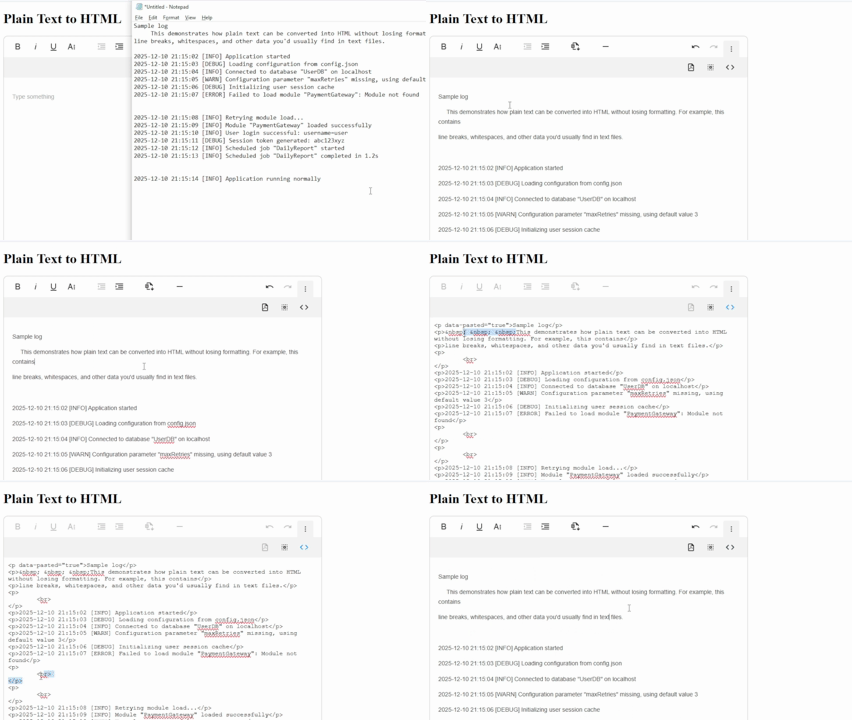
It’s important to note that, like the other methods, WYSIWYG editors don’t present an absolute solution to everything. You might still have to rely on other means for automatically detecting Markdown, code, and other advanced formatting. Still, with these tools, you skip most of the work, like creating a custom plain text format to HTML converter.
Note: Click here to see how you can get started with a WYSIWYG editor implementation of plain text to HTML conversion.
Conclusion
Converting plain text format into HTML requires careful handling of whitespace, encoding, structure, and escaping. Each technique supports different goals, and it’s up to you to choose what’s best for your use case. Manual parsing offers full control, CSS rules preserve visual alignment, and libraries and WYSIWYG editors reduce complexity.
Browsers and editors follow rules that shape how plain text appears. So, understanding these rules can help you build stable and predictable conversion workflows. In the end, the best approach depends on your content (logs, documentation, etc.), its structure, and your users’ needs.






No comment yet, add your voice below!