



Introducing Advanced Find and Replace in Froala | A Better WYSIWYG Editor

I recently built a demo to show off what’s new in Froala editor 4.6. In fact, if you’ve seen the video I published, you’ll know we’re tackling a big challenge with our new advanced find and replace in a WYSIWYG editor. This is because professional content workflows often demand more precision than standard browser tools can offer.
For that reason, I’m excited to give you a behind-the-scenes look at how I built the demo. In this post, I’ll walk you through how this new plugin offers a significant upgrade for complex tasks. Ultimately, it gives developers fine-grained control over text manipulation.
Key Takeaways
- Enhancing a Familiar Tool: This isn’t about replacing standard search, but rather enhancing it with the precision needed for professional editing, like case sensitivity and whole-word matching.
- Full Programmatic Control: The new plugin gives developers complete control through a rich API. This allows you to find, navigate, and replace text programmatically.
- Dynamic Configuration: You can also configure the plugin on initialization. This lets you set default behaviors to match your application’s needs.
- Event-Driven Architecture: Additionally, the plugin fires events before and after actions. This allows you to hook in your own custom logic, like showing a confirmation dialog or saving the document.
- Precision for Professional Work: The plugin makes it possible to perform delicate operations. These are crucial for brand consistency, technical accuracy, and legal documents.
Why Your Web App Needs an Efficient Text Correction Tool
For most day-to-day tasks, standard find and replace is perfect. However, when you’re working with complex documents inside a rich text editor, the stakes are higher. For a developer or content manager, for instance, the integrity of the document is everything.
Consequently, an efficient text correction tool for web apps becomes essential when users need to perform very specific tasks. A simple search, for example, can’t differentiate between a standalone word and one that’s part of another. This limitation can lead to costly errors in legal documents, technical manuals, or branded content. Indeed, these are the real-world scenarios that inspired us to build a smarter, more capable find and replace tool.
Streamline Your Content Editing Workflow
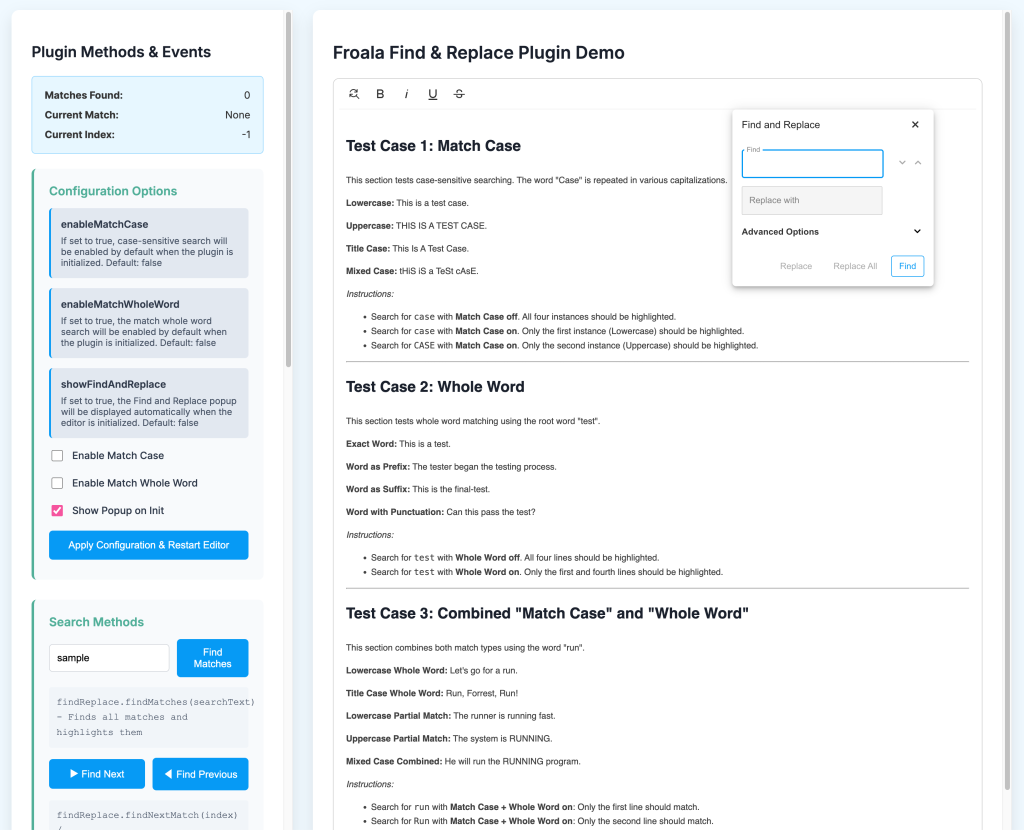
To show how the Froala 4.6 find and replace feature works, I built an interactive demo which you can run yourself by checking this github repo. Specifically, it has a control panel to test every method and an editor pre-filled with text. This setup lets you see the immediate result of every action. As a result, it clearly demonstrates how you can streamline your content editing workflow.
A good tool should adapt to your needs. The Find & Replace plugin is certainly configurable from the start.
const editorConfig = {
    heightMin: 400,
    pluginsEnabled: ['findReplace'],
    toolbarButtons: [
        ['findReplaceButton', 'bold', 'italic', 'underline', 'strikeThrough']
    ],
    // Plugin-specific configurations
    enableMatchCase: false,
    enableMatchWholeWord: false,
    showFindAndReplace: false,
    ...config
};

editor = new FroalaEditor('#froala-editor', editorConfig);
In the demo, you can toggle key options and re-initialize the editor to see their effect. In other words, this shows how you can set up the plugin’s default behavior to perfectly match what your application needs.
Practical Use Cases for Find and Replace
Beyond simple corrections, a powerful find and replace also opens up new possibilities for content management.
- Bulk Text Replacement for Branding: Imagine your company rebrands a product. Using a rich text editor with bulk text replacement, you can update the old name to the new one across hundreds of articles. This can all be done in a single operation, thereby ensuring brand consistency.
- Standardizing Terminology: In technical or legal documents, consistent terminology is critical. Therefore, you can enforce standards by replacing variations of a term with the official one.
- Correcting Recurring Typos: Furthermore, if you discover a common typo that appears dozens of times in a long document, you can fix every instance at once with precision.
- Updating Placeholders: Finally, for teams that use templates, find and replace can quickly populate placeholder text. For example, you can fill in
[Client Name]or[Date]with the correct information.
How to Use Find and Replace in Froala
The core of the plugin is its API. For instance, methods like findMatches(), replaceMatch(), and getMatchesCount() give you the necessary hooks. You can then build your own custom interface around the plugin’s logic. In short, this is perfect for developers looking for a javascript editor find and replace all solution.
Moreover, a truly flexible tool also tells you when it’s performing tasks. The plugin fires several events that you can listen for to run your own code:
findandreplace.beforeClosefindandreplace.beforeOnReplacefindandreplace.onReplacefindandreplace.onReplaceAll
For example, you could use the beforeOnReplace event to show a custom confirmation message. Alternatively, you could use onReplaceAll to automatically save the document. Ultimately, this approach turns the plugin from a simple feature into a fully extensible part of your application. For a complete guide, you can also check out the official Find and Replace documentation.
Putting the Power in Your Hands
Our goal with this new plugin wasn’t to reinvent the wheel, but rather to give it precision steering. Specifically, we’ve built upon the familiar concept of find and replace. This gives developers the robust, controllable API they need to handle sophisticated text manipulation with confidence. Since this has been a long-requested feature, I’m excited that we can finally offer a solution that is both powerful and easy to integrate.
To learn more about this and other new features, you can read our latest release blog post. In the meantime, I encourage you to play with the demo, explore the code, and see how you can bring this new level of control to your own projects.







No comment yet, add your voice below!