



Guide to DeepSeek API Integration: What It Is and How to Get Started

The fast-paced AI environment today enables developers to build applications using large language models (LLMs) and multimodal APIs, resulting in intelligent chatbots and advanced content-generation tools. DeepSeek stands as a powerful innovation that is gaining momentum in the rapidly advancing field of AI development.
So what’s behind the buzz? The DeepSeek platform provides developers with open, high-performance models, including DeepSeek-Coder and DeepSeek-VL, which offer a scalable alternative for intelligent AI-driven features. The DeepSeek API enables developers to access powerful capabilities that are specifically designed for practical applications when working with text, images, or code.
This guide provides information about DeepSeek and its comparison to other leading APIs, as well as a step-by-step process for project integration. This walkthrough provides step-by-step instructions to help beginners start their first AI application development while showing them how to replace OpenAI or Claude with confidence. Start building smarter websites with DeepSeek API integration and unlock endless possibilities for your next project
Key Takeaways
- DeepSeek API integration gives access to open-source models for text, code, and image tasks.
- Includes DeepSeek-Coder for code generation and DeepSeek-VL for multimodal input.
- Offers a fast, scalable alternative to APIs like OpenAI and Claude.
- Easy to use with Python, Postman, or curl via OpenAI-compatible endpoints.
- No hard rate limits on the official API, but usage may vary with traffic or third-party hosts.
- Free access available via Hugging Face; hosted use via OpenRouter or Together.ai.
- Follow best practices: secure your API key, cache responses, and optimize prompts.
- Can be embedded into apps like Froala Editor for AI-assisted content creation.

What is DeepSeek?
DeepSeek operates as an open-source AI project that develops large language and vision models for developers, researchers, and tech enthusiasts. DeepSeek presents itself as a clear and fast API solution that provides open access to its capabilities while encouraging community involvement and state-of-the-art functionality.
The project foundation rests on its two main models:
DeepSeek-Coder functions as an LLM (Large Language Model) that specializes in code generation, completion, and understanding of multiple programming languages. The system proves beneficial for software development automation, code review support, and the development of AI-based developer tools.
DeepSeek-VL functions as a strong vision-language model that accepts multiple input types, including images, charts, documents, and text, to support applications such as visual question answering, caption generation, and document comprehension.
The models within DeepSeek provide users with a wide range of AI application possibilities, including:
- Coding assistance
- Research and data analysis
- Workflow automation
- Multimodal applications combining text and images
The open-source community supports DeepSeek as a flexible platform that serves developers who want to implement AI-driven development and users who need intelligent visual interfaces.
Key features of the DeepSeek API
DeepSeek stands apart from other AI APIs through its distinctive features in the expanding AI API market. The DeepSeek API stands out through these distinctive features, which make it an attractive option for developers and researchers:
Advanced language and vision understanding
DeepSeek models surpass traditional LLMs through their ability to merge natural language processing with visual understanding capabilities. DeepSeek delivers state-of-the-art performance through accurate context-aware outputs when you need to analyze code or generate text, or interpret image-text combinations.
Open-source friendly
The open nature of DeepSeek distinguishes it from proprietary alternatives because it promotes open collaboration among developers. The developer-friendly ecosystem of DeepSeek enables open environment development, model auditing, and contribution and extension through its supportive framework for innovation and trust.
Scalable and high-performance
DeepSeek operates at high speeds and maintains low response times, which makes it appropriate for projects ranging from solo work to large enterprise implementations. The robust architecture of this system enables smooth handling of traffic and load regardless of the number of users it serves.
Competitive edge over other APIs
DeepSeek provides distinct advantages compared to proprietary APIs like OpenAI, Anthropic Claude, and Google Gemini through its unique strengths:
- Open-source architecture with fewer usage limitations
- Multimodal capabilities available out of the box (e.g., image + text tasks)
- A developer-friendly platform with scalable performance
While each API has its strengths, DeepSeek stands out as a flexible and transparent solution, especially for those looking to build with open tools, experiment freely, or fine-tune for specific use cases.
Getting access to the DeepSeek API
The process to integrate DeepSeek API with your system remains simple, whether you are new to AI development or building it into an existing system.
Sign up for an account
The first step involves visiting deepseek.com or the official GitHub page to obtain registration or access instructions. DeepSeek models that are open on Hugging Face platforms do not require direct registration with DeepSeek unless you use their hosted API service.
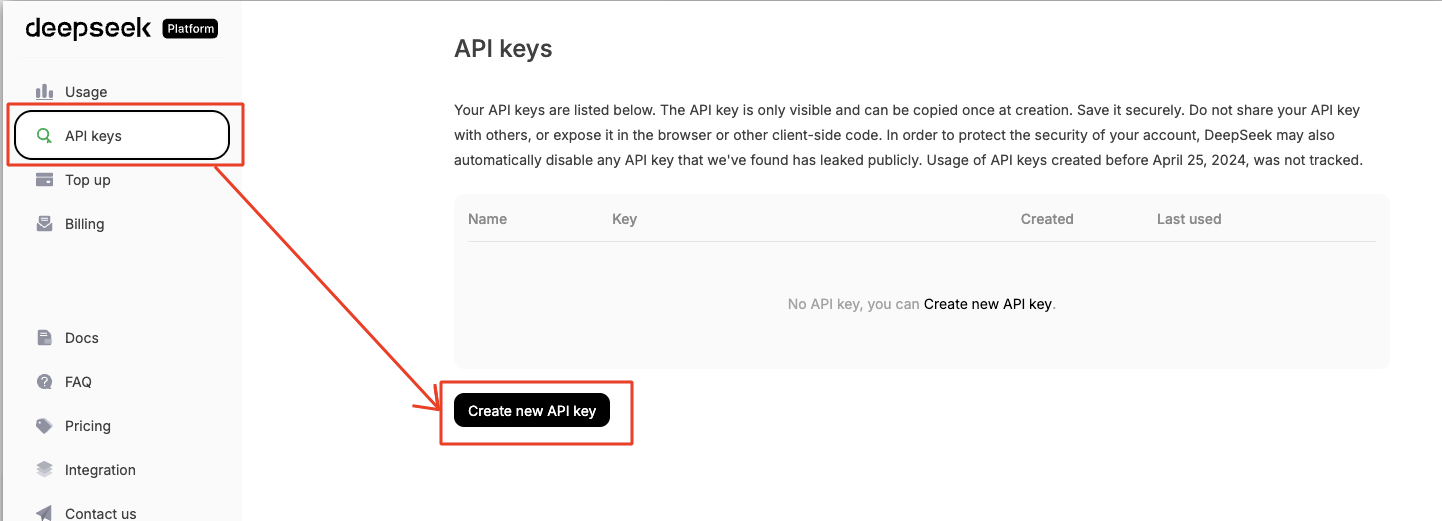
Generate your API key
If you’re using an official DeepSeek-hosted API endpoint (or accessing via a third-party provider like Together.ai or OpenRouter), you’ll typically need to sign up and retrieve an API key from your dashboard. This key is used to authenticate your requests and track usage.
Pricing and free access
DeepSeek-Coder and DeepSeek-VL models are openly available on platforms like Hugging Face for free use in research and many commercial applications, depending on the license terms (typically Apache 2.0). If you’re using the models via hosted APIs (e.g., Together.ai or OpenRouter), pricing will vary by provider and usage volume. DeepSeek’s open-source approach makes it a budget-friendly option for testing, development, and even production use when self-hosted.
Documentation and resources
The official API documentation provides a centralized reference for DeepSeek API integration. It includes:
- Quick start guides
- Input/output formats
- Supported endpoints
- Model capabilities
- Sample scripts and integration examples
You can also find additional resources and real-world usage patterns on platforms like GitHub, Hugging Face model cards, and community forums. These sources offer valuable implementation tips and troubleshooting insights shared by developers.
Understanding the API basics
Before diving into implementation, it’s important to get familiar with the core components of the DeepSeek API. This section walks you through the base URL, authentication process, and any rate limits you should be aware of.
Base URL and endpoint structure
The DeepSeek API is accessible via:
https://api.deepseek.com
(For OpenAI‑compatible clients, you may also use `https://api.deepseek.com/v1`; this “v1” namespace is for compatibility, not model versions.)
Endpoints follow a consistent RESTful structure. For example:
POST /chat/completions – For generating text completions using models like deepseek-chat or deepseek-coder
Each request typically includes a `model` parameter, a `messages` array, and hyperparameters such as `temperature`, `max_tokens`, `frequency_penalty`, etc.
Authentication methods
Authentication is handled via API keys. Once you create an account or access DeepSeek via a third-party provider (like OpenRouter), you’ll receive a token.
To authenticate a request, include the following header:
Authorization: Bearer YOUR_API_KEY
Never expose your key in client-side applications. Store it securely and rotate it regularly if needed.
Rate limits and usage caps
DeepSeek’s official API does not enforce a rate limit on user requests. Their infrastructure is designed to serve as many requests as possible, even under heavy traffic.
During periods of high load:
- Non-streaming requests may return continuous empty lines.
- Streaming requests may return keep-alive events (e.g., : keep-alive) until a full response is ready.
If a response cannot be completed within 30 minutes, the server will automatically close the connection.
⚠️ If you’re using DeepSeek through a third-party API provider (like OpenRouter or Together.ai), rate limits may apply depending on your plan.
And if you’re self-hosting (e.g., via Hugging Face), usage is only limited by your compute power (e.g., GPU/CPU/memory).
For up-to-date behavior, check the official DeepSeek API docs or your provider’s dashboard.
Step-by-step integration guide
Let’s learn to integrate the DeepSeek API step by step.
Prerequisites
Before you begin your DeepSeek API integration, make sure you have the following:
- Basic programming knowledge in a language like Python or JavaScript
- Access to an API client such as:
- Postman
- curl (command-line tool)
- A language-specific HTTP library like requests (Python) or fetch (JavaScript)
- An API key from DeepSeek or a third-party provider (e.g., OpenRouter)
Making your first request
Let’s walk through a basic “Hello World”-style text generation request using the /chat/completions endpoint.
Python example:
import requests

url = "https://api.deepseek.com/v1/chat/completions"

headers = {

    "Authorization": "Bearer YOUR_API_KEY",

    "Content-Type": "application/json"

}

data = {

    "model": "deepseek-chat",

    "messages": [{"role": "user", "content": "Say hello to the world!"}],

    "temperature": 0.7

}

response = requests.post(url, headers=headers, json=data)

print(response.json())
cURL example:
curl https://api.deepseek.com/v1/chat/completions \

  -H "Authorization: Bearer YOUR_API_KEY" \

  -H "Content-Type: application/json" \

  -d '{

        "model": "deepseek-chat",

        "messages": [{"role": "user", "content": "Say hello to the world!"}],

        "temperature": 0.7

      }'
Response format:
The response will be a JSON object with a choices array. You can extract the generated text like this:
{

  "choices": [

    {

      "message": {

        "role": "assistant",

        "content": "Hello, world!"

      }

    }

  ]

}
Step-by-step setup in Postman
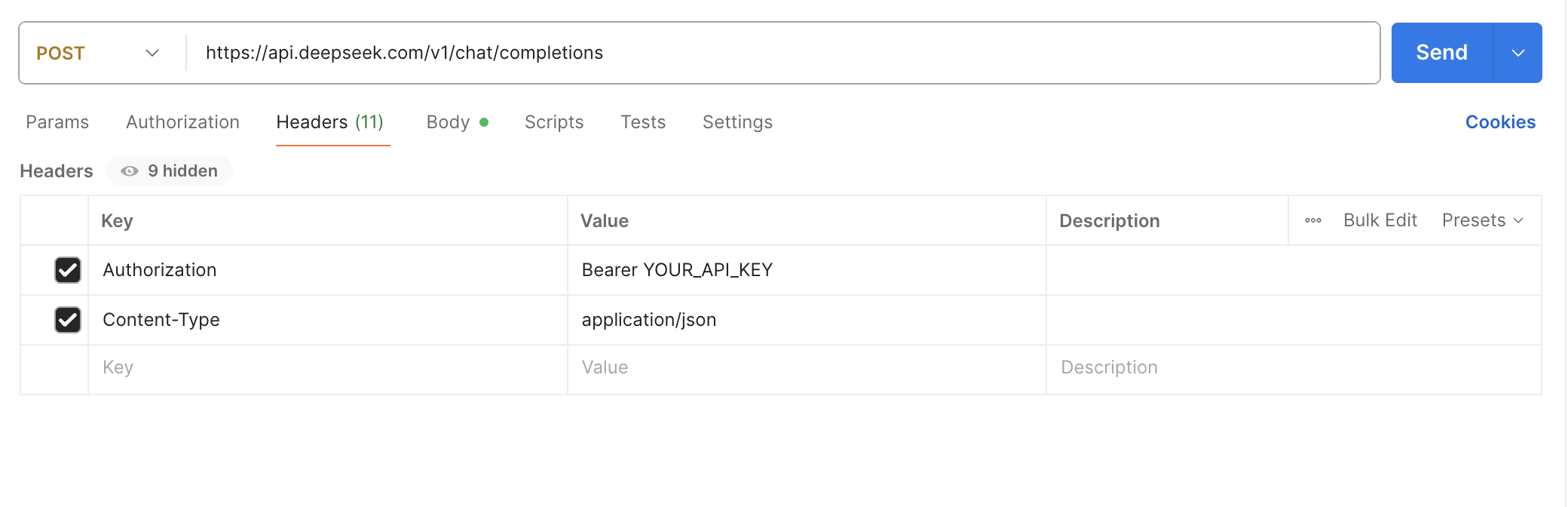
You can run the equivalent of the above request code in Postman by setting up a POST request with the correct headers and JSON body.
Here’s how to do it step by step in Postman:
1. Set the request method to POST
URL:
https://api.deepseek.com/v1/chat/completions
2. Set the headers
Go to the “Headers” tab and add:
| Key | Value |
| Authorization | Bearer YOUR_API_KEY |
| Content-Type | application/json |
Replace YOUR_API_KEY with your actual DeepSeek API key.
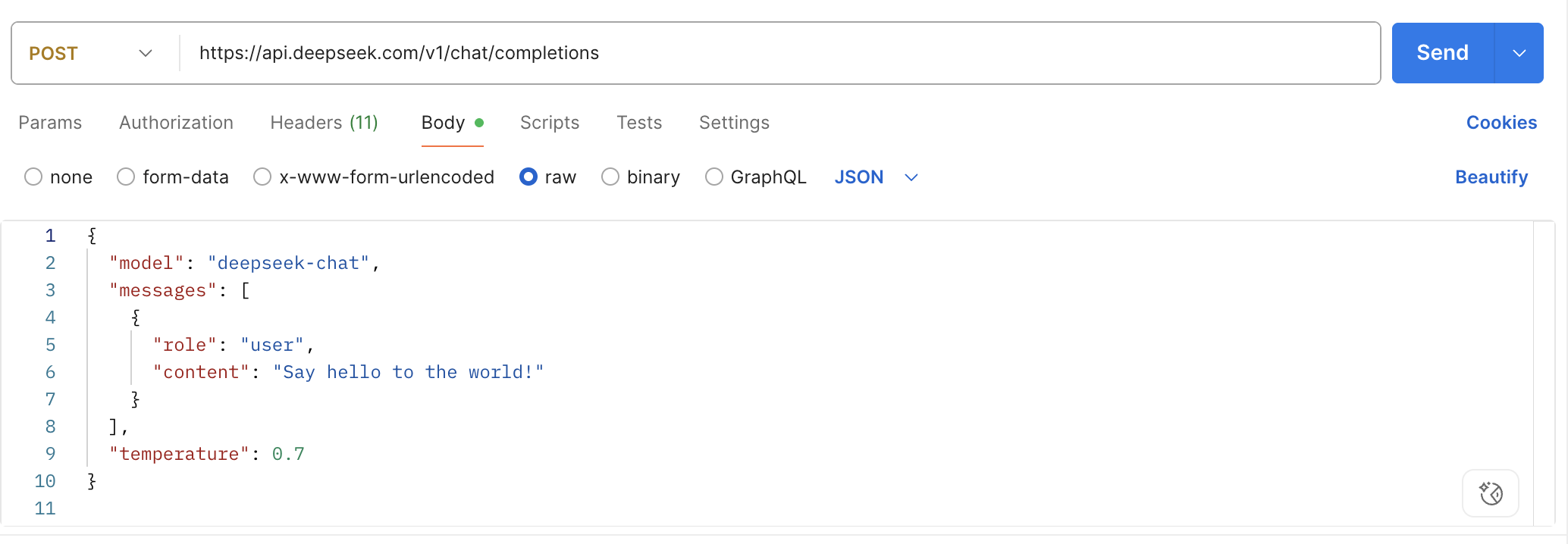
3. Set the request body
Go to the “Body” tab → Select “raw” → Choose JSON (from the dropdown).
Paste the following JSON:
{

  "model": "deepseek-chat",

  "messages": [

    {

      "role": "user",

      "content": "Say hello to the world!"

    }

  ],

  "temperature": 0.7

}
4. Send the request
Click the “Send” button.
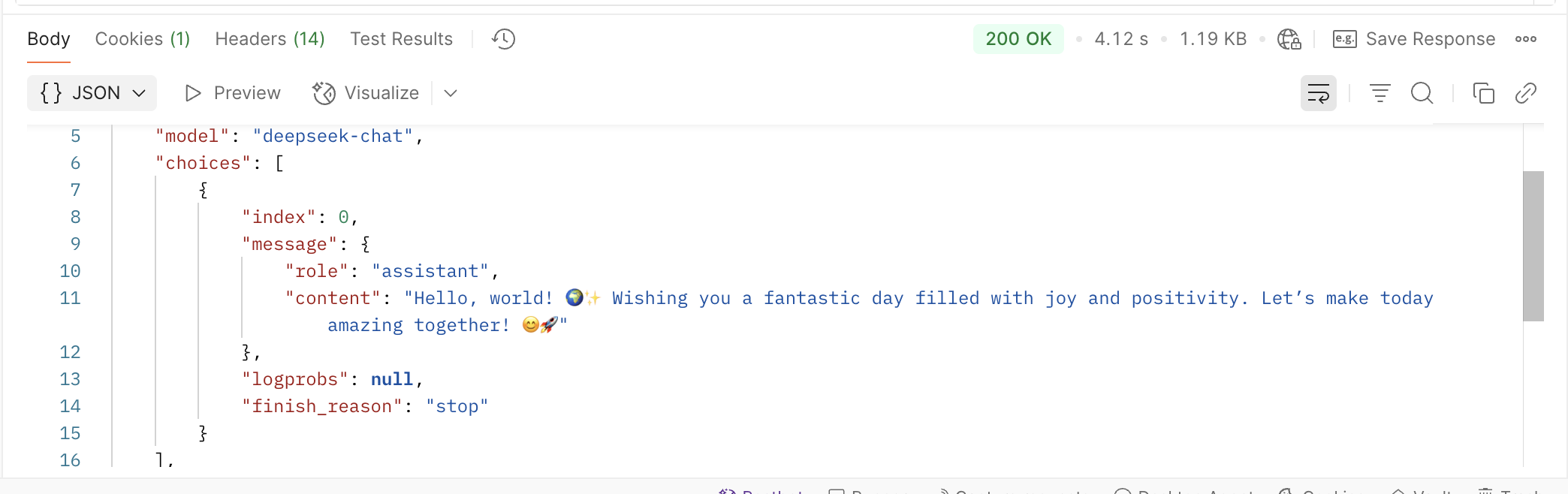
5. View the response
You’ll get a JSON response like:
{

  "choices": [

    {

      "message": {

        "role": "assistant",

        "content": "Hello, world!"

      }

    }

  ]

}
Handling errors and debugging
When working with any API, it’s important to know how to handle errors gracefully.
Common error messages:
- 401 Unauthorized: Check if your API key is missing or incorrect.
- 400 Bad Request: Often due to malformed JSON or missing parameters.
- 402 Payment Required: Your account has insufficient balance to process this request.
- 429 Too Many Requests: Applies only if you’re using a third-party API provider.
- 500 Internal Server Error: May occur under heavy load or internal issues.
Retry strategies:
- Use exponential backoff for retrying failed requests (especially 429 or timeout errors).
- Avoid retrying 400 or 401 errors unless corrected.
Logging best practices:
- Log the full request payload and response body (excluding API keys).
- Tag logs with timestamps and response status codes for traceability.
A quick note on Froala integration
Because DeepSeek is an API-based service, it can be embedded into various applications, including our very own Froala WYSIWYG Editor. While we won’t go deep into this here, the potential is exciting: AI-assisted content suggestions, intelligent grammar corrections, or auto-generated text snippets—all triggered live within the editing interface.
Imagine building a rich-text editor that not only formats your content but also helps generate it. That’s the kind of seamless experience developers can create by combining the Froala Editor with DeepSeek API integration.
For example, you could build a note-taking or documentation app where DeepSeek autocompletes sentences or summarizes content directly inside Froala’s editor frame.
DeepDive: Example use cases
Let’s explore how DeepSeek’s models perform in real-world scenarios—from writing clean code to understanding multimodal content.
Code completion or generation with DeepSeek-Coder
DeepSeek-Coder is optimized for software development tasks such as autocompletion, refactoring suggestions, and generating functions from plain-text prompts.
Input/output sample:
Input prompt:
{"role": "user", "content": "Write a Python function to check if a number is prime."}
Output:
def is_prime(n):

    if n <= 1:

        return False

    for i in range(2, int(n**0.5) + 1):

        if n % i == 0:

            return False

    return True
This makes DeepSeek-Coder ideal for coding assistants, educational platforms, and documentation generators.
IDE plugin (if available):
While there’s no official IDE plugin from DeepSeek at the time of writing, developers can integrate DeepSeek-Coder with code editors (like VS Code) using custom scripts or API wrappers, similar to how GitHub Copilot operates.
Multimodal tasks with DeepSeek-VL
DeepSeek-VL enables models to process both visual and text inputs, making it useful for applications involving documents, images, and diagrams.
Example input:
- Image: A scanned document or screenshot
- Text prompt: “Summarize the key points from this image.”
The model interprets the visual content and responds with a meaningful summary or extracted data.
Sample application:
- Caption generation: Upload an image and receive an accurate caption like:
“A group of engineers reviewing a circuit board schematic on a table.”
- Document Q&A: Upload a PDF and ask:
“What is the main clause in paragraph 3?”
→ DeepSeek-VL reads the image-based document and extracts answers.
These use cases show how DeepSeek API integration can power next-gen apps across development, education, productivity, and visual understanding.
Best practices for working with DeepSeek API
To get the most out of your DeepSeek API integration, follow these best practices for security, performance, and cost-efficiency.
Token management & security tips
- Never expose API keys in frontend code or public repositories.
- Use environment variables or secret managers to store keys securely.
- Rotate keys periodically and revoke them immediately if compromised.
- Consider using IP whitelisting if supported by your API provider.
Optimizing input prompts
- Keep prompts clear and context-rich, especially when working with coding or multimodal tasks.
- Avoid unnecessary verbosity—it can waste tokens and reduce model accuracy.
- Test prompt variations to identify the most efficient phrasing for consistent results.
Example:
Instead of saying:
“Please can you help me by writing a function that checks whether a number is prime?”
Try:
“Write a Python function to check if a number is prime.”
Caching strategies for repeated calls
- If your app sends the same or similar requests frequently, implement caching at the application level.
- Cache both input-response pairs and processed outputs to reduce token consumption and latency.
- Use hash keys of prompt strings as identifiers for quick retrieval.
Rate limiting and efficient usage
Although DeepSeek’s official API does not enforce hard rate limits, usage can still be impacted by:
- Server congestion
- Timeout thresholds (e.g., 30-minute max response window)
To ensure efficient usage:
- Batch smaller queries when possible
- Use streaming mode for faster response delivery
- Implement retry logic with exponential backoff for handling transient errors
By following these practices, you’ll build more stable, secure, and scalable applications while keeping your DeepSeek usage optimized and cost-effective.
Conclusion
In this guide, we explored everything you need to know about DeepSeek API integration—from understanding its models and features to setting up your first request and handling advanced use cases. Whether you’re building with DeepSeek-Coder for code generation or experimenting with DeepSeek-VL’s multimodal capabilities, the API offers flexibility, speed, and open accessibility for modern AI development.
Now it’s your turn. Start small with a simple prompt, or go big by integrating DeepSeek into your next project. There’s a lot to discover—and even more to build.
FAQs
What is the DeepSeek API used for?
The DeepSeek API enables developers to integrate advanced AI models—such as DeepSeek‑Coder for code generation and DeepSeek‑VL for multimodal tasks—into their applications. It’s ideal for building chatbots, code assistants, image analyzers, and AI‑powered content tools using open‑source, high‑performance models.
How do I get started with DeepSeek API integration?
To start using the DeepSeek API, visit the official DeepSeek website or GitHub page to access documentation and generate your API key. You can make API calls using Python, Postman, or curl. DeepSeek also supports OpenAI‑compatible endpoints, making it easy to switch from other APIs such as OpenAI or Claude.
Is the DeepSeek API free to use?
Yes, many DeepSeek models—such as DeepSeek‑Coder and DeepSeek‑VL—are available for free on platforms like Hugging Face under open‑source licenses (e.g., Apache 2.0). However, if you use hosted endpoints via providers such as OpenRouter or Together.ai, usage fees may apply depending on your plan and traffic volume.








No comment yet, add your voice below!