



useState Hook: Manage Froala React WYSIWYG Editor State

React has evolved to make state management and side effects efficient and expressive. One significant addition to React is the hooks, which allow functional components to manage state and side effects traditionally associated with class components.
In this article, we will explain a basic introduction to React Hooks, with a focus on the “useState“.
Additionally, Using the “useState” hook, we will show how the Froala React WYSIWYG editor can manage its state and dynamically display the editor changes.

React Hooks Overview
Before the hooks, state and lifecycle methods were exclusive to class components.
Hooks were introduced in React to enable functional components to manage local state and other React features without the need for class components. They provide a concise way to handle stateful logic.
The useState is a fundamental hook used for adding state to functional components. It allows you to declare state variables in functional components, making them dynamic.
The basic syntax for “useState” is:
const [state, setState] = useState(initialState);
Here, state is the current state value, and setState is a function that allows you to update the state. The “initialState” is the initial value of the state variable.
Integrating Froala React WYSIWYG Editor
Now, let’s explore how to integrate the Froala with React and the “useState” hook.
The Froala React WYSIWYG editor is a powerful WYSIWYG editor that allows users to easily create rich content. First, install the necessary packages on your React project:
npm install react-froala-wysiwyg --save
Next, create a new React component and import the required dependencies on the “App.js” file:
import React, { useState } from 'react';

import FroalaEditorComponent from 'react-froala-wysiwyg';

import FroalaEditorView from 'react-froala-wysiwyg';

import 'froala-editor/css/froala_style.min.css';

import 'froala-editor/css/froala_editor.pkgd.min.css';

import 'froala-editor/js/plugins.pkgd.min.js';
- React and useState are imported from the ‘react’ library. useState is a React hook used for managing state in functional components.
- FroalaEditorComponent and FroalaEditorView are components provided by the ‘react-froala-wysiwyg’ package. They are used for integrating the Froala WYSIWYG editor into a React application.
- This code imports the styles and scripts for the Froala WYSIWYG editor. These include CSS files for styling and a packaged JavaScript file (plugins.pkgd.min.js) that contains bundled plugins for the editor.
Now, let’s use the “useState” hook to manage the editor’s content:
function App() {

  const [model,setModel] = useState("Example Set");

  const handleModelChange= (event)=>{

    setModel(event)

  }

  return (

    <div className="App">

      <FroalaEditorComponent

        tag='textarea'

        onModelChange={handleModelChange}

      />

      <FroalaEditorView

        model={model}

    />

    </div>

  );

}

export default App;
- The component uses the useState hook to define a state variable named model with an initial value of “Example Set”. This state will hold the content of the Froala editor.
- The handleModelChange function is a callback function that will be called when the content of the Froala editor changes.
- Inside the function, it updates the model state using setModel(event), effectively updating the content of the editor.
- The return statement renders JSX for the component.
- The component is wrapped in a div with the class name “App”.
- FroalaEditorComponent is rendered with a textarea as the underlying HTML tag. The onModelChange prop is set to the handleModelChange callback function.
- FroalaEditorView is rendered with the model prop set to the model state. This component is used to display the content of the Froala editor.
- The App component is exported as the default export of the module, making it available for use in other parts of the application.
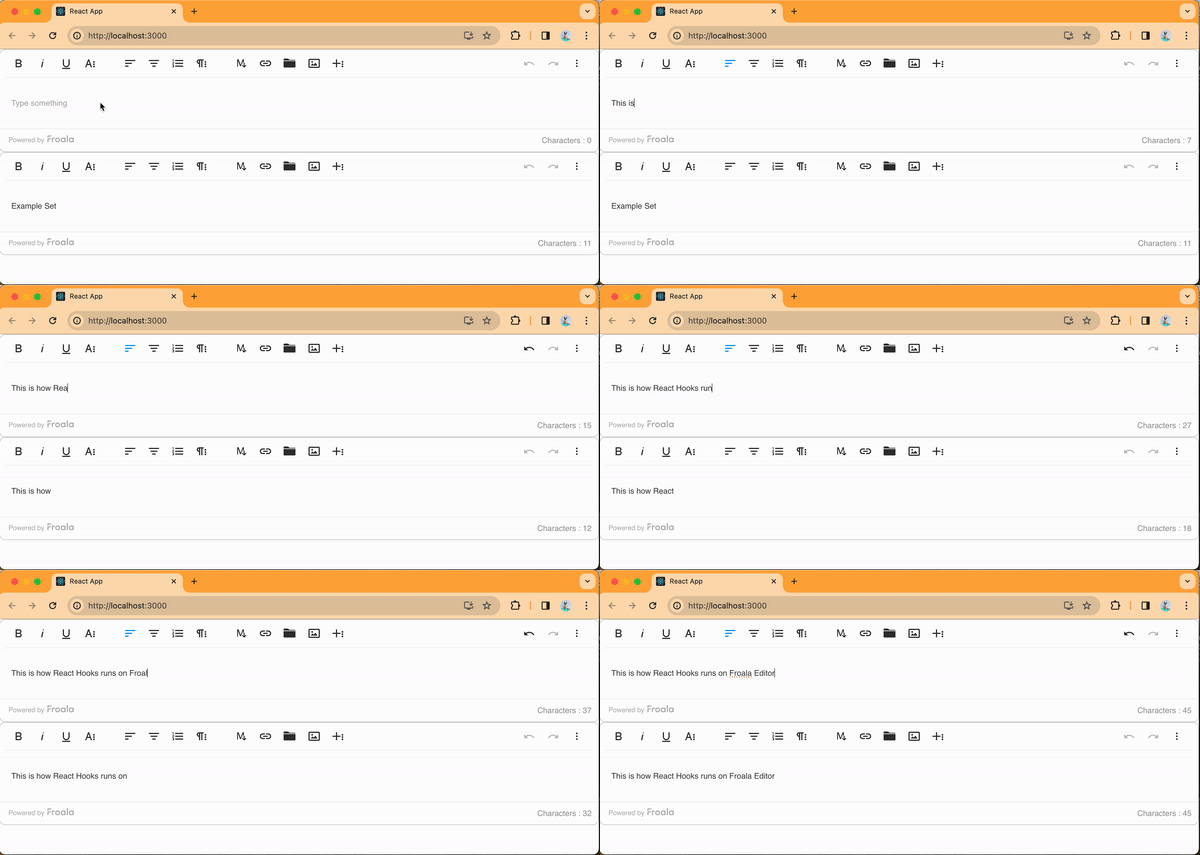
In this example, we’ve created a React component named App. It uses the “FroalaEditorComponent” for editing and the “FroalaEditorView” for displaying the content.
The model state variable is used to manage the content of the editor.
When the content changes, the “handleModelChange” function is called. It updates the model state and triggers a re-render with the new content.
This integration demonstrates how the “useState” hook can manage the state of the Froala. It’s used in a React functional component.
Conclusion
React hooks have upgraded how developers manage state in functional components. The “useState” hook, in particular, is a key part of this upgrade.
Using hooks provides a more concise and readable syntax. It also makes it easier to work with stateful logic in functional components.
Integrating Froala with React enhances the development experience. It allows for seamless content creation and management within your applications. You can manage the editor’s state using the “useState” hook. It enables dynamic creation.
As you explore React hooks and their integration with libraries like Froala React WYSIWYG editor, you’ll find that the combination of these lets you easily build feature-rich web applications.








No comment yet, add your voice below!