



Build a Note‑Taking App with Flask, Froala, and DeepSeek AI in 30 Minutes

Hey everyone! Earlier, I shared a general guide on Deepseek API Integrations in web apps. This time, I want to walk you through how I used the DeepSeek API for an AI-powered note-taking app to build a simple yet modern note-taking app with Flask, Froala, and (of course) DeepSeek AI—all in just 30 minutes.
Spoiler: Yes, DeepSeek AI actively helped me build this! I used prompt engineering to have it generate boilerplate Flask code, offer suggestions for integrating Froala, and even refine my Python functions. If you’re a developer looking for a quick and functional starting point with a sleek design, this tutorial (and DeepSeek) has you covered. Let’s dive in!

What We’re Building
We’ll create a note-taking app where users can:
- Write and format notes using the Froala WYSIWYG editor.
- Save notes to a local JSON file (simple, lightweight storage).
- Use DeepSeek’s API Integration to generate suggestions or improve their notes (e.g., “Help me summarize this note” or “Make this note more concise”).
The app will feature a modern Material UI design powered by the Materialize CSS framework. Everything will reside in a single app.py file for simplicity.
How I Used DeepSeek to Build It
1. Creating a Starter Flask App
I started by asking DeepSeek AI for a simple Flask starter app. Here’s a condensed version of my prompt:
Prompt to DeepSeek AI:
“Help me create a starter Flask app with a single route that returns a home page. Please use Python best practices, and initialize a JSON file if it doesn’t exist.”
DeepSeek responded with a skeleton code snippet, which I adapted. It even reminded me to handle the case where the JSON file might not exist.
2. Integrating the Froala Editor
Once my Flask starter was in place, I wanted to embed the Froala WYSIWYG editor into my front end. I asked DeepSeek:
Prompt to DeepSeek AI:
“Show me how to integrate the Froala Editor into a Flask template with Materialize CSS. I want a minimal example that includes a text editor and a button to save the content via a POST request.”
DeepSeek returned a neat HTML snippet that used both Froala and Materialize CSS from CDN links. With just a bit of tweaking, it fit perfectly into index.html.
3. Hooking Up DeepSeek for AI-Powered Notes
Finally, I wanted to let users improve or summarize their notes with AI. I asked DeepSeek:
Prompt to DeepSeek AI:
“How do I make a POST request to my own Flask route and then call the DeepSeek Chat API with the user input? Include an example of the JSON payload and how to handle the response in Flask.”
DeepSeek walked me through constructing the API request, including the headers and payload. It also showed me how to process the result and return it to the client.
Let’s Build It: Step-by-Step Code
Below is the final, consolidated code. I’ve included the relevant DeepSeek calls, which you can adapt as needed.
Prerequisites
- Python installed.
- Flask installed (pip install flask).
- A DeepSeek API key (get one from their website).
- Basic knowledge of Flask and HTML.
Step 1: Setting Up Flask
Create a file called app.py and add the following code:
from flask import Flask, render_template, request, jsonify
import json
import os
import requests

app = Flask(__name__)

# DeepSeek API endpoint and key
DEEPSEEK_API_URL = "https://api.deepseek.com/v1/chat/completions"
DEEPSEEK_API_KEY = "yourapikey_here"

# File to store notes
NOTES_FILE = "notes.json"

# Ensure the notes file exists
if not os.path.exists(NOTES_FILE):
    with open(NOTES_FILE, "w") as f:
        json.dump([], f)


@app.route("/")
def home():
    return render_template("index.html")
This creates:
- A simple Flask app with a / route pointing to index.html.
- A local JSON file called notes.json to store your notes.
- Variables for the DeepSeek API URL and key.
(DeepSeek’s suggestion helped me remember to handle the file check gracefully.)
Step 2: Adding the Froala Editor and Materialize CSS
Inside a templates folder, add index.html with the following code:
<!DOCTYPE html>
<html lang="en">

<head>
    <meta charset="UTF-8" />
    <meta name="viewport" content="width=device-width, initial-scale=1.0" />
    <title>Note-Taking App</title>
    <!-- Materialize CSS -->
    <link href="https://cdnjs.cloudflare.com/ajax/libs/materialize/1.0.0/css/materialize.min.css" rel="stylesheet" />
    <!-- Froala Editor CSS (using the official CDN) -->
    <link href="https://cdn.jsdelivr.net/npm/froala-editor@latest/css/froala_editor.pkgd.min.css" rel="stylesheet"
        type="text/css" />
</head>

<body>
    <div class="container">
        <h1 class="center-align">My Note-Taking App</h1>
        <div class="row">
            <div class="col s12">
                <!-- Froala Editor Target (using a DIV as recommended) -->
                <div id="froala-editor"></div>
            </div>
        </div>
        <div class="row">
            <div class="col s12">
                <button class="btn waves-effect waves-light" onclick="saveNote()">
                    Save Note
                </button>
                <button class="btn waves-effect waves-light" onclick="askDeepSeek()">
                    Improve Note with DeepSeek
                </button>
            </div>
        </div>
        <div class="row">
            <div class="col s12">
                <h3>Saved Notes</h3>
                <ul id="notes-list" class="collection"></ul>
            </div>
        </div>
    </div>

    <!-- jQuery (if you need it for other parts of your app) -->
    <script src="https://cdnjs.cloudflare.com/ajax/libs/jquery/3.6.0/jquery.min.js"></script>
    <!-- Materialize JS -->
    <script src="https://cdnjs.cloudflare.com/ajax/libs/materialize/1.0.0/js/materialize.min.js"></script>
    <!-- Froala Editor JS -->
    <script type="text/javascript"
        src="https://cdn.jsdelivr.net/npm/froala-editor@latest/js/froala_editor.pkgd.min.js"></script>

    <script>
        // Global variable to hold the editor instance
        let editorInstance;

        // Initialize Froala using the constructor API when the DOM is ready
        document.addEventListener("DOMContentLoaded", function () {
            if (typeof FroalaEditor === "function") {
                editorInstance = new FroalaEditor("#froala-editor", {
                    // Optional configuration options go here.
                });
                loadNotes();
            } else {
                console.error("FroalaEditor is not loaded correctly.");
            }
        });

        // Save note to server using the editor instance API
        function saveNote() {
            // Use the Froala Editor instance to get HTML content.
            const content = editorInstance.html.get();
            console.log("Saving note:", content);
            fetch("/save_note", {
                method: "POST",
                headers: { "Content-Type": "application/json" },
                body: JSON.stringify({ content: content }),
            })
                .then((response) => response.json())
                .then((data) => {
                    alert("Note saved!");
                    loadNotes();
                })
                .catch((error) => {
                    console.error("Error saving note:", error);
                });
        }

        // Ask DeepSeek for AI suggestions using the editor instance API
        function askDeepSeek() {
            const content = editorInstance.html.get();
            console.log("Sending note to DeepSeek:", content);
            fetch("/ask_deepseek", {
                method: "POST",
                headers: { "Content-Type": "application/json" },
                body: JSON.stringify({ content: content }),
            })
                .then((response) => response.json())
                .then((data) => {
                    // Update the editor content with the response from DeepSeek
                    editorInstance.html.set(data.response);
                })
                .catch((error) => {
                    console.error("Error with DeepSeek:", error);
                });
        }

        // Load saved notes from the server
        function loadNotes() {
            fetch("/get_notes")
                .then((response) => response.json())
                .then((data) => {
                    const notesList = $("#notes-list");
                    notesList.empty();
                    data.forEach((note) => {
                        notesList.append(
                            `<li class="collection-item">${note.content}</li>`
                        );
                    });
                })
                .catch((error) => {
                    console.error("Error loading notes:", error);
                });
        }
    </script>
</body>

</html>
This integrates:
- Froala Editor for rich text editing.
- Materialize CSS for a modern look and feel.
- Buttons for saving notes and asking DeepSeek for improvements.
- A list (<ul>) that displays all the saved notes.
Step 3: Adding Backend Logic (Saving Notes + DeepSeek)
Finally, we add routes to save notes, retrieve them, and request help from DeepSeek. In app.py, place the following below the existing code:
@app.route("/save_note", methods=["POST"])
def save_note():
    data = request.json
    with open(NOTES_FILE, "r") as f:
        notes = json.load(f)
    notes.append({"content": data["content"]})
    with open(NOTES_FILE, "w") as f:
        json.dump(notes, f)
    return jsonify({"status": "success"})


@app.route("/get_notes", methods=["GET"])
def get_notes():
    with open(NOTES_FILE, "r") as f:
        notes = json.load(f)
    return jsonify(notes)


@app.route("/ask_deepseek", methods=["POST"])
def ask_deepseek():
    data = request.json
    # Modify the prompt to instruct the API to return only the improved note text.
    prompt = f"Return only the revised note: {data['content']} dont add any ** ** or any formatting that would look weird just return it with plain text"

    headers = {
        "Authorization": f"Bearer {DEEPSEEK_API_KEY}",
        "Content-Type": "application/json"
    }
    payload = {
        "model": "deepseek-chat",
        "messages": [
            {"role": "user", "content": prompt}
        ]
    }

    response = requests.post(DEEPSEEK_API_URL, headers=headers, json=payload)
    if response.status_code == 200:
        return jsonify({"response": response.json()["choices"][0]["message"]["content"]})
    else:
        return jsonify({"response": "Error contacting DeepSeek API."})
Here’s what’s happening:
- /save_note: Takes the note from the user, loads existing notes from notes.json, appends the new note, and saves it back.
- /get_notes: Returns the JSON array of all saved notes.
- /ask_deepseek:
- Prepares a prompt by adding the user’s note content.
- Calls the DeepSeek API with the user’s text.
- Returns the AI-generated response to the front end.
(DeepSeek initially gave me the code in smaller pieces, and I combined them into one final function.)
Step 4: Run and Test the App
Save all files.
In your terminal, run:
python app.py
Open your browser and go to:
http://localhost:5000
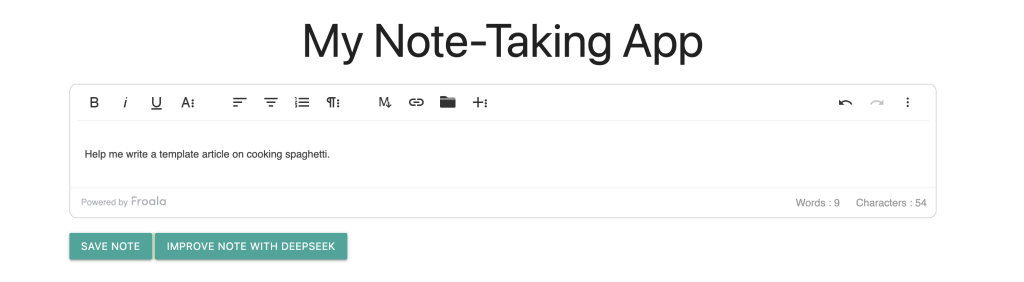
You’ll see your new note-taking app, with a WYSIWYG editor and buttons to save or improve your notes with AI.
Sample Prompts to Try
- “Help me summarize this note”
For instance:
“I need to buy groceries. I want apples, bananas, and bread.”
DeepSeek might return a concise list like:
“Grocery list: apples, bananas, bread.” - “Make this note more concise”
Takes a lengthy paragraph and returns a more streamlined version. - “Rewrite this note with a friendlier tone”
Makes an abrupt list or instructions sound more inviting.
Lessons Learned (Thanks to DeepSeek)
- Prompt Engineering: The better your prompt, the more helpful DeepSeek is. Experiment with “Rewrite,” “Summarize,” “Shorten,” or “Explain like I’m 5.”
- Rapid Prototyping: Generating boilerplate code quickly lets you focus on logic instead of syntax.
- UI Integration: Materialize + Froala looks elegant with very little CSS or JavaScript overhead.
Final Thoughts
In just 30 minutes—with a bit of help from DeepSeek—I built a modern, AI-powered note-taking app. The synergy of Flask for quick server setup, Froala for rich text editing, Materialize for design, and DeepSeek for AI suggestions made the experience seamless.
Here’s what it looks like when you run it in your local browser:
Ready to customize your app further? Here are some ideas:
- Add user authentication for private note-taking.
- Tag or categorize notes for organization.
- Search capabilities with DeepSeek’s semantic understanding.
If you haven’t tried DeepSeek yet, give it a shot—it’s a powerful addition to your dev toolkit. Let me know in the comments or on social media if you build something cool.
FAQs
What is DeepSeek AI used for in this AI-powered note-taking app?
DeepSeek AI enhances your notes with capabilities such as summarization, grammar improvement, and rewriting. By integrating DeepSeek’s API, your app can offer smart note suggestions in real-time — making it more than just a text editor.
Can I use DeepSeek AI with other Python frameworks besides Flask?
Yes, DeepSeek AI can be integrated with any Python framework, including Django, FastAPI, or a CLI-based app. The important part is making HTTP requests to DeepSeek’s API endpoint, which works universally across Python projects.
Is this note-taking app beginner-friendly for Python developers?
Absolutely. This project uses simple Python file operations, Flask routing, and basic API requests—making it ideal for beginners who want to learn about backend development, AI integration, and building full-stack apps with tools like Froala and DeepSeek AI.







No comment yet, add your voice below!