



What’s New in Froala 4.6.2: Powerful Table Functionality

We are excited to announce the release of Froala 4.6.2, which introduces new Table features. These features were highly requested by our users and we are thrilled to finally bring it to you.
Moreover, this release comes with an enhanced Word Pasting Experience.
Additionally, we’ve made several other improvements to our powerful text editor. We believe this new addition will greatly enhance your editing experience with Froala.
Improved Table Editing Experience
Froala 4.6.2 introduces several new table features that enhance the editing experience. Users can now easily drag and drop tables, copy and paste cells, and resize tables vertically. Let’s find out how.
Flexible Table Positioning: Drag and Drop Tables
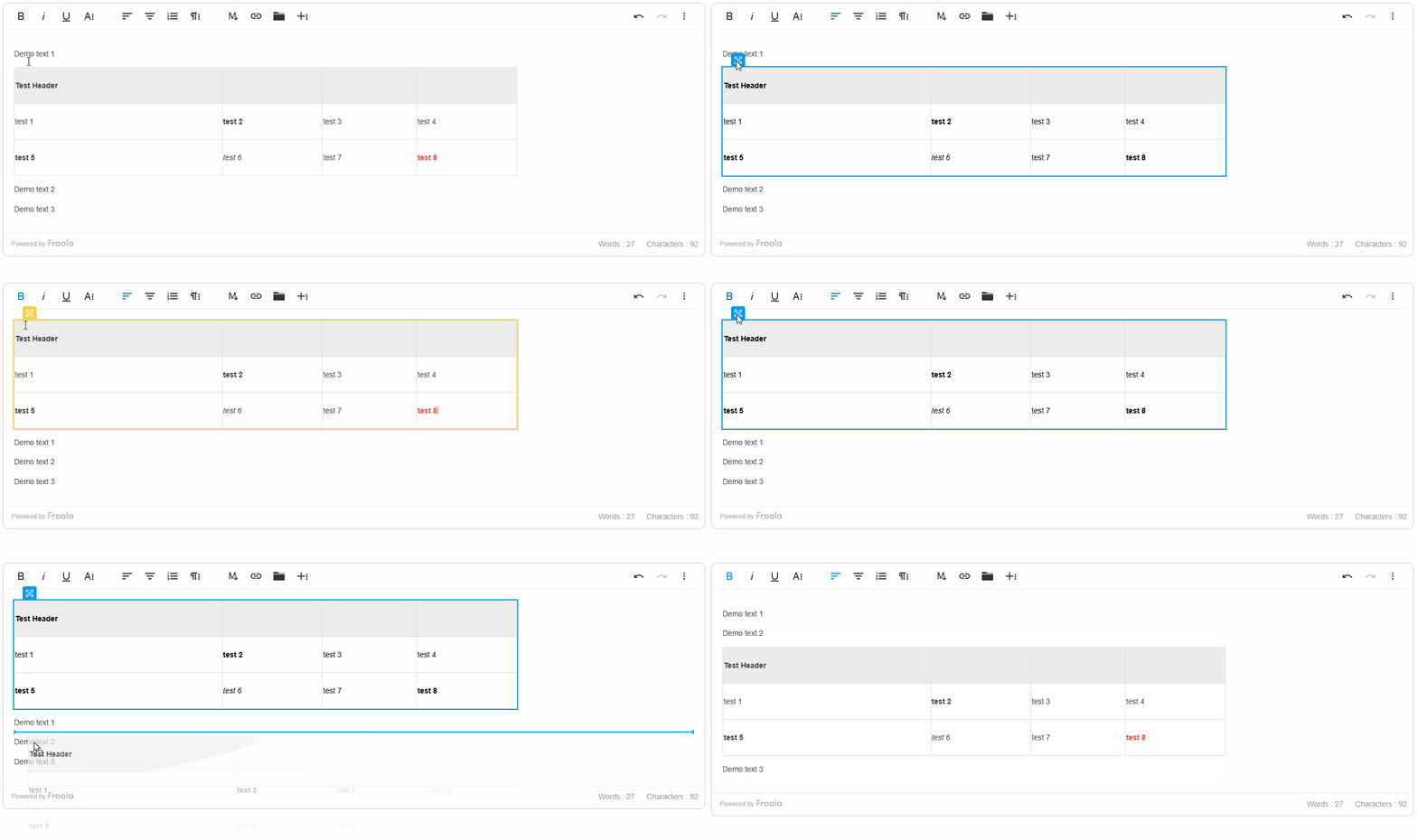
This release introduces the ability to easily move tables within the editor by dragging and dropping them. Users can click and hold the draggable handle at the top-left of a table, then drag it to the desired location on the page.
This feature simplifies rearranging tables in your content. You can move a table higher or lower, or shift it to a new section. The drag-and-drop functionality provides an intuitive way to adjust the table’s positioning.
Froala also includes a new configuration option called enableTableSelection. Users can select and drag tables when set to true (the default). Setting it to false disables table selection and dragging, giving you more control over the table positioning.
This draggable table feature works consistently across different table types and layouts, ensuring a seamless editing experience no matter how your tables are structured. This new capability in Froala 4.6.2 empowers content creators to organize and rearrange tabular data within their content quickly.
Froala 4.6.2 Vertical Table Resizing Feature
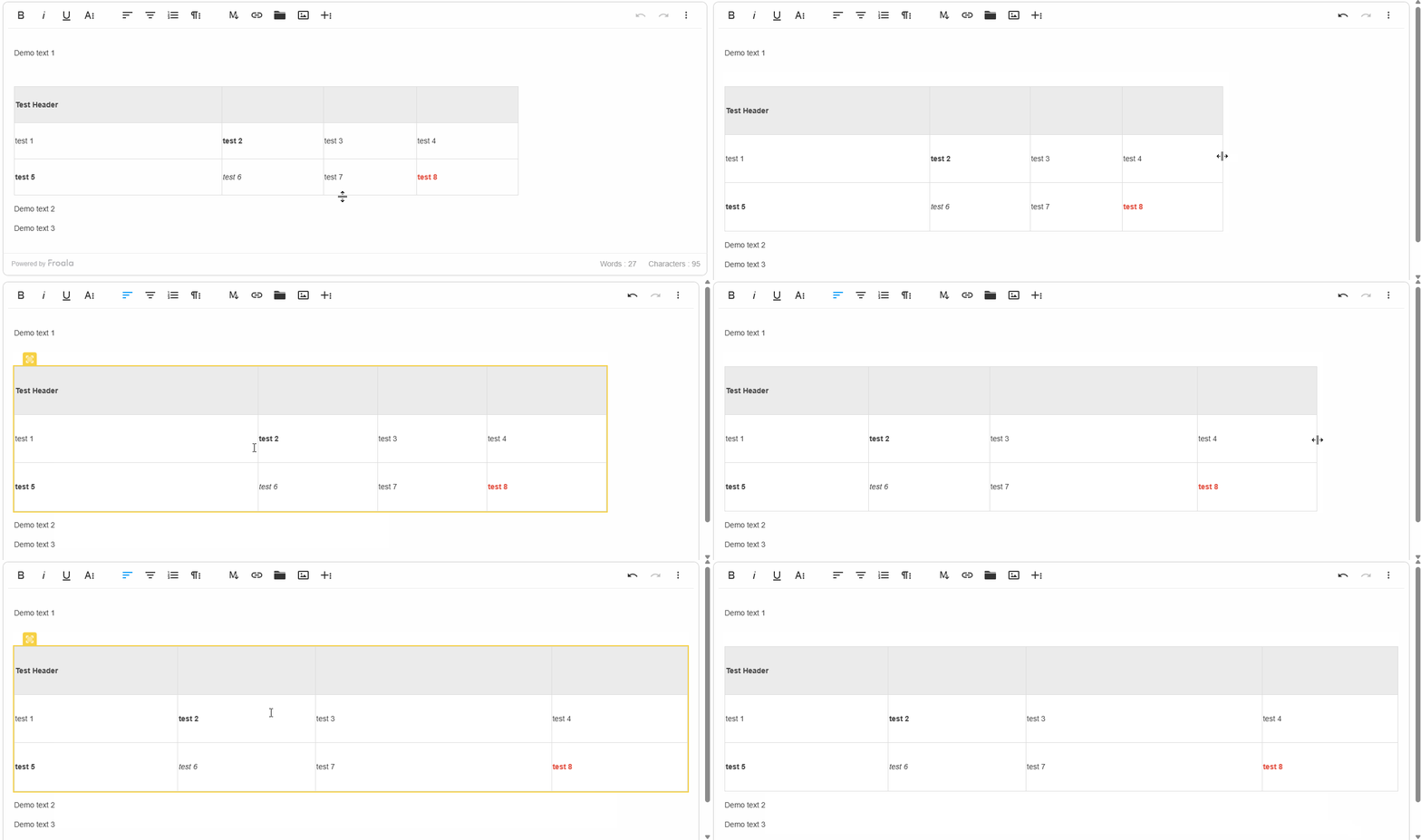
We are excited to introduce the highly requested vertical table resizing feature. This new capability allows users to easily adjust the height of rows within a table, giving them more control over the layout and appearance of tabular data.
The vertical resizing functionality works consistently with Froala’s existing horizontal resizing features. Users can simply click and drag the resize handle at the bottom of a table row to adjust its height. This makes it easy to fine-tune the visual presentation of tables to best suit the content.
Froala now applies <colgroup> and <col> tags during table creation and resizing. This provides a cleaner, more consistent resizing experience.
Moreover, Froala has introduced a new configuration option called proportionalTableResize. This allows developers to choose between:
- Proportional adjustments: Resizing the table from any side (top, bottom, left, or right) proportionally adjusts all rows or columns. If resizing is done between specific rows or columns, only that row or column is resized.
- Targeted resizing: Resizing affects only the individual row or column being adjusted.
With the introduction of vertical resizing, combined with the existing horizontal resizing capabilities, Froala editor empowers content creators to precisely shape and optimize the appearance of tables within their digital content. This feature enhances the overall table management experience, making it easier than ever to create visually appealing and well-structured tabular layouts.
Effortless Table Data Replication: Froala’s New Copy-Paste Cell Feature
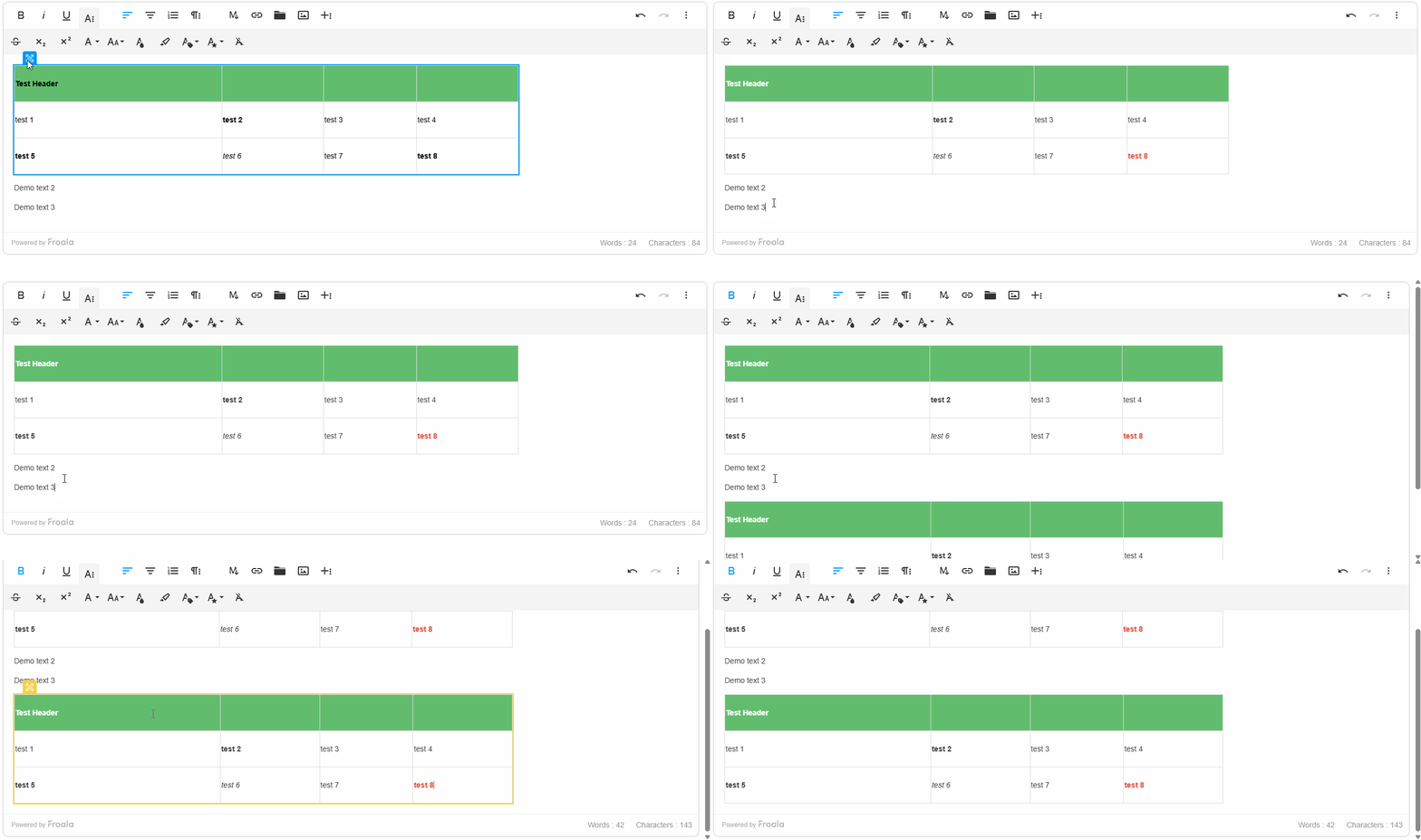
Froala 4.6.2 introduces another powerful new copy-and-paste feature for table cells, including both the content and formatting. This highly requested functionality empowers content creators to quickly replicate and transfer tabular data within their digital content.
To copy cells, users can select multiple cells by holding the Shift key and clicking, or by dragging the mouse over the desired cells. Then, they can copy the cells using the standard Ctrl+C (Windows) or Cmd+C (Mac) shortcuts.
The copied cells retain not only the data but also the formatting attributes, such as font styles, colors, and borders. When pasted, the exact visual representation and structure of the original table cells are preserved.
Pasting is just as simple. Users position their cursor where they want the cells to go, then use Ctrl+V (Windows) or Cmd+V (Mac) to paste.
Click and hold the draggable handle at the top-left of a table before copying if you want to copy the entire table while preserving its original size.
If pasting into an empty area, Froala will automatically create a new table to hold the pasted content, maintaining the original formatting. If pasting into an existing table, Froala will adjust the column widths and row heights as needed to ensure a proper fit, maintaining the visual integrity of the tabular data.
This copy-and-paste functionality empowers content creators to work with tables more efficiently. They can quickly duplicate and transfer data between tables, or even generate new tables from copied content. By preserving the original formatting, this feature streamlines the content creation process, saving time and enhancing the overall user experience.
More Table Enhancements and Bug Fixes
The 4.6.2 release includes several other table-related improvements and bug fixes. These changes help ensure a more stable and reliable table editing experience across different browsers.
For example, users can now properly align cell content within tables. We also addressed an issue where users were previously unable to select text within table cells due to a Firefox-specific problem.
These updates further solidify Froala’s commitment to providing a robust and user-friendly content creation platform. Content creators can now work with tabular data more seamlessly and create visually appealing, well-structured tables with ease.
By addressing these table-related bugs and enhancing the overall editing experience, Froala continues to improve its text editor capabilities and empower users to produce high-quality content.
Enhanced Word Pasting Experience
In addition to the new table features, Froala 4.6.2 also includes several improvements to the Word pasting functionality. These enhancements deliver a more seamless experience when users copy and paste content from Microsoft Word into the Froala editor.
Support Scrolling to View Comments
Froala 4.6.2 improves the handling of Word comments when pasting content. Now, when users paste content that contains comments, Froala inserts an anchor tag at the location of each comment. The actual comments are then appended to the bottom of the pasted content.
This new functionality allows users to easily navigate to the relevant comments by simply clicking on the anchor tags. The anchor tags provide a clear visual cue, making it straightforward for users to jump to the associated comments quickly.
This enhancement improves the overall flow and organization of the pasted content. Users can now effortlessly review and understand the context of the comments, leading to a more seamless content creation experience.
Optimized Pasting Attribute
Another enhancement in Froala 4.6.2 is the change in the attribute used to identify pasted content. Previously, the editor would add an id="isPasted" attribute to elements that were pasted from Microsoft Word.
In this release, the editor now uses a data-pasted="isPasted" attribute instead. This change provides several benefits:
- Semantic Improvement: The use of a
data-*attribute aligns better with HTML’s semantic structure, as it indicates that the attribute is for internal use and does not represent a standard HTML attribute. - Compatibility: The id attribute is reserved for unique identifiers within an HTML document, and using it for pasted content could cause conflicts with other elements on the page. The
data-*attribute avoids this potential issue. - Accessibility: Screen readers and other assistive technologies are more likely to ignore
data-*attributes, reducing the risk of exposing unnecessary information to users.
By making this change, Froala ensures a more robust and accessible handling of pasted content, while also maintaining the ability to identify and process the pasted elements as needed.
Improved Numbered List Alignment
Froala 4.6.2 also addresses an issue related to the alignment of pasted numbered lists. Previously, when copying and pasting numbered lists from Microsoft Word, the list items could sometimes appear misaligned within the Froala editor.
This release includes a fix for this problem, ensuring that the numbered lists are correctly aligned and formatted when pasted into the editor. Users can now seamlessly copy and paste numbered lists from Word, and the list structure and formatting will be preserved without any visual inconsistencies.
These enhancements to the Word pasting functionality in Froala 4.6.2 demonstrate the team’s commitment to improving the content creation experience. By addressing common pain points, such as handling comments and numbered lists, Froala continues to provide a robust and user-friendly platform for content creators to work with.
Much More…
We have addressed several bug fixes to improve the overall performance and stability of the editor.
Here are some of the key improvements:
- Pasting from External Sources on Android Chrome: Copied content (text or images) from external sources is now inserted at the cursor position in the Froala Editor when pasted using long-press or system paste on Android Chrome.
- Preserving Formatting on Delete: The
keepFormatOnDeleteconfiguration now correctly preserves the formatting when deleting characters or entire lines. Users can continue typing using the same style. - Inserting
<br>in Empty Table Cells: The issue with thehtml.wrap(false, true, false)method has been resolved, and it removes the<br>tags in empty<td>elements when called after inserting the table. - Angular Compatibility: The compilation error when referencing
FroalaEditorin Angular projects has been addressed.
These bug fixes and enhancements demonstrate Froala’s commitment to continuously improving the editor’s performance and addressing user-reported issues. By resolving these problems, Froala ensures a more reliable and seamless content creation experience for its users.
Please find the complete changelog list here.
How Can I Update?
Update to Froala WYSIWYG Editor 4.6.2 today and experience enhanced editing features and improvements.
Follow the table below to learn how to download the latest Froala Editor release and include it in your project based on your preferred method.
If you are using a plain JavaScript library or other framework, follow the table below to learn how to download the latest Froala Editor release and include it in your project based on your preferred method.
| Method | How to download | Include in your project | |
| CDN | – |
<!-- Include Editor stylesheet--> <link href="https://cdn.jsdelivr.net/npm/froala-editor@4.6.2/css/froala_editor.pkgd.min.css" rel="stylesheet" type="text/css" /> <!-- Include Editor JavaScript file--> <script type="text/javascript" src="https://cdn.jsdelivr.net/npm/froala-editor@4.6.2/js/froala_editor.pkgd.min.js"></script> |
|
| CDN (Always the latest version) | – |
<!-- Include Editor stylesheet--> <link href="https://cdn.jsdelivr.net/npm/froala-editor@latest/css/froala_editor.pkgd.min.css" rel="stylesheet" type="text/css" /> <!-- Include Editor JavaScript file--> <script type="text/javascript" src="https://cdn.jsdelivr.net/npm/froala-editor@latest/js/froala_editor.pkgd.min.js"></script> |
|
| NPM |
npm install froala-editor |
<!--

Replace the {download-folder-path} in the following example with the path to the folder containing the stylesheet file e.g.

../css/froala_editor.pkgd.min.js

-->

<link href="{download-folder-path}/froala_editor.pkgd.min.css" rel="stylesheet" type="text/css" />

<!--

Replace the {download-folder-path} with the path to the folder containing the JS file e.g.

../js/froala_editor.pkgd.min.js

-->

<script type="text/javascript" src="{download-folder-path}/froala_editor.pkgd.min.js"></script>
|
|
| bower |
bower install froala-wysiwyg-editor |
||
| NO Package Manager | Download Froala WYSIWYG Editor files using the download form here. | ||
| Integrated with a Framework | Select your preferred framework from 17 different popular frameworks. | ||
| Other options | Check here for other options for using Froala WYSIWYG Editor in your project. | ||
For Froala Editor Version 2 Users:
Follow this migration guide for step-by-step instructions on upgrading from version 2.
Try The Latest Froala Editor
Explore a variety of examples that demonstrate the functionality of the Froala HTML Editor.
Support and Feedback
We are dedicated to always offering the best possible experience for all our users. We believe this release, meant to enhance Typescript support, is a stepping stone towards that commitment. We encourage you to try this improved Typescript support and give us your valuable feedback. Your input is crucial for delivering continuous enhancement and meeting your evolving needs. Thank you for being a valuable part of our vibrant and growing community.
We would like to hear what you think of the latest release! Join us on our GitHub Community to chat with our product manager, developers, and other members of the Froala team.
Change Log
- Please visit the release notes for a complete list of changes.
Get Started
- You can download and start using Froala in less than five minutes following our get-started guide.
Technical Questions
- If you have a technical question, you can check whether we have already answered it in our help center. If not, contact our Support team.








No comment yet, add your voice below!