WYSIWYG is an acronym for “What You See Is What You Get”. In computing, a WYSIWYG editor is a chunk of code that allows users to format text inside their browsers just like they’d do with desktop software like Word or OpenOffice. The text displayed onscreen during editing appears in the same format as when displayed as a finished product.
If you’re going to search the web for WYSIWYG editors you’ll find a bunch of them, but most people say that what you see is NOT actually what you get and even more some say that “WYSIWYG HTML editing“ is an oxymoron. As if this wasn’t enough, some (so called WYSIWYG) editors are not looking too good, are heavyweight, don’t have support for mobile devices and so on.
But does a WYSIWYG editor really exist? Yes, it does and it’s called Froala Editor. It’s a very simple and yet complete tool. It offers a lot of functionality that can be customised, it’s good looking, it will fit nicely everywhere and the users will just love it. I am confident that Froala Editor is the best tool of its kind out there.
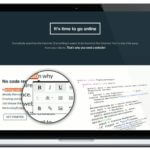
Most of the javascript WYSIWYG text editors work by transforming a simple textarea into a fully-blown text formatting section, with lots of toolbars and buttons to style the contained text. Another way of adding a rich text editor to a page is to allow users to select text and then show a popup with formatting controls next to it. Both ways are great, but few WYSIWYG editors provide both these editing options, Froala Editor being among them.
Froala Editor offers the option of uploading images using drag and drop. Don’t worry about storing them, images are saved by default on http://i.awsstage.froala.com, so you don’t have to do a thing. Still, if you want to store them on your own server then that’s easy to do, just follow the image upload tutorial.
Froala Editor is the first WYSIWYG text editor with full mobile support. You can resize images even on tablets and smartphones. The first text editor with the popup with formatting controls appearing the same on mobile devices as on desktops. So it’s pretty obvious: a busy day won’t stop you from editing your website, just use your tablet or smartphone.
Some key features of Froala Editor are listed bellow:
Certainly there are a lot more features than you can cover in a blog post, but you can check all of them on https://awsstage.froala.com/wysiwyg-editor. Despite all its features, Froala Editor is a lightweight editor with high performance. You can edit either one paragraph or thousands of pages, you won’t feel a difference at all.








No comment yet, add your voice below!