



Froala Editor V4.5: Disable Plugins, Excel Paste, & New Features!

As a top-rated WYSIWYG editor, Froala is dedicated to consistently delivering innovative features that elevate the content creation experience for our users. Today, we’re thrilled to unveil the latest version of our powerful editor – Froala Editor V4.5.
This release includes several exciting new features that enhance the user experience and provide greater flexibility. Imagine being able to effortlessly disable specific plugins, allowing you to tailor the editor to your unique needs. Or how about the ability to seamlessly paste multiple cells from Excel directly into your content? These are just a few of the remarkable enhancements that make Froala Editor V4.5 a must-have for Froala users.
We recommend updating your editor today – it will take less than 5 minutes, and you’ll enjoy an even better editing experience. To help you update your editor as smoothly as possible, we’ve added a detailed section at the end of the post.
What’s New in Froala 4.5 – At a Glance
Froala Editor V4.5 packs powerful updates for developers and content creators alike. Here’s a quick look:
- Disable Plugins: Easily turn off specific plugins with the new pluginsDisabled option—no need to manage long plugin lists.
- Custom Line Heights: Control the order of line-height options for a cleaner, more intuitive dropdown.
- Excel Paste Upgrade: Paste multiple Excel cells directly into tables—Froala adjusts formatting and layout automatically.
- Smarter Performance: Enjoy bug fixes and enhancements across plugins, toolbar behavior, and content formatting.
It’s Froala customization, smarter pasting, and smoother editing—all in one update.

What’s New in Froala Editor V4.5
Let’s take a closer look at what’s new in Froala Editor V4.5. From plugin control to smoother Excel pasting, these updates are designed to give developers and content creators more power and flexibility.
1. Disable Specific Froala Plugins Easily
Froala’s modular plugin structure is a powerful feature that allows developers to include only the plugins they need. This Froala plugin disabling feature makes the editor more efficient, easier to understand, and simpler to extend and maintain. Instead of loading all 40+ plugins by default, developers can use the pluginsEnabled option to specify which plugins are active.
However, using this way to disable one or two plugins could be cumbersome. Developers had to list all the plugins they wanted to keep enabled, which became tedious as the number of plugins grew.
With the new pluginsDisabled option, you can easily turn off specific plugins without hassle. Simply list the plugins you want to disable, and Froala takes care of the rest—no need to manage a long list of enabled plugins.
Now, developers can easily exclude specific plugins without needing to maintain a comprehensive list of enabled plugins. This streamlines the configuration process, giving you greater control over the editor’s functionality.
For example, let’s say you want to disable the “emoticons” and “fullscreen” plugins. You can simply set pluginsDisabled: ['emoticons', 'fullscreen'], and those plugins will be disabled regardless of how the pluginsEnabled option is configured.
This new feature makes it effortless to customize Froala to your specific needs, leading to a more efficient and optimized implementation.
2. Customize Line Height Dropdown Order
Take control of your content’s layout! Froala Editor V4.5 now lets you customize the order of line height options in the dropdown menu, ensuring a more intuitive and user-friendly experience.
Previously, when setting the lineHeights option as an object, the order of the options would be determined by the natural order of the object’s elements in JavaScript. This meant the order was not necessarily intuitive or consistent with how the developer had intended to present the options.
Now, with Froala Editor V4.5, you can set the lineHeights option as an array of objects. When you do this, the editor will display the line height options in the exact order you specify in the array. This gives you complete control over the presentation of these options, ensuring a seamless and intuitive user experience.
For example, let’s say you want to offer your users the following line height options 1, 1.15, 1.5, 2, 3. If you used the object-based approach
new FroalaEditor('.selector', {

  lineHeights: {
    '1': '1',
    '1.15': '1.15',
    '1.5': '1.5',
    '2': '2',
    '3': '3'
  }

});
The options will be displayed in the following order: 1, 2, 3, 1.15, 1.5 due to the way JavaScript objects are structured. But now, with the new array-based approach:
new FroalaEditor('.selector', {

 lineHeights: [

  {label: '1', value: 1},

  {label: '1.15', value: 1.15},

  {label: '1.5', value: 1.5},

  {label: '2', value: 2},

  {label: '3', value: 3},

 ]

});
The options will be shown exactly as you defined them, preserving your intended order and layout.
This enhancement empowers you, the developer, to create a more polished and customized editing experience for your users. By controlling the order of line height options, you can ensure your content authors have easy access to the most relevant and useful formatting choices.
3. Paste Multiple Excel Cells into Tables
Pasting Excel data into an existing table just got easier! Now, you can seamlessly merge Excel content into existing tables in Froala. Whether your data has more rows, columns, or different formatting, Froala adapts automatically—saving you time and effort.
Here’s how it works:
When you hover over a table in the Froala editor, you’ll see a new selection icon in the top-left corner. Clicking this icon selects the entire table, allowing you to paste content from Excel directly into it.
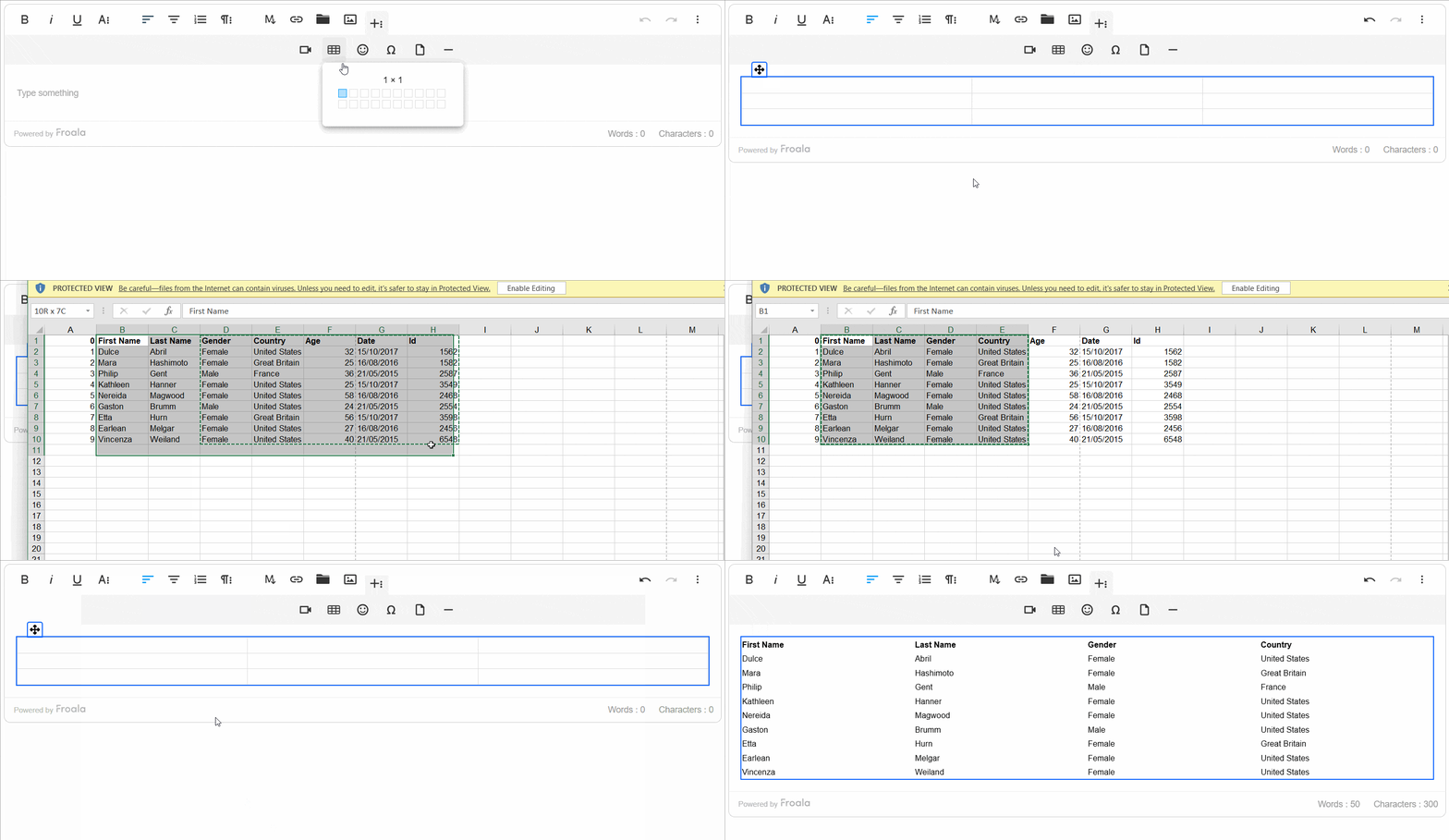
If the copied Excel content has more rows or columns than the selected table, the table will automatically expand to accommodate the new data. The formatting from Excel, such as text styles, colors, and cell borders, will carry over seamlessly.
Conversely, if the pasted content is smaller than the existing table, the extra cells will remain intact. This ensures you never lose any of your carefully crafted table structure.
4. Additional Improvements & Fixes
We have made additional enhancements and addressed various issues reported by our users to improve the overall performance and stability of the Froala Editor, ensuring that the content is in the correct format. These include:
- Files Manager plugin now supports uploading .hex files.
- Enhance the Word Paste plugin to retain the Roman Numerals in numbered lists.
- Improve the link plugin to ensure the right display of the Link Edit popup in the Full Page mode.
- Update the URL plugin to enhance URL and email detection in pasted content.
- Apply the fontSizeUnit option value to the editor content by default.
- Addresses improvements to ensure proper toolbar positioning and visibility handling in sticky mode.
- Resolved the issue where clear formatting removes video from the content.
These enhancements demonstrate Froala’s commitment to continuously improving the editor’s functionality and addressing user feedback to provide a superior content creation experience.
Please find the complete Froala changelog list here.
How to Update to Froala Editor V4.5
Don’t miss out on the benefits of the latest Froala 4.5 release. Update today and experience the enhanced editing features and improvements.
If you are using a plain JavaScript library or other framework, check the get started page to know how to download the latest Froala Editor release and how to include it in your project based on your preferred method.
If you are using a plain JavaScript library or other framework, follow the table below to learn how to download the latest Froala Editor release and include it in your project based on your preferred method.
| Method | How to download | Include in your project | |
| CDN | – |
<!-- Include Editor stylesheet--> <link href="https://cdn.jsdelivr.net/npm/froala-editor@4.5/css/froala_editor.pkgd.min.css" rel="stylesheet" type="text/css" /> <!-- Include Editor JavaScript file--> <script type="text/javascript" src="https://cdn.jsdelivr.net/npm/froala-editor@4.5/js/froala_editor.pkgd.min.js"></script> |
|
| CDN (Always the latest version) | – |
<!-- Include Editor stylesheet--> <link href="https://cdn.jsdelivr.net/npm/froala-editor@latest/css/froala_editor.pkgd.min.css" rel="stylesheet" type="text/css" /> <!-- Include Editor JavaScript file--> <script type="text/javascript" src="https://cdn.jsdelivr.net/npm/froala-editor@latest/js/froala_editor.pkgd.min.js"></script> |
|
| NPM |
npm install froala-editor |
<!--

Replace the {download-folder-path} in the following example with the path to the folder containing the stylesheet file e.g.

../css/froala_editor.pkgd.min.js

-->

<link href="{download-folder-path}/froala_editor.pkgd.min.css" rel="stylesheet" type="text/css" />

<!--

Replace the {download-folder-path} with the path to the folder containing the JS file e.g.

../js/froala_editor.pkgd.min.js

-->

<script type="text/javascript" src="{download-folder-path}/froala_editor.pkgd.min.js"></script>
|
|
| bower |
bower install froala-wysiwyg-editor |
||
| NO Package Manager | Download Froala WYSIWYG Editor files using the download form here. | ||
| Integrated with a Framework | Select your preferred framework from 17 different popular frameworks. | ||
| Other options | Check the Get Started page for other options for using Froala WYSIWYG Editor in your project. | ||
For Froala Editor Version 2 Users:
Follow this migration guide for step-by-step instructions on upgrading from version 2.
Try Froala Editor V4.5 Today
Explore a variety of examples that demonstrate the functionality of the Froala HTML Editor.
Support and Feedback
We are committed to providing the best possible experience for all our users. We believe this release, meant to enhance TypeScript support, is a stepping stone towards that commitment. We encourage you to try this improved TypeScript support and provide us with your valuable feedback.
Your input is crucial for delivering continuous enhancement and meeting your evolving needs. Thank you for being a valuable part of our vibrant and growing community.
To learn more about previous updates, check out the related blog pages for Froala 4.4 and Froala 4.3. We would love to hear your thoughts on the latest release! Join us on our GitHub Community to chat with our product manager, developers, and other members of the Froala team.
Change Log
- Please visit the release notes for a complete list of changes.
Get Started
- You can download and start using Froala in less than five minutes by following our get-started guide.
Technical Questions
If you have a technical question, you can check whether we have already answered it in our help center. If not, contact our Support team.








No comment yet, add your voice below!