



Froala 4.6.0: New Table Editing Features, React 19 Compatibility, and Find & Replace Plugin

Froala Editor 4.6 is here, and it’s packed with exciting new features that will elevate your content creation workflow. From advanced table editing capabilities to React 19 compatibility and the official release of the Find & Replace plugin, this update is a important for developers and content creators alike.
Read on to discover the fantastic improvements that will elevate your content creation workflow.
Key Takeaways
- Total Table and Cell Customization
- Stable and Powerful Find & Replace
- Full React 19 Compatibility
- Enhanced Workflow and Accessibility
- New Developer Customization Options
What’s New
Find & Replace Graduates from Beta
The Find & Replace plugin is now an official, stable feature. This powerful tool gives developers and content creators a seamless way to search for and modify text across an entire document.
Key Benefits
- Efficient Editing: Quickly locate and replace text throughout your document
- Comprehensive Search: Support for case-sensitive and case-insensitive searches
- Flexible Replacement: Replace single or multiple occurrences of text
- Intuitive User Interface: Simple and clean design that integrates smoothly with the Froala Editor
Use Cases
- Content Editing: Streamline large document modifications
- Localization: Easily replace text during translation processes
- Compliance and Consistency: Ensure uniform terminology across documents
Important Notes
- Compatible with all major browsers
- Works across different content types (rich text, markdown)
- Minimal performance overhead
- Fully customizable to match your application’s design
Upgrade to Froala Editor 4.6 to experience the full power of the Find & Replace plugin and enhance your content editing workflow.
React 19 Compatibility; Integrate with the Latest Ecosystem
Froala Editor’s React SDK is now fully updated to support React 19. This ensures you can leverage the latest features and performance improvements in your modern React applications.
Key Benefits of React 19 Support
- Future-Proofing: Immediate compatibility with the latest React version
- Performance Improvements: Leverage new rendering optimizations in React 19
- Enhanced Developer Experience: Smooth integration with modern React applications
- Zero-Configuration Setup: Plug-and-play support for React 19 projects
What Developers Can Expect
- Full compatibility with React 19’s new features and APIs
- Maintained backward compatibility with previous React versions
- Optimized rendering and component lifecycle management
- Seamless integration with existing Froala Editor React implementations
Our React SDK continues to provide a robust, flexible solution for developers looking to integrate a powerful rich text editor into their React applications. Whether you’re building complex web applications or simple content management systems, Froala Editor’s React implementation ensures a smooth, efficient editing experience.
Upgrade now and stay ahead of the curve with Froala Editor’s latest React SDK update!
Introducing Advanced Table Properties
Froala Editor 4.6 completely transforms table editing. We are introducing two major upgrades; the Table Properties modal and the Cell Properties popup, giving you complete mastery over every aspect of your tables.
Table Properties Modal: Complete Customization at Your Fingertips
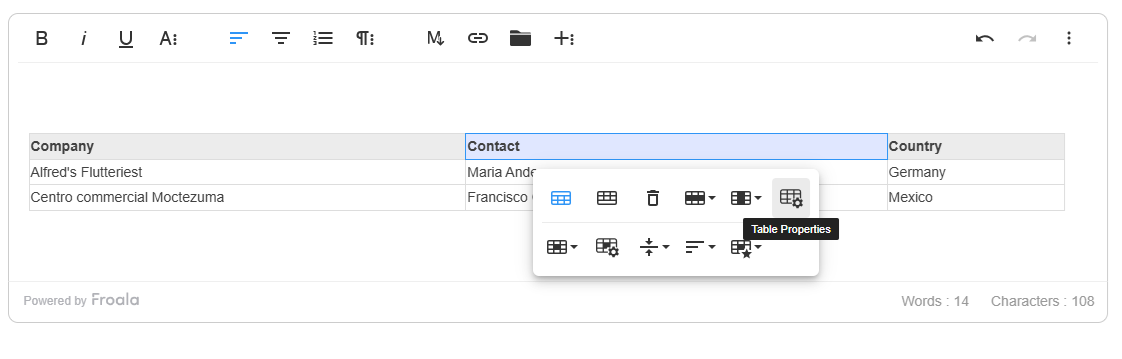
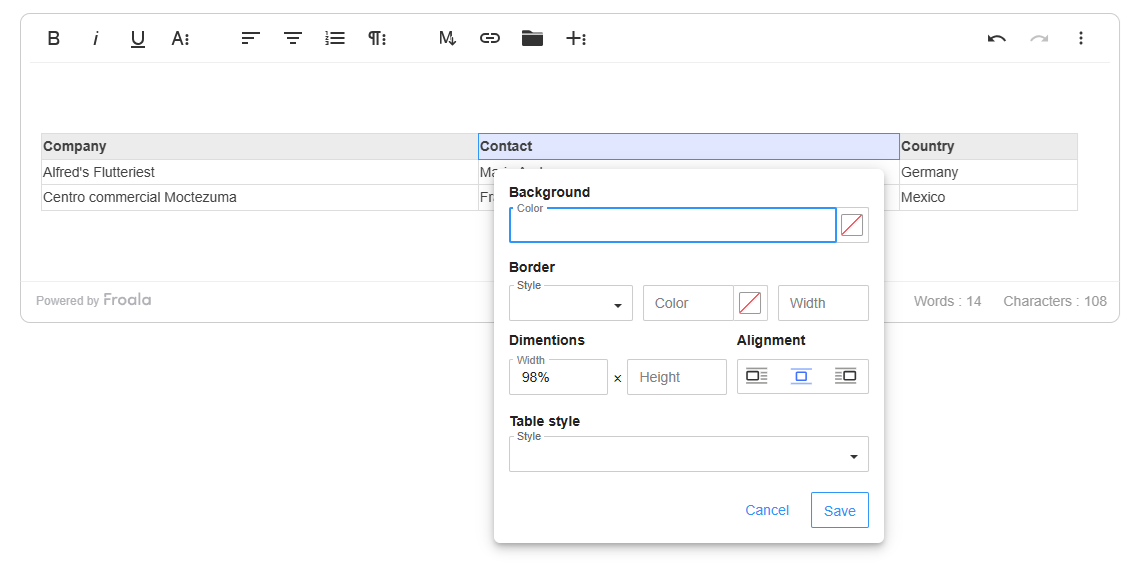
When users click the new “Table Properties” button in the table toolbar, a modal window opens, revealing a suite of advanced customization options:
Background Color
- Select a background color for the entire table
- Uses a color picker with full RGB and hex support
- Applies color uniformly across all table cells.
Border Customization
- Border Color: Choose a specific color for table borders
- Border Width: Adjust border thickness (1-10px recommended)
- Border Style: Select from multiple options:
- Solid
- Dotted
- Dashed
- Double
- And more!
Dimensions and Sizing
- Set table width and height using:
- Pixels (px)
- Percentages (%)
- Maintains table responsiveness across different screen sizes
Table Alignment
- Align table within the content area:
- Left
- Center
- Right
Alternate Rows
- Enable/disable alternating row colors
- Improve table readability with visual separation
- Perfect for data-heavy tables and complex layouts
Customizable Table Defaults: Enhanced Configuration Options
Froala Editor 4.6 introduces a comprehensive set of new configuration options that provide developers with granular control over default table properties during table insertion. These new configurations allow for precise customization of table appearance and behavior right from the initialization.
New Configuration Options
- Table Alignment: Define the default alignment of newly inserted tables with a single configuration option.
- Table Dimensions: Easily set a default height for new tables to maintain consistent layout.
- Color Customization: Control the initial appearance of tables with hex color configurations.
- Border Styling: Customize border properties to match your design requirements.
new FroalaEditor('.selector', {

  tableDefaultAlign: 'left',

  tableDefaultHeight: '200px',

  tableDefaultBGColor: '#000000',

  tableDefaultBorderColor: '#000000',

  tableDefaultBorderWidth: '2px',

  tableDefaultBorderStyle: 'dashed',

});
New Table Properties Methods
We’ve also introduced two new methods to programmatically manage table properties:
- Show Table Properties: Programmatically open the table properties popup.
- Hide Table Properties: Programmatically close the table properties popup.
new FroalaEditor('.selector', {
  events: {
    'table.inserted': function (table) {
      // Do something here.
      // this is the editor instance.
      console.log(this);
      this.table.showTableProperties();
    }
  }
});
Key Benefits
- Comprehensive Customization: One-stop solution for table styling
- User-Friendly Interface: Intuitive modal with clear options
- Flexible Design: Supports various styling needs
- Intelligent Validation: Prevents incorrect input
- Responsive Styling: Maintains layout across devices
- Developer Control: Precise management of table insertion properties
- Intuitive API: Simple, straightforward configuration options and methods
Developer and User Experience
The new Table Properties feature represents our commitment to providing powerful, yet easy-to-use editing tools. Whether you’re creating documentation, reports, or complex data presentations, these enhanced table editing capabilities will streamline your workflow.
Introducing Advanced Table Cell Properties
We didn’t just improve table editing – we revolutionized it. The new Table Cell Properties provide users with unprecedented control over individual table cell styling and layout.
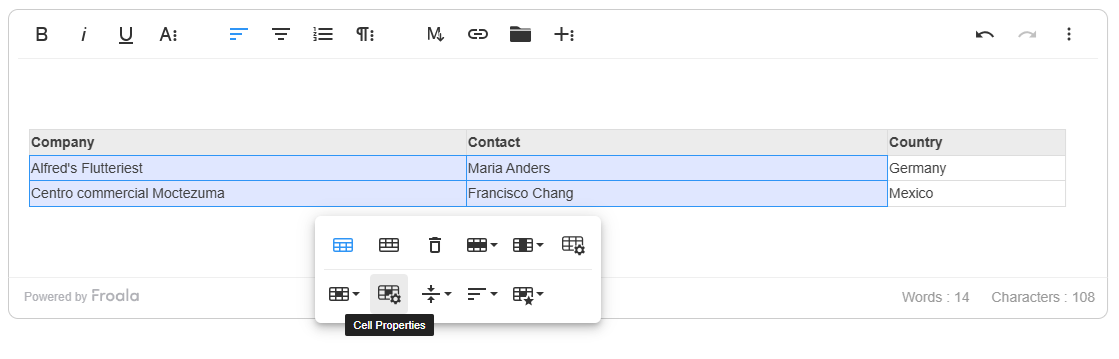
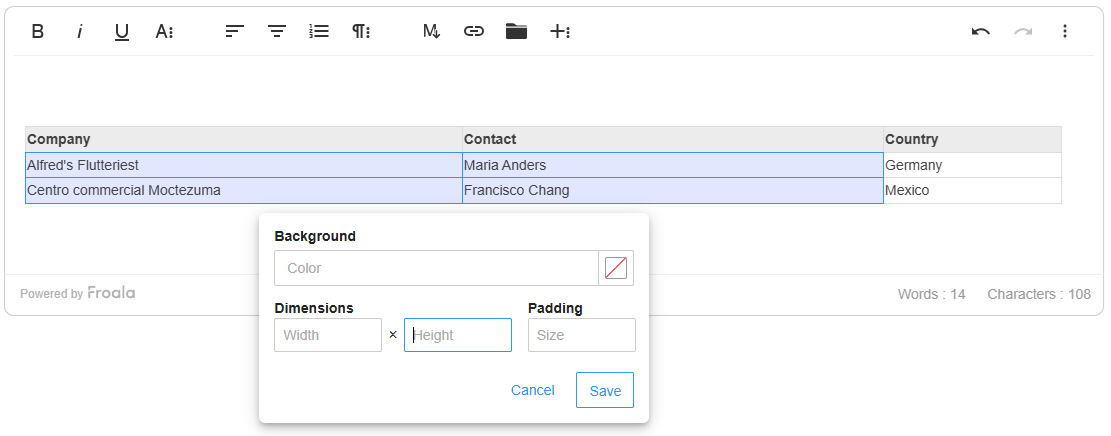
When one or multiple table cells are selected, a new “Cell Properties” button appears in the table toolbar. This button offers instant access to a powerful customization popup that consolidates multiple cell editing functionalities into one convenient location.
Cell Properties Popup: Comprehensive Cell Customization
The Cell Properties popup provides granular control over selected table cells, offering four key customization areas:
Background Color
- Utilize the integrated color picker to select custom background colors.
- Full RGB and hex color support
- Apply colors to single or multiple selected cells
Padding Control
- Set internal cell spacing with precision
- Support for both pixel (px) and percentage (%) measurements
- Adjust top, right, bottom, and left padding independently
- Ensure optimal content layout and readability
Dimensions Configuration
- Customize cell width and height
- Flexibility to use pixels (px) or percentages (%)
- Automatic pixel (px) conversion for numeric inputs
- Maintain responsive design across different screen sizes.
Alignment Options
- Horizontal alignment controls
- Vertical alignment settings
- Ensure content is perfectly positioned within each cell.
Key Benefits
- Unified Interface: All cell properties in one convenient popup
- Precise Customization: Granular control over cell styling
- Flexible Measurements: Support for pixels and percentages
- Intuitive Design: Simple, user-friendly interaction
- Consistent User Experience: Streamlined cell editing workflow
Developer and User Experience
We introduced a new showCellPropertiesPopup() method that allows developers to programmatically display cell properties popups.
The new Table Cell Properties feature represents our commitment to providing powerful, yet intuitive editing tools. Whether you’re creating complex data tables, reports, or documentation, these enhanced cell editing capabilities will significantly improve your content creation workflow.
Enhanced Keyboard Interaction With Selected Table
In Froala Editor 4.6, we’ve significantly improved keyboard interaction when an entire table is selected, addressing previous limitations and providing a more intuitive, predictable editing experience.
Our latest update ensures that when a table is fully selected, all standard keyboard actions now function seamlessly and logically. Such as: Ensures smooth cursor movement while navigating with arrow keys.
Key Benefits
- Improved User Experience: Eliminates frustrating interaction limitations
- Intuitive Editing: Keyboard actions now behave predictably
- Reduced Friction: Streamlines table editing and management
- Consistent Interaction: Aligns with user expectations across different editing scenarios
Developer and User Impact
These keyboard interaction improvements represent our commitment to creating a more responsive, user-friendly rich text editing experience. By addressing these nuanced interaction challenges, we’ve made table editing more intuitive and efficient.
Enhanced Accessibility
In our latest release, we’ve implemented targeted accessibility improvements based on direct user feedback:
- Enhanced Form Controls: Implemented aria-label attributes on checkbox fields to improve screen reader comprehension
- Dynamic State Representation: Added aria-expanded attribute to accurately communicate expand/collapse states
- Improved Visual Focus:
- Introduced background color styles for hover and active states in image dropdowns.
- Implemented clear focus indication for list dropdowns during keyboard navigation.
- Keyboard Navigation Optimization:
- Enabled seamless Tab key navigation within color palette popups
- Ensured smooth focus transitions between interactive elements
- Screen Reader Support:
- Added aria-pressed attributes to tab buttons in specialized popups (Emoticons, Special Characters, Font Awesome)
- Refined aria-pressed state management for popup trigger buttons
These refinements demonstrate our ongoing commitment to creating an accessible, user-friendly editing environment that meets diverse user needs.
Much More…
We have addressed various issues reported by our users to enhance the overall performance and stability of Froala Editor. These include:
- Resolved the issue in MS Edge where suggested text does not get replaced correctly on autocorrect.
- Modified the list creation logic to ensure that if the current line or selected lines have styles applied, those styles are preserved in the list content.
- Resolved the issue in the Android WebView where when the character limit is set to N, and when typed over N characters, it exceeds the character limit.
Please find the complete changelog list here.
How Can I Update?
Don’t miss out on the benefits of the latest Froala WYSIWYG Editor 4.6 release. Update today and experience the enhanced editing features and improvements.
If you are using a plain JavaScript library or other framework, check the get started page to know how to download the latest Froala Editor release and how to include it in your project based on your preferred method.
If you are using a plain JavaScript library or other framework, follow the table below to learn how to download the latest Froala Editor release and include it in your project based on your preferred method.
| Method | How to download | Include in your project | |
| CDN | – |
<!-- Include Editor stylesheet--> <link href="https://cdn.jsdelivr.net/npm/froala-editor@4.6/css/froala_editor.pkgd.min.css" rel="stylesheet" type="text/css" /> <!-- Include Editor JavaScript file--> <script type="text/javascript" src="https://cdn.jsdelivr.net/npm/froala-editor@4.6/js/froala_editor.pkgd.min.js"></script> |
|
| CDN (Always the latest version) | – |
<!-- Include Editor stylesheet--> <link href="https://cdn.jsdelivr.net/npm/froala-editor@latest/css/froala_editor.pkgd.min.css" rel="stylesheet" type="text/css" /> <!-- Include Editor JavaScript file--> <script type="text/javascript" src="https://cdn.jsdelivr.net/npm/froala-editor@latest/js/froala_editor.pkgd.min.js"></script> |
|
| NPM |
npm install froala-editor |
<!--

Replace the {download-folder-path} in the following example with the path to the folder containing the stylesheet file e.g.

../css/froala_editor.pkgd.min.js

-->

<link href="{download-folder-path}/froala_editor.pkgd.min.css" rel="stylesheet" type="text/css" />

<!--

Replace the {download-folder-path} with the path to the folder containing the JS file e.g.

../js/froala_editor.pkgd.min.js

-->

<script type="text/javascript" src="{download-folder-path}/froala_editor.pkgd.min.js"></script>
|
|
| bower |
bower install froala-wysiwyg-editor |
||
| NO Package Manager | Download Froala WYSIWYG Editor files using the download form here. | ||
| Integrated with a Framework | Select your preferred framework from 17 different popular frameworks. | ||
| Other options | Check here for other options for using Froala WYSIWYG Editor in your project. | ||
For Froala Editor Version 2 Users:
Follow this migration guide for step-by-step instructions on upgrading from version 2.
Try The Latest Froala Editor
Explore a variety of examples that demonstrate the functionality of the Froala HTML Editor.
Support and Feedback
We are dedicated to always offering the best possible experience for all our users. We believe this release, meant to enhance Typescript support, is a stepping stone towards that commitment. We encourage you to try this improved Typescript support and give us your valuable feedback. Your input is crucial for delivering continuous enhancement and meeting your evolving needs. Thank you for being a valuable part of our vibrant and growing community.
We would like to hear what you think of the latest release! Join us on our GitHub Community to chat with our product manager, developers, and other members of the Froala team.
Change Log
- Please visit the release notes for a complete list of changes.
Get Started
- You can download and start using Froala in less than five minutes following our get-started guide.
Technical Questions
- If you have a technical question, you can check whether we have already answered it in our help center. If not, contact our Support team.







No comment yet, add your voice below!