Days
Hours
Minutes
Seconds
x

New Froala Editor v5.0.0 is here โ€“ Learn More

Skip to content

Froala V5.0.0 Release: Code Snippets, Word Imports, and More

Froala V5.0.0

Froala V5.0.0 introduces two major features: code snippet insertion with syntax highlighting, and direct Word document import with formatting preserved. This release also includes table handling improvements and updated styling defaults.

Code Snippet Feature Overview

The Code Snippet plugin adds syntax-highlighted code blocks to your editor. Supports JavaScript, Python, HTML, CSS, TypeScript, Java, C++, SQL, and JSON. Works across Chrome, Firefox, Edge, and Safari.
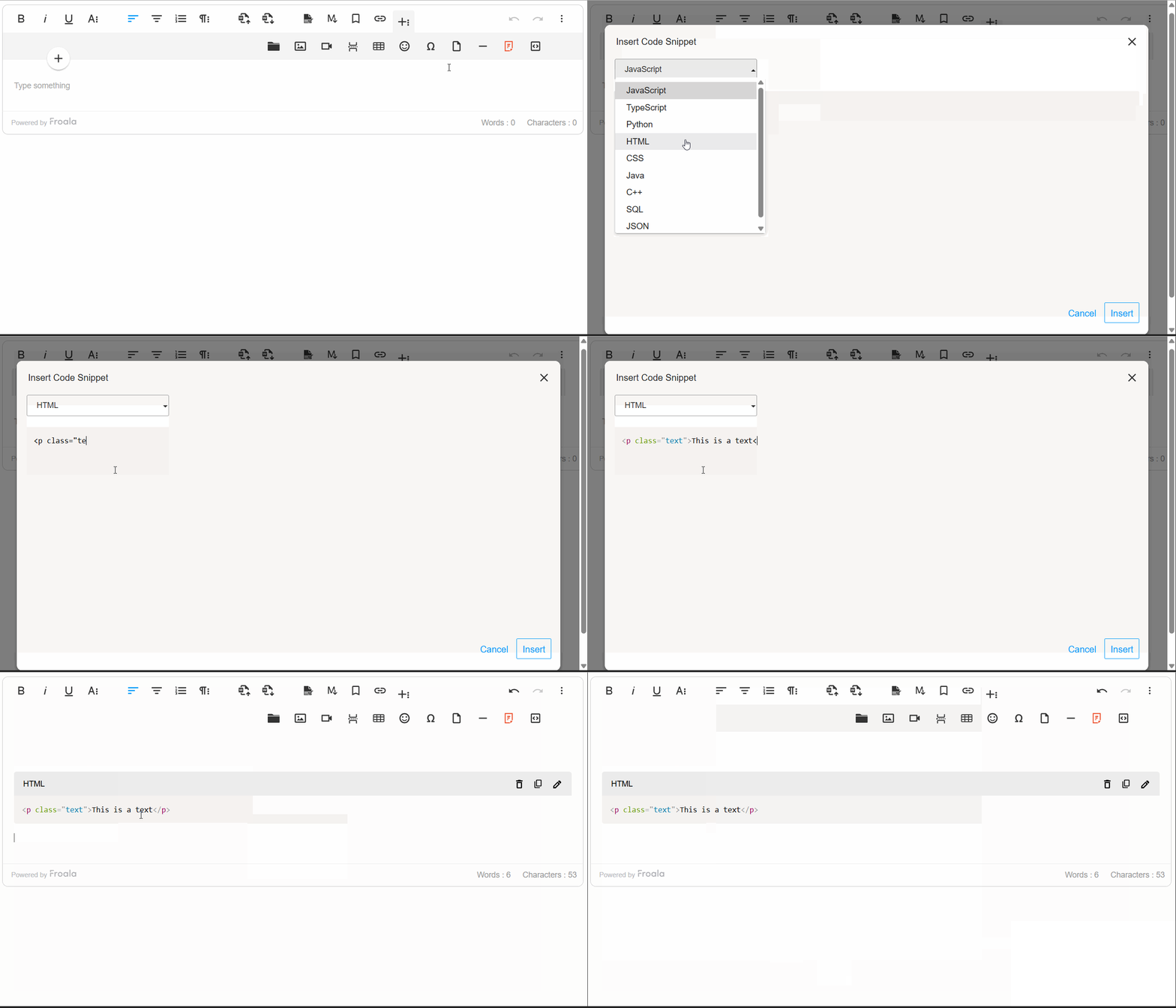
code snippet insertion

Inserting Code Snippets

Click the “Insert Code Snippet” button in the toolbar to open the code entry modal. Select a programming language from the dropdown and paste or write your code. Syntax highlighting applies automatically.

Code Block Rendering

Code snippets are rendered in a monospace font within styled <pre> and <code> blocks, ensuring precision and consistency. The plugin intelligently preserves indentation and line breaks, maintaining the exact formatting developers intended. By default, code blocks are read-only, protecting formatting integrity while allowing users to view and reference code effortlessly.

Edit, Remove, and Copy with Ease

Use the Code Snippet toolbar to edit, remove, or copy code blocks. The “Copy to Clipboard” button copies the code with formatting intact.
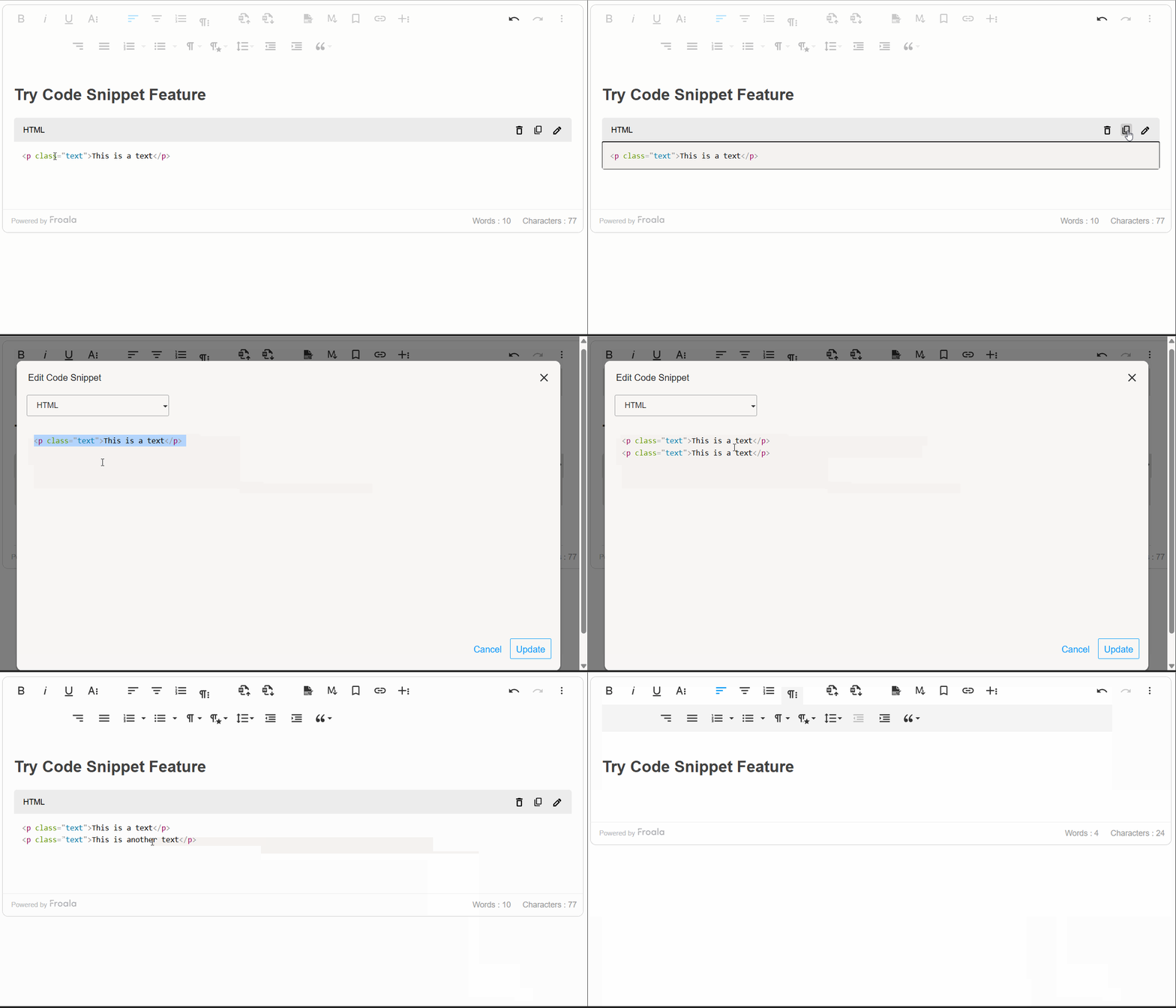
code snippet edit

Developer Control and Customization

Froala V5.0.0 provides a comprehensive set of options, methods, and events that give developers programmatic control over the code snippet feature.

The plugin configuration options allow developers to customize the code snippet feature according to their needs. Whether you want to limit available programming languages, set a default language preference, or tailor the feature to your specific workflow, these settings give you complete control over the code snippet behavior.

Additionally, there are methods for code snippet insertion, updating, and display. These methods enable you to integrate code snippet functionality seamlessly into your custom workflows and automate code block management.

Moreover, the Code Snippet plugin exposes powerful events that allow you to hook into the code insertion lifecycle. These events enable you to implement custom validation, analytics tracking, and dynamic code processingโ€”giving you fine-grained control over how code snippets are handled within your editor. By leveraging these events, you can build sophisticated workflows that align with your application’s specific requirements and user needs.

new FroalaEditor('.selector', {
  codeSnippetLanguage: {
    'JavaScript': 'javascript',
    'Python': 'python',
    'Ruby': 'ruby',
    'Go': 'go',
    'Rust': 'rust'
  },
  codeSnippetDefaultLanguage: 'Python',
  events: {
    'codeSnippet.beforeInsert': function (code) {
  
      // Add a comment to all code snippets
      return '// Auto-generated comment\n' + code;
    },
    'codeSnippet.afterInsert': function (code) { 
   
      console.log('Code snippet inserted:', code);

    }

}, function () {
  // Call the method inside the initialized event.
  this.codeSnippet.insert('console.log("Hello World");', 'JavaScript');

});

Import from MS Word Feature Overview

Another powerful addition to Froala V5.0.0 is the ability to seamlessly import content from Microsoft Word documents into the editor while preserving formatting, styles, and structure. This feature simplifies the transition for users who draft content in Word, ensuring compatibility and reducing the need for manual adjustments, enhancing productivity and usability across platforms.
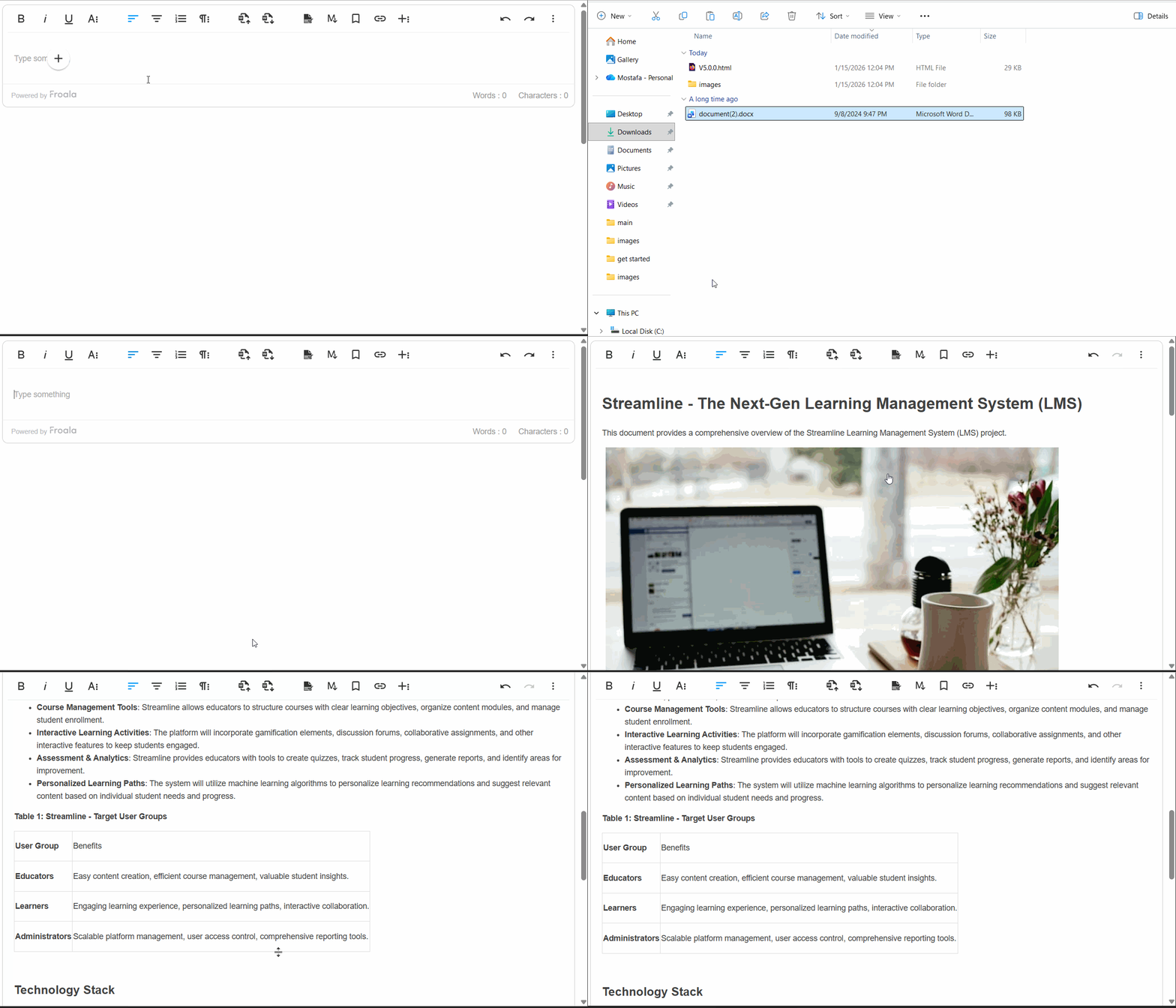
Import from word

Why This Enhancement Matters

Content creators often work in Microsoft Word due to its familiarity and advanced formatting capabilities. However, moving that polished content into a web editor typically requires tedious manual adjustmentsโ€”reformatting text, recreating tables, repositioning images, and reapplying styles. The Import from MS Word feature solves this problem entirely, allowing users to upload Word documents and have all their work instantly available in the editor, exactly as intended.

How It Works

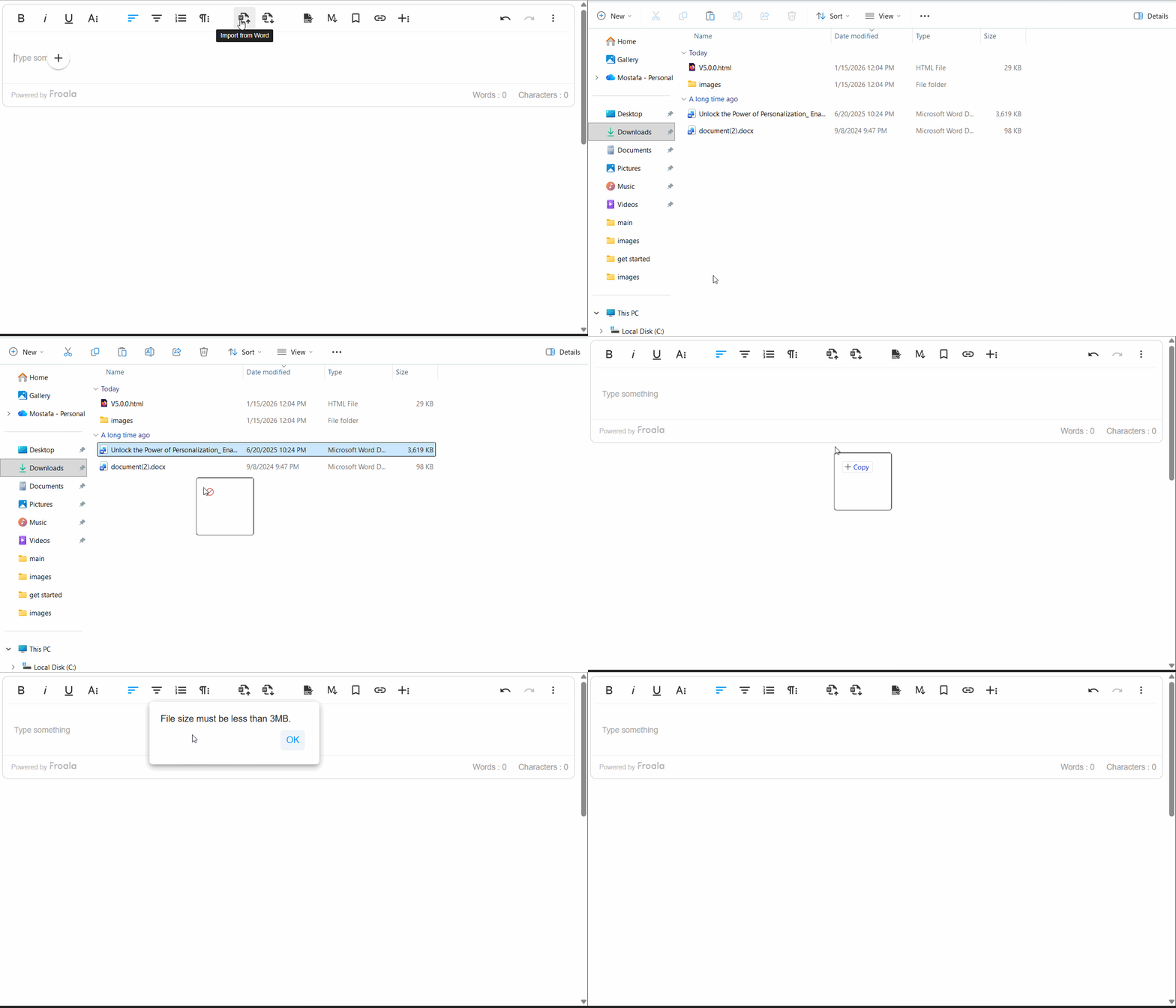
Importing Word documents is remarkably simple. Users click the “Import from Word” button on the toolbar, select their .doc or .docx file, and the editor handles the rest. The plugin even supports drag-and-drop importing, allowing users to simply drag Word files directly into the editor for instant importโ€”making the process as intuitive as possible.

Comprehensive Content Preservation

The Import from MS Word feature preserves virtually every element of your Word document:

Text & Formatting: All text formatting is maintained exactly as authored. Headings and paragraphs retain their structure and hierarchy, ensuring your document’s visual organization remains intact.

Lists: The plugin imports lists with complete accuracy, preserving indentation and hierarchy.

Images & Media: Embedded images imported directly into the editor.

Styling & Links: Inline styles such as font color, background color, and text highlights are preserved. Hyperlinks remain functional, allowing your content to maintain its interconnectedness.

Enterprise-Grade Performance

The plugin is engineered to handle real-world document sizes efficiently. It processes large, complex documents, importing smoothly and quickly without freezing the editor or degrading performance.

Robust Error Handling

The feature includes intelligent error management. For example, if a Word file size is larger than what specified, users receive a clear, helpful error message explaining the issue.ย 

word Import error

Developer Control & Customization

Froala V5.0.0 provides developers with comprehensive control over the Import from MS Word feature through powerful configuration options, methods, and events:

Configuration Options

importFromWordMaxFileSize โ€“ Control the maximum allowed file size (default: 3 MB). Adjust this setting based on your infrastructure and user needs.

importFromWordFileTypesAllowed โ€“ Specify which Word file formats are accepted (default: [‘.docx’]). Enable support for legacy .doc files if required.

importFromWordUrlToUpload โ€“ Provide your own server endpoint for processing Word file uploads, giving you complete control over file handling and storage.

importFromWordEnableImportOnDrop โ€“ Enable or disable drag-and-drop import functionality (default: true). Disable this if you want to restrict imports to the toolbar button only.

Methods

editor.importFromWord.import() โ€“ Programmatically trigger a file selection dialog, or pass a file object directly to import without user interaction. This enables integration with custom file pickers and automation workflows.

Events

word.beforeImport โ€“ Hook into the import lifecycle before processing begins. Use this event to validate files, track analytics, or perform custom preprocessing.

word.afterImport โ€“ Trigger custom logic after import completes successfully. Implement post-import workflows, update UI elements, or notify other systems that new content has been added.

Import from MS Word Overall

The Import from MS Word feature transforms how teams collaborate and manage content. By eliminating manual reformatting, preserving document fidelity, and providing developers with extensive customization options, this enhancement makes Froala V5.0.0 an even more powerful choice for organizations relying on Microsoft Word in their content workflows. Whether you’re a content creator seeking convenience or a developer building sophisticated workflows, this feature delivers tangible value and productivity gains.

Table Enhancements

Froala V5.0.0 brings meaningful improvements to table editing and management, making it easier for content creators to work with tables while giving developers finer control over table behavior and styling.

Smarter Line Break Handling in Table Cells

Tables are essential for organizing data and content, but managing text wrapping within cells can be tricky. Froala V5.0.0 introduces the retainLineBreaksInCellsOnWrap option, which gives you control over how line breaks are handled when cell content wraps to multiple lines.

What This Means for You

By default, Froala now retains line breaks within table cells when content wraps (retainLineBreaksInCellsOnWrap: true). This is particularly useful for content creators who intentionally format their cell content with line breaks for readability and structureโ€”think of lists, multi-line labels, or formatted addresses within a table. Your carefully structured formatting is now preserved exactly as you intended.

If you prefer the behavior where line breaks are removed during wrapping, you can simply disable this feature by setting retainLineBreaksInCellsOnWrap to false. This flexibility ensures Froala adapts to your specific workflow and content requirements.

Real-World Example

Imagine you’re creating a product comparison table with detailed descriptions in each cell. You might want product features listed on separate lines within a cell for clarityโ€”without line breaks being automatically stripped, your formatting stays intact, resulting in a cleaner, more professional-looking table.

Cleaner Table Styling Defaults

Froala V5.0.0 refines how table styling defaults are applied, giving you more control and preventing unnecessary styling overhead.

What Changed

Two table styling configurations have been updated with improved defaults:

  • tableDefaultBorderWidth โ€“ Now defaults to an empty string () instead of a predefined value
  • tableDefaultBorderStyle โ€“ Now defaults to an empty string () instead of a predefined value

Why This Matters

Previously, Froala suggested default border widths and styles for new tables. While this provided a starting point, it sometimes resulted in unwanted styling being automatically appliedโ€”particularly when you wanted complete design flexibility or preferred to apply your own CSS styling.

By changing these defaults to empty strings, Froala now takes a “blank slate” approach: new tables created without enforcing any specific border styling. This means:

โœ“ More Design Freedom โ€“ You have complete control over table appearance from the start

โœ“ Cleaner HTML โ€“ Less unnecessary inline styling clutters your code

โœ“ Better CSS Integration โ€“ Tables integrate seamlessly with your site’s stylesheet without style conflicts

โœ“ Consistent Branding โ€“ Apply your own design system directly through CSS rather than fighting against defaults

For Content Creators

You’ll notice that newly created tables now appear with minimal or no visible borders by default. Don’t worryโ€”borders are easy to add! Using the table toolbar, you can quickly apply border styles that match your content needs. This approach empowers you to design tables intentionally rather than inheriting styling you didn’t ask for.

For Developers

These changes simplify table integration into custom applications. With no default border styling applied, you have complete freedom to:

  • Apply your own border styling via CSS frameworks (Bootstrap, Tailwind, etc.)
  • Maintain consistent table appearance across your application.
  • Avoid CSS specificity conflicts with default styles

If you need the old behavior where borders are suggested by default, you can easily restore it by explicitly setting these configuration options in your Froala initialization.

Result: Tables That Work the Way You Do

These table enhancements reflect Froala’s commitment to balancing powerful functionality with user control. Whether you’re preserving intentional formatting within cells or designing tables with complete styling freedom, Froala V5.0.0 adapts to your workflow rather than imposing rigid defaults. Your tables, your way.

Much Moreโ€ฆ

This release includes additional improvements and bug fixes. See the complete changelog for details.

How Can I Update?

Update to Froala WYSIWYG Editor 5.0.0 today and experience enhanced editing features and improvements.

Check our getting-started guide to know how to download the latest Froala Editor release and how to include it in your project based on your preferred method.

Try The Latest Froala Editor

Explore a variety of examples that demonstrate the functionality of the Froala HTML Editor.

Support and Feedback

We are dedicated to always offering the best possible experience for all our users. We believe this release, meant to enhance TypeScript support, is a stepping stone towards that commitment. We encourage you to try this improved TypeScript support and give us your valuable feedback. Your input is crucial for delivering continuous enhancement and meeting your evolving needs. Thank you for being a valuable part of our vibrant and growing community.We would like to hear what you think of the latest release! Join us on our GitHub Community to chat with our product manager, developers, and other members of the Froala team.

Change Log

Please visit the release notes for a complete list of changes.

Technical Questions

If you have a technical question, you can check whether we have already answered it in our help center. If not, contact our Support team.


Add In-Document Navigation to Your Editor with the Link to Anchor Plugin

link anchor

Long-form content needs structure. Whether your users are writing technical documentation, course materials, or detailed reports, they need a way to help readers navigate to specific sections without scrolling through pages of text in a WYSIWYG editor.

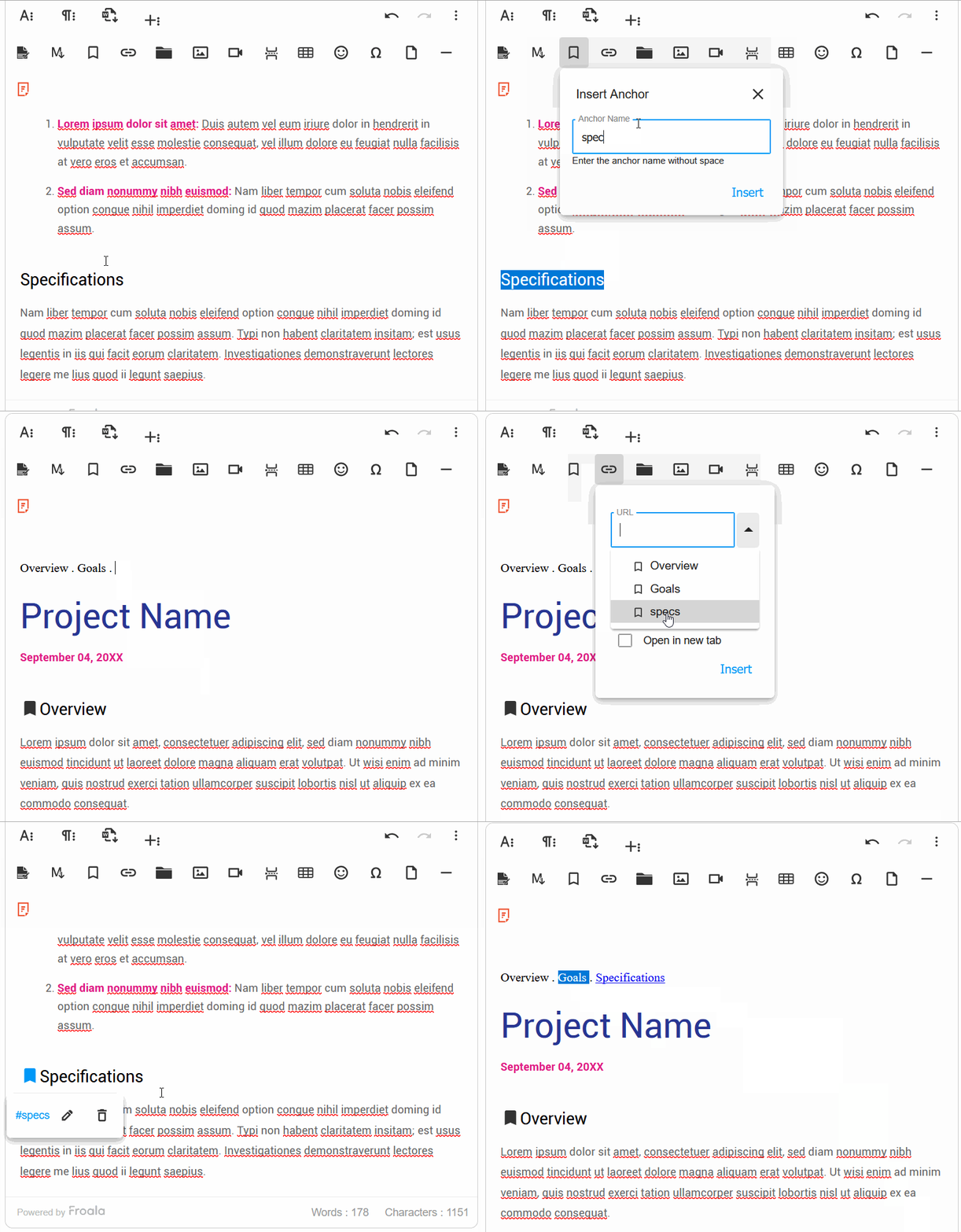
The Link to Anchor plugin, introduced in Froala 4.7, adds this capability directly to the editor. Users can insert named anchors at key points in their document, then create links that jump to those anchors. When readers click the link, the page scrolls smoothly to the target section.

What the Plugin Does

The plugin adds two related features to the editor toolbar.

First, users can insert named anchors at any cursor position. These anchors appear as small bookmark icons in the editor, marking locations that can be linked to.

Second, when users create a link using the standard Link plugin, a dropdown now appears listing all available anchors in the document. Selecting an anchor creates an internal link that smoothly scrolls to that position when clicked.

Both the Link plugin and Link to Anchor plugin need to be enabled for the full functionality.

Setting Up the Editor

Here’s a complete implementation using CDN resources. This approach requires no build tools and gives you a working editor in minutes:

ย 
<!DOCTYPE html>
<html lang="en">
<head>
  <meta charset="UTF-8">
  <meta name="viewport" content="width=device-width, initial-scale=1.0">
  <title>Froala Link to Anchor Demo</title>
  
  <link href="https://cdn.jsdelivr.net/npm/froala-editor@4.7.1/css/froala_editor.pkgd.min.css" 
        rel="stylesheet" type="text/css" />
  
  <link href="https://cdn.jsdelivr.net/npm/froala-editor@4.7.1/css/plugins/link_to_anchor.min.css" 
        rel="stylesheet" type="text/css" />
  
  <style>
    body {
      font-family: -apple-system, BlinkMacSystemFont, 'Segoe UI', Roboto, sans-serif;
      max-width: 900px;
      margin: 40px auto;
      padding: 0 20px;
    }
    
    /* Enable smooth scrolling for anchor navigation */
    html {
      scroll-behavior: smooth;
    }
  </style>
</head>
<body>
  <h1>Document Editor with Anchor Links</h1>
  
  <div id="editor">
    <h2>Getting Started</h2>
    <p>This is the introduction. Add an anchor here so readers can jump back from anywhere.</p>
    
    <h2>Main Content</h2>
    <p>Your primary content goes here. Consider adding anchors at each major heading.</p>
    
    <h2>Conclusion</h2>
    <p>Wrap up your document here.</p>
  </div>

  <script src="https://cdn.jsdelivr.net/npm/froala-editor@4.7.1/js/froala_editor.pkgd.min.js"></script>
  
  <script src="https://cdn.jsdelivr.net/npm/froala-editor@4.7.1/js/plugins/link_to_anchor.min.js"></script>
  
  <script>
    var editor = new FroalaEditor('#editor', {
      key: 'YOUR_LICENSE_KEY',
      
      toolbarButtons: {
        moreText: {
          buttons: ['bold', 'italic', 'underline', 'fontSize'],
          buttonsVisible: 3
        },
        moreParagraph: {
          buttons: ['alignLeft', 'alignCenter', 'formatOL', 'formatUL', 'paragraphFormat'],
          buttonsVisible: 3
        },
        moreRich: {
          buttons: ['insertLink', 'insertAnchor', 'insertImage', 'insertTable'],
          buttonsVisible: 3
        },
        moreMisc: {
          buttons: ['undo', 'redo', 'fullscreen', 'html'],
          align: 'right',
          buttonsVisible: 2
        }
      },
      
      pluginsEnabled: [
        'align', 'fontSize', 'fullscreen', 'image', 'link', 
        'linkToAnchor', 'lists', 'paragraphFormat', 'table', 'codeView'
      ],
      
      heightMin: 300,
      heightMax: 600
    });
  </script>
</body>
</html>

Understanding the Configuration

The toolbarButtons configuration places insertAnchor alongside insertLink in the “moreRich” group. This keeps related functions together in the toolbar.

The pluginsEnabled array explicitly includes both link and linkToAnchor. While the packaged Froala build includes most plugins by default, being explicit helps when optimizing load times.

The CSS scroll-behavior: smooth property ensures that anchor link clicks animate the scroll rather than jumping instantly.

Handling Anchor Events

For more control over anchor behavior, you can listen to the plugin’s events:

var editor = new FroalaEditor('#editor', {
  key: 'YOUR_LICENSE_KEY',
  
  // Explicitly enabled plugins
  pluginsEnabled: ['link', 'linkToAnchor', 'align', 'lists'],
  
  // Customized toolbar layout
  toolbarButtons: [
    ['bold', 'italic', 'underline'],
    ['insertLink', 'insertAnchor'], // Buttons for linking and inserting/managing anchors
    ['undo', 'redo']
  ],
  
  // Custom event handlers for the Anchor plugin
  events: {
    'anchor.beforeInsert': function(link, text) {
      if (text && text.length < 3) {
        // Validation check
        alert('Anchor names should be at least 3 characters');
        return false; // Prevents the anchor from being inserted
      }
      console.log('Inserting anchor:', text);
      return true; // Allows the anchor to be inserted
    },
    
    'anchor.beforeRemove': function(link) {
      console.log('Removing anchor:', link);
      // You could add a confirmation here (e.g., return confirm('Are you sure?'))
      return true; // Allows the anchor to be removed
    }
  }
});

The anchor.beforeInsert event fires before an anchor is added. Returning false cancels the insertion, which is useful for enforcing naming conventions or limiting anchors per document.

Link Anchor in Action


Practical Use Cases

The Link to Anchor plugin fits naturally into several content types.

Documentation and help articles often run to dozens of pages. Adding anchors at each major section with a table of contents at the top lets readers jump directly to the information they need.

Course materials benefit from structured navigation within lessons. Anchors allow students to bookmark progress conceptually and return to specific concepts during review.

Long-form reports like annual reports and research papers also benefit. Stakeholders can jump to sections most relevant to their interests.

Getting Started

The Link to Anchor plugin requires Froala 4.7 or later. Add the plugin by including its JavaScript and CSS files as shown in the examples above.

For the complete API reference, see the Link to Anchor plugin documentation. The Froala 4.7 release notes cover additional features like page breaks and Word export.

If you’re new to Froala, the CDN installation guide walks through the basics, and the plugins overview explains how the modular architecture lets you include only the features you need.

For smooth scrolling behavior, the MDN documentation on scroll-behavior covers the CSS approach. If you need more control over the animation, CSS-Tricks has a detailed guide covering both CSS and JavaScript options.

Froala Editor 4.7.1: Cleaner HTML and Smooth Pasting

Froala 4.7.1 release

The 4.7.1 release focuses on the stability and reliability, tackling 15+ customer-reported issues behind the scenes. This release tightens up find-and-replace, cleans HTML output, and smooths copy-paste. All of this comes on the heels of 4.7.0โ€™s game-changing featuresโ€”Anchor text, Export to Word, and page breaks. Ready to see whatโ€™s new?

Seamless Support for the Latest Vimeo Link Formats

The Froala video plugin now fully supports the latest Vimeo event links and embed codes. This means you can reliably embed Vimeo videos and have them play directly inside the editor.

Whatโ€™s improved and why it matters:

  • Seamless embedding: New Vimeo formats are recognized automatically, so you donโ€™t have to juggle code or workarounds.
  • In-editor playback: Videos render and play inside the editor, giving you a true WYSIWYG experience.
  • Improved reliability: The updated formats reduce compatibility issues when inserting or updating Vimeo content.

Benefits for you:

  • Faster workflow: Copy, paste, and embed Vimeo videos with fewer steps.
  • Cleaner output: Consistent, standards-compliant embeds that render predictably.

Support Vimeo video

Lean HTML, Cleaner Output

This release introduces cleanReduntantStyleOnGet configuration. With this configuration enabled, the editor automatically removes redundant styling inherited from parent elements and unwraps non-block elements lacking attributes when retrieving content using editor.html.get(). The result is cleaner, more concise HTML output with less unnecessary markup.

Benefits for you:

  • Cleaner HTML: Removes redundant styles and empty wrappers, producing leaner markup.
  • More predictable rendering: Output is easier to process downstream and maintain consistency across editors.
  • Faster downstream edits: With simpler HTML, further formatting or transformations are less error-prone.

Start Fresh: Clean New Lines After Pasting

The 4.7.1 release comes with a new configuration, clearFormatOnEnterNewLine. This option controls how formatting behaves when you start a new line after pasting content. If set to true: the new line starts with a clean, default style. It will not inherit formatting (font, color, size, etc.) from the pasted content or surrounding text. If set to false (or not enabled): the new line likely retains the same formatting as the previous line.

Why this matters:

  • Predictable formatting: You get a fresh line you can style from scratch, instead of fighting inherited styles.
  • Easier edits: The toolbar formatting you apply will affect the new line immediately, without needing to strip or override inline styles.

Benefits for you:

  • Cleaner, more consistent new lines after paste.
  • Reduces issues when pasting content from sources like Wikipedia, where inline styles can bleed into the new line.
  • Improves workflow by making formatting changes intuitive and reliable from the start.

Find and Replace Improvements

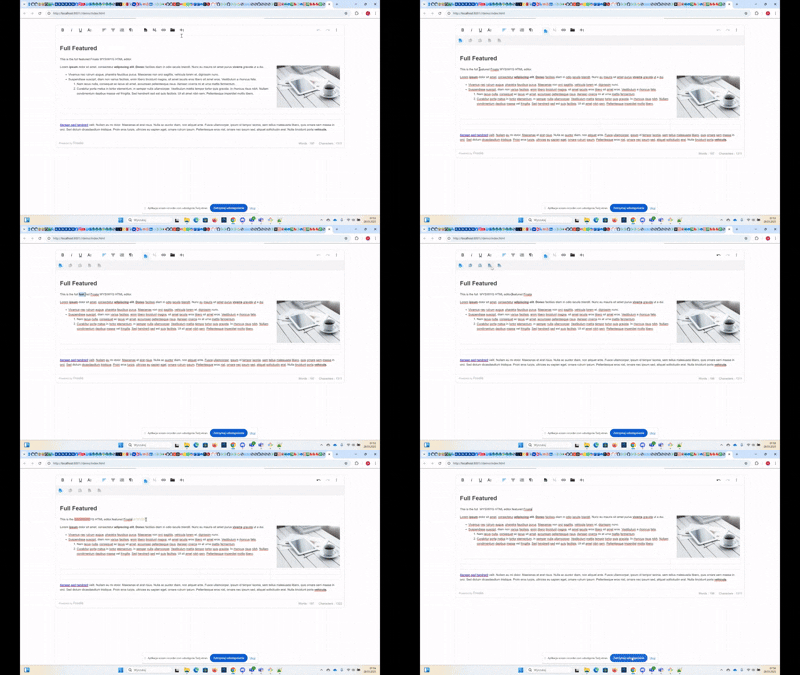
The 4.7.1 release introduces a cleaner, more intuitive Find and Replace experience. These updates make the tool less disruptive, more precise, and easier to navigateโ€”especially when editing complex documents or working with multiple editors.

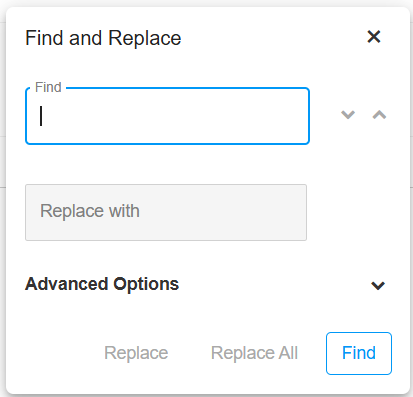
find and replace feature

Precise Popup Repositioning

When you drag and drop to reposition the Find and Replace popup, it now snaps to the exact position where you drop it.

Why it matters:

The tooltips align more accurately with your cursor, making it easier to locate and use the popup in rapid edits.

Benefit to you:

Faster, more reliable placement during demanding edits and when working with complex layouts.

Find/Replace Shortcuts Now in the Help Guide

The Help popup now displays the shortcuts for Find and Replace (Ctrl + F on Windows, Command + F on Mac).

Why it matters:

Your users donโ€™t have to remember shortcuts off the top of their head; guidance is right where they look.

Benefit to you:

Quicker access to the feature with improved keyboard navigation and discoverability.

Find/Replace Popup Clears on Instance Switch

Switching focus from one Froala editor instance to another resets the Find and Replace popup (clears the popup fields).

Why it matters:

Each editor instance starts fresh, avoiding stale searches from another context.

No More Overlaps with Quick Insert Icon

The Find and Replace popup no longer overlaps the Quick Insert icon. This prevents overlapping interactions and keeps focus predictable during quick edits.

Focus-Aware Highlighting: Maintain Selection While Editing

When you select text and then open the formatting dropdown menu (for example, the color picker dropdown), the text remains highlighted. You wonโ€™t lose your selection or be surprised by a shift in highlight while youโ€™re adjusting styling.

Why this matters:

  • Predictable editing: Highlights stay in place, so you can apply changes without reselecting.
  • Faster workflow: You donโ€™t waste time reselecting text or reapplying emphasis after opening a formatting tool.
  • Reduces confusion: Maintains visual continuity, making it clear which text will be affected by your formatting.

Programmatic Styling of Table Cell Text

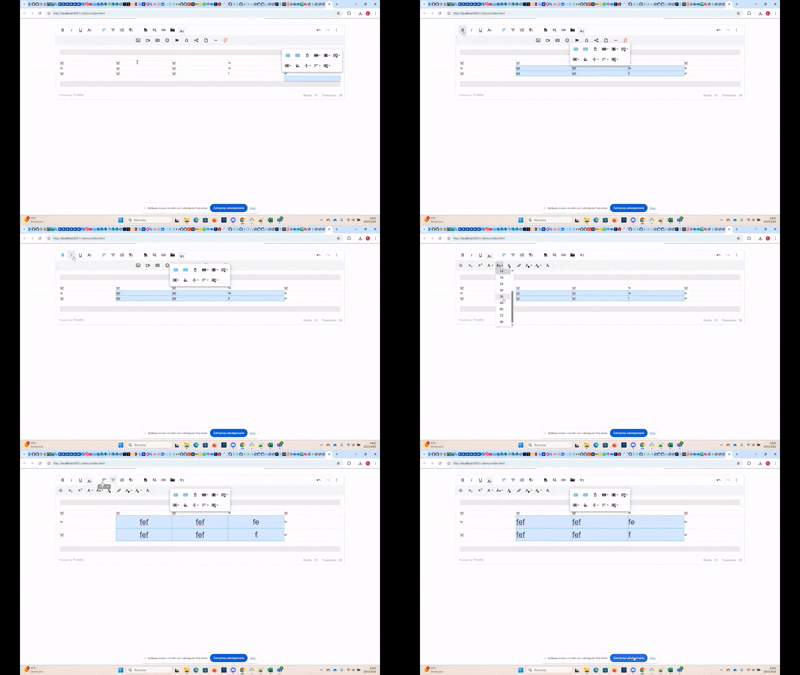
The editor now reliably applies programmatic style changes to the actual text inside selected table cells. Previously, font size and other text styles could fail to affect the cell content when updated via API calls.

Example: Selecting table cells and calling froala.fontSize.apply('20pt') now updates the text inside those cells to “20pt” as expected.

This means with the V4.7.1 release, you can reliably bulk format table text via API.

Paste with Confidence: Higher Fidelity from External Apps

With the 4.7.1 release, you get fresher fidelity when pasting from Word, OneNote, and other apps. Pasted content now retains more of the original formatting and structure instead of becoming misaligned or fragmented.

  • Fixed OneNote image-pasting issue
    When content from OneNote is pasted, it no longer converts to an image by default, so you get text that you can edit and count toward character limits.
  • Multilevel lists stay aligned.
    Nested/bulleted lists paste with correct indentation and alignment, preventing corruption or shifting.
  • Roman numerals and font family preserved
    Pasted Roman numeral lists retain their intended font family and styling, keeping lists consistent with the source.

Users are more likely to see output that matches their original documents, saving time and effort.

Much Moreโ€ฆ

This release includes additional improvements and bug fixes. See the complete changelog for details.

How Can I Update?

Update to Froala WYSIWYG Editor 4.7.1 today and experience enhanced editing features and improvements.

Check the get started page to know how to download the latest Froala Editor release and how to include it in your project based on your preferred method.

Try The Latest Froala Editor

Explore a variety of examples that demonstrate the functionality of the Froala HTML Editor.

Support and Feedback

We are dedicated to always offering the best possible experience for all our users. We believe this release, meant to enhance TypeScript support, is a stepping stone towards that commitment. We encourage you to try this improved TypeScript support and give us your valuable feedback. Your input is crucial for delivering continuous enhancement and meeting your evolving needs. Thank you for being a valuable part of our vibrant and growing community.We would like to hear what you think of the latest release! Join us on our GitHub Community to chat with our product manager, developers, and other members of the Froala team.

Change Log

Get Started

Technical Questions

Froala 4.7 Release with Anchors, Page Breaks, and Word Export

Froala 4.7

You asked for anchor text, page breaks, and export to Word features. We listened and today we are excited to announce our long awaited release, Froala 4.7 is available for download.

With advanced document organization features, your favorite rich text editor is now even more powerful allowing you to create documents with greater precision and efficiency.

With the new anchor text feature, you can easily link to specific sections within your content. The page break option ensures seamless formatting for printed or exported documents, while the export to Word functionality simplifies sharing and collaboration.

In this article, we’ll delve deeper into each of these new features and explore how they can enhance your document creation process. Let’s take a closer look at what makes these updates so impactful.

Anchors, Page Breaks, and Word Export

Introduce Anchors Feature

Anchors are particularly useful for creating tables of contents or linking to specific sections in long documents, allowing readers to jump to specific sections with just a click.

By creating strategic anchor points, writers can improve document readability and structure, making information easier to find and access.

Froala 4.7 introduces a robust anchor feature that lets users:

Insert Named Anchor

Click the anchor toolbar button to open a dialog box. Enter a descriptive name for the anchor, which will be inserted into the HTML at the cursor’s current location. Anchors are represented with a bookmark icon.

Create Link to an Anchor

To link to an anchor, click the insert link button. You can:

  • Select from a list of existing anchors
  • Manually enter the anchor name (e.g., #introduction)

When clicked, the link will smoothly scroll to the targeted anchor position.

anchors

Pro Tip for Effective Anchor Text Usage

To maximize the utility of anchor text, use clear, descriptive names that reflect the content of the section. For example, instead of generic names like “section1”, use meaningful identifiers like “advanced-features” or “getting-started”. This approach not only improves navigation but also enhances the overall user experience and document structure.

Introduce Page Break Feature

This release enables a user to insert page breaks in the editable area. This is useful for creating print-ready documents or preparing content for export. Page breaks help maintain consistent formatting and improve document readability, especially when dealing with longer texts.

Users can easily insert a page break at any point in their document, ensuring smooth pagination and a professional appearance.

This feature is particularly beneficial for academic papers, reports, and other formal documentation where precise layout is crucial.

We implemented the Page Break feature with precision and user-friendly functionality. Users can access the Page Break option through a dedicated toolbar button, which inserts a non-editable horizontal marker at the cursor’s current position. This marker is visually distinct, allowing easy identification within the document.

Page breaks can only be removed through explicit deletion using Backspace or Delete keys after selecting the page break handle, preventing accidental removal during typing.

Additionally, the implementation guarantees cross-browser compatibility and supports smooth keyboard navigation, making it accessible and consistent across different platforms and devices.

The new pageBreak plugin includes the exportPageBreak option, enabled by default. Disabling it excludes page break elements from the html.get method, offering developers granular control over page break handling during export.

The plugin also features the pageBreak.insert() method and a pageBreak.beforeInsert event, triggered before insertion.

These advanced options provide developers with extensive flexibility in managing page breaks, ensuring intuitive and responsive document editing.

Developers can easily customize page break behavior for web documentation, print preparation, or complex document management, seamlessly integrating the feature into various workflows to cater to diverse user requirements.

Introduce Export to Word Feature

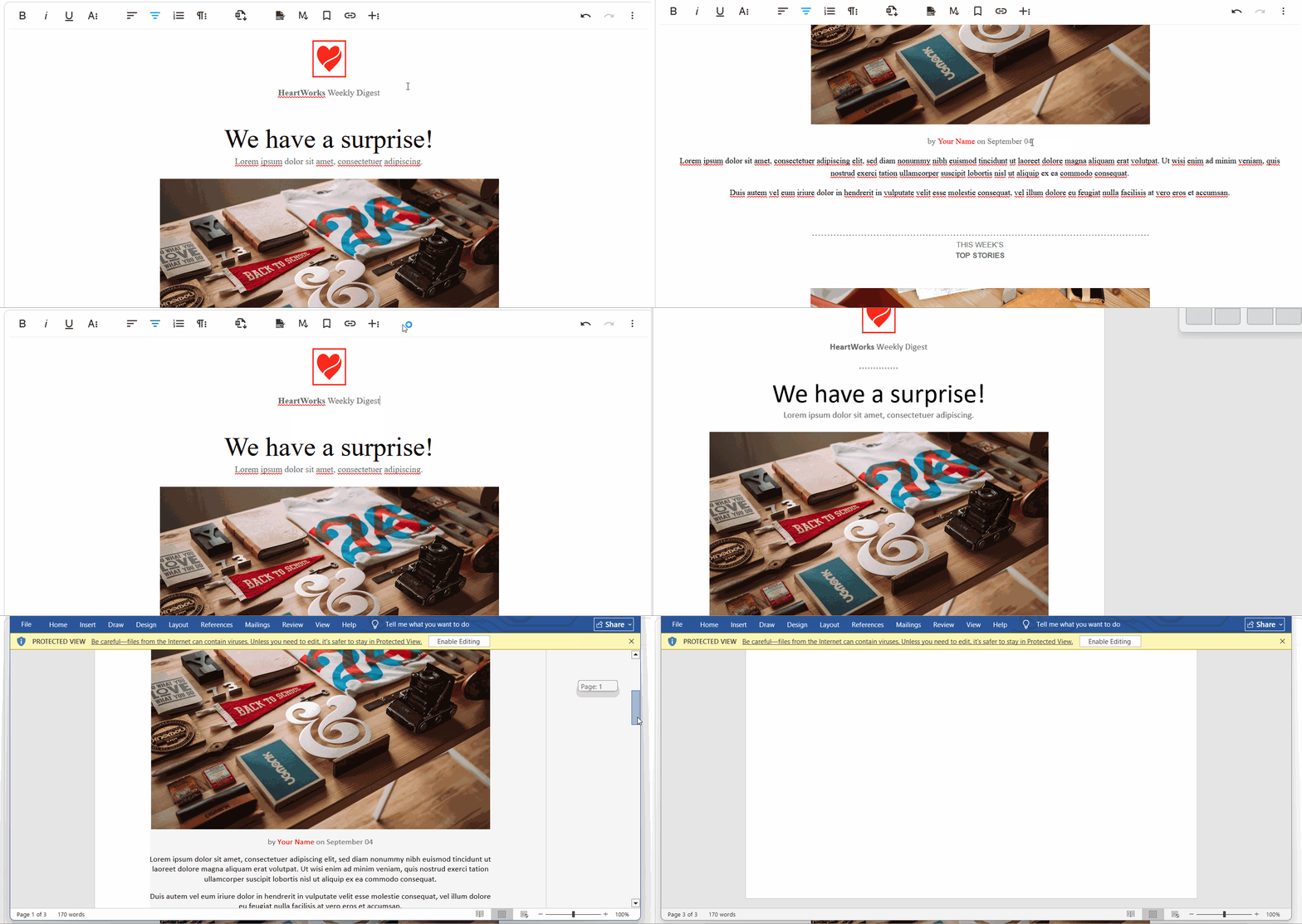
This release enables users to export content from a web-based rich text editor into a well-formatted Microsoft Word document (.docx) while preserving text formatting, images, tables, and styles.

This feature helps streamline document creation workflows by bridging the gap between web-based editing and traditional word processing. Users can now seamlessly transfer their carefully crafted content to Microsoft Word without losing formatting or layout integrity.

The export functionality supports a wide range of document elements, including complex formatting, embedded images, and intricate table structures, ensuring a smooth transition from web editor to professional document preparation.

This feature is particularly beneficial for professionals who frequently switch between web-based editing platforms and Microsoft Word. Researchers, writers, and content creators will appreciate the ability to quickly transfer their work without manual reformatting.

The export feature supports multiple languages and character sets, ensuring compatibility with international document standards.

export to word

The exportToWord plugin lets developers configure a default filename for exported files using theย wordExportFileNameย setting. It also offersย word.beforeExportย andย word.afterExportย events for customizing content before or after the export.

By providing a seamless transition between web editing and traditional word processing, Froala 4.7 empowers users to work more efficiently and maintain document quality across different platforms.

Pro Tip for Export to Word

When exporting documents, ensure all formatting elements are compatible with Word’s document structure. Consider using standard fonts and avoiding complex CSS styling that might not translate perfectly.

Test the exported document in different versions of Microsoft Word to guarantee consistent rendering. Always review the exported file to confirm that critical elements like headings, lists, and embedded media maintain their intended appearance and layout.

Enable Dynamic Translation for the new Table Cell Popup

Froala 4.6.2 introduced a new table and cell features, including border customization and dimension/sizing options. Input labels, tooltips, and placeholders for these features now utilize the editor’s language system, enabling localization.

The localization feature allows developers to create multilingual interfaces with ease, supporting a global user base. By dynamically translating interface elements, the editor becomes more accessible to international users.

Much Moreโ€ฆ

We have addressed various issues reported by our users to enhance the overall performance and stability of Froala Editor. These include:

  • Inserting an emoji no longer changes the paragraph’s font-family.
  • Enhance plain paste feature to strip out all background color, font family, and formatting from the source.

Please find the complete changelog list here.

How Can I Update?

Update to Froala WYSIWYG Editor 4.7 today and experience enhanced editing features and improvements.

If you are using a plain JavaScript library or other framework, check the get started page to know how to download the latest Froala Editor release and how to include it in your project based on your preferred method.

If you are using a plain JavaScript library or other framework, follow the table below to learn how to download the latest Froala Editor release and include it in your project based on your preferred method.

Method How to download Include in your project
CDN โ€“
<!-- Include Editor stylesheet-->
<link href="https://cdn.jsdelivr.net/npm/froala-editor@4.7.0/css/froala_editor.pkgd.min.css" rel="stylesheet" type="text/css" />

<!-- Include Editor JavaScript file-->
<script type="text/javascript" src="https://cdn.jsdelivr.net/npm/froala-editor@4.7.0/js/froala_editor.pkgd.min.js"></script>
CDN (Always the latest version) โ€“
<!-- Include Editor stylesheet-->
<link href="https://cdn.jsdelivr.net/npm/froala-editor@latest/css/froala_editor.pkgd.min.css" rel="stylesheet" type="text/css" />

<!-- Include Editor JavaScript file-->
<script type="text/javascript" src="https://cdn.jsdelivr.net/npm/froala-editor@latest/js/froala_editor.pkgd.min.js"></script>
NPM
npm install froala-editor
<!--

Replace the {download-folder-path} in the following example with the path to the folder containing the stylesheet file e.g.

../css/froala_editor.pkgd.min.js

-->

<link href="{download-folder-path}/froala_editor.pkgd.min.css" rel="stylesheet" type="text/css" />

<!--

Replace the {download-folder-path} with the path to the folder containing the JS file e.g.

../js/froala_editor.pkgd.min.js

-->

<script type="text/javascript" src="{download-folder-path}/froala_editor.pkgd.min.js"></script>
bower
bower install froala-wysiwyg-editor
NO Package Manager Download Froala WYSIWYG Editor files using the download form here.
Integrated with a Framework Select your preferred framework from 17 different popular frameworks.
Other options Check here for other options for using Froala WYSIWYG Editor in your project.

For Froala Editor Version 2 Users:

Follow this migration guide for step-by-step instructions on upgrading from version 2.

Try The Latest Froala Editor

Explore a variety of examples that demonstrate the functionality of the Froala HTML Editor.

Support and Feedback

We are dedicated to always offering the best possible experience for all our users. We believe this release, meant to enhance Typescript support, is a stepping stone towards that commitment. We encourage you to try this improved Typescript support and give us your valuable feedback. Your input is crucial for delivering continuous enhancement and meeting your evolving needs. Thank you for being a valuable part of our vibrant and growing community.
We would like to hear what you think of the latest release! Join us on our GitHub Community to chat with our product manager, developers, and other members of the Froala team.

Change Log

Get Started

  • You can download and start using Froala in less than five minutes following our get-started guide.

Technical Questions

What’s New in Froala 4.6.2: Powerful Table Functionality

text

We are excited to announce the release of Froala 4.6.2, which introduces new Table features. These features were highly requested by our users and we are thrilled to finally bring it to you.

Moreover, this release comes with an enhanced Word Pasting Experience.

Additionally, weโ€™ve made several other improvements to our powerful text editor. We believe this new addition will greatly enhance your editing experience with Froala.

Improved Table Editing Experience

Froala 4.6.2 introduces several new table features that enhance the editing experience. Users can now easily drag and drop tables, copy and paste cells, and resize tables vertically. Letโ€™s find out how.

Flexible Table Positioning: Drag and Drop Tables

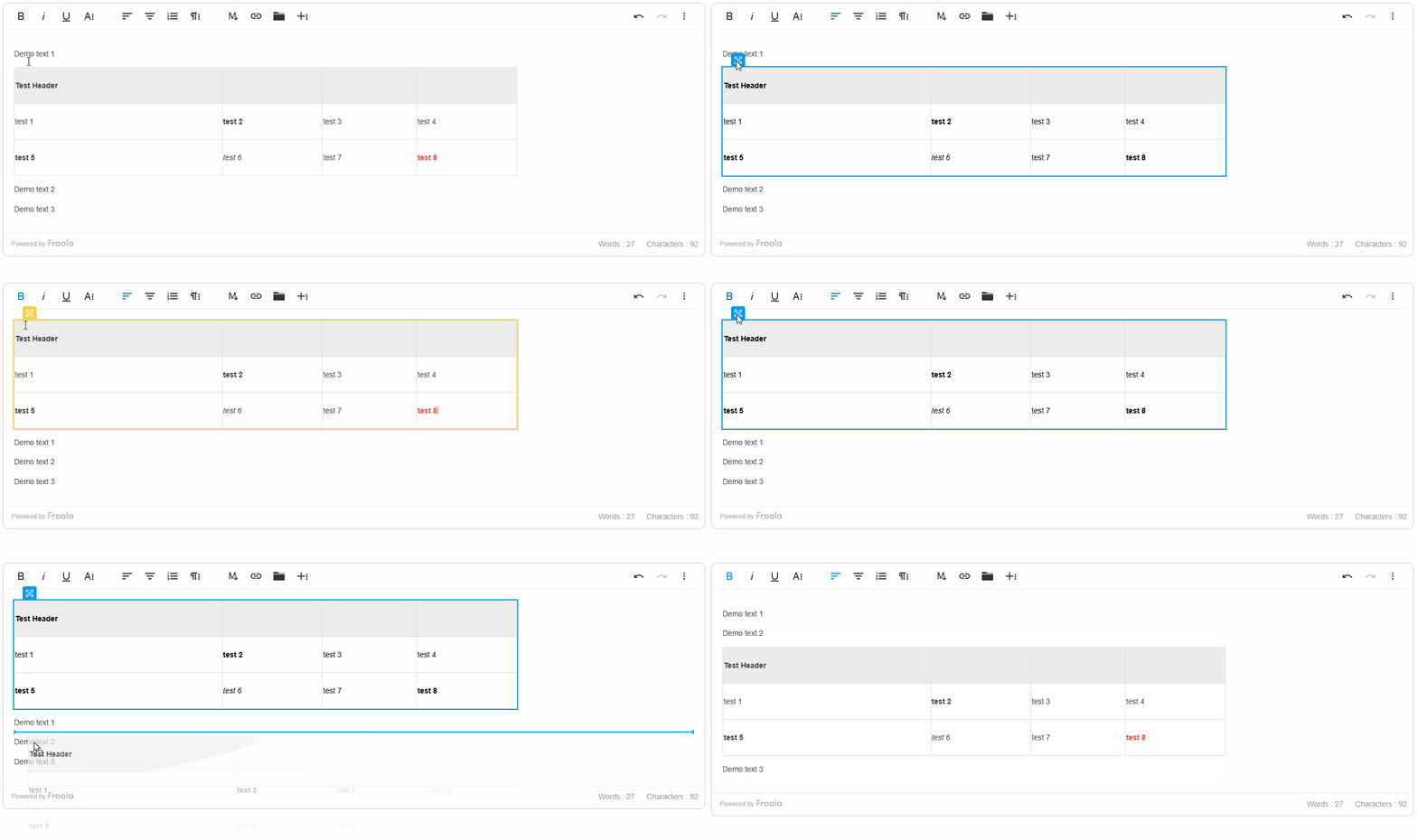
This release introduces the ability to easily move tables within the editor by dragging and dropping them. Users can click and hold the draggable handle at the top-left of a table, then drag it to the desired location on the page.

This feature simplifies rearranging tables in your content. You can move a table higher or lower, or shift it to a new section. The drag-and-drop functionality provides an intuitive way to adjust the table’s positioning.

Froala also includes a new configuration option called enableTableSelection. Users can select and drag tables when set to true (the default). Setting it to false disablesย table selection and dragging, giving you more control over the table positioning.

This draggable table feature works consistently across different table types and layouts, ensuring a seamless editing experience no matter how your tables are structured. This new capability in Froala 4.6.2 empowers content creators to organize and rearrange tabular data within their content quickly.

drag and drop table

Froala 4.6.2 Vertical Table Resizing Feature

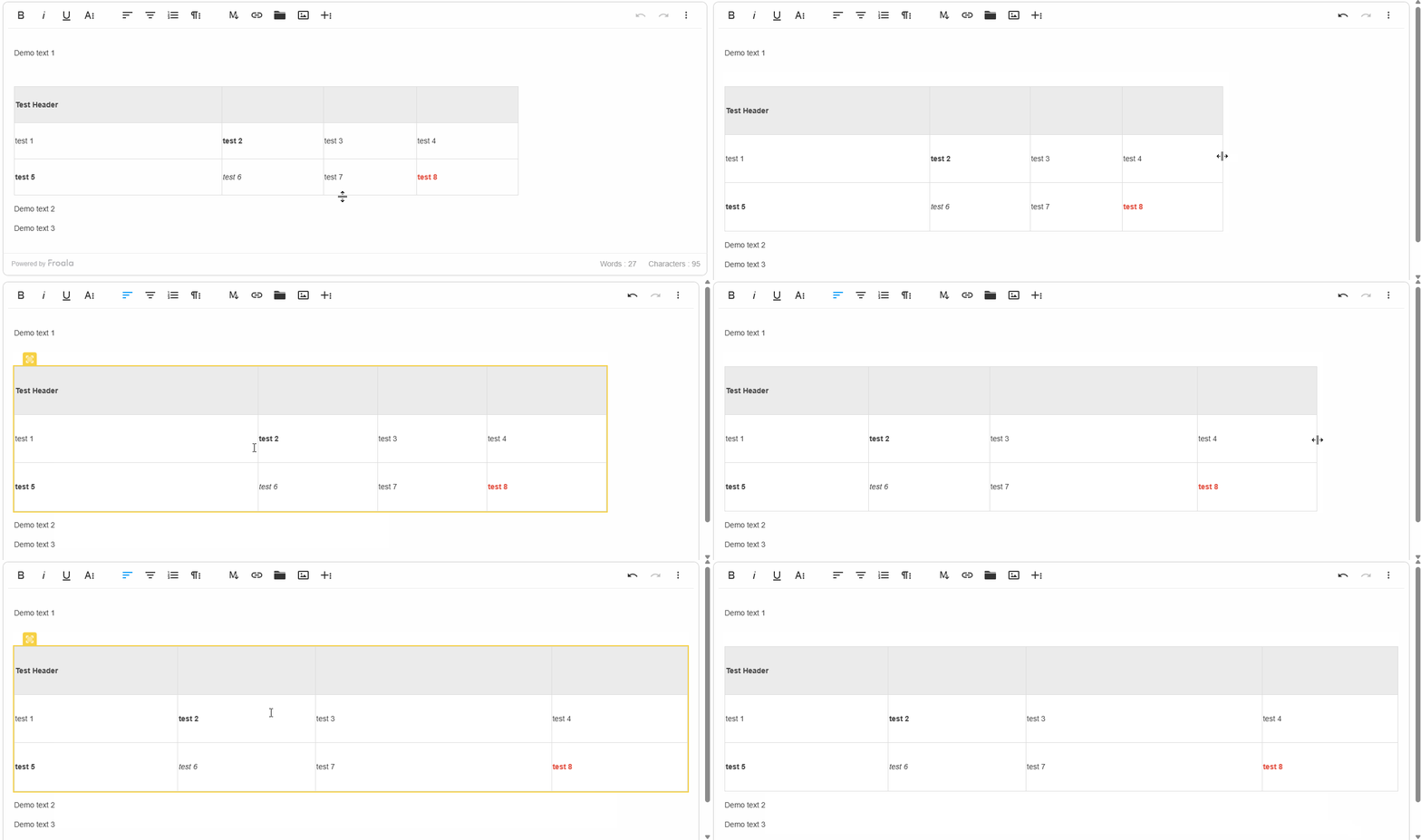
We are excited to introduce the highly requested vertical table resizing feature. This new capability allows users to easily adjust the height of rows within a table, giving them more control over the layout and appearance of tabular data.

The vertical resizing functionality works consistently with Froala’s existing horizontal resizing features. Users can simply click and drag the resize handle at the bottom of a table row to adjust its height. This makes it easy to fine-tune the visual presentation of tables to best suit the content.

Froala now applies <colgroup> and <col> tags during table creation and resizing. This provides a cleaner, more consistent resizing experience.

Moreover, Froala has introduced a new configuration option called proportionalTableResize. This allows developers to choose between:

  1. Proportional adjustments: Resizing the table from any side (top, bottom, left, or right) proportionally adjusts all rows or columns. If resizing is done between specific rows or columns, only that row or column is resized.
  2. Targeted resizing: Resizing affects only the individual row or column being adjusted.

With the introduction of vertical resizing, combined with the existing horizontal resizing capabilities, Froala editor empowers content creators to precisely shape and optimize the appearance of tables within their digital content. This feature enhances the overall table management experience, making it easier than ever to create visually appealing and well-structured tabular layouts.

resize table

Effortless Table Data Replication: Froala’s New Copy-Paste Cell Feature

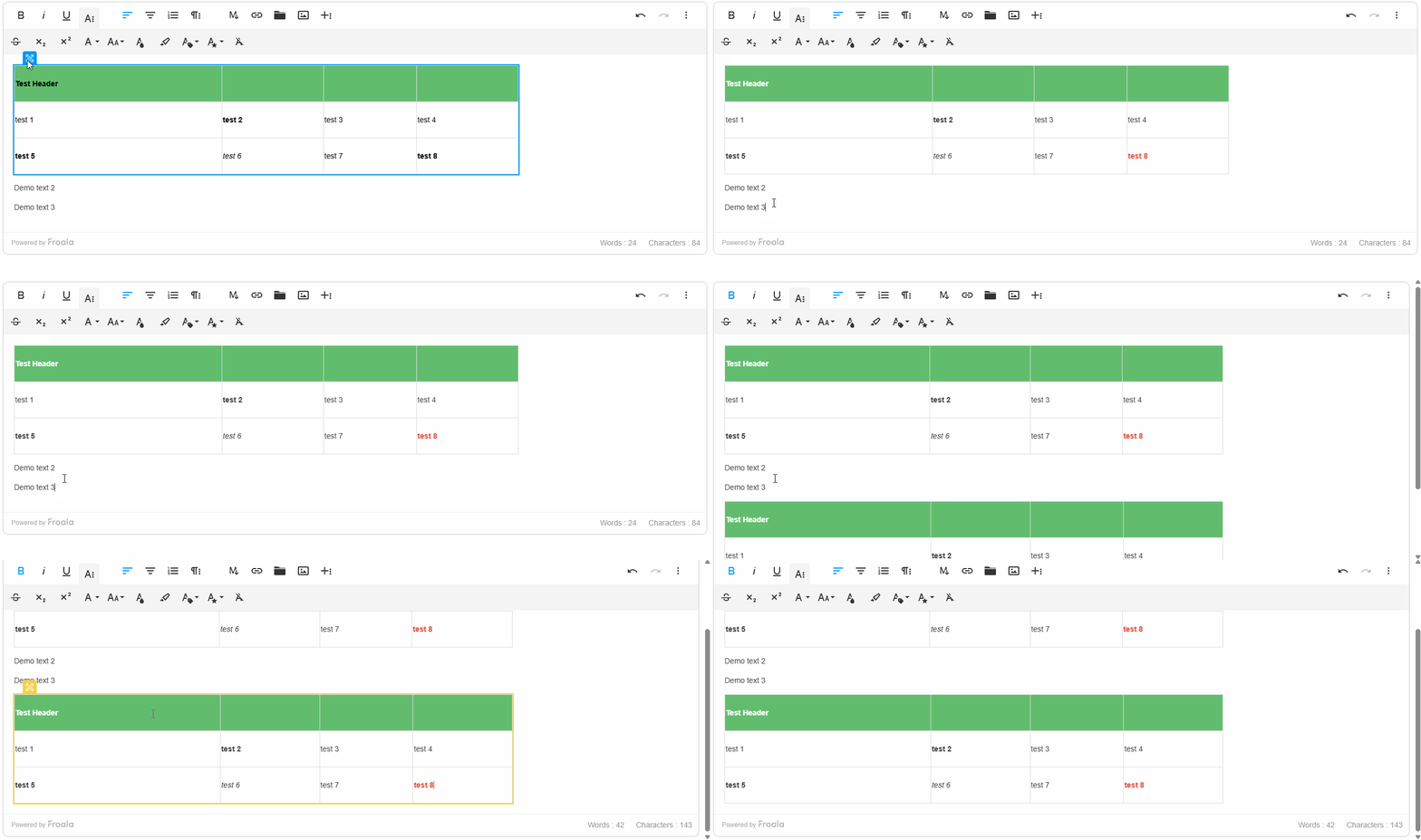
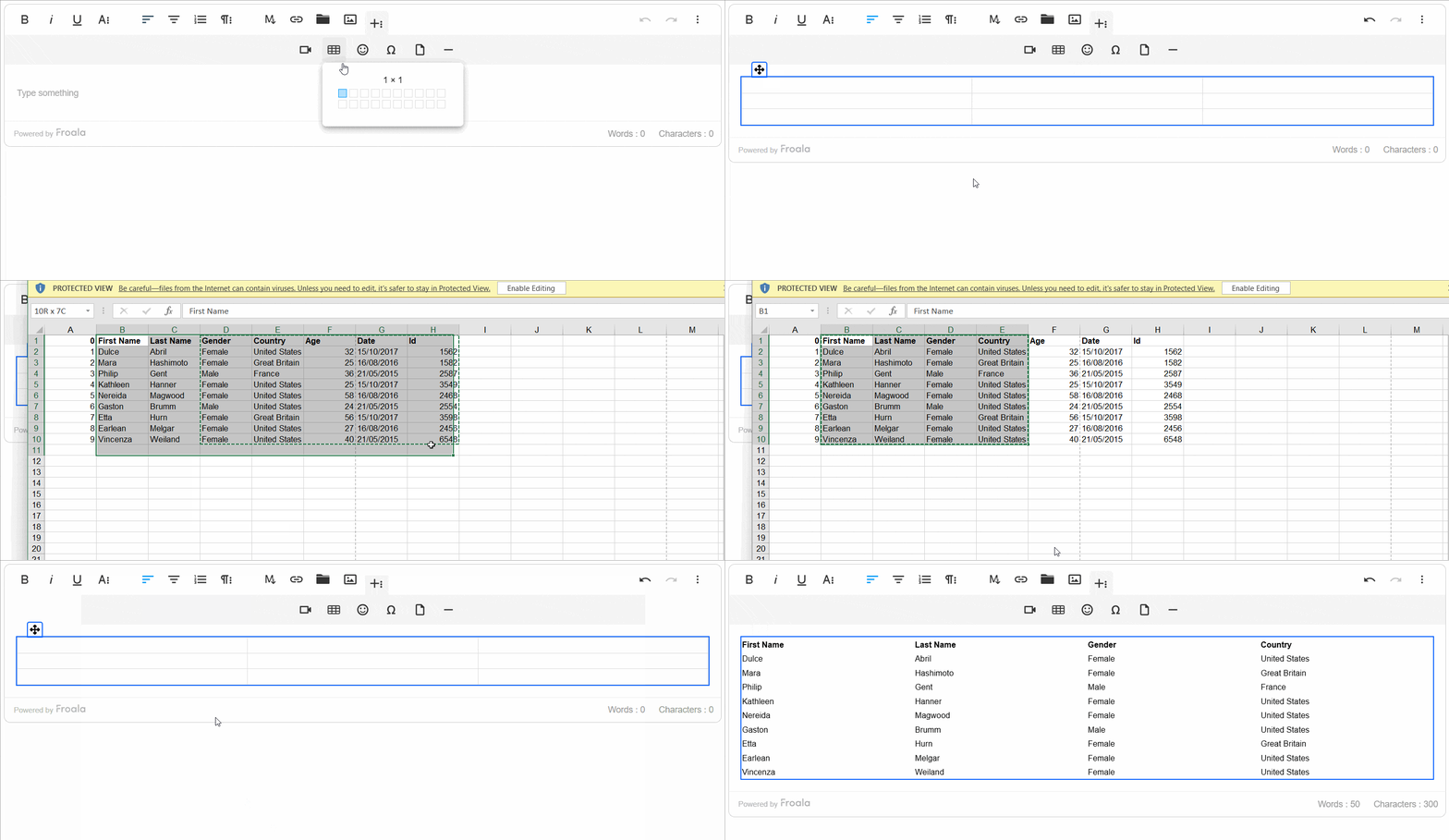
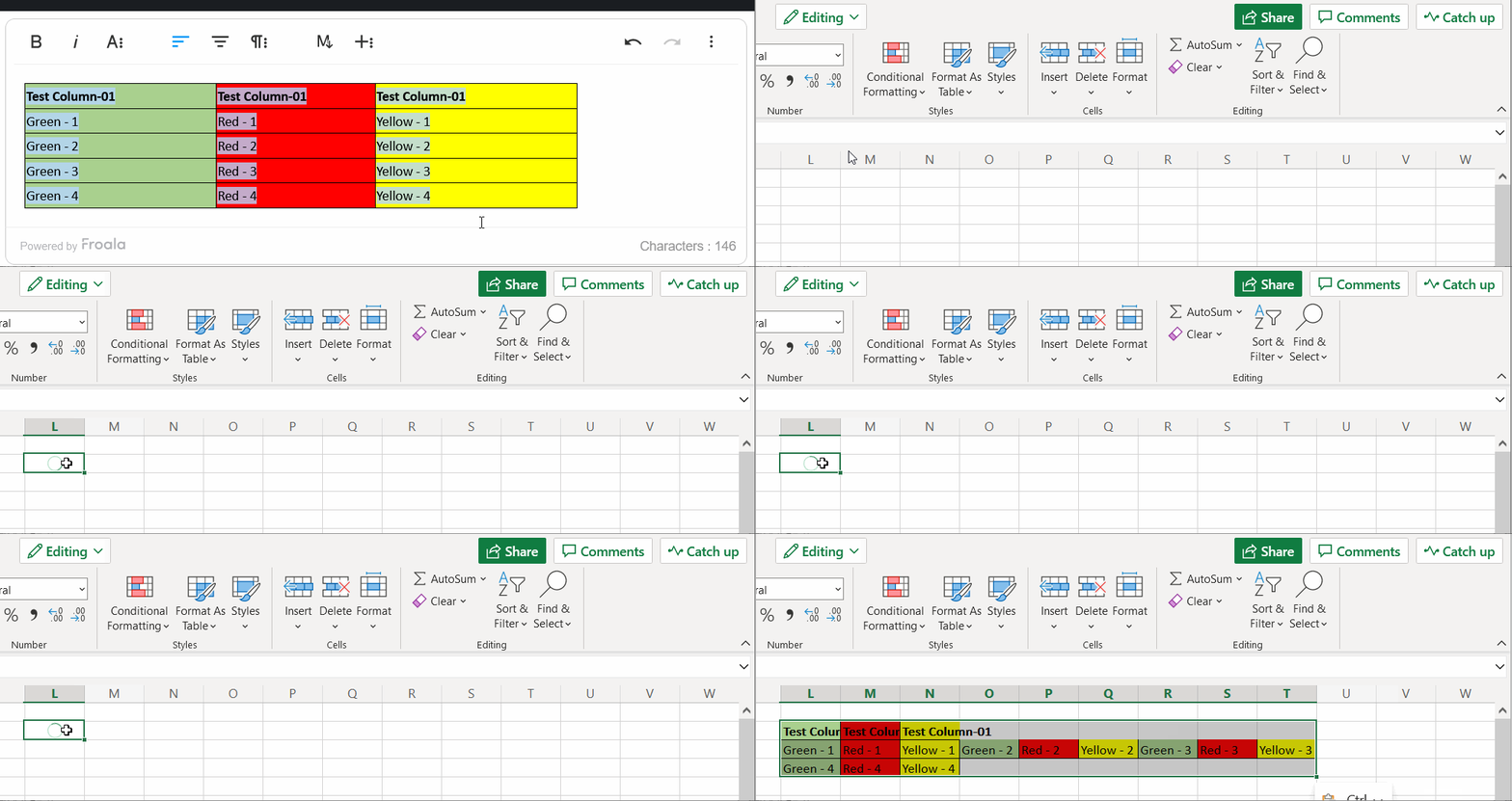
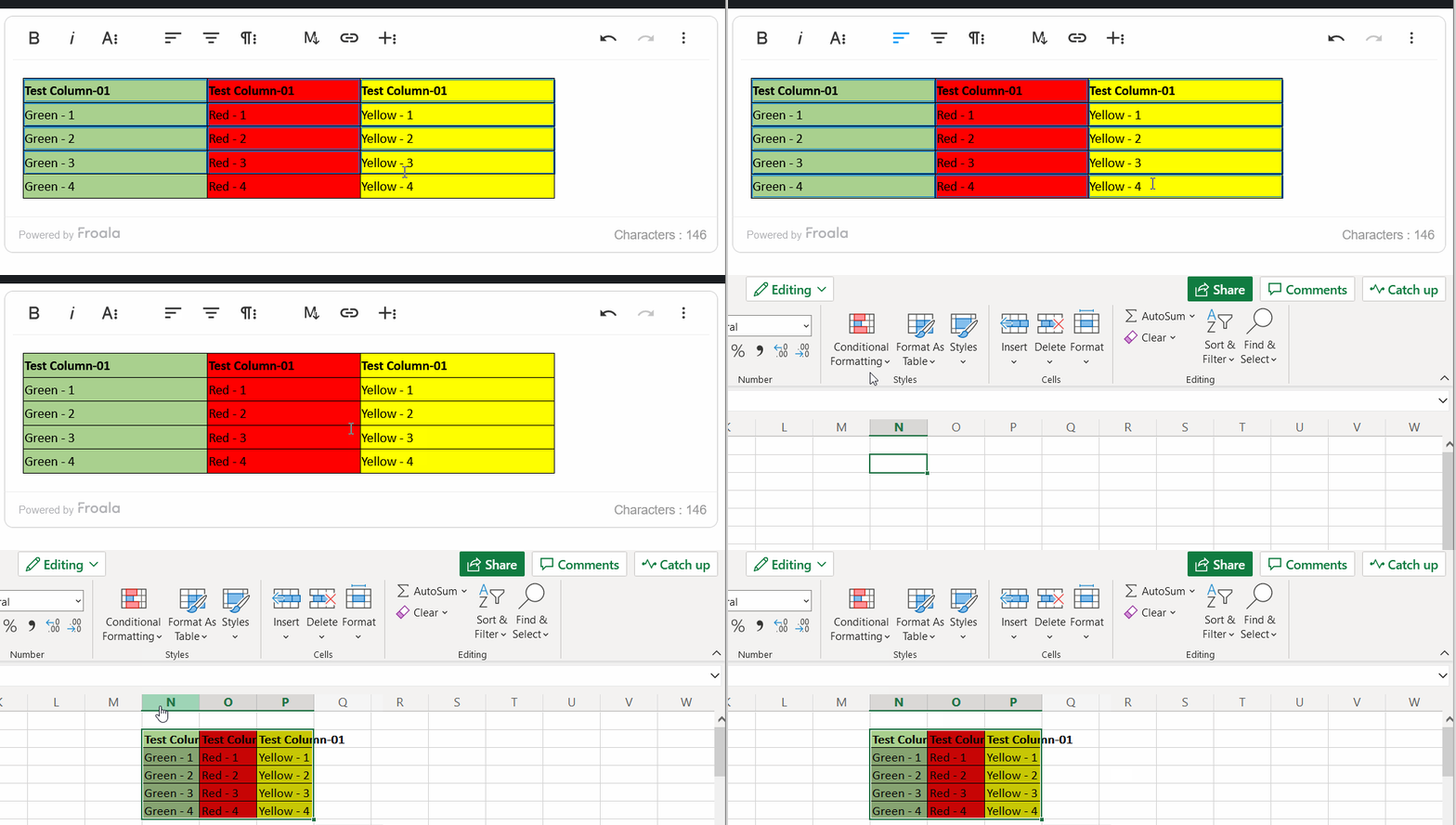
Froala 4.6.2 introduces another powerful new copy-and-paste feature for table cells, including both the content and formatting. This highly requested functionality empowers content creators to quickly replicate and transfer tabular data within their digital content.

To copy cells, users can select multiple cells by holding the Shift key and clicking, or by dragging the mouse over the desired cells. Then, they can copy the cells using the standard Ctrl+C (Windows) or Cmd+C (Mac) shortcuts.

The copied cells retain not only the data but also the formatting attributes, such as font styles, colors, and borders. When pasted, the exact visual representation and structure of the original table cells are preserved.

Pasting is just as simple. Users position their cursor where they want the cells to go, then use Ctrl+V (Windows) or Cmd+V (Mac) to paste.

Click and hold the draggable handle at the top-left of a table before copying if you want to copy the entire table while preserving its original size.

If pasting into an empty area, Froala will automatically create a new table to hold the pasted content, maintaining the original formatting. If pasting into an existing table, Froala will adjust the column widths and row heights as needed to ensure a proper fit, maintaining the visual integrity of the tabular data.

This copy-and-paste functionality empowers content creators to work with tables more efficiently. They can quickly duplicate and transfer data between tables, or even generate new tables from copied content. By preserving the original formatting, this feature streamlines the content creation process, saving time and enhancing the overall user experience.

copy table

More Table Enhancements and Bug Fixes

The 4.6.2 release includes several other table-related improvements and bug fixes. These changes help ensure a more stable and reliable table editing experience across different browsers.

For example, users can now properly align cell content within tables. We also addressed an issue where users were previously unable to select text within table cells due to a Firefox-specific problem.

These updates further solidify Froala’s commitment to providing a robust and user-friendly content creation platform. Content creators can now work with tabular data more seamlessly and create visually appealing, well-structured tables with ease.

By addressing these table-related bugs and enhancing the overall editing experience, Froala continues to improve its text editor capabilities and empower users to produce high-quality content.

Enhanced Word Pasting Experience

In addition to the new table features, Froala 4.6.2 also includes several improvements to the Word pasting functionality. These enhancements deliver a more seamless experience when users copy and paste content from Microsoft Word into the Froala editor.

Support Scrolling to View Comments

Froala 4.6.2 improves the handling of Word comments when pasting content. Now, when users paste content that contains comments, Froala inserts an anchor tag at the location of each comment. The actual comments are then appended to the bottom of the pasted content.

This new functionality allows users to easily navigate to the relevant comments by simply clicking on the anchor tags. The anchor tags provide a clear visual cue, making it straightforward for users to jump to the associated comments quickly.

This enhancement improves the overall flow and organization of the pasted content. Users can now effortlessly review and understand the context of the comments, leading to a more seamless content creation experience.

Optimized Pasting Attribute

Another enhancement in Froala 4.6.2 is the change in the attribute used to identify pasted content. Previously, the editor would add an id="isPasted" attribute to elements that were pasted from Microsoft Word.

In this release, the editor now uses a data-pasted="isPasted" attribute instead. This change provides several benefits:

  1. Semantic Improvement: The use of aย data-*ย attribute aligns better with HTML’s semantic structure, as it indicates that the attribute is for internal use and does not represent a standard HTML attribute.
  2. Compatibility: The id attribute is reserved for unique identifiers within an HTML document, and using it for pasted content could cause conflicts with other elements on the page. The data-*ย attribute avoids this potential issue.
  3. Accessibility: Screen readers and other assistive technologies are more likely to ignore data-* attributes, reducing the risk of exposing unnecessary information to users.

By making this change, Froala ensures a more robust and accessible handling of pasted content, while also maintaining the ability to identify and process the pasted elements as needed.

Improved Numbered List Alignment

Froala 4.6.2 also addresses an issue related to the alignment of pasted numbered lists. Previously, when copying and pasting numbered lists from Microsoft Word, the list items could sometimes appear misaligned within the Froala editor.

This release includes a fix for this problem, ensuring that the numbered lists are correctly aligned and formatted when pasted into the editor. Users can now seamlessly copy and paste numbered lists from Word, and the list structure and formatting will be preserved without any visual inconsistencies.

These enhancements to the Word pasting functionality in Froala 4.6.2 demonstrate the team’s commitment to improving the content creation experience. By addressing common pain points, such as handling comments and numbered lists, Froala continues to provide a robust and user-friendly platform for content creators to work with.

Much Moreโ€ฆ

We have addressed several bug fixes to improve the overall performance and stability of the editor.

Here are some of the key improvements:

  1. Pasting from External Sources on Android Chrome: Copied content (text or images) from external sources is now inserted at the cursor position in the Froala Editor when pasted using long-press or system paste on Android Chrome.
  2. Preserving Formatting on Delete: The keepFormatOnDelete configuration now correctly preserves the formatting when deleting characters or entire lines. Users can continue typing using the same style.
  3. Inserting <br> in Empty Table Cells: The issue with the html.wrap(false, true, false) method has been resolved, and it removes the <br> tags in empty <td> elements when called after inserting the table.
  4. Angular Compatibility: The compilation error when referencing FroalaEditor in Angular projects has been addressed.

These bug fixes and enhancements demonstrate Froala’s commitment to continuously improving the editor’s performance and addressing user-reported issues. By resolving these problems, Froala ensures a more reliable and seamless content creation experience for its users.

Please find the complete changelog list here.

How Can I Update?

Update to Froala WYSIWYG Editor 4.6.2 today and experience enhanced editing features and improvements.

Follow the table below to learn how to download the latest Froala Editor release and include it in your project based on your preferred method.

If you are using a plain JavaScript library or other framework, follow the table below to learn how to download the latest Froala Editor release and include it in your project based on your preferred method.

Method How to download Include in your project
CDN โ€“
<!-- Include Editor stylesheet-->
<link href="https://cdn.jsdelivr.net/npm/froala-editor@4.6.2/css/froala_editor.pkgd.min.css" rel="stylesheet" type="text/css" />

<!-- Include Editor JavaScript file-->
<script type="text/javascript" src="https://cdn.jsdelivr.net/npm/froala-editor@4.6.2/js/froala_editor.pkgd.min.js"></script>
CDN (Always the latest version) โ€“
<!-- Include Editor stylesheet-->
<link href="https://cdn.jsdelivr.net/npm/froala-editor@latest/css/froala_editor.pkgd.min.css" rel="stylesheet" type="text/css" />

<!-- Include Editor JavaScript file-->
<script type="text/javascript" src="https://cdn.jsdelivr.net/npm/froala-editor@latest/js/froala_editor.pkgd.min.js"></script>
NPM
npm install froala-editor
<!--

Replace the {download-folder-path} in the following example with the path to the folder containing the stylesheet file e.g.

../css/froala_editor.pkgd.min.js

-->

<link href="{download-folder-path}/froala_editor.pkgd.min.css" rel="stylesheet" type="text/css" />

<!--

Replace the {download-folder-path} with the path to the folder containing the JS file e.g.

../js/froala_editor.pkgd.min.js

-->

<script type="text/javascript" src="{download-folder-path}/froala_editor.pkgd.min.js"></script>
bower
bower install froala-wysiwyg-editor
NO Package Manager Download Froala WYSIWYG Editor files using the download form here.
Integrated with a Framework Select your preferred framework from 17 different popular frameworks.
Other options Check here for other options for using Froala WYSIWYG Editor in your project.

For Froala Editor Version 2 Users:

Follow this migration guide for step-by-step instructions on upgrading from version 2.

Try The Latest Froala Editor

Explore a variety of examples that demonstrate the functionality of the Froala HTML Editor.

Support and Feedback

We are dedicated to always offering the best possible experience for all our users. We believe this release, meant to enhance Typescript support, is a stepping stone towards that commitment. We encourage you to try this improved Typescript support and give us your valuable feedback. Your input is crucial for delivering continuous enhancement and meeting your evolving needs. Thank you for being a valuable part of our vibrant and growing community.
We would like to hear what you think of the latest release! Join us on our GitHub Community to chat with our product manager, developers, and other members of the Froala team.

Change Log

Get Started

  • You can download and start using Froala in less than five minutes following our get-started guide.

Technical Questions

The Developer’s Ultimate Guide to Froala’s Find and Replace Plugin

In the world of web development and text editing, efficiency is key. Whether you’re managing large documents or simply trying to clean up text, having a robust find and replace functionality can save countless hours of manual editing. Enter Froala’s Find and Replace Plugin โ€“ a powerful tool designed to streamline text manipulation and enhance user productivity.

This comprehensive guide will walk you through everything you need to know about this essential plugin. We’ll explore:

  • How the Find and Replace plugin operates
  • Step-by-step installation and setup instructions
  • A detailed breakdown of the plugin’s API options and methods
  • Practical use cases and implementation strategies

By the end of this article, you’ll have a complete understanding of how to leverage Froala’s Find and Replace Plugin to transform your text editing workflow.

Key Takeaways

  • Froala Find and replace plugin allowing user to perform comprehensive text search and replacement functionality
  • The plugin supports case-sensitive and whole word matching
  • The plugin has a flexible configuration and customization

How the Find and Replace Works

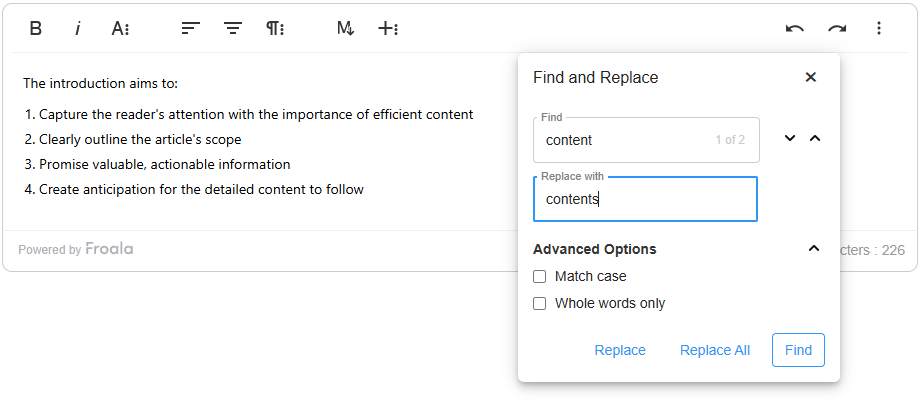
Froala’s Find and Replace plugin offers a user-friendly interface for searching and modifying text within the editor. Users can access the search and replace popup in two ways:

  • Through the editor toolbar
  • By using the keyboard shortcut (CTRL + F)

Search and Replace Popup Features

The popup provides comprehensive search capabilities, including:

  • Search term input field
  • Replacement word input field
  • Optional match case sensitivity
  • Option to match whole words only

Available Actions

Users can choose from three primary actions:

  1. Find: Locate occurrences of the search term
  2. Replace: Swap a single matched instance
  3. Replace All: Substitute all matching instances

Workflow

Initially, only the “Find” button is active. When you click “Find”, the plugin displays the number of matching occurrences and activates the replacement field and buttons. This allows you to to replace the current match or all matches.

Find and Replace plugin in action

This intuitive design enables efficient text editing with minimal effort.

Installation and Setup of Froala Find and Replace Plugin

Plugin Inclusion

If you’re using the full Froala editor package (`.pkgd`), the Find and Replace plugin is automatically included. For custom implementations, you’ll need to manually add two files:

  • JavaScript: /js/plugins/find_and_replace.min.js
  • Stylesheet: /css/plugins/find_and_replace.min.css

Plugin Configuration

Enabling the Plugin

If youโ€™re customizing the editorโ€™s enabled plugins, include findReplace in the pluginsEnabled array to activate the Find and Replace plugin

new FroalaEditor('#editor', { 
       pluginsEnabled: ['findReplace', 'fontFamily', 'image', 'link', 'video']
 });

Adding Toolbar Button

If youโ€™re customizing the editorโ€™s toolbar buttons and want to display the Find and Replace button, add findReplaceButton to your toolbar configuration:

new FroalaEditor('#editor', {
    toolbarButtons: ['findReplaceButton', 'bold', 'italic', 'insertLink']
});

If you are customizing the toolbar buttons for different screen sizes, add findReplaceButton to the used configuration:

  • toolbarButtonsMD (Medium screens)
  • toolbarButtonsSM (Small screens)
  • toolbarButtonsXS (Extra small screens)

By default, these inherit the buttons from toolbarButtons.

The Find and Replace Plugin Configuration

Froala’s Find and Replace plugin provides flexible configuration options, methods, and events that allow developers to customize the search experience.

Plugin Options

The plugin offers three key configuration settings:

  1. Case Sensitivity:
    • Set enableMatchCase: true to make case-sensitive search the default behavior.
  2. Word Matching:
    • Set enableMatchWholeWord: true to match entire words by default.
  3. Automatic Popup Display:
    • Set showFindAndReplace: true to display the Find and Replace popup when the editor initializes.

These options give developers granular control over the search and replace functionality, enabling a more tailored text editing experience.

Plugin Events

Froala’s Find and Replace plugin provides four key events that give developers precise control over text replacement workflows:

1. findandreplace.beforeClose()

Triggered before the Find and Replace popup closes, allowing for any necessary cleanup or validation.

2. findandreplace.beforeOnReplace()

Fires before a replacement occurs, enabling developers to:

  • Validate replacements
  • Implement custom validation logic
  • Prevent replacements if needed

3. findandreplace.onReplace([{ oldValue, newValue }])

Occurs after a single text replacement, providing:

  • The original text (oldValue)
  • The replacement text (newValue)

Useful for:

  • Tracking changes
  • Logging modifications
  • Triggering additional actions

4. findandreplace.onReplaceAll([{ oldValue, newValue }])

Triggered after replacing all matching instances, with similar details to onReplace().

new FroalaEditor('.selector', {
  events: {
    'findandreplace.beforeClose': function () {
      // this is the editor instance.
      console.log(this);
    },
    'findandreplace.beforeOnReplace': function () {
      // Do something here.
      // this is the editor instance.
      console.log(this);
    },
    'findandreplace.onReplace': function (textArray) {
      // Do something here.
      // this is the editor instance.
      console.log(this);
    },
    'findandreplace.onReplaceAll': function (textArray) {
      // Do something here.
      // this is the editor instance.
      console.log(this);
    }
  }
});

These events offer powerful hooks for customizing the Find and Replace plugin’s behavior, enabling developers to create more intelligent and interactive text editing experiences.

Plugin Methods

Froala’s Find and Replace plugin offers a comprehensive set of methods to programmatically control search and replacement functionality:

Search and Match Methods

findReplace.findMatches(searchText)

Locate and highlight all instances of a specific text. Use this when you want to identify all occurrences of a keyword in a document

findReplace.findNextMatch(index)

Navigate to the next matching instance. Allowing to systematically review search results

  • Example: editor.findReplace.findNextMatch(2) moves to the third match

findReplace.findPreviousMatch(index)

Navigate to the previous matching instance in a circular manner. Allowing to Backtrack through search results

  • Example: editor.findReplace.findPreviousMatch(1) moves to the previous match

Replacement Methods

findReplace.replaceMatch(replaceText)

Replace the current matched text. Use it if you want to selectively update specific instances

  • Example: editor.findReplace.replaceMatch("updated term")

findReplace.replaceMatches(replaceText)

Replace all matching instances. Use it to perform bulk text updates

  • Example: editor.findReplace.replaceMatches("new text")

Information and Control Methods

findReplace.getMatchesCount()

Retrieve total number of matches. This helpful to understand search result scope

  • Example: let matchCount = editor.findReplace.getMatchesCount()

findReplace.getCurrentMatch()

Get text of the current match. Use it when you want to inspect current search result

  • Example: let currentText = editor.findReplace.getCurrentMatch()

findReplace.getCurrentMatchIndex()

Get index of current match. Use it to track position in search results

  • Example: let currentIndex = editor.findReplace.getCurrentMatchIndex()

findReplace.showPopup()

Manually display Find and Replace interface. Use it to programmatically trigger search functionality

  • Example: editor.findReplace.showPopup()

findReplace.hidePopup()

Programmatically close Find and Replace popup

  • Example: editor.findReplace.hidePopup()

Each method provides granular control over the Find and Replace functionality, enabling developers to create sophisticated text editing experiences.

Practical Use Cases

1. Large-Scale Documentation Management

Scenario: Technical writers managing extensive documentation repositories

  • Example: Replacing an outdated product name across multiple documents
  • Leverage case sensitivity and whole word matching for precision

2. Internationalization and Localization

Translating and standardizing text across multilingual content

3. Content Compliance and Style Guide Enforcement

Ensuring consistent language and branding across organizational documents

Advanced Implementation Techniques

Programmatic Search and Replace Workflow

// Example: Systematic document review process
function reviewDocument(editor, searchTerms) {
    searchTerms.forEach(term => {
        const matches = editor.findReplace.findMatches(term);
        if (matches.length > 0) {
            // Trigger review workflow
            openReviewModal(matches);
        }
    });
}

By understanding these practical use cases, developers can leverage Froala’s Find and Replace plugin to create more intelligent, efficient, and robust text editing experiences.

Frequently Asked Questions (FAQ)

Is the Find and Replace plugin included in all Froala Editor versions?

The plugin is automatically included in the full Froala editor package (.pkgd). For custom implementations, you’ll need to manually include the JavaScript and CSS files.

Can I track or log text replacements?

Yes, use event handlers like:

  • findandreplace.onReplace()
  • findandreplace.onReplaceAll()

These provide details about the replaced text and allow for custom logging or tracking.

How can I add custom validation before text replacement?

Use the findandreplace.beforeOnReplace() event to implement custom validation logic:

editor.events.on('findandreplace.beforeOnReplace', function(oldValue, newValue) {
    // Custom validation logic
    if (containsSensitiveInformation(oldValue)) {
        return false; // Prevent replacement
    }
    return true;
});

Which browsers support the Froala Find and Replace plugin?

The plugin is compatible with all modern browsers, including:

  • Google Chrome
  • Mozilla Firefox
  • Safari
  • Microsoft Edge
  • Opera

Compatibility is ensured across desktop and mobile platforms.

Is the Find and Replace plugin available in all Froala plans?

Yes, the Find and Replace plugin is available across all Froala licensing plans.

Where can I get additional support?

Conclusion

Froala’s Find and Replace plugin represents a powerful solution for developers and content creators seeking efficient text manipulation. By providing intuitive search capabilities, flexible configuration options, and robust API methods, the plugin transforms text editing from a manual, time-consuming process to a streamlined, programmatic experience.

As web content continues to evolve, tools like Froala’s Find and Replace plugin will remain critical in helping writers maintain accuracy, consistency, and efficiency in their text editing workflows.

Ready to Transform Your Text Editing?

Don’t just read about efficiencyโ€”experience it. Froala offers a free trial that lets you explore the Find and Replace plugin and the entire editor ecosystem. Whether you’re a solo developer, part of a team, or managing large-scale documentation, there’s no better time to upgrade your text editing workflow.

Try Froala Editor for Free โ†’

Froala 4.6.0: New Table Editing Features, React 19 Compatibility, and Find & Replace Plugin

icon

Froala Editor 4.6 is here, and it’s packed with exciting new features that will elevate your content creation workflow. From advanced table editing capabilities to React 19 compatibility and the official release of the Find & Replace plugin, this update is a important for developers and content creators alike.

Read on to discover the fantastic improvements that will elevate your content creation workflow.

Key Takeaways

  • Total Table and Cell Customization
  • Stable and Powerful Find & Replace
  • Full React 19 Compatibility
  • Enhanced Workflow and Accessibility
  • New Developer Customization Options

4.6 release with table improvements and React 19 support

Whatโ€™s New

Find & Replace Graduates from Beta

The Find & Replace plugin is now an official, stable feature. This powerful tool gives developers and content creators a seamless way to search for and modify text across an entire document.

Key Benefits

  • Efficient Editing: Quickly locate and replace text throughout your document
  • Comprehensive Search: Support for case-sensitive and case-insensitive searches
  • Flexible Replacement: Replace single or multiple occurrences of text
  • Intuitive User Interface: Simple and clean design that integrates smoothly with the Froala Editor

Use Cases

  • Content Editing: Streamline large document modifications
  • Localization: Easily replace text during translation processes
  • Compliance and Consistency: Ensure uniform terminology across documents

Important Notes

  • Compatible with all major browsers
  • Works across different content types (rich text, markdown)
  • Minimal performance overhead
  • Fully customizable to match your application’s design

Upgrade to Froala Editor 4.6 to experience the full power of the Find & Replace plugin and enhance your content editing workflow.

React 19 Compatibility; Integrate with the Latest Ecosystem

Froala Editor’s React SDK is now fully updated to support React 19. This ensures you can leverage the latest features and performance improvements in your modern React applications.

Key Benefits of React 19 Support

  • Future-Proofing: Immediate compatibility with the latest React version
  • Performance Improvements: Leverage new rendering optimizations in React 19
  • Enhanced Developer Experience: Smooth integration with modern React applications
  • Zero-Configuration Setup: Plug-and-play support for React 19 projects

What Developers Can Expect

  • Full compatibility with React 19’s new features and APIs
  • Maintained backward compatibility with previous React versions
  • Optimized rendering and component lifecycle management
  • Seamless integration with existing Froala Editor React implementations

Our React SDK continues to provide a robust, flexible solution for developers looking to integrate a powerful rich text editor into their React applications. Whether you’re building complex web applications or simple content management systems, Froala Editor’s React implementation ensures a smooth, efficient editing experience.

Upgrade now and stay ahead of the curve with Froala Editor’s latest React SDK update!

Introducing Advanced Table Properties

Froala Editor 4.6 completely transforms table editing. We are introducing two major upgrades; the Table Properties modal and the Cell Properties popup, giving you complete mastery over every aspect of your tables.

Table Properties Modal: Complete Customization at Your Fingertips

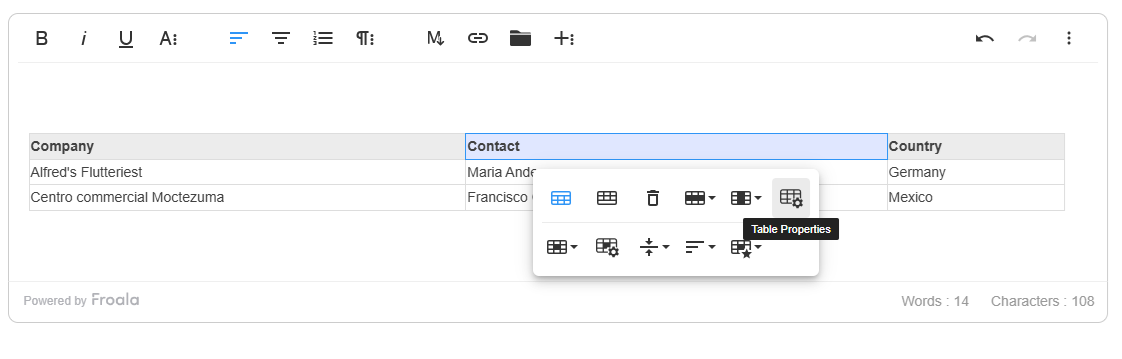
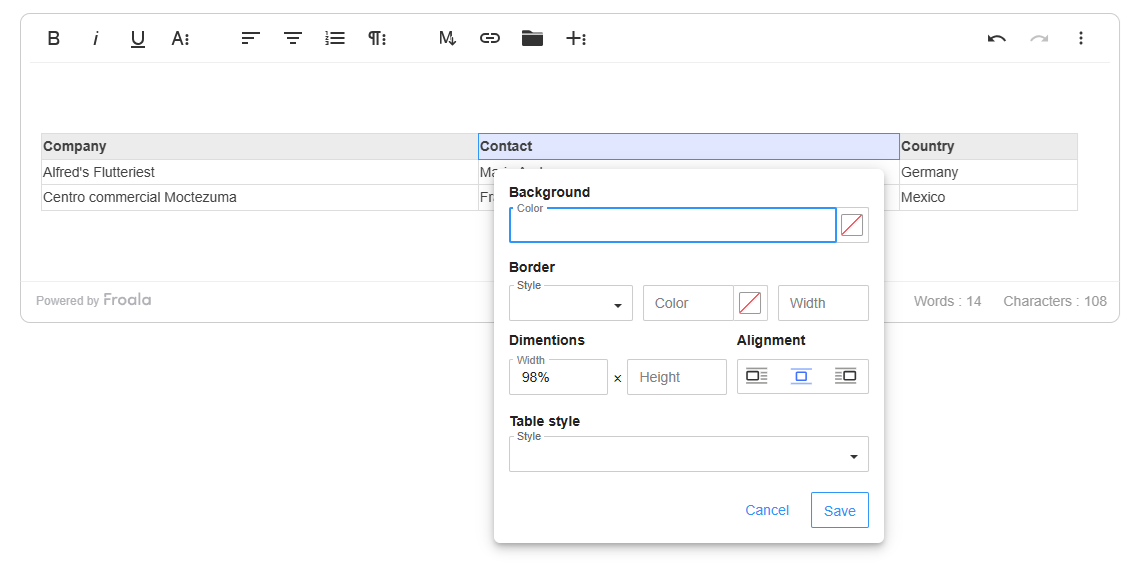
When users click the new “Table Properties” button in the table toolbar, a modal window opens, revealing a suite of advanced customization options:

Background Color

  • Select a background color for the entire table
  • Uses a color picker with full RGB and hex support
  • Applies color uniformly across all table cells.

Border Customization

  • Border Color: Choose a specific color for table borders
  • Border Width: Adjust border thickness (1-10px recommended)
  • Border Style: Select from multiple options:
    • Solid
    • Dotted
    • Dashed
    • Double
    • And more!

Dimensions and Sizing

  • Set table width and height using:
    • Pixels (px)
    • Percentages (%)
  • Maintains table responsiveness across different screen sizes

Table Alignment

  • Align table within the content area:
    • Left
    • Center
    • Right

Alternate Rows

  • Enable/disable alternating row colors
  • Improve table readability with visual separation
  • Perfect for data-heavy tables and complex layouts

Table Properties

Table Properties opened

Customizable Table Defaults: Enhanced Configuration Options

Froala Editor 4.6 introduces a comprehensive set of new configuration options that provide developers with granular control over default table properties during table insertion. These new configurations allow for precise customization of table appearance and behavior right from the initialization.

New Configuration Options

  • Table Alignment: Define the default alignment of newly inserted tables with a single configuration option.
  • Table Dimensions: Easily set a default height for new tables to maintain consistent layout.
  • Color Customization: Control the initial appearance of tables with hex color configurations.
  • Border Styling: Customize border properties to match your design requirements.
new FroalaEditor('.selector', {

ย ย tableDefaultAlign: 'left',

ย ย tableDefaultHeight: '200px',

ย ย tableDefaultBGColor: '#000000',

ย ย tableDefaultBorderColor: '#000000',

ย ย tableDefaultBorderWidth: '2px',

ย ย tableDefaultBorderStyle: 'dashed',

});

New Table Properties Methods

We’ve also introduced two new methods to programmatically manage table properties:

  • Show Table Properties: Programmatically open the table properties popup.
  • Hide Table Properties: Programmatically close the table properties popup.
new FroalaEditor('.selector', {
  events: {
    'table.inserted': function (table) {
      // Do something here.
      // this is the editor instance.
      console.log(this);
      this.table.showTableProperties();
    }
  }
});

Key Benefits

  • Comprehensive Customization: One-stop solution for table styling
  • User-Friendly Interface: Intuitive modal with clear options
  • Flexible Design: Supports various styling needs
  • Intelligent Validation: Prevents incorrect input
  • Responsive Styling: Maintains layout across devices
  • Developer Control: Precise management of table insertion properties
  • Intuitive API: Simple, straightforward configuration options and methods

Developer and User Experience

The new Table Properties feature represents our commitment to providing powerful, yet easy-to-use editing tools. Whether you’re creating documentation, reports, or complex data presentations, these enhanced table editing capabilities will streamline your workflow.

Introducing Advanced Table Cell Properties

We didn’t just improve table editing โ€“ we revolutionized it. The new Table Cell Properties provide users with unprecedented control over individual table cell styling and layout.

Cell Properties Toolbar Button

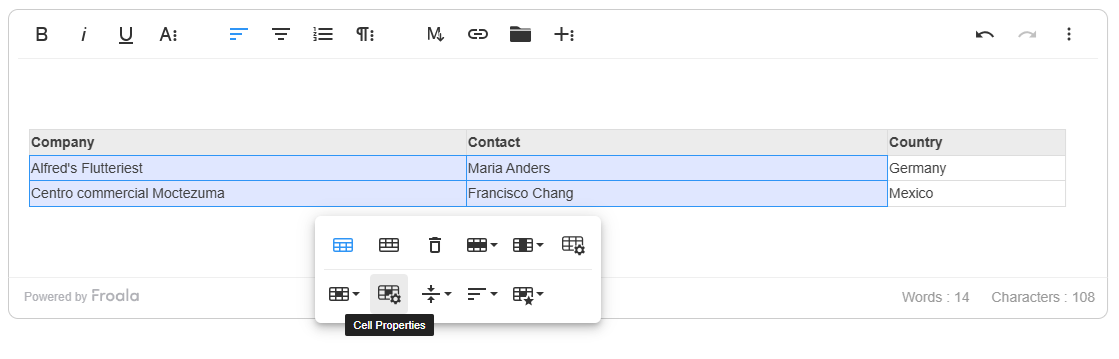
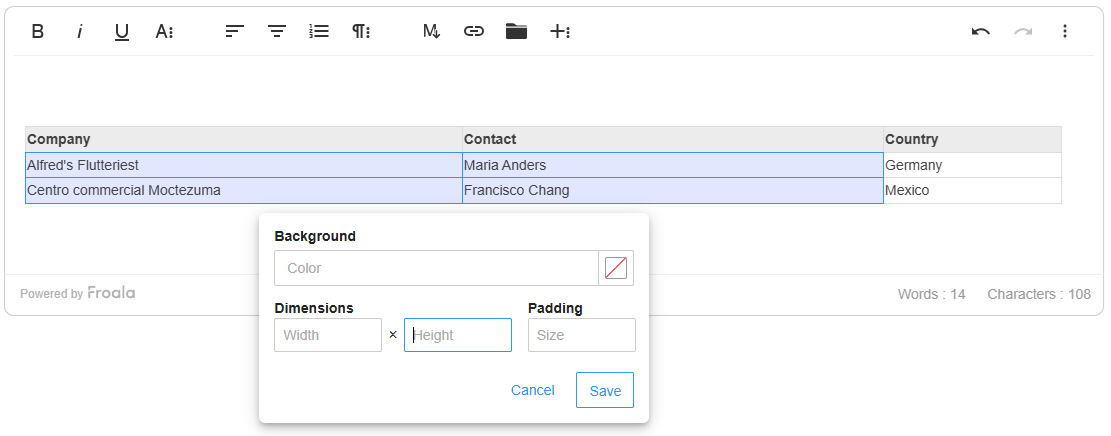
When one or multiple table cells are selected, a new “Cell Properties” button appears in the table toolbar. This button offers instant access to a powerful customization popup that consolidates multiple cell editing functionalities into one convenient location.

Cell Properties Popup: Comprehensive Cell Customization

The Cell Properties popup provides granular control over selected table cells, offering four key customization areas:

Background Color

  • Utilize the integrated color picker to select custom background colors.
  • Full RGB and hex color support
  • Apply colors to single or multiple selected cells

Padding Control

  • Set internal cell spacing with precision
  • Support for both pixel (px) and percentage (%) measurements
  • Adjust top, right, bottom, and left padding independently
  • Ensure optimal content layout and readability

Dimensions Configuration

  • Customize cell width and height
  • Flexibility to use pixels (px) or percentages (%)
  • Automatic pixel (px) conversion for numeric inputs
  • Maintain responsive design across different screen sizes.

Alignment Options

  • Horizontal alignment controls
  • Vertical alignment settings
  • Ensure content is perfectly positioned within each cell.

Table cell Properties

Table cell Properties opened

Key Benefits

  • Unified Interface: All cell properties in one convenient popup
  • Precise Customization: Granular control over cell styling
  • Flexible Measurements: Support for pixels and percentages
  • Intuitive Design: Simple, user-friendly interaction
  • Consistent User Experience: Streamlined cell editing workflow

Developer and User Experience

We introduced a new showCellPropertiesPopup() method that allows developers to programmatically display cell properties popups.

The new Table Cell Properties feature represents our commitment to providing powerful, yet intuitive editing tools. Whether you’re creating complex data tables, reports, or documentation, these enhanced cell editing capabilities will significantly improve your content creation workflow.

Enhanced Keyboard Interaction With Selected Table

In Froala Editor 4.6, we’ve significantly improved keyboard interaction when an entire table is selected, addressing previous limitations and providing a more intuitive, predictable editing experience.

Our latest update ensures that when a table is fully selected, all standard keyboard actions now function seamlessly and logically. Such as: Ensures smooth cursor movement while navigating with arrow keys.

Key Benefits

  • Improved User Experience: Eliminates frustrating interaction limitations
  • Intuitive Editing: Keyboard actions now behave predictably
  • Reduced Friction: Streamlines table editing and management
  • Consistent Interaction: Aligns with user expectations across different editing scenarios

Developer and User Impact

These keyboard interaction improvements represent our commitment to creating a more responsive, user-friendly rich text editing experience. By addressing these nuanced interaction challenges, we’ve made table editing more intuitive and efficient.

Enhanced Accessibility

In our latest release, we’ve implemented targeted accessibility improvements based on direct user feedback:

  • Enhanced Form Controls: Implemented aria-label attributes on checkbox fields to improve screen reader comprehension
  • Dynamic State Representation: Added aria-expanded attribute to accurately communicate expand/collapse states
  • Improved Visual Focus:
    • Introduced background color styles for hover and active states in image dropdowns.
    • Implemented clear focus indication for list dropdowns during keyboard navigation.
  • Keyboard Navigation Optimization:
    • Enabled seamless Tab key navigation within color palette popups
    • Ensured smooth focus transitions between interactive elements
  • Screen Reader Support:
    • Added aria-pressed attributes to tab buttons in specialized popups (Emoticons, Special Characters, Font Awesome)
    • Refined aria-pressed state management for popup trigger buttons

These refinements demonstrate our ongoing commitment to creating an accessible, user-friendly editing environment that meets diverse user needs.

Much Moreโ€ฆ

We have addressed various issues reported by our users to enhance the overall performance and stability of Froala Editor. These include:

  • Resolved the issue in MS Edge where suggested text does not get replaced correctly on autocorrect.
  • Modified the list creation logic to ensure that if the current line or selected lines have styles applied, those styles are preserved in the list content.
  • Resolved the issue in the Android WebView where when the character limit is set to N, and when typed over N characters, it exceeds the character limit.

Please find the complete changelog list here.

How Can I Update?

Don’t miss out on the benefits of the latest Froala WYSIWYG Editor 4.6 release. Update today and experience the enhanced editing features and improvements.

If you are using a plain JavaScript library or other framework, check the get started page to know how to download the latest Froala Editor release and how to include it in your project based on your preferred method.

If you are using a plain JavaScript library or other framework, follow the table below to learn how to download the latest Froala Editor release and include it in your project based on your preferred method.

Method How to download Include in your project
CDN โ€“
<!-- Include Editor stylesheet-->
<link href="https://cdn.jsdelivr.net/npm/froala-editor@4.6/css/froala_editor.pkgd.min.css" rel="stylesheet" type="text/css" />

<!-- Include Editor JavaScript file-->
<script type="text/javascript" src="https://cdn.jsdelivr.net/npm/froala-editor@4.6/js/froala_editor.pkgd.min.js"></script>
CDN (Always the latest version) โ€“
<!-- Include Editor stylesheet-->
<link href="https://cdn.jsdelivr.net/npm/froala-editor@latest/css/froala_editor.pkgd.min.css" rel="stylesheet" type="text/css" />

<!-- Include Editor JavaScript file-->
<script type="text/javascript" src="https://cdn.jsdelivr.net/npm/froala-editor@latest/js/froala_editor.pkgd.min.js"></script>
NPM
npm install froala-editor
<!--

Replace the {download-folder-path} in the following example with the path to the folder containing the stylesheet file e.g.

../css/froala_editor.pkgd.min.js

-->

<link href="{download-folder-path}/froala_editor.pkgd.min.css" rel="stylesheet" type="text/css" />

<!--

Replace the {download-folder-path} with the path to the folder containing the JS file e.g.

../js/froala_editor.pkgd.min.js

-->

<script type="text/javascript" src="{download-folder-path}/froala_editor.pkgd.min.js"></script>
bower
bower install froala-wysiwyg-editor
NO Package Manager Download Froala WYSIWYG Editor files using the download form here.
Integrated with a Framework Select your preferred framework from 17 different popular frameworks.
Other options Check here for other options for using Froala WYSIWYG Editor in your project.

For Froala Editor Version 2 Users:

Follow this migration guide for step-by-step instructions on upgrading from version 2.

Try The Latest Froala Editor

Explore a variety of examples that demonstrate the functionality of the Froala HTML Editor.

Support and Feedback

We are dedicated to always offering the best possible experience for all our users. We believe this release, meant to enhance Typescript support, is a stepping stone towards that commitment. We encourage you to try this improved Typescript support and give us your valuable feedback. Your input is crucial for delivering continuous enhancement and meeting your evolving needs. Thank you for being a valuable part of our vibrant and growing community.
We would like to hear what you think of the latest release! Join us on our GitHub Community to chat with our product manager, developers, and other members of the Froala team.

Change Log

Get Started

  • You can download and start using Froala in less than five minutes following our get-started guide.

Technical Questions

Introducing Froala 4.5.2: Now with Find & Replace, Enhanced Colors, and More

Froala 4.5.2 is now available, introducing the long-awaited Find & Replace plugin (beta), expanded alpha color support, and a series of critical usability fixes. This update enhances editing flexibility while preparing the foundation for future stable features.
Dive into whatโ€™s new, test the beta plugin, and help shape the next release by sharing your feedback.

Froala 4.5.2 release

Spotlight on the New Find and Replace Plugin

ย The highlight of version 4.5.2 is the new Find and Replace plugin. Please note: This feature is currently in beta and disabled by default, giving you the opportunity to test it and provide feedback before its stable release, targeted for our next update by the end of June.

paste and replace

When enabled, this plugin introduces a range of capabilities that our users have been eagerly awaiting:

  • Search Functionality: Users can now search for specific text or words within the editor and see the total number of occurrences, even in styled text like bold or italic.
  • Replace Options: The plugin provides the ability to replace a specific occurrence or all occurrences of the searched text with new replacement text.
  • Highlighted Matches: Each instance of the searched text is highlighted, making it easy for users to identify and navigate the matches.
  • Advanced Search: Users can enable options to match case or restrict the search to whole words only.
  • Draggable Popup: The search and replace interface is presented in a fully draggable popup, allowing users to position it wherever is most convenient.
  • Keyboard Shortcuts: Opening the search popup can be performed using customizable keyboard shortcuts. Default is (CTRL + F).
  • Undo Functionality: Users can easily revert any changes made through the Find and Replace plugin by using the undo feature or the (Ctrl + Z) shortcut.
  • Intuitive Design: The plugin features an intuitive and user-friendly interface, making it accessible for both novice and advanced users.

Developers can further customize the Find and Replace behavior using its dedicated options, events, and methods.

To enable the plugin, its resource file must be loaded separately in each application where it’s needed. The method for loading it depends on the type of application you’re working with. Here are a few examples:

  1. ย For Web Applications (using a <script> tag):
    <script src="froala-editor/js/plugins/find_and_replace.min.js"></script>
  2. For JavaScript Modules (using import):
    import 'froala-editor/js/plugins/find_and_replace.min.js';
  3. For Node.js/CommonJS (using require):
    require('froala-editor/js/plugins/find_and_replace.min.js');

Ensure that the plugin file is included and loaded correctly in the applicationโ€™s runtime environment for the plugin functionality to be available.

Here is an example of Froala with find and replace plugin enabled

Alpha Color Support

One of the notable improvements in this Froala 4.5.2 release is the enhanced support for alpha colors (RGBA) in text coloring. This ensures that users can now properly apply transparency to the text within the editor.

For example, let’s say you want to apply a semi-transparent blue color to a section of text. Developers can now add the RGBA color value rgba(0, 0, 255, 0.5) or the Hex color value #0000ff80 to the colorsText array. This enables users to select the desired color from the text color popup in the editor. The text will then be displayed with the specified level of transparency, allowing the background to partially show through.

new FroalaEditor('div#froala-editor', {

ย ย ย ย colorsText: [ย ย ย 

ย ย ย ย 'rgba(255, 220, 59, 0.7)', 'rgba(255, 220, 59, 0.5)',

ย ย ย ย '#ffdc3bb3','#ff1e001a','#ff1e0040','#ff1e0059','#ff1e0080','#ff1e00a6',

ย ย ย ย '#ff960026','#ff96004d','#ff960066','#ff96008c','#ff9600bf',

ย ย ย ย '#ffdc3b26','#ffdc3b40','#ffdc3b66','#ffdc3b80','#ffdc3bb3',

ย ย ย ย 'REMOVE'

],

});

This improvement in alpha color support empowers users to create more visually striking and nuanced content within the Froala editor. Whether you’re designing eye-catching headings, highlighting important information, or creating subtle textual effects, the enhanced color capabilities give you greater creative control and flexibility.

Other Improvements and Bug Fixes

While the Find and Replace plugin is the highlight of this release, we’ve also addressed several other issues and made various improvements to the Froala editor:

  • Increase Indent button and keyboard shortcut functions Synchronization: Fixed an issue where the Increase Indent button and keyboard shortcut were not correctly synchronized, leading to inconsistent behavior.
  • Handling URLs with Hyphens: When pasting a URL that ends with a hyphen (e.g., https://example.com/-) into the Froala Editor as plain text (Ctrl + Shift + V), the editor incorrectly removed the hyphen from the hyperlink, resulting in a broken or incorrect link.
    Now, the full URL, including the trailing hyphen, is preserved when pasted as plain text.
  • Table Formatting Consistency: Addressed inconsistent behavior with selection and clear formatting for tables, ensuring a uniform experience regardless of the presence of text after the table.
  • Ordered List Button Error: Fixed an error that occurred when clicking the Ordered List button, which previously threw a “querySelectorAll is not a function” error.
  • Shadow DOM Compatibility:
    Fixed an issue where tooltips were rendering outside the Shadow DOM scope, causing styles not to apply correctly.
    Moreover, resolved an issue where inputs were not editable when working inside a shadow DOM, making the editor more versatile in various environments.
  • Fixed console errors appeared after clicking the Ordered List button while htmlUntouched is true.
  • Addressed a problem where the image resize box would expand to full width when a caption was added with htmlUntouched: true, avoiding unexpected layout shifts.

Please find the complete changelog list here.

How Can I Update?

Don’t miss out on the benefits of the latest Froala 4.5.1 release. Update today and experience the enhanced editing features and improvements.

If you are using a plain JavaScript library or other framework, check the get started page to know how to download the latest Froala Editor release and how to include it in your project based on your preferred method.

If you are using a plain JavaScript library or other framework, follow the table below to learn how to download the latest Froala Editor release and include it in your project based on your preferred method.

Method How to download Include in your project
CDN โ€“
<!-- Include Editor stylesheet-->
<link href="https://cdn.jsdelivr.net/npm/froala-editor@4.5.2/css/froala_editor.pkgd.min.css" rel="stylesheet" type="text/css" />

<!-- Include Editor JavaScript file-->
<script type="text/javascript" src="https://cdn.jsdelivr.net/npm/froala-editor@4.5.2/js/froala_editor.pkgd.min.js"></script>
CDN (Always the latest version) โ€“
<!-- Include Editor stylesheet-->
<link href="https://cdn.jsdelivr.net/npm/froala-editor@latest/css/froala_editor.pkgd.min.css" rel="stylesheet" type="text/css" />

<!-- Include Editor JavaScript file-->
<script type="text/javascript" src="https://cdn.jsdelivr.net/npm/froala-editor@latest/js/froala_editor.pkgd.min.js"></script>
NPM
npm install froala-editor
<!--

Replace the {download-folder-path} in the following example with the path to the folder containing the stylesheet file e.g.

../css/froala_editor.pkgd.min.js

-->

<link href="{download-folder-path}/froala_editor.pkgd.min.css" rel="stylesheet" type="text/css" />

<!--

Replace the {download-folder-path} with the path to the folder containing the JS file e.g.

../js/froala_editor.pkgd.min.js

-->

<script type="text/javascript" src="{download-folder-path}/froala_editor.pkgd.min.js"></script>
bower
bower install froala-wysiwyg-editor
NO Package Manager Download Froala WYSIWYG Editor files using the download form here.
Integrated with a Framework Select your preferred framework from 17 different popular frameworks.
Other options Check here for other options for using Froala WYSIWYG Editor in your project.

For Froala Editor Version 2 Users:

Follow this migration guide for step-by-step instructions on upgrading from version 2.

Try The Latest Froala Editor

Explore a variety of examples that demonstrate the functionality of the Froala HTML Editor.

Support and Feedback

We are dedicated to always offering the best possible experience for all our users. We believe this release, meant to enhance Typescript support, is a stepping stone towards that commitment. We encourage you to try this improved Typescript support and give us your valuable feedback. Your input is crucial for delivering continuous enhancement and meeting your evolving needs. Thank you for being a valuable part of our vibrant and growing community.
We would like to hear what you think of the latest release! Join us on our GitHub Community to chat with our product manager, developers, and other members of the Froala team.

Change Log

Get Started

  • You can download and start using Froala in less than five minutes following our get-started guide.

Technical Questions

Froala Editor V4.5.1: Enhanced Filestack, Styling Non-editable Content, and More

a group of people that are standing in the snow

We are excited to announce the release of Froala Editor 4.5.1. This version includes several new features and improvements, such as enhanced performance, bug fixes, and new customization options. Users can now enjoy a more seamless editing experience with increased stability and efficiency.

By upgrading to Froala Editor V4.5.1, users will benefit from using the Filestack plugin on all browsers, the ability to easily style contenteditable="false" elements, and much more!

Letโ€™s dive in and explore the key highlights.

Filestack Plugin now works across all browsers

Froala Editor 4.3 introduced the powerful Filestack plugin, allowing users to easily upload and manage files from various cloud storage providers.

The Filestack integration offers a complete file upload management solution. When a user uploads a file, a CDN link is created instantly, providing optimized and rapid file delivery.

However, the previous version had some browser compatibility restrictions, limiting its usage.

With Froala Editor V4.5.1, the Filestack plugin now works seamlessly across all browsers and operating systems. Users can now enjoy a consistent and reliable file management experience, regardless of their browser of choice.

Configuring the Filestack plugin is easy. Check out these guides for more details:

With the cross-browser compatibility of the Filestack plugin, users can now confidently manage their files from any device or browser, saving time and hassle. This improvement further enhances the flexibility and reliability of the Froala Editor, making it an even more powerful tool for content creation and management.

Easily Style Non-Editable Content

Froala Editor 4.5.1 introduces a powerful new feature that gives you more control over styling your content. The update adds a new configuration option called (allowStylingOnNonEditable). When you set this to true, users will be able to style contenteditable=”false” elements. If a user styles content partially within a non-editable element, the entire element’s content will be styled.

new FroalaEditor('#editor', {

allowStylingOnNonEditable: true

});

By default, this configuration is set to false, maintaining the old behavior where non-editable element styling is not allowed.

By unlocking the ability to style non-editable content, Froala Editor 4.5.1 gives you greater creative control and a more streamlined editing experience. No more workarounds or compromises – just the freedom to format your content exactly how you want it.

Table Formatting Enhancements

This release supercharges table formatting, dramatically boosting user productivity. The new features streamline content management and editing, saving time and reducing frustration.

Multi-cell Content Formatting

You can now select and format multiple table cells at once. Simply click and drag, or use the (Shift + Arrow) keys shortcut. Then, apply text styles like font size, bold, italics, alignment, and background color across all selected cells with a single action.

Multi-cell Content Formatting

Improved table content alignment

If the user wants to align content within a table cell, he can select the cell and align the content from the table popup alignment option or from the editor toolbar alignment options.

Previously, the table popup alignment applies styles directly to the <td> elements, while toolbar alignment targets the content inside these cells. This discrepancy leads to conflicts when switching between the two alignment methods, causing the alignment to stop working as expected.

Froala V4.5.1 syncs the two alignment methods for a seamless experience. Now, if a cell is selected and a style is applied from the toolbar, it is applied to the entire td element. However, if a specific text or element within the cell is selected, the style from the toolbar applies only to that selected text/element.

Additional Table Improvements

Froala V4.5.1 also addresses other table-related issues. It removes the unnecessary .fr-table-selector overlay that appeared when hovering over the editor inside a table, even without a table inside the editor. And it fixes table resizing problems when using Froala within the Fluent UI 8 Dialog component.

These table formatting enhancements make Froala Editor an even more powerful tool for organizing and presenting your content. With these time-saving features, you can focus on creating great work instead of wrestling with formatting.

Track Content Movements with Ease

Froala Editor 4.5.1 introduces an exciting new feature that allows you to track content movements. When you enable the Track Changes plugin, the editor will now visually indicate whenever users drag and drop content within the document.

The ability to track drag and drop actions further enhances Froala Editor’s capabilities. Now, you can confidently rearrange content, knowing you can monitor and understand the changes. This makes Froala an even more powerful tool for efficiently expressing your ideas and keeping your content organized.

To take advantage of this feature, simply enable the Track Changes plugin by including its button in the toolbarButtons option. Refer to the plugin’s documentation to learn more about its configuration and usage.

new FroalaEditor('#froala-editor',ย  {

toolbarButtons: ['bold', 'italic', 'underline','fontFamily', 'color',ย  'paragraphStyle','trackChanges', ]

});

Bug Fixes

Additionally, the team has addressed various bug fixes and stability improvements to ensure a seamless and reliable editing experience for all Froala Editor users. These include:

  • The release resolves an issue that caused the editor to freeze when users inserted an image as a base64 string and then switched to the Code View. This fix ensures a smooth transition between the visual and code editing modes, saving users from frustrating interruptions.
  • The team removed a duplicate identifier runtime error in the TypeScript type definition file index.d.ts. This issue had previously caused problems with TypeScript compilation, making integration with TypeScript-based projects more challenging. By addressing this bug, the Froala team has improved the editor’s overall compatibility and reliability for developers.

Please find the complete changelog list here.

How Can I Update?

Don’t miss out on the benefits of the latest Froala 4.5.1 release. Update today and experience the enhanced editing features and improvements.

If you are using a plain JavaScript library or other framework, check the get started page to know how to download the latest Froala Editor release and how to include it in your project based on your preferred method.

If you are using a plain JavaScript library or other framework, follow the table below to learn how to download the latest Froala Editor release and include it in your project based on your preferred method.

Method How to download Include in your project
CDN โ€“
<!-- Include Editor stylesheet-->
<link href="https://cdn.jsdelivr.net/npm/froala-editor@4.5.1/css/froala_editor.pkgd.min.css" rel="stylesheet" type="text/css" />

<!-- Include Editor JavaScript file-->
<script type="text/javascript" src="https://cdn.jsdelivr.net/npm/froala-editor@4.5.1/js/froala_editor.pkgd.min.js"></script>
CDN (Always the latest version) โ€“
<!-- Include Editor stylesheet-->
<link href="https://cdn.jsdelivr.net/npm/froala-editor@latest/css/froala_editor.pkgd.min.css" rel="stylesheet" type="text/css" />

<!-- Include Editor JavaScript file-->
<script type="text/javascript" src="https://cdn.jsdelivr.net/npm/froala-editor@latest/js/froala_editor.pkgd.min.js"></script>
NPM
npm install froala-editor
<!--

Replace the {download-folder-path} in the following example with the path to the folder containing the stylesheet file e.g.

../css/froala_editor.pkgd.min.js

-->

<link href="{download-folder-path}/froala_editor.pkgd.min.css" rel="stylesheet" type="text/css" />

<!--

Replace the {download-folder-path} with the path to the folder containing the JS file e.g.

../js/froala_editor.pkgd.min.js

-->

<script type="text/javascript" src="{download-folder-path}/froala_editor.pkgd.min.js"></script>
bower
bower install froala-wysiwyg-editor
NO Package Manager Download Froala WYSIWYG Editor files using the download form here.
Integrated with a Framework Select your preferred framework from 17 different popular frameworks.
Other options Check here for other options for using Froala WYSIWYG Editor in your project.

For Froala Editor Version 2 Users:

Follow this migration guide for step-by-step instructions on upgrading from version 2.

Try The Latest Froala Editor

Explore a variety of examples that demonstrate the functionality of the Froala HTML Editor.

Support and Feedback

We are dedicated to always offering the best possible experience for all our users. We believe this release, meant to enhance Typescript support, is a stepping stone towards that commitment. We encourage you to try this improved Typescript support and give us your valuable feedback. Your input is crucial for delivering continuous enhancement and meeting your evolving needs. Thank you for being a valuable part of our vibrant and growing community.
We would like to hear what you think of the latest release! Join us on our GitHub Community to chat with our product manager, developers, and other members of the Froala team.

Change Log

Get Started

  • You can download and start using Froala in less than five minutes following our get-started guide.

Technical Questions

Froala Editor V4.5: Disable Plugins, Excel Paste, & New Features!

Froala Release 4.5

As a top-rated WYSIWYG editor, Froala is dedicated to consistently delivering innovative features that elevate the content creation experience for our users. Today, we’re thrilled to unveil the latest version of our powerful editor – Froala Editor V4.5.

This release includes several exciting new features that enhance the user experience and provide greater flexibility. Imagine being able to effortlessly disable specific plugins, allowing you to tailor the editor to your unique needs. Or how about the ability to seamlessly paste multiple cells from Excel directly into your content? These are just a few of the remarkable enhancements that make Froala Editor V4.5 a must-have for Froala users.

We recommend updating your editor today – it will take less than 5 minutes, and youโ€™ll enjoy an even better editing experience. To help you update your editor as smoothly as possible, weโ€™ve added a detailed section at the end of the post.

Whatโ€™s New in Froala 4.5 โ€“ At a Glance

Froala Editor V4.5 packs powerful updates for developers and content creators alike. Hereโ€™s a quick look:

  • Disable Plugins: Easily turn off specific plugins with the new pluginsDisabled optionโ€”no need to manage long plugin lists.
  • Custom Line Heights: Control the order of line-height options for a cleaner, more intuitive dropdown.
  • Excel Paste Upgrade: Paste multiple Excel cells directly into tablesโ€”Froala adjusts formatting and layout automatically.
  • Smarter Performance: Enjoy bug fixes and enhancements across plugins, toolbar behavior, and content formatting.

Itโ€™s Froala customization, smarter pasting, and smoother editingโ€”all in one update.

Froala release with new feature

Whatโ€™s New in Froala Editor V4.5

Letโ€™s take a closer look at whatโ€™s new in Froala Editor V4.5. From plugin control to smoother Excel pasting, these updates are designed to give developers and content creators more power and flexibility.

1. Disable Specific Froala Plugins Easily

Froala’s modular plugin structure is a powerful feature that allows developers to include only the plugins they need. This Froala plugin disabling feature makes the editor more efficient, easier to understand, and simpler to extend and maintain. Instead of loading all 40+ plugins by default, developers can use the pluginsEnabled option to specify which plugins are active.

However, using this way to disable one or two plugins could be cumbersome. Developers had to list all the plugins they wanted to keep enabled, which became tedious as the number of plugins grew.

With the new pluginsDisabled option, you can easily turn off specific plugins without hassle. Simply list the plugins you want to disable, and Froala takes care of the restโ€”no need to manage a long list of enabled plugins.

Now, developers can easily exclude specific plugins without needing to maintain a comprehensive list of enabled plugins. This streamlines the configuration process, giving you greater control over the editor’s functionality.

For example, let’s say you want to disable the “emoticons” and “fullscreen” plugins. You can simply set pluginsDisabled: ['emoticons', 'fullscreen'], and those plugins will be disabled regardless of how the pluginsEnabled option is configured.

This new feature makes it effortless to customize Froala to your specific needs, leading to a more efficient and optimized implementation.

2. Customize Line Height Dropdown Order

Take control of your contentโ€™s layout! Froala Editor V4.5 now lets you customize the order of line height options in the dropdown menu, ensuring a more intuitive and user-friendly experience.

Previously, when setting the lineHeights option as an object, the order of the options would be determined by the natural order of the object’s elements in JavaScript. This meant the order was not necessarily intuitive or consistent with how the developer had intended to present the options.

Now, with Froala Editor V4.5, you can set the lineHeights option as an array of objects. When you do this, the editor will display the line height options in the exact order you specify in the array. This gives you complete control over the presentation of these options, ensuring a seamless and intuitive user experience.

For example, let’s say you want to offer your users the following line height options 1, 1.15, 1.5, 2, 3. If you used the object-based approach

new FroalaEditor('.selector', {

ย ย lineHeights: {
ย ย ย ย '1': '1',
ย ย ย ย '1.15': '1.15',
ย ย ย ย '1.5': '1.5',
ย ย ย ย '2': '2',
ย ย ย ย '3': '3'
ย ย }

});

The options will be displayed in the following order: 1, 2, 3, 1.15, 1.5 due to the way JavaScript objects are structured. But now, with the new array-based approach:

new FroalaEditor('.selector', {

 lineHeights: [

  {label: '1', value: 1},

  {label: '1.15', value: 1.15},

  {label: '1.5', value: 1.5},

  {label: '2', value: 2},

  {label: '3', value: 3},

 ]

});

The options will be shown exactly as you defined them, preserving your intended order and layout.

This enhancement empowers you, the developer, to create a more polished and customized editing experience for your users. By controlling the order of line height options, you can ensure your content authors have easy access to the most relevant and useful formatting choices.

3. Paste Multiple Excel Cells into Tables

Pasting Excel data into an existing table just got easier! Now, you can seamlessly merge Excel content into existing tables in Froala. Whether your data has more rows, columns, or different formatting, Froala adapts automaticallyโ€”saving you time and effort.

Here’s how it works:

When you hover over a table in the Froala editor, you’ll see a new selection icon in the top-left corner. Clicking this icon selects the entire table, allowing you to paste content from Excel directly into it.

pasting from Excel into Froala

If the copied Excel content has more rows or columns than the selected table, the table will automatically expand to accommodate the new data. The formatting from Excel, such as text styles, colors, and cell borders, will carry over seamlessly.

Conversely, if the pasted content is smaller than the existing table, the extra cells will remain intact. This ensures you never lose any of your carefully crafted table structure.

4. Additional Improvements & Fixes

We have made additional enhancements and addressed various issues reported by our users to improve the overall performance and stability of the Froala Editor, ensuring that the content is in the correct format. These include:

  • Files Manager plugin now supports uploading .hex files.
  • Enhance the Word Paste plugin to retain the Roman Numerals in numbered lists.
  • Improve the link plugin to ensure the right display of the Link Edit popup in the Full Page mode.
  • Update the URL plugin to enhance URL and email detection in pasted content.
  • Apply the fontSizeUnit option value to the editor content by default.
  • Addresses improvements to ensure proper toolbar positioning and visibility handling in sticky mode.
  • Resolved the issue where clear formatting removes video from the content.

These enhancements demonstrate Froalaโ€™s commitment to continuously improving the editorโ€™s functionality and addressing user feedback to provide a superior content creation experience.

Please find the complete Froala changelog list here.

How to Update to Froala Editor V4.5

Don’t miss out on the benefits of the latest Froala 4.5 release. Update today and experience the enhanced editing features and improvements.

If you are using a plain JavaScript library or other framework, check the get started page to know how to download the latest Froala Editor release and how to include it in your project based on your preferred method.

If you are using a plain JavaScript library or other framework, follow the table below to learn how to download the latest Froala Editor release and include it in your project based on your preferred method.

Method How to download Include in your project
CDN โ€“
<!-- Include Editor stylesheet-->
<link href="https://cdn.jsdelivr.net/npm/froala-editor@4.5/css/froala_editor.pkgd.min.css" rel="stylesheet" type="text/css" />

<!-- Include Editor JavaScript file-->
<script type="text/javascript" src="https://cdn.jsdelivr.net/npm/froala-editor@4.5/js/froala_editor.pkgd.min.js"></script>
CDN (Always the latest version) โ€“
<!-- Include Editor stylesheet-->
<link href="https://cdn.jsdelivr.net/npm/froala-editor@latest/css/froala_editor.pkgd.min.css" rel="stylesheet" type="text/css" />

<!-- Include Editor JavaScript file-->
<script type="text/javascript" src="https://cdn.jsdelivr.net/npm/froala-editor@latest/js/froala_editor.pkgd.min.js"></script>
NPM
npm install froala-editor
<!--

Replace the {download-folder-path} in the following example with the path to the folder containing the stylesheet file e.g.

../css/froala_editor.pkgd.min.js

-->

<link href="{download-folder-path}/froala_editor.pkgd.min.css" rel="stylesheet" type="text/css" />

<!--

Replace the {download-folder-path} with the path to the folder containing the JS file e.g.

../js/froala_editor.pkgd.min.js

-->

<script type="text/javascript" src="{download-folder-path}/froala_editor.pkgd.min.js"></script>
bower
bower install froala-wysiwyg-editor
NO Package Manager Download Froala WYSIWYG Editor files using the download form here.
Integrated with a Framework Select your preferred framework from 17 different popular frameworks.
Other options Check the Get Started page for other options for using Froala WYSIWYG Editor in your project.

For Froala Editor Version 2 Users:

Follow this migration guide for step-by-step instructions on upgrading from version 2.

Try Froala Editor V4.5 Today

Explore a variety of examples that demonstrate the functionality of the Froala HTML Editor.

Support and Feedback

We are committed to providing the best possible experience for all our users. We believe this release, meant to enhance TypeScript support, is a stepping stone towards that commitment. We encourage you to try this improved TypeScript support and provide us with your valuable feedback.ย 

Your input is crucial for delivering continuous enhancement and meeting your evolving needs. Thank you for being a valuable part of our vibrant and growing community.

To learn more about previous updates, check out the related blog pages for Froala 4.4 and Froala 4.3. We would love to hear your thoughts on the latest release! Join us on our GitHub Community to chat with our product manager, developers, and other members of the Froala team.

Change Log

Get Started

  • You can download and start using Froala in less than five minutes by following our get-started guide.

Technical Questions

If you have a technical question, you can check whether we have already answered it in our help center. If not, contact our Support team.

Froala 4.4: Empowering Developers with New Advancements

Froala Release

We’re thrilled to announce the release of Froala WYSIWYG Editor version 4.4, a milestone that demonstrates our commitment to delivering cutting-edge solutions for developers and Froala customers alike.

This release is packed with a host of exciting updates, enhancements, and bug fixes that are sure to elevate your content creation and management experience.

Froala SDKs now support the latest versions of popular frameworks:

  • React SDK supports React 18.
  • Angular SDK supports Angular 19.
  • Django plugin works with Django 5.
  • WordPress plugin integrates with WordPress 6.

In addition to these framework updates, this release includes several bug fixes, with a particular focus on improving the content pasting experience. Furthermore, we’ve enhanced the integration with the Dompurify library, which helps sanitize HTML and strengthen security.

Let’s dive in and explore the key highlights.

Froala 4.4 release

SDK Updates: Embracing the Future

Froala SDKs help developers seamlessly integrate the Froala WYSIWYG Editor into their applications. With this release, we’ve ensured our SDKs work with the latest versions of popular frameworks. This empowers developers to leverage cutting-edge technologies and deliver exceptional user experiences.

React SDK

The React SDK now supports React 18, ensuring seamless integration with the recent advancements in the React ecosystem. This allows developers to benefit from new React 18 features such as:

  • Concurrent Rendering: React 18’s concurrent rendering allows for smoother and more responsive user interfaces by enabling non-blocking rendering.
  • Automatic Batching: This feature reduces the number of re-renders, improving performance and efficiency.
  • Suspense for Data Fetching: Enhanced support for Suspense allows for better handling of asynchronous data fetching, making your application more robust.
  • startTransition API: This API helps in marking updates as non-urgent, ensuring smoother transitions and better user experience.

As a developer, updating to the latest Froala React SDK is beneficial if you want to leverage the new features and improvements in React 18. This can enhance the performance and user experience of your application, making it more efficient and responsive.

To update your Froala React SDK, run the following command:

npm update froala-editor    

If new to Froala, follow the React SDK documentation to get started.

Angular SDK

The Angular SDK has been updated to work with Angular 19, providing developers with the tools to leverage the latest features and improvements in the Angular framework.

As a developer, updating to the latest SDK is generally recommended to take advantage of:

  • Improved Performance: Angular 19 includes performance enhancements that can make your applications run faster and more efficiently.
  • New Features: You’ll have access to the latest features and APIs introduced in Angular 19, which can help streamline development and improve functionality.
  • Better Compatibility: Ensures compatibility with other libraries and tools that are also updated to work with Angular 19.
  • Security Updates: Newer versions often include security patches that protect your application from vulnerabilities.

To update your Froala Angular SDK, run the following command:

npm update froala-editor --save

If new to Froala, follow the Angular SDK documentation to get started.

Django Framework Plugin

The Froala Django framework plugin has been updated to work seamlessly with the latest version of the popular Python web framework, Django 5.0. This update empowers developers building web applications with Django to integrate the Froala WYSIWYG Editor into their projects easily.

Django 5.0 introduces several new features and improvements, including:

  • Enhanced URL handling.
  • Improved database support.
  • Enhanced security features.

By updating the Froala Django plugin to work with Django 5.0, we’re enabling our developers to take advantage of these new features and improvements. This allows you to build more robust, secure, and feature-rich web applications with the Froala WYSIWYG Editor seamlessly integrated into your Django-powered projects.

To update your Froala Django plugin to the latest version, follow these steps:

  1. Open your project’s requirements.txt file (or equivalent dependency management file).
  2. Locate the line that specifies the Froala Django plugin version and update it to the latest version:
    froala-editor-django==4.4
    
  3. Save the requirements.txt file and run the following command in your terminal to update the dependencies:
    pip install -r requirements.txt
    

After completing these steps, your Froala Django plugin will be updated to the latest version, allowing you to leverage the new features and improvements introduced in Django 5.0. This will help you build even more powerful and efficient web applications with the Froala WYSIWYG Editor seamlessly integrated into your Django-based projects.

If you’re new to using the Froala Django plugin, be sure to check out the Froala Django documentation to get started.

WordPress Plugin

The Froala WordPress plugin has been updated to work seamlessly with the latest version of WordPress, WordPress 6, ensuring a smooth and reliable integration for our WordPress-based customers.

This update is especially important for Froala users who leverage the WordPress platform to power their websites and blogs. The Froala WordPress plugin empowers WordPress administrators to seamlessly integrate the Froala WYSIWYG Editor into their content creation workflows. With this plugin, admins can create posts and pages using the robust editing capabilities of the Froala Editor.

Beyond the admin experience, the Froala WordPress plugin also enables front-end integration. This allows your website’s users to leverage the Froala Editor when adding comments or submitting other user-generated content.

The plugin comes with a dedicated configuration page in the WordPress admin dashboard, making it easy for administrators to customize the editor’s settings to match their specific needs.

To update the Froala WordPress plugin to the latest version:

  1. Backup Your WordPress Site: Before making any changes, it’s always a good idea to create a full backup of your WordPress site. This will allow you to restore your site in case any issues arise during the update process.
  2. Download the Latest Plugin Version: Visit the Froala WordPress plugin GitHub repository and download the latest version of the plugin. You can either clone the repository or download the ZIP file containing the plugin files.
  3. Replace the Plugin Files: Log in to your WordPress admin dashboard and navigate to the “Plugins” section. Locate the existing Froala WYSIWYG Editor plugin and deactivate it. Then, delete the plugin folder from the wp-content/plugins/ directory of your WordPress installation.
  4. Install the Updated Plugin: Upload the new plugin files you downloaded in Step 2 to the wp-content/plugins/ directory, either by extracting the ZIP file or cloning the repository directly into the plugins folder.
  5. Activate the Updated Plugin: Once the new plugin files are in place, go back to the “Plugins” section in your WordPress admin dashboard and activate the Froala WYSIWYG Editor plugin.

If you encounter any issues during the update process or have questions about the new Froala WordPress plugin features, please don’t hesitate to reach out to our support team. We’re here to ensure seamless integration and help you make the most of the Froala WYSIWYG Editor within your WordPress-powered projects.

Improved Content Pasting: Enhancing the User Experience

Froala is renowned for its powerful pasting capabilities. However, in this release, we’ve made significant improvements to the content pasting functionality. We’ve addressed various issues and edge cases to ensure a smoother and more reliable pasting process.

One key improvement is the retention of the id property for table of contents (TOC) items when pasting content from Microsoft Word. This allows users to seamlessly scroll down to a specific section identified by the TOC item, preserving the intended navigation structure.

Additionally, Froala now supports the mso-list attribute from Office HTML. This helps maintain the proper hierarchy of complex multi-level lists after pasting them, ensuring the lists remain in order.

These improvements enhance the overall user experience, making it easier for users to paste content into the Froala Editor without losing formatting or structure.

Bug Fixes and Improvements

In this release, we’ve addressed various issues reported by our users to enhance the overall performance and stability of the Froala Editor. These improvements include:

  • Enhanced table header handling: We’ve ensured proper table structure and resolved issues where rows might not correctly align within the <thead> section. This improves the merging of table header cells.
  • Consistent underline color: We’ve made the underline color match the text color.
  • Restored full-page content: We’ve fixed the issue where the editor did not return the full-page content when the fontFamilyDefaultSelection option was used.
  • Cleaned text formatting: We’ve resolved the issue where the text format was not properly cleaned when setting the enter option to FroalaEditor.ENTER_BR.
  • Preserved cursor position: We’ve fixed the issue where the cursor position was lost when content was wrapped with html.wrap inside tables.
  • Improved link handling: We’ve resolved an issue where all formatting was removed when inserting a link containing special characters. The fix is to URL-encode the link, ensuring special characters are stored correctly.

Additionally, we’ve enhanced the integration with the DOMPurify library, a powerful HTML sanitization tool, to further strengthen the security and reliability of the Froala Editor. DOMPurify now respects the configurable options htmlAllowedAttrs, htmlAllowedTags, htmlAllowedEmptyTags, and not just the contenteditable property.

You can find the release notes on our website.

Embracing the Future of Content Creation

The Froala WYSIWYG Editor 4.4 release represents a significant step forward in our mission to empower developers and content creators with the tools they need to thrive in the ever-evolving digital landscape. By aligning our SDK updates with the latest versions of popular frameworks like React, Angular, and Django, we’re ensuring that our users can leverage the most cutting-edge technologies and seamlessly integrate Froala into their workflows.

Moreover, the bug fixes and security enhancements included in this release underscore our dedication to providing a reliable and secure content editing experience. By addressing the XSS vulnerability and improving the DOMPurify integration, we’re safeguarding our users’ content and protecting their digital assets from potential threats.

Unlocking New Possibilities

As we move forward, we remain committed to pushing the boundaries of what’s possible in the world of content creation and management.

Whether you’re a seasoned Froala user or new to our platform, we encourage you to explore the latest features and enhancements. Upgrade your Froala WYSIWYG Editor to version 4.4 and unlock a world of new possibilities for your content creation and management needs.

If you have any questions or feedback, our dedicated support team is always here to assist you. We value your input and look forward to continuing our collaboration as we shape the future of content creation together.

Try The Latest Froala Editor

Explore a variety of examples that demonstrate the functionality of the Froala HTML Editor.

Change Log

Please visit the release notes for a complete list of changes.

Get Started

Following our get started guide, you can download and start using Froala in less than five minutes.

Change Log

Please visit the release notes for a complete list of changes.

Technical Questions

If you have a technical question, you can check whether we have already answered it in our help center. If not, contact our Support team.
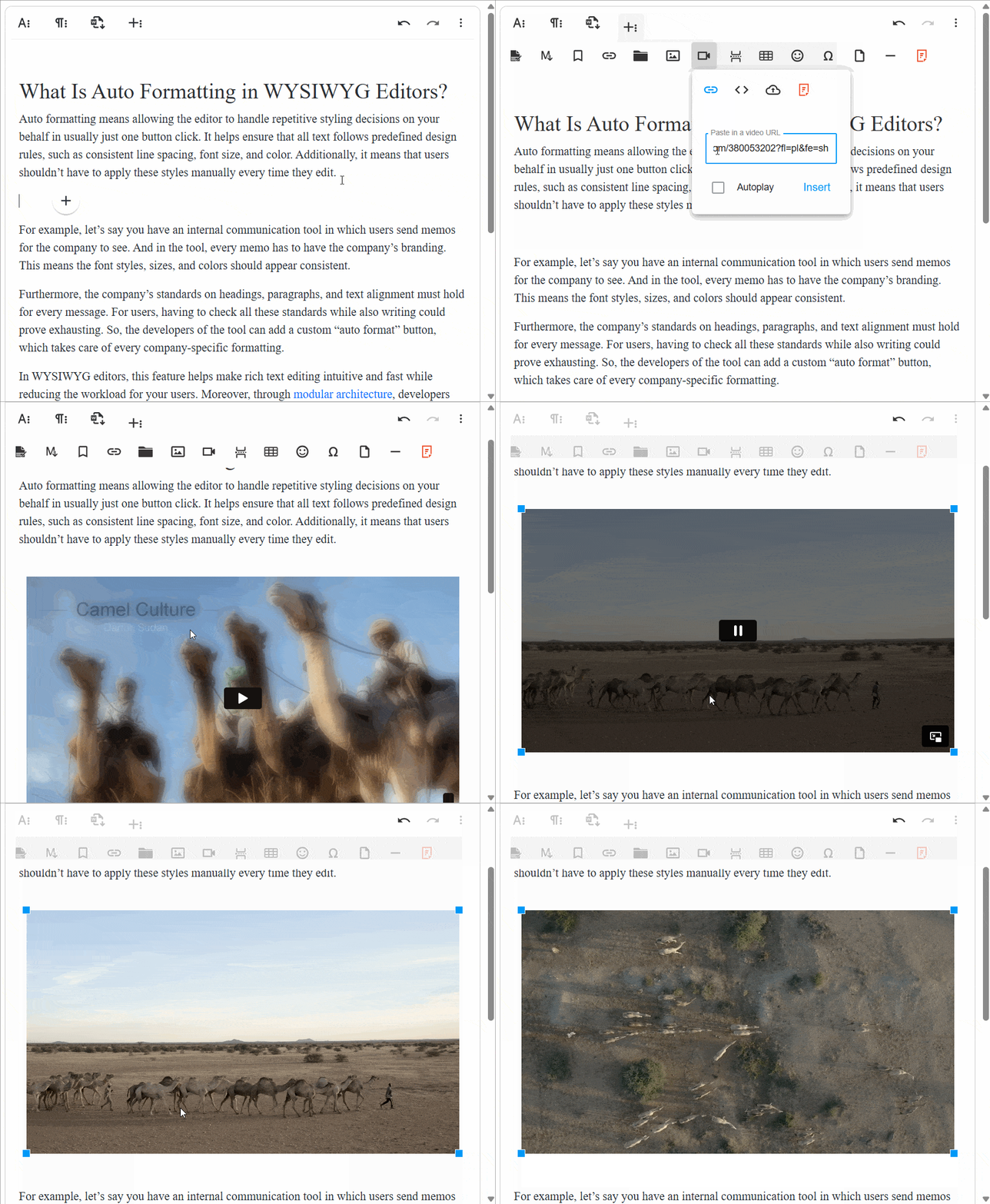
Froala 4.3.1: Improved Pasting and Enhanced Content Creation

Froala Release

Weโ€™re thrilled to announce Froala Editor 4.3.1 with impressive improvements to the content pasting process, enhancements to the lists plugin, and fixes for reported customer issues.

At Froala, we’re committed to delivering the best possible user experience. That’s why we maintain an ongoing feedback loop with our users, ensuring that we’re addressing your top-requested features and pain points. With this release, we’ve laser-focused on bringing those highly anticipated improvements to life.

So, what can you expect from Froala Editor 4.3.1? Read on to discover the fantastic improvements that will elevate your content creation workflow!

content pasting

Improved Content Pasting Process

Maintaining the format of pasted text has always been a challenge for users, often leading to frustration and extra work. Many editors struggle to perform this function correctly, resulting in inconsistent and messy formatting.

Imagine pasting a complex table or a styled document into your editor, only to find the layout entirely off. You have to spend valuable time fixing it, which can be incredibly annoying and disrupt your workflow.

In the latest improvements in Froala Editor, we enhanced pasting capabilities, particularly from Microsoft Word, to ensure that the original formatting of your content is preserved seamlessly, saving you time and effort.

Froala Editor has been improved to enhance pasting capabilities, ensuring that the original formatting of your content is preserved seamlessly, saving you time and effort. Pasting from Microsoft Word, a popular text editor known for pasting issues, has been particularly problematic in the past, often resulting in lost or altered formatting and requiring manual adjustments. With the latest updates, pasting from Word is now smoother and more accurate.

Your end-users can look forward to a more seamless experience that eliminates the hassle of reformatting. With these updates, they’ll be empowered to concentrate on what truly matters: creating outstanding content that resonates

Key improvements in this release for content pasting include:

  • Preserve the font size for text pasted from Microsoft Word by prioritizing CSS font-family styles over embedded Rich Text Format (RTF) styles.
  • Maintaining list numbering order and style, even with extra white spaces.
  • Preventing the insertion of inappropriate list items when copying and pasting part of a list item.
  • Ensuring the Word Paste feature functions correctly across Android Chrome versions.
  • Preserving table formatting when pasting from Word365.
  • Maintaining nested table column widths without parent table overflow.
  • Avoiding content duplication when multiple editor instances exist on the same page.

Enhancements to The Lists Plugin

Froala Editor allows users to create and manage various types of lists within their content using the Lists plugin. This plugin supports not only basic lists like numbered (ordered) and bulleted (unordered) lists but also advanced list types such as lower Greek and upper Roman numerals.

In this release, Froala enhanced list indenting and outdenting capabilities. We have updated the code in order to account for selections spanning multiple list levels. Additionally, the editor now considers the text-indent CSS property, disabling the outdent button if the next outdent would push the text outside the editor’s boundaries.

But that’s not all! Froala has also ensured that the editor preserves the first item’s list type when indenting the list further. This means the intended list structure is always maintained, keeping your content organized and consistent.

Much Moreโ€ฆ

We have addressed various issues reported by our users to enhance the overall performance and stability of Froala Editor. These include:

  • Resolved the incorrect word replacement issue caused by the Microsoft Edge autocorrect feature.
  • Resolved the issue where inserting a table on an Android device would result in one of the table cells being automatically focused.
  • Resolved the issue where the href attribute values were being truncated when the editor was loaded with pre-existing HTML content.

These enhancements demonstrate Froala’s commitment to continuously improving the editor’s functionality and addressing user feedback to provide a superior content creation experience.

Please find the complete changelog list here.

How Can I Update?

Don’t miss out on the benefits of the latest Froala 4.3 release. Update today and experience the enhanced editing features and improvements.

If you are using a plain JavaScript library or other framework, check the get started page to know how to download the latest Froala Editor release and how to include it in your project based on your preferred method.

If you are using a plain JavaScript library or other framework, follow the table below to learn how to download the latest Froala Editor release and include it in your project based on your preferred method.

Method How to download Include in your project
CDN โ€“
<!-- Include Editor stylesheet-->
<link href="https://cdn.jsdelivr.net/npm/froala-editor@4.3.1/css/froala_editor.pkgd.min.css" rel="stylesheet" type="text/css" />

<!-- Include Editor JavaScript file-->
<script type="text/javascript" src="https://cdn.jsdelivr.net/npm/froala-editor@4.3.1/js/froala_editor.pkgd.min.js"></script>
CDN (Always the latest version) โ€“
<!-- Include Editor stylesheet-->
<link href="https://cdn.jsdelivr.net/npm/froala-editor@latest/css/froala_editor.pkgd.min.css" rel="stylesheet" type="text/css" />

<!-- Include Editor JavaScript file-->
<script type="text/javascript" src="https://cdn.jsdelivr.net/npm/froala-editor@latest/js/froala_editor.pkgd.min.js"></script>
NPM
npm install froala-editor
<!--

Replace the {download-folder-path} in the following example with the path to the folder containing the stylesheet file e.g.

../css/froala_editor.pkgd.min.js

-->

<link href="{download-folder-path}/froala_editor.pkgd.min.css" rel="stylesheet" type="text/css" />

<!--

Replace the {download-folder-path} with the path to the folder containing the JS file e.g.

../js/froala_editor.pkgd.min.js

-->

<script type="text/javascript" src="{download-folder-path}/froala_editor.pkgd.min.js"></script>
bower
bower install froala-wysiwyg-editor
NO Package Manager Download Froala WYSIWYG Editor files using the download form here.
Integrated with a Framework Select your preferred framework from 17 different popular frameworks.
Other options Check Get Started page for other options for using Froala WYSIWYG Editor in your project.

For Froala Editor Version 2 Users:

Follow this migration guide for step-by-step instructions on upgrading from version 2.

Try The Latest Froala Editor

Explore a variety of examples that demonstrate the functionality of the Froala HTML Editor.

Support and Feedback

We are dedicated to always offering the best possible experience for all our users. We believe this release, meant to enhance Typescript support, is a stepping stone towards that commitment. We encourage you to try this improved Typescript support and give us your valuable feedback. Your input is crucial for delivering continuous enhancement and meeting your evolving needs. Thank you for being a valuable part of our vibrant and growing community.
We would like to hear what you think of the latest release! Join us on our GitHub Community to chat with our product manager, developers, and other members of the Froala team.

Change Log

Get Started

  • You can download and start using Froala in less than five minutes following our get-started guide.

Technical Questions

Get your Filestack API here for free.

Froala 4.2.2: Improved Word Pasting, YouTube Shorts Support, and More

Froala Release

We are excited to announce the release of Froala Editor 4.2.2. Froala always brings stability and quality improvements with each new release to keep delivering our customers the best WYSIWYG editing experience.

Froala V4.2.2 improves MS Word pasting, supports YouTube Shorts, improves the inline toolbar on mobile, and more.

Letโ€™s dig deep into the most significant changes in this release.

Pasting From Microsoft Word

Enhancing Pasting From MS Word

The latest version of Froala significantly improves the experience of pasting content from Microsoft Word. Users can now upload pasted images to their server and receive the corresponding upload events. Additionally, the editor retains font formatting, even for font families that use MS Word attributes. Overall, the pasting experience from MS Word is better than ever, saving users time while maintaining clean, well-formatted documents.

Enhanced Pasting Images

Previously, when you pasted images with other content from MS Word into the editor, the pasted images were just displayed in the editor with other content. Now the pasted image is also uploaded to the server and triggers the related events such as the image.beforeUpload event.

Uploading images to the server allows you to save the images to your content management system and use them later. This enhanced pasting experience ensures a seamless workflow when incorporating content from Microsoft Word into your Froala-powered applications.

Support Microsoft Word Custom Font Family Attributes

Microsoft Word represents font families in various ways, sometimes using HTML attributes and other times employing custom attributes like mso-bidi-font-family and mso-fareast-font-family.

In this release, Froala adds support for the following custom MS Word attributes:

  • mso-bidi-font-family
  • mso-fareast-font-family
  • mso-fareast-theme-font

This preserves the text font format when pasting from MS Word, ensuring a seamless integration of content into your Froala-powered applications while maintaining original formatting.

Fix Table Pasting

Previously, pasting a table from Microsoft Word into the editor could place the table outside the selected div, resulting in extra div elements. This issue has been resolved; now, tables from DOCX files paste directly within the selected div without adding extra div elements.

Support YouTube Shorts

The Froala Video plugin enables users to insert videos directly in the editor from different sources. It automatically parses YouTube, Vimeo, Yahoo, and DailyMotion video links.

The Froala Video plugin now supports YouTube Shorts, enabling users to embed short-form videos directly into their documents. Users can manage these videos just like regular YouTube videos, including resizing, adjusting alignment, and previewing or removing them, all within the editor’s interface without leaving the page.

With the addition of YouTube Shorts support, Froala continues to evolve and adapt to the changing landscape of digital content, keeping users aligned with the latest social media trends and enriching their overall content experience.

Enhancing Mobile Experience

Froala 4.2.2 enhances the mobile editing experience by improving the responsiveness of the alignment and font size dropdowns in the inline toolbar. The update ensures that these dropdowns reliably respond to user clicks, allowing for easy selection of alignment options and font sizes directly from the toolbar, thus streamlining the mobile editing workflow. These enhancements aim to provide a seamless editing experience across all devices and platforms.

Enhancing List Management with Track Changes Enabled

If you utilize the Track Changes plugin, which is not enabled by default, this update is for you. In earlier versions, users experienced issues formatting unordered lists when Track Changes was enabled. This issue is no longer happening.

How Can I Update?

Don’t miss out on the benefits of the latest Froala 4.2.2 release. Update today and experience the enhanced editing features and improvements.

If you are using a plain JavaScript library or other framework, check the get started page to know how to download the latest Froala Editor release and how to include it in your project based on your preferred method.

If you are using a plain JavaScript library or other framework, follow the table below to learn how to download the latest Froala Editor release and include it in your project based on your preferred method.

Method How to download Include in your project
CDN โ€“
<!-- Include Editor stylesheet-->
<link href="https://cdn.jsdelivr.net/npm/froala-editor@4.2.2/css/froala_editor.pkgd.min.css" rel="stylesheet" type="text/css" />

<!-- Include Editor JavaScript file-->
<script type="text/javascript" src="https://cdn.jsdelivr.net/npm/froala-editor@4.2.2/js/froala_editor.pkgd.min.js"></script>
CDN (Always the latest version) โ€“
<!-- Include Editor stylesheet-->
<link href="https://cdn.jsdelivr.net/npm/froala-editor@latest/css/froala_editor.pkgd.min.css" rel="stylesheet" type="text/css" />

<!-- Include Editor JavaScript file-->
<script type="text/javascript" src="https://cdn.jsdelivr.net/npm/froala-editor@latest/js/froala_editor.pkgd.min.js"></script>
NPM
npm install froala-editor
<!--

Replace the {download-folder-path} in the following example with the path to the folder containing the stylesheet file e.g.

../css/froala_editor.pkgd.min.js

-->

<link href="{download-folder-path}/froala_editor.pkgd.min.css" rel="stylesheet" type="text/css" />

<!--

Replace the {download-folder-path} with the path to the folder containing the JS file e.g.

../js/froala_editor.pkgd.min.js

-->

<script type="text/javascript" src="{download-folder-path}/froala_editor.pkgd.min.js"></script>
bower
bower install froala-wysiwyg-editor
NO Package Manager Download Froala WYSIWYG Editor files using the download form here.
Integrated with a Framework Select your preferred framework from 17 different popular frameworks.
Other options Check here for other options to use Froala WYSIWYG Editor in your project.

For Froala Editor Version 2 Users:

Follow this migration guide for step-by-step instructions on upgrading from version 2.

Try The Latest Froala Editor

Explore a variety of examples that demonstrate the functionality of the Froala HTML Editor.

Support and Feedback

We are dedicated to always offering the best possible experience for all our users. We believe this release, meant to enhance Typescript support, is a stepping stone towards that commitment. We encourage you to try this improved Typescript support and give us your valuable feedback. Your input is crucial for delivering continuous enhancement in meeting your evolving needs. Thank you for being a valuable part of our vibrant and growing community.
We would like to hear what you think of the latest release! Join us on our GitHub Community to chat with our product manager, developers, and other members of the Froala team.

Change Log

Get Started

  • You can download and start using Froala in less than five minutes following our get-started guide.

Technical Questions

Froala 4.2.1 release: Word Counter Type definitions, new API options, and More

Froala V4.2.1

Say hello to the Froala Editor V4.2.1! We are thrilled to introduce a range of exciting features and enhancements that will take your editing experience to the next level. In this blog post, we will delve into the key highlights of this new release, including type definitions for the Word Counter plugin, new API options for preserving tab spaces, Track Changes feature enhancements, and bug fixes. Let’s explore what’s new with this update.

Key Features of the New Release

Enhancements for the Word Counter plugin

Froala 4.2 introduced the Word Counter plugin to highlight the word count at the bottom toolbar of the editor. This helps in tracking the number of words in your content. This release continues to build on this feature by providing type definitions for the word counter, ensuring a more seamless integration. Additionally, we fixed a bug that was happening when trying to limit the content using the wordCounterMax API option.


Froala 4.2.1

Type Definitions for Word Counter:

In this release, we have incorporated type definitions for the Word Counter. With this integration, the expected data types are explicitly defined, enhancing predictability and reducing the likelihood of errors. This acts as a form of self-documentation, clarifying the required types for each variable. These improvements contribute to a more efficient and error-resistant development process, giving the following benefits to the developers:

  1. Enhanced Error Detection: By incorporating type definitions, developers can identify and rectify potential errors at an early stage through static type checking. This proactive approach aids in mitigating common programming mistakes, ultimately leading to more robust and reliable applications. This means that if you accidentally set one of the Word Counter options to the wrong type, TypeScript will raise a compile-time error. For example, the wordCounterMax API option accepts integers; if you set wordCounterMax to a string, TypeScript will raise a compile-time error. This proactive approach helps in avoiding common programming mistakes and ensures the reliability of applications.
  2. Improved Development Efficiency: The inclusion of type definitions enables advanced IDE features like code completion, streamlining the development process, and enhancing the overall developer experience.
    For example, as you start typing โ€œwordCounterMโ€ฆโ€œ, your IDE will suggest โ€œwordCounterMaxโ€œ, ensuring you pick the correct option without constantly referring to the documentation.
    This efficiency boost can accelerate the implementation of new features and improvements.
  3. Simplified Maintainability: If a developer tries to expand the Word Counter plugin functionality, managing various data types can become complex. Type definitions serve as a roadmap for understanding the data flow within the plugin, facilitating smoother transitions and minimizing bugs during updates and modifications.

Using type definitions in this manner not only promotes code clarity but also fosters a more robust and reliable development process for the Word Counter plugin integration.

wordCounterMax Bug Fix

The Word Counter plugin introduced the wordCounterMax API option to restrict the number of words in the editor. However, in version 4.2, this feature had a flaw where it only allowed entering one character in the last permitted word. For instance, setting wordCounterMax to โ€œ2โ€ would let users input one full word and the initial letter of the second word. By updating to V4.2.1, this issue has been resolved, ensuring that the wordCounterMax API option now functions correctly by restricting the input to the specified word limit without allowing partial words. This fix enhances the overall user experience by accurately enforcing the word count limit set by the developers.

new FroalaEditor('.selector', {
   wordCounterMax: 140
});

New API Option For The Default Font Family and Styles

The Froala V4.2.1 introduces the fontFamilyDefaultSelection and fontSizeDefaultSelection options. These options allow developers to apply a default custom font family and size to the editor content.

To use the fontFamilyDefaultSelection option, developers have to provide the fontFamily property accordingly (in case the asked defaultFontFamily doesn’t belong to the default font-family options).

By setting this option, the editor will add a newย  <style id="default-styles"> tag to the webpage <head>. It will contain the default font size and family style for the Froala editor. The class name defined in that style tag will be added to the HTML element defined in the editor.$el property. As a result, all the elements inside the editor can inherit the defined default styles.

new FroalaEditor('#froala-editor',  {
fontFamilyDefaultSelection : "Dosis",
fontSizeDefaultSelection : "30"
});


This feature simplifies the process of customizing the font styles within the editor, offering greater flexibility in design choices.

Tab Spaces Preservation Feature

Starting from Froala V4.2.1, users can now enjoy enhanced control over the preservation of tab spaces (\t character) defined in the initialization content.

By default, tab spaces are removed when content is rendered in the editor. To retain the spaces, set the newly preserveTabSpaces option to true. When preserveTabSpaces is true, the \t character is replaced with the number of spaces specified by the user using the tabSpaces option. If no number of tabSpaces is specified, \t is replaced with 4 spaces, enabling the visualization of tab spaces in the user interface.

new FroalaEditor('#froala-editor',  {
preserveTabSpaces : true,
tabSpaces : 3
});

This feature offers a significant advantage for users such as:

  • Improved Content Formatting
    By enabling the preserveTabSpaces option in Froala V4.2.1, users can maintain the intended layout and alignment of their text, especially when dealing with content where precise spacing is crucial. This ensures that the visual representation of the content remains true to the original formatting, enhancing readability and clarity.
  • Enhanced Code Readability
    For developers and users working with code blocks or technical documentation, preserving tab spaces is essential for maintaining the integrity and readability of the code. With the ability to retain tab characters intact, the code structure is preserved, making it easier to identify and understand different sections of the codebase. This feature simplifies the process of reviewing and editing code within the editor, leading to improved code quality and efficiency.
  • Customizable Tab Space Conversion
    The flexibility offered by the tabSpaces option allows users to customize the conversion of tab characters to spaces according to their preferences. By specifying the number of spaces to replace each tab character, users can tailor the display of content to suit their individual needs.
  • Consistent User Interface Experience
    The standardization of tab space representation across different content types maintains a cohesive user experience, regardless of the original formatting. This ensures a consistent and visually appealing user interface.

The ability to preserve tab spaces in Froala V4.2.1 offers users a valuable feature that enhances content formatting, code readability, customization options, and user interface consistency. This functionality not only improves the editing experience but also empowers users to create and manage content more effectively within the editor environment.

Track Changes Feature Improvements

With Froala, you can keep track of all the changes you make to your content in the editor using the Track Changes plugin. You can enable this plugin using the pluginsEnabled option if you want to use it, as it is not enabled by default. With Track Changes enabled, any text or image additions are shown with a yellow highlight, and changes that are intended to be deleted are highlighted in red with a strikethrough. Later, you can accept your changes or reject them.

In this release, we improved the Track Changes feature and fixed some bugs related to this feature. This includes:

  • Using the ‘Ctrl + X’ keys for multiline cut and paste works as expected when you paste the content again inside the editor.

Tracking changes in your documents is now more intuitive and efficient, providing a clearer overview of the edits made by collaborators. Stay in control of your content revisions with improved tracking capabilities that streamline the editing process.

Bug Fixes

In addition to the new features and enhancements, this release also includes essential bug fixes to ensure a smoother and more reliable editing experience. We have addressed various issues reported by our users to enhance the overall performance and stability of Froala Editor. These include:

  • Resolving the issue of the editor jumping unexpectedly when pasting large content into the editor and subsequently performing actions like scrolling or inserting content that influences the iframe’s height (e.g., pressing Enter) aims to ensure the editor can manage pasted content and changes to the iframe’s height smoothly. This provides a consistent and predictable user experience without any disruptive jumping.
  • Resolving the problem where the font format resets when toggling in and out of table rows using the Tab key with the “keepTextFormatOnTable” setting enabled.

With this, we highlighted the new features and bug fixes in Froala V4.2.1. Your feedback is invaluable to us, and we are committed to delivering a top-notch editing solution.

How Can I Update?

Don’t miss out on the benefits of the latest Froala 4.2.1 release. Update today and experience the enhanced editing features and improvements.

If you are using a plain JavaScript library or other framework, check the get started page to know the proper way of downloading the latest Froala Editor release and how to include it in your project based on your preferred method.

If you are using a plain JavaScript library or other framework, follow the table below to learn how to download the latest Froala Editor release and how to include it in your project based on your preferred method.

Method How to download Include in your project
CDN โ€“
<!-- Include Editor stylesheet-->
<link href="https://cdn.jsdelivr.net/npm/froala-editor@4.2.1/css/froala_editor.pkgd.min.css" rel="stylesheet" type="text/css" />

<!-- Include Editor JavaScript file-->
<script type="text/javascript" src="https://cdn.jsdelivr.net/npm/froala-editor@4.2.1/js/froala_editor.pkgd.min.js"></script>
CDN (Always the latest version) โ€“
<!-- Include Editor stylesheet-->
<link href="https://cdn.jsdelivr.net/npm/froala-editor@latest/css/froala_editor.pkgd.min.css" rel="stylesheet" type="text/css" />

<!-- Include Editor JavaScript file-->
<script type="text/javascript" src="https://cdn.jsdelivr.net/npm/froala-editor@latest/js/froala_editor.pkgd.min.js"></script>
NPM
npm install froala-editor
<!--

Replace the {download-folder-path} in the following example with the path to the folder containing the stylesheet file e.g.

../css/froala_editor.pkgd.min.js

-->

<link href="{download-folder-path}/froala_editor.pkgd.min.css" rel="stylesheet" type="text/css" />

<!--

Replace the {download-folder-path} with the path to the folder containing the JS file e.g.

../js/froala_editor.pkgd.min.js

-->

<script type="text/javascript" src="{download-folder-path}/froala_editor.pkgd.min.js"></script>
bower
bower install froala-wysiwyg-editor
NO Package Manager Download Froala WYSIWYG Editor files using the download form here.
Integrated with a Framework Select your preferred framework from 17 different popular frameworks.
Other options Check here for other options to use Froala WYSIWYG Editor in your project.

For Froala Editor Version 2 Users:

Follow this migration guide to get step-by-step instructions on how to upgrade from version 2.

Try The Latest Froala Editor

Explore a variety of examples that demonstrate the functionality of the Froala HTML Editor.

Support and Feedback

We are dedicated to always offering the best possible experience for all our users. We believe this release, meant to enhance Typescript support, is a stepping stone towards that commitment. We encourage you to try this improved Typescript support and give us your valuable feedback. Your input is crucial for delivering continuous enhancement in meeting your evolving needs. Thank you for being a valuable part of our vibrant and growing community.
We would like to hear what you think of the latest release! Join us on our GitHub Community to chat with our product manager, developers, and other members of the Froala team.

Change Log

Get Started

  • You can download and start using Froala in less than five minutes following our get started guide.

Technical Questions

Enhance Your Editing with Froala 4.2: Word Count and MS Word Pasting Improvements

Froala Word Count Feature

We are super excited to announce the release of Froala 4.2, which introduces the new Word Counter. This feature was highly requested by our users and we are thrilled to finally bring it to you.

In addition to adding the Word Count plugin, weโ€™ve made several other improvements to our powerful text editor. We believe this new addition will greatly enhance your editing experience with Froala.

New Features

  • Introduce the word count feature.
  • Support the new Safari 17 Range API.

Improvements

  • Enhance the pasting of content from MS Word.

Letโ€™s dig deeper into the Froala 4.2 release!

Fraola 4.2 release - Word Count Plugin

Word Counter Plugin

The Word Count plugin lets you easily track the number of words in your content, providing valuable insights into your textโ€™s length. This simple yet powerful tool helps you optimize your writing and ensures your content meets certain word count requirements.

The Word Count feature is beneficial for bloggers, content creators, and writers alike. It allows them to meet their SEO requirements, evaluate their progress with written pieces, and set targets for future writing sessions.

However, Froala already has a character count feature. Adding the word count feature provides another layer of information and flexibility. Knowing the exact number of words in your content lets you make more informed decisions about editing, formatting, and optimizing your text.

WordCount Plugin

Word Count Plugin API

The Word Count plugin comes with powerful API options, events, and methods, allowing you to seamlessly customize and integrate the plugin into your existing workflows.

Word Counter Plugin API Options

The plugin offers two options:

  • wordCounterCount to turn the word count display on or off, according to your preference.
  • wordCounterMax limits the number of words in the editor.
new FroalaEditor('.selector', {

     wordCounterCount: true,

     wordCounterMax: 1200

});

Word Counter Plugin API Events

The plugin provides two API events:

  • wordCounter.exceeded is triggered when the wordCounterMax is exceeded.
  • wordCounter.update is triggered when the word count is updated.
new FroalaEditor('.selector', {

ย ย events: {

ย ย ย ย 'wordCounter.update': function () {

ย ย ย ย ย ย // Do something every time the word count is updated.

ย ย ย ย ย ย // this is the editor instance.

ย ย ย ย ย ย console.log(this);

ย ย ย ย },

ย ย ย ย 'wordCounter.exceeded': function () {

ย ย ย ย ย ย // Do something after the wordCounterMax is exceeded.ย 

ย ย ย ย ย ย // this is the editor instance.

ย ย ย ย ย ย console.log(this);

ย ย ย ย },ย ย ย ย 

ย ย }

});

Word Counter Plugin API methods

The plugin added the wordCounter.wordCount API method to return the word count in the editor.

var editor = new FroalaEditor('.selector', {}, function () {

     // Call the methodย 

     let words = editor.wordCounter.wordCount();

})

Word Counter is a handy feature that adds another layer of functionality to the Froala text editor. Its API options, events, and methods give you full control over the Word Count plugin and allow you to customize it according to your needs.

Support the new Safari 17 Range API

Safari 17 comes with improved interoperability for the Range API and Selection API. These APIs play a crucial role in interacting with selected content and manipulating the text range in the Safari browser. In this release, Froala added support for the new Safari Range API and Selection API, providing a seamless editing experience for Safari users.

Weโ€™re committed to providing the best for all our users, regardless of their chosen browser. Froala continues to deliver a powerful and reliable text editing solution to Safari users by supporting the new Safari 17 Range API and Selection API.

Enhanced Pasting Content from MS Word

MS Word documents contain rich formatting such as bold, italics, font styles, and bullet points. When you paste content from MS Word into the editor, it is crucial to preserve this formatting to ensure the content appears as intended.

In the Froala 4.2 release, we made significant improvements to the way content is pasted from MS Word, especially when it comes to pasting lists. These enhancements ensure that the formatting of the pasted lists is retained, allowing you to seamlessly transfer your content from MS Word to the Froala editor without any loss of list styling, alignment, or structure. Whether youโ€™re pasting ordered, unordered, or nested lists, the pasted content will match the original content from MS Word.

We didnโ€™t just improve the pasting of lists; we also enhanced the functionality to correctly display the icons from the Word document. This means the Froala editor will accurately reproduce any pasted icons.

We have also improved pasting tables to ensure they appear correctly in the Froala editor. We have resolved issues with adding columns and changing cell text colors in pasted tables, making editing the pasted tables more seamless and efficient.

By preserving the formatting while pasting content from MS Word, you can save valuable time and effort that would otherwise be spent reapplying styles and formatting manually. With Froala 4.2, you can confidently transfer your content from MS Word to the editor, knowing that it will preserve your content formatting.

How Can I Update?

Don’t miss out on the benefits of the latest Froala 4.2 release. Update today and experience the enhanced editing features and improvements.

If you are using a plain JavaScript library or other framework, check the get started page to know the proper way of downloading the latest Froala Editor release and how to include it in your project based on your preferred method.

If you are using a plain JavaScript library or other framework, follow the table below to learn how to download the latest Froala Editor release and how to include it in your project based on your preferred method.

Method How to download Include in your project
CDN โ€“
<!-- Include Editor stylesheet-->
<link href="https://cdn.jsdelivr.net/npm/froala-editor@4.2/css/froala_editor.pkgd.min.css" rel="stylesheet" type="text/css" />

<!-- Include Editor JavaScript file-->
<script type="text/javascript" src="https://cdn.jsdelivr.net/npm/froala-editor@4.2/js/froala_editor.pkgd.min.js"></script>
CDN (Always the latest version) โ€“
<!-- Include Editor stylesheet-->
<link href="https://cdn.jsdelivr.net/npm/froala-editor@latest/css/froala_editor.pkgd.min.css" rel="stylesheet" type="text/css" />

<!-- Include Editor JavaScript file-->
<script type="text/javascript" src="https://cdn.jsdelivr.net/npm/froala-editor@latest/js/froala_editor.pkgd.min.js"></script>
NPM
npm install froala-editor
<!--

Replace the {download-folder-path} in the following example with the path to the folder containing the stylesheet file e.g.

../css/froala_editor.pkgd.min.js

-->

<link href="{download-folder-path}/froala_editor.pkgd.min.css" rel="stylesheet" type="text/css" />

<!--

Replace the {download-folder-path} with the path to the folder containing the JS file e.g.

../js/froala_editor.pkgd.min.js

-->

<script type="text/javascript" src="{download-folder-path}/froala_editor.pkgd.min.js"></script>
bower
bower install froala-wysiwyg-editor
NO Package Manager Download Froala WYSIWYG Editor files using the download form here.
Integrated with a Framework Select your preferred framework from 17 different popular frameworks.
Other options Check here for other options to use Froala WYSIWYG Editor in your project.

For Froala Editor Version 2 Users:

Follow this migration guide to get step-by-step instructions on how to upgrade from version 2.

Try The Latest Froala Editor

Explore a variety of examples that demonstrate the functionality of the Froala HTML Editor.

Support and Feedback

We are dedicated to always offering the best possible experience for all our users. We believe this release, meant to enhance Typescript support, is a stepping stone towards that commitment. We encourage you to try this improved Typescript support and give us your valuable feedback. Your input is crucial for delivering continuous enhancement in meeting your evolving needs. Thank you for being a valuable part of our vibrant and growing community.
We would like to hear what you think of the latest release! Join us on our GitHub Community to chat with our product manager, developers, and other members of the Froala team.

Change Log

Get Started

  • You can download and start using Froala in less than five minutes following our get started guide.

Technical Questions

Froala 4.1.4 Release: XSS Vulnerability, Enhancements

Froala 4.1.4 release

We are excited to share Froala version 4.1.4, addressing security vulnerabilities, improving stability, boosting performance, and delivering an enhanced user experience. Update now and enjoy a better Froala. Our commitment to the safety and satisfaction of all users remains our top priority.

Key Highlights

This release comes with several improvements and enhancements. Letโ€™s take a look at the key highlights:

  • Resolving XSS vulnerabilities
  • Froala’s Sticky Toolbar is Now Working as Expected
  • Enter a Custom Text Color and Background Colors are Now Fixed
  • and More.

Froala 4.1.4 release

Letโ€™s dig deep into the most significant changes in this release.

Resolving XSS vulnerabilities

There were three cross-site scripting (XSS) vulnerabilities reported by the CVE program. These vulnerabilities are:

  • CVE-2023-41592: A Cross-site scripting (XSS) vulnerability in Froala Editor v.4.1.1 allows attackers to manipulate the preview text when inserting a link in the document, allowing the insertion of XSS codes.
  • CVE-2023-43263: A Cross-site scripting (XSS) vulnerability in Froala Editor v.4.1.1 allows attackers to execute arbitrary code via the Markdown component.
  • CVE-2023-42426: A Cross-site scripting (XSS) vulnerability in Froala Froala Editor v.4.1.1 allows remote attackers to execute arbitrary code via the ‘Insert link’ parameter in the ‘Insert Image’ component.

The technical team modified the editor code to prevent hackers from using these vulnerabilities to attack the editor users and ensure the security of the Froala Editor. Examples of such attacks are

  • The attacker can alter the content of the page viewed by the user.
  • An attacker could lead you to a fraudulent website.
  • Attackers can obtain information through malicious input and fake forms.
  • Others.

Update to Froala 4.1.4 today and ensure a secure environment for your content to thrive. making sure your content stays safe and your users are protected

Froala’s Sticky Toolbar is Now Working as Expected

Unfortunately, some users have encountered problems using Froala’s Sticky toolbar since version 4.0.18. By setting the toolbarStickyย  API option to true, users expected the toolbar to stick to the editor when scrolling. However, this feature was not functioning as expected in previous versions. We are happy to announce that in Froala 4.1.4, we have fixed this issue. Now, when the `toolbarSticky` option is enabled, the toolbar will remain visible while scrolling down the page. This feature enhances the user experience and makes it easier for users to access the toolbar while working with the editor. Update to Froala 4.1.4 now and enjoy this fixed feature.

Here is an example of a Froala with a Sticky Toolbar.

Enter a Custom Text Color and Background Colors are Now Fixed

When selecting text in Froala Editor to apply a text or background color, a color picker appears with user-defined colors and input to enter a custom Hex code. However, in older versions, when a user enters a color Hex code into the Froala input, the text selection is removed resulting in the color not being applied after clicking the “submit” button.

Froala color picker

This issue has been fixed in Froala 4.1.4. This fix ensures that users can easily customize the appearance of their content.

And More

By upgrading to the 4.1.4 release, you will also enjoy the following fixes:

  1. Fix the cursor jumping during editing within a table.
  2. Fix scrolling issues in specific scenarios, such as
    • A scrolling issue when pressing Enter while the ENTER_BR option is enabled.
    • A scrolling issue when pasting large content containing images while the editor height is set to a fixed value.

All these improvements and more come together to make an already powerful WYSIWYG editor even better. Please find the complete changelog list here.

Itโ€™s time to update!

Don’t miss out on the benefits of the latest Froala 4.1.4 release. Update today and experience a safer, more efficient, and smoother content editing platform.

If you are using a plain JavaScript library or other framework, check the get started page to know the proper way of downloading the latest Froala Editor release and how to include it in your project based on your preferred method.

If you are using a plain JavaScript library or other framework, follow the table below to learn how to download the latest Froala Editor release and how to include it in your project based on your preferred method.

Method How to download Include in your project
CDN โ€“
<!-- Include Editor stylesheet-->
<link href="https://cdn.jsdelivr.net/npm/froala-editor@4.1.4/css/froala_editor.pkgd.min.css" rel="stylesheet" type="text/css" />

<!-- Include Editor JavaScript file-->
<script type="text/javascript" src="https://cdn.jsdelivr.net/npm/froala-editor@4.1.4/js/froala_editor.pkgd.min.js"></script>
CDN (Always the latest version) โ€“
<!-- Include Editor stylesheet-->
<link href="https://cdn.jsdelivr.net/npm/froala-editor@latest/css/froala_editor.pkgd.min.css" rel="stylesheet" type="text/css" />

<!-- Include Editor JavaScript file-->
<script type="text/javascript" src="https://cdn.jsdelivr.net/npm/froala-editor@latest/js/froala_editor.pkgd.min.js"></script>
NPM
npm install froala-editor
<!--

Replace the {download-folder-path} in the following example with the path to the folder containing the stylesheet file e.g.

../css/froala_editor.pkgd.min.js

-->

<link href="{download-folder-path}/froala_editor.pkgd.min.css" rel="stylesheet" type="text/css" />

<!--

Replace the {download-folder-path} with the path to the folder containing the JS file e.g.

../js/froala_editor.pkgd.min.js

-->

<script type="text/javascript" src="{download-folder-path}/froala_editor.pkgd.min.js"></script>
bower
bower install froala-wysiwyg-editor
NO Package Manager Download Froala WYSIWYG Editor files using the download form here.
Integrated with a Framework Select your preferred framework from 17 different popular frameworks.
Other options Check here for other options to use Froala WYSIWYG Editor in your project.

For Froala Editor Version 2 Users:

Follow this migration guide to get step-by-step instructions on how to upgrade from version 2.

Try The Latest Froala Editor

Explore a variety of examples that demonstrate the functionality of the Froala HTML Editor.

Support and Feedback

We are dedicated to always offering the best possible experience for all our users. We believe this release, meant to enhance Typescript support, is a stepping stone towards that commitment. We encourage you to try this improved Typescript support and give us your valuable feedback. Your input is crucial for delivering continuous enhancement in meeting your evolving needs. Thank you for being a valuable part of our vibrant and growing community.
We would like to hear what you think of the latest release! Join us on our GitHub Community to chat with our product manager, developers, and other members of the Froala team.

Change Log

Get Started

  • You can download and start using Froala in less than five minutes following our get started guide.

Technical Questions

Froala Blog Call To Action

Froala 4.1.3 for Enhanced Security and Performance

froala-4-1-3-feature-image

We are always trying to make web writing tools better, and we stress how important it is to switch to Froala version 4.1.3. It’s important to understand that this update goes beyond normal software improvements; it’s a big step toward making your web content safer and faster overall. This version of Froala isn’t just another update in the series; it’s a highly important upgrade that was carefully made to protect your online presence from new cyber threats and make the user experience better.

If you use Froala 4.1.3, you’ll not only have access to the newest features, but you’ll also be strongly committed to keeping your web work as safe and efficient as possible.

froala-4-1-3

Understanding XSS Vulnerability: A Developer’s Perspective

What is XSS?

  • Cross-Site Scripting Explained: Cross-Site Scripting, or XSS, is a common security risk in which criminals add harmful scripts to web pages that other users view. This kind of abuse can allow people to get into user info without their permission and do other bad things.

Why is Addressing XSS Critical?

  • Protecting User Data and Trust: Froala 4.1.3 is very important for keeping your users’ info safe because it fixes XSS problems. This keeps trust and integrity in your web applications.

Key Updates in Froala 4.1.3

1. Enhanced Security Against XSS Attacks:

  • Strong defense systems: The newest version of Froala makes security stronger against XSS attacks, so these attacks can’t hurt your content or user data.

2. Extended Platform Compatibility:

  • Safari iPad Support: Froala 4.1.3 supports a wide range of devices by bringing its famous editing experience to iPad users through Safari. This fills in gaps in accessibility and usefulness.

3. Improved Table Management:

  • More advanced features for resizing tables: With the new features for resizing tables, developers have more control over making sure that tables fit the needs of the content correctly.

4. Streamlined Content Pasting:

  • Easy integration from outside sources: Enhanced algorithms for pasting content from applications like Word ensure error-free and format-consistent integration.

Why Developers Should Prioritize This Update

Balancing Technicality with User-Friendly Interfaces:

  • For Developers, By Developers: Froala 4.1.3 is designed to be both technically advanced and easy to use. This makes it a popular choice among coders who want to work quickly and safely.

A Step Towards a More Secure Web:

  • Your Role in Web Security: Developers are very important in making the internet a safer place by updating to Froala 4.1.3. This protects both content authors and end users from new web threats.

Embrace the Change, Elevate Your Experience

Therefore, after installing Froala 4.1.3, you’ll not only be able to use new features, but you’ll also be helping to make web editing safer and more efficient. We’re committed to giving developers and content makers a tool that is both powerful and safe, and this version shows that.

Don’t Delay, Update Today!

Join us in this critical step towards enhancing web security and user experience. Update to Froala 4.1.3 and be a part of a safer, more efficient, and user-friendly web development community.


Froala Blog Call To Action

Froala 4.1.3 Release – XSS vulnerability resolved, and more

Froala Release 4.1.3

We are pleased to announce the release of Froala version 4.1.3. This release is a must-have for all users as it addresses critical security vulnerabilities, ensures stability, improves performance, and delivers a seamless user experience. This release emphasizes our commitment to providing a safer and smoother experience for all users. We encourage you to update to this latest version and enjoy an even better Froala.

Key Highlights

This release comes with several improvements and enhancements. Let’s take a look at the key highlights:

  • Resolving XSS vulnerability in the insert link field
  • Safari iPad Support
  • Improvements for table resizing
  • Improvements for content pasting from different sources.
  • and More.

Froala 4.1.3 release

Letโ€™s dig deep into the most significant changes in this release.

Resolving XSS vulnerability in the insert link field

We’ve discovered a cross-site scripting (XSS) vulnerability that lets attackers use the insert link field to add and run code. Examples of such attacks are

  • The attacker can change what the user sees on the original page.
  • The attacker can redirect you to a phishing screen.
  • The attacker can collect or solicit information via input and fake forms.
  • Others.

Froala’s latest release stops these attacks, making sure your content stays safe and your users are protected. Update to Froala 4.1.3 today and ensure a secure environment for your content to thrive.

Safari iPad Support

Froala is famous for working well on various platforms, and now we’ve added support for Safari on iPad. This means you can enjoy the same easy editing experience on your iPad as you do on your PC, creating, editing, and managing content with ease.

Improvements for table resizing

Tables are an important component of web content. Many users use tables for organizing and presenting data in a structured manner.

Froala simplifies the creation and editing of tables. In this release, we have made significant improvements to table resizing.ย  We’ve improved how you can resize tables, making it easier and more precise to adjust their size.ย  This ensures that you can create tables that perfectly fit your content and layout needs.

When it comes to table resizing, Froala empowers you with complete control. You have the capability to enable or disable cell resizing, as well as set the resizing offset and limit. To accomplish this, simply leverage the following API options:

  • tableResizer: Enables resizing table cells. By default it is true.
  • tableResizerOffset: The distance in pixels from the table cell’s left or right border to show the resizer. The default value is 5.
  • tableResizingLimit: The minimum width in pixels of a table cell is allowed while resizing. The resizer cannot be dragged over this limit. The default value is 20.

Improvements for content pasting from different sources

We understand it’s vital for users to copy and paste content without losing its look and quality. When it comes to pasting content from 3rd party tools, Froala is more efficient than TinyMCE and CKEditor. However, some users saw an error in the console when pasting from Word documents.ย 

By updating Froala 4.1.3, no errors will appear on the console after pasting content from Word. Moreover, we have improved the editor code to prevent the creation of unwanted newlines when users copy and paste text.

Also, in the past, some users had problems with pasted images being wider than the original when the imageOutputSize API option was set to true.ย  Enabling imageOutputSize sets the image width and height attributes but it shouldnโ€™t change the image width when it is pasted. Thatโ€™s exactly the behavior of the editor you will get when updating to Froala 4.1.3.

These updates help users copy and paste content without losing formatting or errors.

And More!

Fixed the issue where the editor could not convert external styles of HTML elements to inline when the useClasses API option was set to false.

Itโ€™s time to update!

Don’t miss out on the benefits of the latest Froala 4.1.3 release. Update today and experience a safer, more efficient, and smoother content editing platform.

If you are using a plain JavaScript library or other framework, check the get started page to know the proper way of downloading the latest Froala Editor release and how to include it in your project based on your preferred method.

If you are using a plain JavaScript library or other framework, follow the table below to know how to download the latest Froala Editor release and how to include it in your project based on your preferred method.

Method How to download Include in your project
CDN โ€“
<!-- Include Editor stylesheet-->
<link href="https://cdn.jsdelivr.net/npm/froala-editor@4.1/css/froala_editor.pkgd.min.css" rel="stylesheet" type="text/css" />

<!-- Include Editor JavaScript file-->
<script type="text/javascript" src="https://cdn.jsdelivr.net/npm/froala-editor@4.1/js/froala_editor.pkgd.min.js"></script>
CDN (Always the latest version) โ€“
<!-- Include Editor stylesheet-->
<link href="https://cdn.jsdelivr.net/npm/froala-editor@latest/css/froala_editor.pkgd.min.css" rel="stylesheet" type="text/css" />

<!-- Include Editor JavaScript file-->
<script type="text/javascript" src="https://cdn.jsdelivr.net/npm/froala-editor@latest/js/froala_editor.pkgd.min.js"></script>
NPM
npm install froala-editor
<!--

Replace the {download-folder-path} in the following example with the path to the folder containing the stylesheet file e.g.

../css/froala_editor.pkgd.min.js

-->

<link href="{download-folder-path}/froala_editor.pkgd.min.css" rel="stylesheet" type="text/css" />

<!--

Replace the {download-folder-path} with the path to the folder containing the JS file e.g.

../js/froala_editor.pkgd.min.js

-->

<script type="text/javascript" src="{download-folder-path}/froala_editor.pkgd.min.js"></script>
bower
bower install froala-wysiwyg-editor
NO Package Manager Download Froala WYSIWYG Editor files using the download form here.
Integrated with a Framework Select your preferred framework from 17 different popular frameworks.
Other options Check here for other options to use Froala WYSIWYG Editor in your project.

For Froala Editor Version 2 Users:

Follow this migration guide to get step-by-step instructions on how to upgrade from version 2.

Try The Latest Froala Editor

Explore a variety of examples that demonstrate the functionality of the Froala HTML Editor.

Support and Feedback

We are dedicated to always offering the best possible experience for all our users. We believe this release, meant to enhance Typescript support, is a stepping stone towards that commitment. We encourage you to try this improved Typescript support and give us your valuable feedback. Your input is crucial for delivering continuous enhancement in meeting your evolving needs. Thank you for being a valuable part of our vibrant and growing community.
We would like to hear what you think of the latest release! Join us on our GitHub Community to chat with our product manager, developers, and other members of the Froala team.

Change Log

Get Started

  • You can download and start using Froala in less than five minutes following our get started guide.

Technical Questions

Froala Blog Call To Action

Customizing Link Styles with Froala WYSIWYG Editor in React

Customizing Link Styles

The Froala WYSIWYG Editor streamlines content creation and editing for websites. Its vast array of features positions it as a go-to for developers keen on integrating rich text editing into their web platforms. One standout feature allows users to style links using custom CSS classes through the “linkStyles” configuration option.

Introduction

What is Froala WYSIWYG Editor?

The Froala WYSIWYG Editor is a robust HTML text editor that simplifies content creation and editing on websites.

It offers a wide range of features, making it a popular choice for developers looking to implement a rich text editing experience in their web applications.

Why Customize Link Styles?

Tailoring link styles ensures your website maintains a polished, consistent appearance. With the Froala Editor, you can set distinct link styles – from text decorations to color – aligning with your site’s branding and aesthetics, enriching the visitor’s experience.

Customizing Link Styles in Froala & Vue

Prerequisites

Before we dive into the implementation, ensure you have the following prerequisites in place:

  • Node.js and npm (Node Package Manager) are installed on your machine.
  • A basic understanding of React and how to create React applications.
  • Access to the Froala WYSIWYG Editor React component.

Setting Up the React Project

Let’s begin by creating a new React project and integrating the Froala WYSIWYG Editor as your react rich text editor.

Follow these steps:

  • Create a new React app using Create React App or your preferred method:
npx create-react-app froala-link-styles-demo

cd froala-link-styles-demo
  • Install the Froala WYSIWYG Editor React component and its dependencies:
npm install react-froala-wysiwyg --save
  • Import the necessary styles and the FroalaEditorComponent into your src/App.js file:
import './App.css';

import FroalaEditorComponent from "react-froala-wysiwyg";

import "froala-editor/css/froala_style.min.css";

import "froala-editor/css/froala_editor.pkgd.min.css";

import "froala-editor/js/plugins.pkgd.min.js";

In your src/App.js file, create a React functional component (App) and configure the FroalaEditorComponent with the “linkStyles” option:

function App() {

ย ย let model = '<p><a href="https://awsstage.froala.com">Froala WYSIWYG Editor</a></p>';

ย ย return (

ย ย ย ย <div id="froala-editor">

ย ย ย ย ย ย <h1>Froala WYSIWYG Editor</h1>

ย ย ย ย ย ย <FroalaEditorComponent

ย ย ย ย ย ย ย ย tag="textarea"

ย ย ย ย ย ย ย ย model={model}

ย ย ย ย ย ย ย ย config={{

ย ย ย ย ย ย ย ย }}

ย ย ย ย ย ย />

ย ย ย ย </div>

ย ย );

}


In the config object of the FroalaEditorComponent include this example of the code of the “linkStyles”.

linkStyles: {

ย ย className1: 'Class 1',

ย ย className2: 'Class 2'

},

This code sets up a basic React component with the FroalaEditorComponent and configures the “linkStyles” option to apply two custom CSS classes: Class 1 and Class 2 to links.

In your src/App.css file, define the custom CSS classes (className1 and className2) that you want to apply to links:

.className1{

ย ย text-decoration: underline dotted red;

}

.className2 {

ย ย color: green;

}

In this example, className1 adds an underline dotted in red to the links, while className2 changes the link text color to green.

You can customize these styles to suit your design preferences.

Testing the “linkStyles” Feature

Now that you’ve set up the project and configured the Froala WYSIWYG Editor with the “linkStyles” option, you can test it by running your React application:

npm start

This will start your development server, and you can access your app in a web browser.

You should see the Froala WYSIWYG Editor with the custom link styles applied when you insert or edit links within the editor.

In our example, links will have underlines dotted red and green text color, reflecting the styles defined in the className1 and className2 CSS classes.

Customizing Link Styles in Vue and Froala

Additional Styling Options

You can further enhance your link styling by modifying the CSS classes defined in src/App.css. Experiment with different CSS properties to achieve the desired visual effects.

For example, you can change the font size, and font family, or add hover effects to your links.

The “linkStyles” configuration applies styles to newly inserted or edited links within the Froala editor.

To style existing links in your content, you can use the editor’s built-in tools to select and apply the desired link styles.

Conclusion

In this tutorial, you learned how to use the “linkStyles” configuration option in the Froala WYSIWYG Editor React component to apply custom CSS classes to links.

By following these steps, you can enhance the styling of links within the editor to match your application’s design requirements.

Froala’s rich features make it a powerful tool for implementing a WYSIWYG editor in your React projects.

Customizing link styles in the Froala WYSIWYG Editor for React is a valuable feature for creating visually appealing and consistent web content.

In this guide, we’ve covered the step-by-step process of implementing custom link styles in a React app project using the FroalaEditorComponent.

You’ve learned how to set up the project, define custom CSS classes, and configure the editor to apply these styles to links.

By following these instructions and experimenting with advanced customization options, you can create a rich text editing experience that seamlessly integrates with your website’s design and enhances the user experience.

The Froala WYSIWYG Editor, combined with React, provides a powerful toolset for building feature-rich web applications with beautifully styled content.


Froala Blog Call To Action

Froala 4.1.2 release – Typescript Support Enhancements

graphical user interface

A new Froala Editor release is here, packed with exciting TypeScript support enhancements. Say hello to Froala 4.1.2. This new version has a lot of improvements to quality and stability, as well as fixes for our customersโ€™ reported issues. Stay connected with our team to ensure swift, high-quality releases tailored to your needs.

Besides updating the index.d.ts file, this release includes:

  • Improved link paste function.
  • Enable font size adjustments for non-editable content.
  • And More..

Update your editor now to enjoy a better editing experience. To help you update your editor as smoothly as possible, weโ€™ve added a detailed section at the end of the post.

A Deep Dive Into The New Froala Editor V4.1.2

Froala new release

Complete missing type definitions.

We have introduced Typescript support in the 4.1 release. For developers who prefer using TypeScript during web development. This significantly enhances their workflow and productivity. TypeScript offers strict type checking, improved error detection, and enhanced tooling, which not only makes code maintenance easier but also provides developers with better code suggestions and auto-completion.

In the 4.1.1 release, we have addressed major gaps in our type definitions, making it much better.

With this latest Froala Editor release, we have updated the index.d.ts file to include the missing method definitions, resulting in a smoother and more efficient development experience. Get ready to amplify your TypeScript capabilities as you dive into this incredible update!

Examples of methods that have been fixed are as follows:

And you should no longer see the following errors:

  • Property 'el' does not exist on type 'FroalaEditor'.
  • Argument of type 'Partial<RegisterCommandParameters>' is not assignable to parameter of type 'FroalaEditor'.
  • Property '$box' does not exist on type 'FroalaEditor'.
  • Property '$wp' does not exist on type 'FroalaEditor'.

Improved link Plugin

The Froalaโ€™s link plugin is one of the most used features in text editing. It not only lets you conveniently insert and edit hyperlinks within the Froala Editor but also it is used to insert a predefined style to your links.

But the superiority of Froalaโ€™s link plugin doesnโ€™t end here; it also enables creating a set of predetermined links, which users can choose from when adding or editing a link.

This plugin comes with a powerful API options, for example, you can:

  • Specify if the links should always be open in a new tab.
  • Specify that the rel="nofollow" attribute should be added on all links
  • Let the editor convert the inserted email addresses to mailto: links.
  • Disables adding the noopener attribute when a link opens in a new tab
  • Disables adding the noreferrer attribute when a link opens in a new tab.
  • Sets the default URL prefix.
  • Specify the attributes that could be customized for a link.

Click on the link to see all the Froala’s link options.

The plugin also provides powerful API methods and events such as triggering an event when a bad link is typed for insertion into the Froala Rich Text Editor.

In this release, we improved the link-pasting function and fixed the link pluginโ€™s stopped-working issue when using V4.1 in Iframe mode.

Improved Link Pasting

When using the Froala WYSIWYG editor, a handy trick to enhance productivity is to paste a URL directly into the editor, and immediately start typing right after the pasted URL without adding a space, your text will automatically become part of the link. This feature saves you time and effort by eliminating the need to open the edit link popup. Moreover, the latest update has made this even more user-friendly as it now even works if you type a comma after pasting the link.

This release also cleans the pasted link encoding so that (amp) in the pasted link will no longer add an extra amp; on the HTML code.

Fix the Link Plugin Incompatibility with Iframe Mode in Froala v4.1.

Iframe mode in Froala Editor ensures better isolation and prevents potential interference with other stylesheets loaded on the page. You can turn it on by configuring the `iframe` option to `true` in the initialization options.

<script>

new FroalaEditor(โ€˜div#froala-editorโ€™, {

iframe: true

})

</script>

However, in v4.1, there were some issues reported regarding the incompatibility of the link plugin when operating in the iframe mode.

In this 4.1.2 update, we have efficiently resolved this issue, reinforcing the efficiency of the link plugin under this mode. Therefore, web developers can now relish an uninterrupted, seamless editing experience with Froala, be it in standard or iframe mode.

Enable font size adjustments for non-editable content.

Many developers set some editor content inside contenteditable=false elements. This helps maintain parts of the content non-modifiable. Developers usually use this when they want to provide templates to users where they can simply fill in relevant information without touching the templateโ€™s format.

With the new upgrade in V4.1.2, weโ€™ve enabled font size adjustments for non-editable content. This update allows you to change the font size of text living in contenteditable=false elements while maintaining its uneditable nature.

Bug Fixes

We believe in continuous progress. Therefore, weโ€™ve tracked down and remedied several bugs and issues that users reported. These include:

  • Fix the issue where the text color breaks when there is another attribute than style
  • Fix the issue where users cannot select text using the Left Arrow and Shift combination

We appreciate your continuous support and engagement with Froala.

How Can I Update?

Weโ€™ve streamlined the process to make it hassle-free. Just head over to our dedicated page for each framework SDK, where youโ€™ll find detailed instructions on installing or updating to the latest version. Follow the links below to get started.

If you are using a plain JavaScript library or other framework, check the get started page to know the proper way of downloading the latest Froala Editor release and how to include it in your project based on your preferred method.

If you are using a plain JavaScript library or other framework, follow the table below to know the proper way of downloading the latest Froala Editor release and how to include it in your project based on your preferred method.

Method How to download Include in your project
CDN โ€“
<!-- Include Editor stylesheet-->
<link href="https://cdn.jsdelivr.net/npm/froala-editor@4.1/css/froala_editor.pkgd.min.css" rel="stylesheet" type="text/css" />

<!-- Include Editor JavaScript file-->
<script type="text/javascript" src="https://cdn.jsdelivr.net/npm/froala-editor@4.1/js/froala_editor.pkgd.min.js"></script>
CDN (Always the latest version) โ€“
<!-- Include Editor stylesheet-->
<link href="https://cdn.jsdelivr.net/npm/froala-editor@latest/css/froala_editor.pkgd.min.css" rel="stylesheet" type="text/css" />

<!-- Include Editor JavaScript file-->
<script type="text/javascript" src="https://cdn.jsdelivr.net/npm/froala-editor@latest/js/froala_editor.pkgd.min.js"></script>
NPM
npm install froala-editor
<!--

Replace the {download-folder-path} in the following example with the path to the folder containing the stylesheet file e.g.

../css/froala_editor.pkgd.min.js

-->

<link href="{download-folder-path}/froala_editor.pkgd.min.css" rel="stylesheet" type="text/css" />

<!--

Replace the {download-folder-path} with the path to the folder containing the JS file e.g.

../js/froala_editor.pkgd.min.js

-->

<script type="text/javascript" src="{download-folder-path}/froala_editor.pkgd.min.js"></script>
bower
bower install froala-wysiwyg-editor
NO Package Manager Download Froala WYSIWYG Editor files using the download form here.
Integrated with a Framework Select your preferred framework from 17 different popular frameworks.
Other options Check here for other options to use Froala WYSIWYG Editor in your project.

For Froala Editor Version 2 Users:

Follow this migration guide to get step-by-step instructions on how to upgrade from version 2.

Try The Latest Froala Editor

Explore a variety of examples that demonstrate the functionality of the Froala HTML Editor.

Support and Feedback

We are dedicated to always offering the best possible experience for all our users. We believe this release, meant to enhance Typescript support, is a stepping stone towards that commitment. We encourage you to try this improved Typescript support and give us your valuable feedback. Your input is crucial for delivering continuous enhancement in meeting your evolving needs. Thank you for being a valuable part of our vibrant and growing community.
We would like to hear what you think of the latest release! Join us on our GitHub Community to chat with our product manager, developers, and other members of the Froala team.

Change Log

Get Started

  • You can download and start using Froala in less than five minutes following our get started guide.

Technical Questions

Download Froala Editor

Why Froala 4.1.1 is Essential: A Quick Recap

graphical user interface, application

Hello developers! A while back, we unveiled Froala V4.1.1, an iteration that succeeded our much-acclaimed V4.1 release. In case you missed out, this update came with a host of improvements designed to give you an unparalleled coding experience. Today, weโ€™re revisiting the groundbreaking features of this update, paying special attention to TypeScript and Angular. Letโ€™s dive in!

A Quick Flashback to Froala 4.1 and TypeScript

Froala 4.1 made a big move by supporting TypeScript. Why is that cool? TypeScript makes coding easier and faster. Here’s how:

  1. Smart Tips: TypeScript is like a smart buddy who helps you code. It gives you hints that can help you avoid mistakes.
  2. Error-Checking: TypeScript checks your code while you’re writing it, helping you catch errors before they become big problems.
  3. Better Auto-complete: This isn’t just regular auto-complete. TypeScript’s suggestions are really on point, which makes finding code easier.

But wait, not everything was perfect. People who used Froala with Angular had some issues. That’s where the new update, Froala 4.1.1, comes in to fix those problems.

Whatโ€™s New in Froala 4.1.1?

TypeScript is Now Even Cooler

First, let’s talk about TypeScript again. In this new 4.1.1 update, TypeScript support is upgraded, and it’s extra helpful if you’re using Angular. Ever run into issues like wrong definitions or missing bits in the index.d.ts file? The 4.1.1 update fixes those problems. That means Froala and Angular’s TypeScript get along really well now. It’s a smooth ride!

More Goodies for Angular Coders

Moving on, if you’re an Angular developer, you’re in for a treat. The 4.1.1 update makes dealing with toolbar buttons a breeze. To get this new feature, all you need to do is add Froala’s plugin scripts to your app.module.ts file. So, it’s gotten a lot easier and more flexible to use.


import 'froala-editor/js/plugins/align.min.js';

You can activate additional buttons like align right, align left, center, and justify. If you want the full package, use this import statement:

import 'froala-editor/js/plugins.pkgd.min.js';

With 4.1.1, you now have the power to tweak the editorโ€™s toolbar using the toolbarButtons API option. By setting this option, you can specify which toolbar buttons appear and where. Hereโ€™s an example:

<div [froalaEditor]="options" [(froalaModel)]="content"></div>


Fixing TypeScript Definitions

One of the most underappreciated but vital updates in 4.1.1 was the refinement of TypeScript definitions. For example, numerous properties were added or edited:

FE.DEFAULTS

FE.DefineIcon

FE.DefineIconTemplate

FE.END_MARKER

FE.KEYCODE

FE.MARKERS

FE.PLUGINS

FE.POPUP_TEMPLATES

FE.RegisterCommand

FE.RegisterQuickInsertButton

FE.RegisterShortcut

FE.START_MARKER

If you were experiencing errors while creating custom buttons or plugins, 4.1.1 is your go-to solution.

Extra Content: Why this is a big deal

Easy-to-Add Features with Modular Design

First off, Froala 4.1.1 has a modular design. What’s that mean? It means you can pick and choose just the features you need. This is great for working with modern JavaScript frameworks like Angular, which also love modularity. For example, you can add just the pieces you need for your Froala editor, making your app quicker to load. Plus, TypeScript makes this process safer and more predictable.

Handle Tasks that Take Time Smoothly with Asynchronous Support

Next up, Froala 4.1.1 is ready for tasks that take some time to complete, like pulling in data from a website. It uses something called JavaScript Promises to make these tasks go smoothly. TypeScript adds another layer of safety here, helping you avoid mistakes when you’re handling these tasks. For example, you can set up rules for what kind of data you’re expecting, making it less likely you’ll run into errors later on.

Keep Up with Real-Time Changes Using Observables

Lastly, if you’re an Angular developer, you’ll be happy to hear about the Observables feature. Observables help you manage changes in your app in real-time. Froala 4.1.1 works really well with Angular’s Observables. You can tie them into Froala’s events, making your app more interactive and dynamic. Picture this: you can auto-save content or update your app’s look in real-time. And again, TypeScript makes this all easier and safer to manage.

Why You Should Update Now

First things first, updating to Froala Editor 4.1.1 is super important. It’s not just another regular update. Think of it as adding a turbo boost to your coding tools, especially if you’re using TypeScript or Angular. We’ve even got a step-by-step guide at the end of our original post to help you with the update.

Time to Wrap It Up

In conclusion, the 4.1.1 version isn’t just a small tweak. It’s like redoing the whole thing to make your coding life better. So if you haven’t updated yet, you really should. You’ll get to see all the cool stuff Froala Editor has to offer.

Happy coding!

Download Froala Editor

Froala V4.1.1 release: Enhancing Typescript Support

Typescript Support

Today, we are delighted to introduce Froala V4.1.1, an update that builds upon the successes of our best release ever with Froala v4.1 which introduced updated LTS support for React, Vue, and Angular among other important improvements.

In response to our usersโ€™ feedback, We have introduced, in V4.1.1, significant changes to ensure a smoother and more compatible experience with TypeScript in Froala.

Froala 4.1 & TypeScript

Froala 4.1 has introduced TypeScript definitions support. This addition is a game-changer for developers as it offers a range of benefits that enhance productivity and code reliability. It provides developers with helpful hints, type-checking at compile-time, and more robust auto-completion.

  1. Better Intelligence:
    Software development teams can now enjoy contextual granularity while coding, thus reducing the chances of making errors..
  2. Compile-time Type Checking:
    Allowing developers to catch potential bugs in their code that may have been missed. This significantly enhances build-time code reliability.
  3. Definitive Auto-completion:
    This feature is a boon for quick coding. Suggestions based on TypeScript definitions provide accurate find-and-replace functionality, making coding a breeze. With accurate types, your editor gains a clear insight into the values and functionalities available, eliminating the need to search through the entire code base.

However, there were some incorrect definitions and missing properties in the index.d.ts file. As a result, using these properties could lead to TypeScript errors. Especially, when using the Angular SDK. Release 4.1.1 came to resolve these issues.

Whatโ€™s new in Froala 4.1.1?

Enhanced TypeScript Support
Froala 4.1.1 boasts enhanced typescript definition support, successfully addressing any issues encountered in 4.1, and guaranteeing seamless compatibility with Angular TypeScript.
To fully benefit from these enhancements and avoid coding complications, we encourage all users to promptly update to the latest release. For instructions on how to update, please refer to our handy “how-to-update” section located at the bottom of this post.

letโ€™s dig deeper into the 4.1.1 release

Displaying toolbar buttons correctly on Angular

Now that Froala supports the latest Angular release, you can enhance your users editing capabilities with the Froala editor. Follow this comprehensive step-by-step tutorial to integrate Froala into your Angular app.

The basic integration process will only display the editorโ€™s default toolbar buttons. However, by importing Froalaโ€™s plugin scripts into the app.module.ts file, users can now have access to additional buttons related to those plugins.

For instance, by importing the align plugin

import 'froala-editor/js/plugins/align.min.js';

The editor toolbar will display the following buttons:

  • Align right
  • Align left
  • Center
  • Justify

To enjoy the full range of features, you can import all the editor plugins with a single statement thereby displaying all plugin toolbar buttons

import 'froala-editor/js/plugins.pkgd.min.js';

Furthermore, You have the flexibility to customize the editor toolbar to your liking by utilizing the toolbarButtons API option. Simply set this option with the desired toolbar buttons and pass it within the Froala Angular component options tag.

<div [froalaEditor]="options" [(froalaModel)]="content" ></div>

Fix TypeScript Definitions

As we mentioned above, in V4.1.1, we added properties that were missed in v4.1, we’ve also fine-tuned some definitions to ensure everything works smoothly.

Many properties have been added or edited. Such as:

  • FE.DEFAULTS
  • FE.DefineIcon
  • FE.DefineIconTemplate
  • FE.END_MARKER
  • FE.KEYCODE
  • FE.MARKERS
  • FE.PLUGINS
  • FE.POPUP_TEMPLATES
  • FE.RegisterCommand
  • FE.RegisterQuickInsertButton
  • FE.RegisterShortcut
  • FE.START_MARKER

If you’ve been encountering errors while creating custom buttons, plugins, or icons, don’t worry! Simply update your editor and it will now work without these errors.

How Can I Update?

We’ve streamlined the process to make it hassle-free. Just head over to our dedicated page for each framework SDK, where you’ll find detailed instructions on installing or updating to the latest version. Follow the links below to get started.

If you are using a plain JavaScript library or other framework, check the get started page to know the proper way of downloading the latest Froala Editor release and how to include it in your project based on your preferred method.

If you are using a plain JavaScript library or other framework, follow the table below to know the proper way of downloading the latest Froala Editor release and how to include it in your project based on your preferred method.

Method How to download Include in your project
CDN โ€“
<!-- Include Editor stylesheet-->
<link href="https://cdn.jsdelivr.net/npm/froala-editor@4.1/css/froala_editor.pkgd.min.css" rel="stylesheet" type="text/css" />

<!-- Include Editor JavaScript file-->
<script type="text/javascript" src="https://cdn.jsdelivr.net/npm/froala-editor@4.1/js/froala_editor.pkgd.min.js"></script>
CDN (Always the latest version) โ€“
<!-- Include Editor stylesheet-->
<link href="https://cdn.jsdelivr.net/npm/froala-editor@latest/css/froala_editor.pkgd.min.css" rel="stylesheet" type="text/css" />

<!-- Include Editor JavaScript file-->
<script type="text/javascript" src="https://cdn.jsdelivr.net/npm/froala-editor@latest/js/froala_editor.pkgd.min.js"></script>
NPM
npm install froala-editor
<!--

Replace the {download-folder-path} in the following example with the path to the folder containing the stylesheet file e.g.

../css/froala_editor.pkgd.min.js

-->

<link href="{download-folder-path}/froala_editor.pkgd.min.css" rel="stylesheet" type="text/css" />

<!--

Replace the {download-folder-path} with the path to the folder containing the JS file e.g.

../js/froala_editor.pkgd.min.js

-->

<script type="text/javascript" src="{download-folder-path}/froala_editor.pkgd.min.js"></script>
bower
bower install froala-wysiwyg-editor
NO Package Manager Download Froala WYSIWYG Editor files using the download form here.
Integrated with a Framework Select your preferred framework from 17 different popular frameworks.
Other options Check here for other options to use Froala WYSIWYG Editor in your project.

For Froala Editor Version 2 Users:

Follow this migration guide to get step-by-step instructions on how to upgrade from version 2.

Try The Latest Froala Editor

Explore a variety of examples that demonstrate the functionality of the Froala HTML Editor.

Support and Feedback

We are dedicated to always offering the best possible experience for all our users. We believe this release, meant to enhance Typescript support, is a stepping stone towards that commitment. We encourage you to try this improved Typescript support and give us your valuable feedback. Your input is crucial for delivering continuous enhancement in meeting your evolving needs. Thank you for being a valuable part of our vibrant and growing community.
We would like to hear what you think of the latest release! Join us on our GitHub Community to chat with our product manager, developers, and other members of the Froala team.

Change Log

Get Started

  • You can download and start using Froala in less than five minutes following our get started guide.

Technical Questions

Get Froala Editor Now


A look inside the core editor improvements in Froala 4.1

Core Editor Improvments

Most JavaScript developers prefer modern libraries and frameworks for coding due to their ability to create web applications that are not only fast and scalable but also easy to maintain. These frameworks provide a set of features and conventions that simplify the development process and reduce the amount of boilerplate code. They also offer security, performance optimization, testing, and deployment benefits. All of these features make it the best choice for developers.

We understand your needs and requirements for having an editor that supports Modern JavaScript Frameworks and we released our 4.1 version for you. A release that supports the popular React and Vue JavaScript libraries’ latest versions. As well as the Angular framework’s latest version.

Moreover, the 4.1 release contains enhancements and bug fixes to the core editor functionality as part of periodic updates to our rich text editor.

The release contains too many improvements. We couldnโ€™t cover all of them in one blog post. We focused on framework improvements in our first post. Today, we will recap quickly the Frameworks improvements and then discuss the core editor improvements in more detail.

React, Angular, and Vue Support

Froala 4.1 supports React 18, Angular 15, and Vue 3. Please refer to the documentation page of your preferred framework and follow it for easy integration. If you want more details, you can read our blog posts about integration with React and Angular. The Vue integration post will be published soon.

Supporting the latest version of these frameworks was very imperative for several reasons:

  1. Maximized Compatibility: Frameworks are frequently updated to deal with emerging issues, optimize performance, and add new features. These updates can sometimes interfere with older code. Froala 4.1 ensures compatibility with other software that’s built using the same version of the used framework- this means fewer breakdowns and better performance overall.
  2. Improved Performance: The most recent versions of a framework aim to provide optimal performance. They might contain code optimizations that make the applications built with them run faster and smoother. In other words, up-to-date SDKs can make better use of system resources.
  3. Access to Latest Features: By supporting the latest version of these frameworks, developers get access to new and enhanced features that weren’t available in previous versions. These features can significantly streamline the development process and allow for more sophisticated applications.
  4. Security Measures: As with most software updates, new versions of a framework often come with patches for known security vulnerabilities. By supporting the latest version in the SDK, It helps protect applications from potential attacks or hacking attempts linked to outdated versions.

Now you can enjoy all of these benefits with Froala 4.1, ensuring your web application development is up-to-date, efficient, and secure.

TypeScript Definition Support

Froala 4.1 comes with a TypeScript definition. This is another big feature added to this version. Having a proper TypeScript definition helps developers by providing helpful hints, type-checking at compile-time, and more robust auto-completion.

  1. Better Intelligence
    The tooling can provide software development teams with more context-rich granularity when coding โ€” leading to fewer errors.
  2. Compile-time Type Checking: Allow for catching possible bugs in your code that you may miss without TypeScript’s type-checking benefit. It greatly enhances build-time code reliability.
  3. Definitive Auto-completion: Better auto-completion aids in quick coding, with suggestions based on TypeScript definitions giving developers an accurate find-and-replace functionality. By having accurate types, your editor gets a clear insight into the value or the functionalities that are available without searching the entire code base.

What else

Read our release blog post to learn more about:

  • Display The Editor Toolbar At The Bottom On Mobile Devices
  • Improved Accessibility
  • Enhanced Pasting of content from 3rd party tools
  • Change Default Settings for Images Inside Iframe
  • Consistent API for image, video, and file uploading
  • Improved adding table rows functionality

Core Editor Improvements

Feedback from our user community continues to drive the development and refinement of Froala’s core editor. Improvements include expanding functionality, enhancing user experience, and fixing bugs.

Improvements to the Editor API

Say hello to the toolbarResponsiveToEditor API option for improved editor toolbar responsiveness.ย 

Froala is known for its responsive toolbar. It was the first editor to introduce API options to handle toolbar button visibility based on screen size. It provides developers with four API options: toolbarButtons, toolbarButtonsMD, toolbarButtonsSM, and toolbarButtonsXS. These options accept objects or arrays to give the developer flexibility when writing code.ย 

  • toolbarButtons: used to set the list of buttons that appear in the rich text editor’s toolbar on large devices (โ‰ฅ 1200px).
  • toolbarButtonsMD: used to set the list of buttons that appear in the rich text editor’s toolbar on medium devices (โ‰ฅ 992px). If you donโ€™t set it, the toolbarButtons value will be used.
  • toolbarButtonsSM: used to set the list of buttons that appear in the rich text editor’s toolbar on small devices (โ‰ฅ 768px). If you donโ€™t set it, the toolbarButtonsMD value will be used.
  • toolbarButtonsXS: used to set the list of buttons that appear in the rich text editor’s toolbar on extra small devices (< 768px). If you donโ€™t set it, the toolbarButtonsSM value will be used.

As you can see, these options are set based on window width. But in real applications, there are many cases where the developers limit the width of the editor to a reasonable width, for example, setting the editor max-width to 800px. In such cases, if you resize your browser, you may observe the toolbar buttons adjust before the editor size itself changes. It was the developer’s responsibility to use the provided options to adjust the toolbar display as needed. However, there were many requests to change this toolbar behavior to make it responsive to the editor size, not the screen size.ย 

In this release, we introduce another option to control editor toolbar behavior. The toolbarResponsiveToEditor API option accepts a Boolean with a default value set to false. This means the toolbar responds to the browser window size. If you prefer to make the editor toolbar responsive based on editor size, set the toolbarResponsiveToEditor option to true. This option enhances the editor’s UI by making toolbars more responsive. To enjoy this new option, update your editor now.

The updated API method html.wrap generates cleaner HTML output

The editor html.wrap API Method helps developers customize the HTML output by wrapping the text using a div with the class fr-temp.

  • The first parameter determines if the editor text should be wrapped or not.
  • The second parameter determines if the <td> and <tr> text should be wrapped or not.
  • The third parameter determines if the text inside the<blockquote> tag should be wrapped or not.

Merging cells in a table wrapped using html.wrapย creates empty paragraphs inside the merged cell.

var editor = new FroalaEditor('.selector', {}, function () {

// Call the method inside the initialized event.

editor.html.unwrap(false, true, false);

})

With the new updated html.wrapย API Method, developers will now experience cleaner editor content when using this method. We encourage you to explore this improved feature and harness its potential in your web application development projects.

Get rid of console error when inserting content using the editor html.insert API method

The html.insert API method allows developers to insert content inside the editor programmatically. You may want to insert content inside the editor in different cases. For example, when a specific event occurs or when you create a custom button that inserts specific content when clicked.

The method takes two parameters:

  1. The first parameter is the HTML to be inserted.
  2. A Boolean parameter. Set it to True if you want the editor to clean HTML content upon insertion, or Falseย to insert content without any cleaning.

Occasionally, a โ€œTypeError: Cannot read properties of undefined (reading 'which')โ€œ error message shows up in the console when calling this method. This no longer happens.

var editor = new FroalaEditor('.selector', {}, function () {
  // Call the method inside the initialized event.
  editor.html.insert('foo bar', true);
})

Improved drag and drop experience

The Froala Draggable plugin allows you to move elements using your computer mouse. In the latest update, we have improved the overall drag and drop experience. User interactions are now more fluid and accurately represented on screen, providing a smooth, responsive experience while moving elements.

The plugin comes with thedragInline API option which specifies how the dragged elements should be placed in the new position. When this option is set to false, dragged elements are placed between block tags and not inside them.
Try to drag the section with red border in the below example:

Improved Safari Support

As part of Froala’s ongoing effort for cross-browser usability, continued improvements have been made to ensure better support for Safari. Now pasting links and images from third-party tools inside the Safari editor has been improved. We have also resolved issues related to incorrect behavior on Ipad Safari when backspacing on Korean text.

As always, we highly encourage developers to update their Froala version to enjoy these improvements and keep their editor within specifications.

Maintaining Viewport Stability: Enhanced FullScreen Transitions and Resolving iFrame Scrolling while pressing backspace

In an effort to deliver a more fluid user experience, we have enhanced full-screen transitions, resulting in more intuitive and engaging displays that go easy on the eyes whenever the mode is toggled. As a result of these UI enhancements, you can expect seamless switches between full-screen and standard modes, ensuring viewport stability for user convenience.

We have also addressed an issue regarding iFrame scrolling while pressing backspace. This unusual activity created difficulty navigating backward through the text. The loss of place posed a significant inconvenience, particularly in lengthy texts. This issue is now resolved. Pressing the backspace key no longer triggers unexpected and intrusive scrolling behavior, enabling greater ease and focus when editing and revising your content.ย 

Many bug fixes

Every new release of Froala features bug fixes to improve its software stability and quality.

Table row with display: none style no longer causes issues

Consider the following scenario

  • You have a table inside the editor
  • One of the table rows has a display: none style
  • You delete a row after the row with the display: none style

Previously, the editor was deleting the incorrect row, but this issue has now been resolved, and the correct row will now be deleted.

Check the release notes for the complete list of updates and improvements

How do I upgrade to V4.1?

Downloading and updating the Froala Editor is extremely straightforward. We have a dedicated page for each Framework SDK that explains in detail how to install or update your SDK to the latest version. Follow the links below to get started.

If you are using a plain JavaScript library or other framework, check the get started page to know the proper way of downloading the latest Froala Editor release and how to include it in your project based on your preferred method.

If you are using a plain JavaScript library or other framework, follow the table below to know the proper way of downloading the latest Froala Editor release and how to include it in your project based on your preferred method.

Method How to download Include in your project
CDN โ€“
<!-- Include Editor stylesheet-->
<link href="https://cdn.jsdelivr.net/npm/froala-editor@4.1/css/froala_editor.pkgd.min.css" rel="stylesheet" type="text/css" />

<!-- Include Editor JavaScript file-->
<script type="text/javascript" src="https://cdn.jsdelivr.net/npm/froala-editor@4.1/js/froala_editor.pkgd.min.js"></script>
CDN (Always the latest version) โ€“
<!-- Include Editor stylesheet-->
<link href="https://cdn.jsdelivr.net/npm/froala-editor@latest/css/froala_editor.pkgd.min.css" rel="stylesheet" type="text/css" />

<!-- Include Editor JavaScript file-->
<script type="text/javascript" src="https://cdn.jsdelivr.net/npm/froala-editor@latest/js/froala_editor.pkgd.min.js"></script>
NPM
npm install froala-editor
<!--

Replace the {download-folder-path} in the following example with the path to the folder containing the stylesheet file e.g.

../css/froala_editor.pkgd.min.js

-->

<link href="{download-folder-path}/froala_editor.pkgd.min.css" rel="stylesheet" type="text/css" />

<!--

Replace the {download-folder-path} with the path to the folder containing the JS file e.g.

../js/froala_editor.pkgd.min.js

-->

<script type="text/javascript" src="{download-folder-path}/froala_editor.pkgd.min.js"></script>
bower
bower install froala-wysiwyg-editor
NO Package Manager Download Froala WYSIWYG Editor files using the download form here.
Integrated with a Framework Select your preferred framework from 17 different popular frameworks.
Other options Check here for other options to use Froala WYSIWYG Editor in your project.

For Froala Editor Version 2 Users:

Follow this migration guide to get step-by-step instructions on how to upgrade from version 2.

Try The Latest Froala Editor

Explore a variety of examples that demonstrate the functionality of the Froala HTML Editor.

Change Log

Get Started

  • You can download and start using Froala in less than five minutes following our get started guide.

Support and Feedback

  • We would like to hear what you think of the latest release! Join us on our GitHub Community to chat with our product manager, developers, and other members of the Froala team.

Technical Questions

Download Froala Editor

How to Integrate Froala with Angular

How to Integrate angular

Before diving in, it’s crucial to understand why you might want to use Froala. Apart from its rich set of features, it’s customizable, intuitive, and plays well with frameworks like Angular. The Froala community is active, ensuring that the editor keeps improving and that you receive support when needed with angular wysiwyg editors.

 How to integrate Froala with Angular

1. Create a Newย Angular Project (If you haven’t already):

For those who are starting fresh:

npm install -g @angular/cli

ng new your-project-name

cd your-project-name

2. Installation

Begin by integrating the angular-froala-wysiwyg package:

npm install angular-froala-wysiwyg

3. Styling the Froala Editor

Ensure that Froala’s style resources are linked. In your project’s index.html, paste:

<link href="node_modules/froala-editor/css/froala_editor.pkgd.min.css" rel="stylesheet">

Icon styling boosts the editor’s appeal. Use Font Awesome:

 npm install font-awesome

4. Setting Up in Angular

Head to app.module.ts and import necessary modules:

import { FroalaEditorModule, FroalaViewModule } from 'angular-froala-wysiwyg';

Update your @NgModule:

@NgModule({
ย ย ย ...
ย ย ย imports: [
ย ย ย ย ย ...,
ย ย ย ย ย FroalaEditorModule.forRoot(),

ย ย ย ย ย FroalaViewModule.forRoot()
ย ย ย ],
ย ย ย ...
})

5. Ensure All Styles are Loaded:

In angular.json, add:

"styles": [

ย ย "styles.css",
ย ย ย "node_modules/froala-editor/css/froala_editor.pkgd.min.css",
ย ย ย "node_modules/froala-editor/css/froala_style.min.css"
]

6. Using Froala in a Component

Let’s see this in action. Navigate to your component, like app.component.html:

<div [froalaEditor]>Hello, Froala!</div>

For two-way data binding:

public editorContent: string = 'My initial content';

<div [froalaEditor] [(froalaModel)]="editorContent"></div>

7. Test it out by running:

ng serve

If you have default settings, it will be running on localhost:4200/ and you should see this:

Angular localhost

8. Adding a Custom Button

Here’s where the fun begins! We can expand Froala’s capabilities by adding our own custom buttons. Let’s dive into a real-world example:

Firstly, import Froala and define the component structure:

import FroalaEditor from 'froala-editor';
import { Component, OnInitย  } from '@angular/core';
@Component({
ย ย selector: 'app-demo',
ย ย template: `<div class="sample">
ย ย ย ย ย ย ย ย ย ย ย ย ย ย ย <h2>Sample: Add Custom Button</h2>
ย ย ย ย ย ย ย ย ย ย ย ย ย ย ย <div [froalaEditor]="options" [(froalaModel)]="content" ></div>
ย ย ย ย ย ย ย ย ย ย ย ย ย </div>`,
ย ย ...
})

Within the component, implement the OnInit method:

export class AppComponent implements OnInit{
ย ย ngOnInit () {
ย ย ย ย FroalaEditor.DefineIcon('alert', {NAME: 'info'});
ย ย ย ย FroalaEditor.RegisterCommand('alert', {
ย ย ย ย ย ย title: 'Hello',
ย ย ย ย ย ย ...
ย ย ย ย ย ย callback: () => {

ย ย ย ย ย ย ย ย alert('Hello!');
ย ย ย ย ย ย }
ย ย ย ย });
ย ย }
ย ย public options: Object = {
ย ย ย ย ...
ย ย ย ย toolbarButtons: ['bold', 'italic', ...,'alert'],
ย ย ย ย ...
ย ย };
}

9. Events and Methods

Froala events allow you to run specific actions in response to editor activities. For instance, you can run a function when the editor’s content changes.

public options: Object = {
ย ย events : {
ย ย ย ย 'froalaEditor.contentChanged' : function(){
ย ย ย ย ย ย console.log('Content updated!');
ย ย ย ย }
ย ย }
};

Methods provide control over the editor’s behavior. For instance:

// Initialize the editor first
editor = new FroalaEditor('div#editor');
// Use a method
editor.html.set('<p>New HTML content</p>');

With regards to Manual Initialization

Get the functionality to operate on the editor: create, destroy and get editor instance. Use it if you want to manually initialize the editor.

(froalaInit)="initialize($event)"
// Where initialize is the name of a function in your component that will receive an object with different methods to control the editor initialization process.
public initialize(initControls) {
ย ย this.initControls = initControls;
ย ย this.deleteAll = function() {
ย ย ย ย this.initControls.getEditor()('html.set', '');
ย ย };
}

The object received by the function will contain the following methods:

  • initialize: Call this method to initialize the Froala Editor
  • destroy: Call this method to destroy the Froala Editor
  • getEditor: Call this method to retrieve the editor that was created. This method will return null if the editor was not yet created

Displaying HTML

To display content created with the Froala editor use the froalaView directive.

[froalaView]="editorContent"
<div [froalaEditor] [(froalaModel)]="editorContent"></div>
<div [froalaView]="editorContent"></div>

Use Cases for Froala and Angular Integration

  1. Dynamic CMS: Make a content management system where users can edit and publish content in real time, while the backend (which is powered by Angular) handles and stores data efficiently.
  2. Educational Platforms: Froala can be used to create and edit rich-text course content, quizzes, and assignments on platforms that offer courses, while Angular can be used to manage user data, track progress, and do other things.
  3. E-Commerce Platforms: Froala can be used to change product descriptions, customer reviews, and any other text on e-commerce platforms. Angular, on the other hand, can handle the cart, user authentication, and managing products.
  4. Collaborative Tools: Tools like document editors or design platforms that let more than one person edit at the same time. Froala can handle the editing, and Angular can handle user sessions, updates in real time, and resolving conflicts.

Why choose Froala with Angular?

Angular is one of the most powerful front-end frameworks because it is scalable, modular, and has a responsive ecosystem. On the other hand, Froala has a rich-text editor that is sleek, easy to use, and powerful. When put together, the two can make applications that are very interactive and dynamic.

1. Reactive Forms with Froala

Reactive forms in Angular are a powerful way to react to form inputs. When developers combine Froala with Angular’s reactive forms, they can easily link the editor’s content to the form controls. This makes sure that when users change content in Froala, the form control underneath is updated automatically, and vice versa.

To integrate Froala with Angularโ€™s reactive forms, you’ll first set up your form and then bind the Froala editor content to a form control:

// In your component.ts

import { Component } from '@angular/core';

import { FormBuilder, FormGroup } from '@angular/forms';

@Component({
ย ย selector: 'app-editor',
ย ย templateUrl: './editor.component.html'
})
export class EditorComponent {
ย ย editorForm: FormGroup;
ย ย constructor(private fb: FormBuilder) {
ย ย ย ย this.editorForm = this.fb.group({
ย ย ย ย ย ย content: ['Initial content']
ย ย ย ย });
ย ย }

In your HTML:

<form [formGroup]="editorForm">
ย ย <textarea [froalaEditor] formControlName="content"></textarea>
</form>

2. Dynamic Content Loading

Similarly, you can easily get content from a backend service and bind it to the Froala editor using Angular’s dynamic content loading features. In other words, this means that for CMS-based applications, the content can be fetched, edited in Froala, and then saved back in a very responsive way.

3. Custom Directives with Froala

Above all, with Angular’s powerful directive system, developers can give DOM elements their own custom behaviors. With Froala, you can make your own directives to give the editor special features. For example, you could use a directive to automatically format content, add custom validations, or even work with plugins from other sites.

4. Component-Based Architecture

In addition, the modularity of Angular is ensured by its component-based architecture. You can make a Froala editor component that works on its own and can be used in other parts of your application. This makes sure all instances of the editor behave and look the same.

Example:

Create a standalone Froala editor component:

editor.component.ts:

import { Component, Input } from '@angular/core';

@Component({

ย ย selector: 'app-froala-editor',

ย ย templateUrl: './froala-editor.component.html'

})

export class FroalaEditorComponent {

ย ย @Input() content: string;

}

In your froala-editor.component.html:

<textarea [froalaEditor] [(ngModel)]="content"></textarea>

Then, you can reuse this component throughout your application:

<app-froala-editor [content]="myContent"></app-froala-editor>

When you use this Angular wysiwyg editor, adding these features will help improve the dynamic capabilities of your Angular application, making it both efficient and easy to use.

5. AOT Compilation and Lazy Loading

Furthermore, by converting Angular components and templates into JavaScript code that the browser can immediately execute, Angular’s Ahead-of-Time (AOT) compilation optimizes the application. When you combine this with Froala, the editor is quick and the user experience is improved. With lazy loading, the editor and its assets can be loaded only when they are needed, making the first load time faster.

6. Event-Driven Architecture

Both Angular and Froala are heavily event-driven. In other words, this makes it easy to set up event listeners that respond to certain actions. For example, you could set up an event that happens when the content in Froala reaches a certain number of words or when a certain style is used. Use the best angular wysiwyg editor to do all of these things.

Ready to build more with Froala and its Angular Wysiwyg Editor?

Because of this, the integration of Froala with Angular isnโ€™t just about embedding a text editor within an Angular application. Itโ€™s about harnessing the combined power of a world-class text editor and a leading front-end framework. Whether youโ€™re building a small blog or a full-fledged web application, this combination ensures scalability, reactivity, and a top-notch user experience with an angular wysiwyg editor.


Get Froala Editor Now

Introducing Froala Editor v4.1: The Long-Awaited Update Packed with Modern Framework Compatibility!

Core editor improvments

We are thrilled to announce the latest release of Froala, the WYSIWYG rich text editor, that everyone eagerly awaits. This new release comes with game-changing features that enhance compatibility with modern frameworks, making integration an absolute breeze. In this blog post, we’ll dig into the newly added Froala’s powerful feature set that makes content creation a pleasure rather than a chore.

Embracing Modern Frameworks: Angular, React, and Vue Compatibility!

One of the major reasons to get excited about this release is that Froala now supports the latest Angular, React, and Vue frameworks. This means you can enjoy Froala’s advanced feature set while quickly integrating and using the editor in a wide range of projects. Say goodbye to compatibility headaches and hello to smooth project workflows!
Froala 4.1 release
Customers will benefit from the support of these popular JavaScript frameworks, reducing development time and improving user experience. This release ensures that the editor performs efficiently when working with these modern frameworks, minimizing the chances of performance bottlenecks or slowdowns. It was designed to work harmoniously with your chosen framework for a smoother user experience.

React Support

The editor now supports React V18. Providing support for the latest React version helps React developers reduce their development time and avoid errors. React is a popular framework with 17M+ NPM weekly downloads. This upgrade demonstrates our commitment to keep pace with technological innovation and modern design trends. It presents our users with a more sophisticated cutting-edge tool to maximize their productivity.

We have updated the React SDK documentation to show you how to use it with Class or Functional components. Additionally, it provides an example of how to create a custom button. This is one of the most valuable things you can do if you want to learn how to customize the Froala editor for enhanced functionality.

Angular Support

Froala Editor 4.1 now fully supports Angular, providing seamless integration with the framework. Developers can benefit from improved compatibility and create engaging content using Froala and Angular.

The editor now provides two Angular SDKs:

The updated Angular SDK documentation is more organized than ever before. It is now easier to explore different integration guides. It explains how to use the editor API and its options, events, and methods more clearly. Moreover, you will find an explanation of how to extend the editor’s functionality and more.

Vue Support

The Vue.js community can also breathe a sigh of relief! Froala embraces Vue.js 3, a progressive JavaScript framework. This makes it easier than ever to benefit from the rich text editor’s advanced features while simplifying the integration processes.

The editor now provides two Vue SDKs:

The Vue SDK documentation includes instructions on how to integrate the SDK, how to use the editor API, how to add a custom button, how to display the editor, and more.

How Supporting Modern Frameworks Gives Developers a Better User Experience

As part of Froala now supports the React, Angular, and Vue frameworks, the editor now provides

  • Typescript definition support
  • Display the Froala editorโ€™s toolbar at the bottom on mobile devices
  • Improved accessibility
  • Enhanced pasting of content from 3rd party tools
  • Change default settings for Images Inside Iframe
  • Consistent API for image, video, and file uploading
  • Improved adding table rows functionality
  • And much more!

Typescript Definition Support

In addition to its compatibility with key JavaScript frameworks, Froala 4.1 takes a forward-looking leap in the right direction by incorporating support for Typescript definitions. This inclusion enhances certainty and reduces the possibility of errors during code compilation. Why does this matter? Typescript, a statically-typed superset of JavaScript, essentially aids developers in writing error-free code, verifying it at the development stage rather than during execution.

By integrating Typescript definitions, users can now benefit from auto suggestions offered by the software while coding. Auto suggestions prompt users in real-time with suitable code autocompletion as they type, creating a more seamless and agile development process. This great feature added to Froala 4.1 reduces Typescript integration complexity. By making sense of user needs, targeted coding becomes a smoother, more focused process, thereby minimizing the scope of errors.

For example, the API iframe option is defined as “Boolean” in Typescript definitions. If a developer, by mistake, configures it this way:
Iframe: "True"
This will highlight an error because “True” (inside double quotes) becomes a string, not a boolean. This will help users integrate the Froala editor using Typescript easily and avoid errors.

Display The Editor Toolbar At The Bottom On Mobile Devices

Forala lets you customize how the editor toolbar looks and where it is displayed. By default, the Froala Toolbar appears at the top. This can be changed and the toolbar displayed at the bottom by setting the toolbarBottom API option to true. This is suitable for chatting and messaging applications. This was only occurring on large screens.

new FroalaEditor('.selector', {

toolbarBottom: true

});

Starting with version 4.1, Froala also displays a toolbar at the bottom of mobile and small screens when this option is enabled. Open the Toolbar Bottom example on your mobile to play with it.

Froala bottom toolbar

Improved Accessibility

In the context of HTML content, accessibility refers to the design and creation of web content that is easily understandable and usable by disabled people. This ensures that everyone, including individuals with disabilities, can interact with the web content effectively.

The Froala WYSIWYG Editor is compliant with ARIA (Accessible Rich Internet Applications). The ARIA markup adds specific attributes to HTML elements, making them more accessible.

It’s important to make emoticons and special characters accessible by providing a description text in addition to their visual representation for screen readers.

To add ARIA markup for emoticons or special characters, use the aria-label attribute along with the role attribute (with a value “img”). The aria-label should contain a description of the emoticon or special character. Here is an example:

<span role="img" aria-label="Smiling face emoji">๐Ÿ˜€</span>

Screen readers will read the “aria-label” value, “Smiling face emoji”, making it accessible to users who rely on assistive technologies.

Inserting emoticons or special characters using Froala automatically adds an ARIA markup.

Froala is also Web Content Accessibility Guidelines (WCAG)-compliant, which includes implementing keyboard navigation to enable users with mobility impairments to interact with the website. By upgrading to Froala 4.1, you can navigate inside the emoticons and special characters popups using the arrow keys, the Tab and Enter keyboards.

Using the Froala editor, HTML content will be accessible to a broader range of users, promoting inclusivity.

It’s even possible to customize the emoticons you want to display to your users with Froala. Check the below example.

Enhanced Pasting of content from 3rd party toolsย 

Froala is known for its ability to paste content from 3rd party tools without losing the pasted format. Compared to other WYSIWYG html editors, Froala was superior. Due to the complex operations, Froala performed on the content through the pasting process, it hung if the content was extremely large. Froala 4.1 can process and load large pasted content without crashing or freezing.

Change Default Settings for Images Inside Iframeย 

In the Froala editorโ€™s normal mode, the editor content can be affected by the CSS code of the pages where the editor is loaded.ย  In certain cases, this could apply unwanted styles to the editor’s content. For example,

If you have the following CSS code on your page

h1{

color: red;

}

Then, after you add H1 heading inside your editor, it will be red. To avoid this, load the editor inside Iframe. In this case, the editor will not be affected by page style.

To enable Iframe mode, easily set the Iframe API option to true.

new FroalaEditor('div#froala-editor',ย  {

iframe: true

});

When Iframe mode was enabled, the uploaded images were

  • Aligned to left
  • Inserted at the top of the content
  • The user cannot use the Align button

Once you update your editor to version 4.1, the uploaded images inside the iframe mode will behave as in the normal mode and be

  • Center aligned
  • Inserted at the cursor position
  • The user will be able to change the image alignment using the Align button.

You are still able to change the default alignment by setting the imageDefaultAlign API option to โ€˜leftโ€™ or โ€˜rightโ€˜ as you like.

new FroalaEditor('.selector', {

imageDefaultAlign: 'left'

});

In the below example, the Froala editor is loaded inside iframe

Consistent API for image, video, and file uploadingย 

We believe that maintaining consistent coding functions is crucial for several reasons.

  1. Readability: When a code has a consistent style, it becomes easier for you and others to read and understand. Consistency enables developers to focus on the logic of the code rather than spending time discerning arbitrary differences in style or formatting.
  2. Maintainability: A consistent code allows developers to predictably make changes and updates, reducing the chance of introducing errors or creating conflicts with other parts of the code base. This predictability makes it easier for team members to navigate and work in different sections of the code.
  3. Collaboration: Consistency helps improve collaboration between developers. By following shared coding standards and conventions, developers can quickly understand each other’s work and reduce the risk of miscommunication or confusion when working on the same project.
  4. Onboarding: In large development teams or when onboarding new team members, a consistent coding style allows newcomers to understand the code, its structure, and patterns more quickly. This aids in increasing productivity and contributes to a smoother transition for new developers in the team.
  5. Quality: When a code is consistently written and organized, it explains the logical flow and simplifies the debugging and error identification. With a consistent style, finding potential flaws and issues becomes more efficient, helping to maintain the overall software quality.

Therefore, we rewrote the Video, File, and File Manager plugins API to flow with the image plugins API.

Improved adding table rows functionality

Froala makes the insertion and editing of tables easy. The edit table toolbar provides all the necessary functions. With a single click, you can add a table header or footer. You can also:

  • Add/remove a row
  • Add/remove a column
  • Remove table
  • Style table
  • Style table cell.
  • Merge cells vertically or horizontally
  • Split cells vertically or horizontally
  • Align cell content horizontally
  • Align cell content vertically

In the previous releases, when an additional table row is added, it creates a normal table row <td> regardless of the cell or row type, that is, header or normal.

Starting from the Froala 4.1 release, when you are on a table header cell <th> and insert an additional row or column, it will add another header row or column. Otherwise, a normal row or column is added.

As a side note, you can customize the editing table popup using the tableEditButtons API option.

new FroalaEditor('.selector', {

tableEditButtons: ['tableRows', 'tableColumns', 'tableCells', 'tableCellVerticalAlign', 'tableRemove']

});

Many bug fixes

Issues like:

  • Markdown UI breaks when enabling the iframe option
  • Hovering over the toolbar buttons generates a lot of errors in the console

are no longer happening

Core Editor Improvements

As a company that innovates web editing, we are constantly improving our core editor’s functionality. As part of this release, many improvements were made to the core editor. Check the changelog for the complete list of improvements and fixes.


How this release benefits key Enterprise account customers

While Froala is a powerful tool for all customers, it’s our Enterprise customers who get to enjoy the exclusive benefit of incorporating the editor within their SaaS offerings.

The beauty of the Froala editor lies not just in its core capabilities, but in its robust compatibility with leading-edge modern frameworks like React, Angular, and Vue. This means you can rebuild your apps with these frameworks, confident that you won’t face a barrage of integration errors.

Consider the impact this seamless user experience could have. By integrating the editor, you’re offering an upgraded interface to your customers, one that could broaden your customer base and escalate your sales.

So, why not let the enhanced functionality of Froala’s editor play a pivotal role in your success story? Boost your SaaS product, improve your profits, and let the journey of your customer be as smooth and appealing as it can possibly be!


In Conclusion: Embrace the Future with Froala Editor

Froala’s latest release enables a seamless editing experience with the latest React, Angular, and Vue frameworks. It delivers an unmatched content creation experience, backed by an impressive feature list and powerful compatibility with modern frameworks, such as React, Angular, and Vue. With effortless integration and customization capabilities, Froala Editor is quickly becoming the go-to choice for developers and content creators alike. Give it a try today and elevate your projects to new heights!

Why Froala?

Froala Editor v4.1 is a WYSIWYG-rich text editor compatible with modern frameworks and provides a powerful feature set, powerful API, detailed documentation, easy customization, and easy theming. Froala Editor features include Font Awesome icon support, document mode and PDF export, responsive videos, advanced Image Manager, advanced list item types, and enhanced text formatting with inline classes & line height

Froala is rated as one of the top WYSIWYG text editors on the market. This is due to its ease of use, setup, and clean design.

How Can I Update?

Downloading and updating the Froala Editor is extremely straightforward. We have a dedicated page for each Framework SDK that explains in detail how to install or update your SDK to the latest version. Follow the links below to get started.

If you are using a plain JavaScript library or other framework, check the get started page to know the proper way of downloading the latest Froala Editor release and how to include it in your project based on your preferred method.

If you are using a plain JavaScript library or other framework, follow the table below to know the proper way of downloading the latest Froala Editor release and how to include it in your project based on your preferred method.

Method How to download Include in your project
CDN โ€“
<!-- Include Editor stylesheet-->
<link href="https://cdn.jsdelivr.net/npm/froala-editor@4.1/css/froala_editor.pkgd.min.css" rel="stylesheet" type="text/css" />

<!-- Include Editor JavaScript file-->
<script type="text/javascript" src="https://cdn.jsdelivr.net/npm/froala-editor@4.1/js/froala_editor.pkgd.min.js"></script>
CDN (Always the latest version) โ€“
<!-- Include Editor stylesheet-->
<link href="https://cdn.jsdelivr.net/npm/froala-editor@latest/css/froala_editor.pkgd.min.css" rel="stylesheet" type="text/css" />

<!-- Include Editor JavaScript file-->
<script type="text/javascript" src="https://cdn.jsdelivr.net/npm/froala-editor@latest/js/froala_editor.pkgd.min.js"></script>
NPM
npm install froala-editor
<!--

Replace the {download-folder-path} in the following example with the path to the folder containing the stylesheet file e.g.

../css/froala_editor.pkgd.min.js

-->

<link href="{download-folder-path}/froala_editor.pkgd.min.css" rel="stylesheet" type="text/css" />

<!--

Replace the {download-folder-path} with the path to the folder containing the JS file e.g.

../js/froala_editor.pkgd.min.js

-->

<script type="text/javascript" src="{download-folder-path}/froala_editor.pkgd.min.js"></script>
bower
bower install froala-wysiwyg-editor
NO Package Manager Download Froala WYSIWYG Editor files using the download form here.
Integrated with a Framework Select your preferred framework from 17 different popular frameworks.
Other options Check here for other options to use Froala WYSIWYG Editor in your project.

For Froala Editor Version 2 Users:

Follow this migration guide to get step-by-step instructions on how to upgrade from version 2.

Try The Latest Froala Editor

Explore a variety of examples that demonstrate the functionality of the Froala HTML Editor.

Change Log

Get Started

  • You can download and start using Froala in less than five minutes following our get started guide.

Support and Feedback

  • We would like to hear what you think of the latest release! Join us on our GitHub Community to chat with our product manager, developers, and other members of the Froala team.

Technical Questions

Download Froala Editor


Froala V4.0.19 released

Froala Editor 4.0.19
We are delighted to announce the new release of Froala Editor, the next-generation WYSIWYG HTML editor that’s easy to integrate with any web application, and your users will fall in love with its clean design. This new release introduces improvements that will enhance your usersโ€™ editing experience and productivity. The most notable feature is the enhanced pasting of content into the editor process. In addition to that, Froala Editor now enhances table editing, link insertion, and Firefox and Safari (MAC OS) support. Froala WYSIWYG editor

Letโ€™s have a deeper look at what’s new in Froala Editor V4.0.19:

Enhanced Pasting:

Froala already offers a superior paste experience compared to WYSIWYG editors but our technical team is constantly striving to make it even better. Pasting content into the editor is now more seamless, maintaining formatting and reducing the need for manual adjustments post-paste. For example:
  • Pasting pre-written text will no longer insert a <span> tag with a lot of inline styles.
  • Copying text from one table column and pasting it into another will not create a new table.
  • Copying text from a <div> element and pasting it will no longer insert a new line.

โ€ฆ and much more!

In this release, several bugs were fixed as part of an ongoing effort to make the user experience better.
  • Initializing Froala on an element containing a table will no longer reverse the table rowsโ€™ order.
  • โ€œfr-โ€ prefix has been added to the File Manager plugin CSS classes.
  • Inserting a link in the middle of a sentence with highlighting a text will no longer insert the new link at the beginning of the text.
  • Fixed the issue where inserting a special character in a link removes the whole content formatting and structure.
  • The scrollbar automatically shifts downward when a new line is added.
  • Fixed the issue that caused word styles to be removed when replacing the first word in a sentence on Firefox.
  • Navigating through the toolbar buttons on Safari (Mac) now works fine.
All these improvements come together to make an already powerful WYSIWYG editor even better. Please find the complete changelog list here. If you want to learn more about the Froala Editor and how it can help you create stunning web content, check its features list or download our free trial today. You will be amazed by what you can do with Froala Editor!

Get Froala V4.0.19

Since version 3.0.1, weโ€™ve made a lot of improvements. Weโ€™ve added new features and enhanced the security of the Froala editor without making any breaking changes. This means that if you havenโ€™t updated Froala in a while, you are missing out on a lot. If you update your editor today, which will take less than 5 minutes, you will enjoy a better editing experience that we think youโ€™ll adore. Updating your editor could also resolve some issues that you or your users might have had before. Donโ€™t hesitate to update your editor today.

How do I upgrade to V4.0.19?

Super easy. Follow the steps below to update to the latest version.

For Froala Editor Version 3 and Version 4 Users

Follow the table below to know the proper way of downloading the latest Froala Editor release and how to include it in your project based on your preferred method.
Method How to download Include in your project
CDN โ€“
<!-- Include Editor stylesheet-->
<link href="https://cdn.jsdelivr.net/npm/froala-editor@4.0.19/css/froala_editor.pkgd.min.css" rel="stylesheet" type="text/css" />

<!-- Include Editor JavaScript file-->
<script type="text/javascript" src="https://cdn.jsdelivr.net/npm/froala-editor@4.0.19/js/froala_editor.pkgd.min.js"></script>
CDN (Always the latest version) โ€“
<!-- Include Editor stylesheet-->
<link href="https://cdn.jsdelivr.net/npm/froala-editor@latest/css/froala_editor.pkgd.min.css" rel="stylesheet" type="text/css" />

<!-- Include Editor JavaScript file-->
<script type="text/javascript" src="https://cdn.jsdelivr.net/npm/froala-editor@latest/js/froala_editor.pkgd.min.js"></script>
NPM
<!--

Replace the {download-folder-path} in the following example with the path to the folder containing the stylesheet file e.g.

../css/froala_editor.pkgd.min.js

-->

<link href="{download-folder-path}/froala_editor.pkgd.min.css" rel="stylesheet" type="text/css" />

<!--

Replace the {download-folder-path} with the path to the folder containing the JS file e.g.

../js/froala_editor.pkgd.min.js

-->

<script type="text/javascript" src="{download-folder-path}/froala_editor.pkgd.min.js"></script>
bower
bower install froala-wysiwyg-editor
NO Package Manager Download Froala WYSIWYG Editor files using the download form here.
Integrated with a Framework Select your preferred framework from 17 different popular frameworks like React, Angular, and Vue.
Other options Check here for other options to use Froala WYSIWYG Editor in your project.

For Froala Editor Version 2 Users:

Follow this migration guide to get step-by-step instructions on how to upgrade from version 2.

Try The Latest Froala Editor

Explore a variety of examples that show you the functionality of Froala HTML Editor.

Change Log

Get Started

  • You can download and start using Froala in less than five minutes following our get started guide.

Support and Feedback

  • Weโ€™d love to hear what you think of the latest release! Join us on GitHub Community to chat with product managers, developers, and other members of the Froala team.

Technical Questions

What’s coming up

Supporting the latest version of React, Angular, and Vue

We understand your demand for Froala to support the latest versions of React, Angular, and Vue, and we’ve heard your requests. Our team is making this a reality in our next V4.1 release, slated for June. Stay tuned!

Froala V4.0.18: Copy and Paste Images Made Better

Froala editor v4.0.18

The Froala Editor team is excited to announce the release of Froala Editor 4.0.18. This new version has a lot of improvements to quality and stability, as well as fixes for problems that customers told us about.

The 4.0.18 release provides a number of benefits for users of the editor. With the bug fixes and improvements, users will be able to edit tables, images, and other content in the editor more easily. This release also contains enhancements that aim to increase usersโ€™ productivity.

Whatโ€™s New in Froala Editor V4.0.18


Refined Process of Copying and Pasting Images Inside the Froala Editor:

When you discover an image you’d like to insert in the editor, you can swiftly paste images into the editor without having to manually upload the file. Simply follow these steps:

  1. Find the desired image.
  2. Copy the image (right-click and select ‘Copy image’ or use keyboard shortcuts like `Ctrl+C`).
  3. Navigate to the editor.
  4. Paste the image directly into the editor.

This improvement streamlines the process of adding images to your content, saving you time and effort. To ensure successful uploads to your server, configure the API settings correctly:

  1. Set the imageUpload API option to true, to enable the uploading functionality.
  2. Set the HTTP image upload request type at the imageUploadMethod API option, by default, it is โ€˜PUTโ€™.
  3. When an image is inserted into the WYSIWYG HTML editor, AJAX requests from the editor to the server. The request is sent to the URL you defined in the imageUploadURL API option. Make sure to set this option correctly.
  4. To store the uploaded image on your server, follow the instructions related to your server on the Froala server integration page. The Froala team also developed several SDKs to get you started on server integration faster.
  5. After the server completes the image processing, it sends a response to the editor via the API image events, such as:
    โ€ข image.uploaded event is triggered after a successful image upload request, but before inserting the image in the editor.
    โ€ข image.inserted event is triggered after inserting the image into the editor.
    โ€ข image.replaced event is triggered after replacing the image in the editor.
    โ€ข image.error event is triggered if any errors occur during the upload process.

For more detailed information about image uploading, visit our comprehensive image upload guide.

Front-end Code Example:

<script>

ย ย new FroalaEditor('.selector', {

ย ย ย ย // Set the image upload parameter.
ย ย ย ย imageUploadParam: 'image_param',

ย ย ย ย // Set the image upload URL.
ย ย ย ย imageUploadURL: '/upload_image',

ย ย ย ย // Additional upload params.
ย ย ย ย imageUploadParams: {id: 'my_editor'},

ย ย ย ย // Set request type.
ย ย ย ย imageUploadMethod: 'POST',

ย ย ย ย // Set max image size to 5MB.
ย ย ย ย imageMaxSize: 5 * 1024 * 1024,
ย ย ย ย // Allow to upload PNG and JPG.
ย ย ย ย imageAllowedTypes: ['jpeg', 'jpg', 'png'],

ย ย ย ย events: {

ย ย ย ย ย ย 'image.beforeUpload': function (images) {

ย ย ย ย ย ย ย ย // Return false if you want to stop the image upload.

ย ย ย ย ย ย },

ย ย ย ย ย ย 'image.uploaded': function (response) {

ย ย ย ย ย ย ย ย // Image was uploaded to the server.

ย ย ย ย ย ย },

ย ย ย ย ย ย 'image.inserted': function ($img, response) {

ย ย ย ย ย ย ย ย // Image was inserted in the editor.

ย ย ย ย ย ย },

ย ย ย ย ย ย 'image.replaced': function ($img, response) {

ย ย ย ย ย ย ย ย // Image was replaced in the editor.

ย ย ย ย ย ย },

ย ย ย ย ย ย 'image.error': function (error, response) {

ย ย ย ย ย ย ย ย // Bad link.
ย ย ย ย ย ย ย ย if (error.code == 1) { ... }

ย ย ย ย ย ย ย ย // No link in upload response.
ย ย ย ย ย ย ย ย else if (error.code == 2) { ... }

ย ย ย ย ย ย ย ย // Error during image upload.
ย ย ย ย ย ย ย ย else if (error.code == 3) { ... }

ย ย ย ย ย ย ย ย // Parsing response failed.
ย ย ย ย ย ย ย ย else if (error.code == 4) { ... }
ย ย ย ย ย ย ย ย // Image too text-large.
ย ย ย ย ย ย ย ย else if (error.code == 5) { ... }

ย ย ย ย ย ย ย ย // Invalid image type.
ย ย ย ย ย ย ย ย else if (error.code == 6) { ... }

ย ย ย ย ย ย ย ย // Image can be uploaded only to same domain in IE 8 and IE 9.
ย ย ย ย ย ย ย ย else if (error.code == 7) { ... }

ย ย ย ย ย ย ย ย // Response contains the original server response to the request if available.

ย ย ย ย ย ย }

ย ย ย ย }

ย ย })

</script>

Refinement Table Editing

One of Froala editor’s key features is the ability to easily create and edit tables in a user-friendly manner. Through an innovative table editing popup, Froala gives you the ability to:

  • Add/Remove table header
  • Add/Remove table footer
  • Merge/Split cells
  • Add/Delete table rows
  • Add/Delete table columns
  • Apply a custom style

Whatโ€™s new in this release:

  • In the past releases, if you inserted a column when a row contained both th and td cells, the new cell would be a th cell. Now the editor defaults to inserting td cells, as this is usually the user’s preferred option.
  • In the past releases, If the htmlUntouched API option is disabled, merging cells of a table with a header row will distort the cell order. This will no longer happen when you update to the latest release.
  • Froala Editor is known for its ability to keep the pasted content format from third-party tools such as Microsoft Word or Excel. When you paste the content into the editor, the editor asks you if you want to keep the pasted content format or not, if you select to keep the pasted content format, the pasted content styles will be preserved. Previously, adding a row or column to a pasted table could remove the table border properties. This will no longer happen when you update to the latest release.

Whatโ€™s more

By upgrading to the 4.0.18 release, you will be able to:

  1. Easily indent and outdent paragraphs using the “Tabโ€ and โ€œShift + Tabโ€œ keys respectively.
  2. Stick the editor toolbar in the Bootstrap modal. Set the toolbarSticky API option to true to fix the editor toolbar to the top of the viewport while you scroll down.

All these improvements and more come together to make an already powerful WYSIWYG editor even better. Please find the complete changelog list here.

Get Froala V4.0.18

Since version 3.0.1, weโ€™ve made a lot of improvements. Weโ€™ve added new features and enhanced the security of the Froala editor without making any breaking changes. This means that if you havenโ€™t updated Froala in a while, you are missing out on a lot. If you update your editor today, which will take less than 5 minutes, you will enjoy a better editing experience that we think youโ€™ll adore.

Updating your editor could also resolve some issues that you or your users might have had before. Donโ€™t hesitate to update your editor today.

How Do I Upgrade to V4.0.17?

Super easy! Follow the steps below to update to the latest version.

For Froala Editor Version 3 and Version 4 Users

Follow the table below to know the proper way of downloading the latest Froala Editor release and how to include it in your project based on your preferred method.

Method How to download Include in your project
CDN โ€“
<!-- Include Editor stylesheet-->
<link href="https://cdn.jsdelivr.net/npm/froala-editor@4.0.18/css/froala_editor.pkgd.min.css" rel="stylesheet" type="text/css" />

<!-- Include Editor JavaScript file-->
<script type="text/javascript" src="https://cdn.jsdelivr.net/npm/froala-editor@4.0.18/js/froala_editor.pkgd.min.js"></script>
CDN (Always the latest version) โ€“
<!-- Include Editor stylesheet-->
<link href="https://cdn.jsdelivr.net/npm/froala-editor@latest/css/froala_editor.pkgd.min.css" rel="stylesheet" type="text/css" />

<!-- Include Editor JavaScript file-->
<script type="text/javascript" src="https://cdn.jsdelivr.net/npm/froala-editor@latest/js/froala_editor.pkgd.min.js"></script>
NPM
npm install froala-editor
<!--

Replace the {download-folder-path} in the following example with the path to the folder containing the stylesheet file e.g.

../css/froala_editor.pkgd.min.js

-->

<link href="{download-folder-path}/froala_editor.pkgd.min.css" rel="stylesheet" type="text/css" />

<!--

Replace the {download-folder-path} with the path to the folder containing the JS file e.g.

../js/froala_editor.pkgd.min.js

-->

<script type="text/javascript" src="{download-folder-path}/froala_editor.pkgd.min.js"></script>
bower
bower install froala-wysiwyg-editor
NO Package Manager Download Froala WYSIWYG Editor files using the download form here.
Integrated with a Framework Select your preferred framework from 17 different popular frameworks like React, Angular, and Vue.
Other options Check here for other options to use Froala WYSIWYG Editor in your project.

For Froala Editor Version 2 Users:

Follow this migration guide to get step-by-step instructions on how to upgrade from version 2.

Try The Latest Froala Editor

Explore a variety of examples that show you the functionality in Froala HTML Editor.

If you like to see the HTML output while trying Froala, use Froala Online HTML Editor.

Change Log

Get Started

  • You can download and start using Froala in less than five minutes following our get started guide.

Support and Feedback

  • Weโ€™d love to hear what you think of the latest release! Join us on GitHub Community to chat with product managers, developers, and other members of the Froala team.

Technical Questions

Youโ€™re helping us build a better editor

Thank you for using Froala. With your support, weโ€™re working to make WYSIWYG editing more enjoyable, accessible, and beneficial for everyone.


Froala Editor 4.0.17 Released: Improving Convenience and User Experience

Froala 4.0.17

Froala always brings more stability and quality improvements with each new release. Our goal is to keep delivering the best WYSIWYG editing experience at affordable prices to our customers. Our success formula is:

Top quality editor + transparent pricing plans without hidden costs + all features included = the best value for the cost WYSIWYG editor (Froala)ย ย 

The Froala team is excited to announce the release of Froala Editor 4.0.17. It is another release built around you that comes with many fixes for customer-reported issues.

Froala WYSIWYG editor new release


Whatโ€™s New in Froala Editor V4.0.17

The Froala v4.0.17 release includes improvements and fixes to content pasting and formatting, iOS device support, images, and a lot more!

Typing a comma after pasting a link now breaks the link editing

When pasting a URL into the Froala WYSIWYG editor, typing directly after it without adding a space will cause the user’s text to be part of the link. This enhances productivity as it allows users to quickly edit the URL without having to open the edit link popup. As URLs typically do not include commas, Froala will henceforth break the link if a comma is typed immediately after it.

The โ€œClear Formattingโ€ tool now removes inline styles from pasted content

One of the features that Froala provides is the ability to clear the formatting that you applied to a text with a single button click. Before this release, the โ€œClear Formattingโ€ tool didn’t remove the inline styles of the content pasted on the editor, especially when pasting in content from Microsoft Word. Now, this tool can get rid of any unwanted inline styles of the pasted content, too.

PRO TIP:

If you want Froala to automatically remove text formatting but keep content structure when pasting content into the editor, turn on the paste plain feature.

new FroalaEditor('.selector', {

pastePlain: true

});

Improved โ€œkeep format on deleteโ€ featureย 

Whenever you type inside the Froala WYSIWYG editor, the last text format you applied remains in effect for any new text you type. For example, if you start typing in normal font weight and then apply bold formatting to one of the words, all words after that will automatically be in bold. However, if you delete the bolded text and continue typing in the non-bolded format, your text will remain in the non-bolded format unless you have the “keep format on delete” feature enabled.

new FroalaEditor('.selector', {

keepFormatOnDelete: true

});

This feature preserves the formatting of deleted text and applies it to the replacement text. It is useful for keeping the correct format of text when replacing content.

The buttons for inserting lists are now disabled when an image is selected

When you click on an image inside the Froala editor, the image edit popup appears, and the toolbar buttons are disabled to prevent users from executing a command before closing the image edit popup. Before the latest release, the ordered and unordered list buttons on the main toolbar were not disabled whenever an image was selected. This is now fixed, and the OL/UL button will be grayed out when an image is focused.

Although not recommended, you can enable the editor toolbar buttons while an image is selected by calling the โ€œtoolbar.enableโ€ Froala API method. To ensure the toolbar buttons are enabled each time the image edit popup is shown, assign an event handler for the โ€œpopups.show.image.editโ€ event to call the โ€œtoolbar.enableโ€ method.


var editor = new FroalaEditor('#editor', {
  events: {
    popups.show.image.edit' : function(){
      // this is the editor instance.
      this.toolbar.enable();
    }
  }
});

โ€ฆ and much more!

In this release, several bugs were fixed as part of an ongoing effort to make the user experience better.

  • Ensure that the image resize feature functions properly when the editor is initialized with its CSS position property set to โ€œabsoluteโ€.
  • Froala no longer has any problems concerning the addition or removal of HTML <br> tags in empty paragraphs.
  • Resolved the problem of backspace not functioning on iOS devices.
  • Fixed the issue where the cursor moves when toggling between formatting.

All these improvements come together to make an already powerful WYSIWYG editor even better. Please find the complete changelog list here.

Get Froala V4.0.17

Since version 3.0.1, weโ€™ve made a lot of improvements, added new features, and enhanced the security of the Froala editor without making any breaking changes. This means that if you havenโ€™t updated Froala in a while, you are missing out on a lot. Plus, like in every Froala release, you donโ€™t have to worry about your product breaking after updating the editor. If you update your editor today, which will take less than 5 minutes, you will enjoy a better editing experience that we think youโ€™ll adore. In the unlikely event that something unexpected occurs, you can easily undo changes in under 5 minutes.

Updating your editor could also resolve some issues that you or your users might have had before. Donโ€™t hesitate to update your editor today.

How Do I Upgrade to V4.0.17?

Super easy! Follow the steps below to update to the latest version.

For Froala Editor Version 3 and Version 4 Users

Follow the table below to know the proper way of downloading the latest Froala Editor release and how to include it in your project based on your preferred method.

Method How to download Include in your project
CDN โ€“
<!-- Include Editor stylesheet-->
<link href="https://cdn.jsdelivr.net/npm/froala-editor@4.0.17/css/froala_editor.pkgd.min.css" rel="stylesheet" type="text/css" />

<!-- Include Editor JavaScript file-->
<script type="text/javascript" src="https://cdn.jsdelivr.net/npm/froala-editor@4.0.17/js/froala_editor.pkgd.min.js"></script>
CDN (Always the latest version) โ€“
<!-- Include Editor stylesheet-->
<link href="https://cdn.jsdelivr.net/npm/froala-editor@latest/css/froala_editor.pkgd.min.css" rel="stylesheet" type="text/css" />

<!-- Include Editor JavaScript file-->
<script type="text/javascript" src="https://cdn.jsdelivr.net/npm/froala-editor@latest/js/froala_editor.pkgd.min.js"></script>
NPM
npm install froala-editor
<!--

Replace the {download-folder-path} in the following example with the path to the folder containing the stylesheet file e.g.

../css/froala_editor.pkgd.min.js

-->

<link href="{download-folder-path}/froala_editor.pkgd.min.css" rel="stylesheet" type="text/css" />

<!--

Replace the {download-folder-path} with the path to the folder containing the JS file e.g.

../js/froala_editor.pkgd.min.js

-->

<script type="text/javascript" src="{download-folder-path}/froala_editor.pkgd.min.js"></script>
bower
bower install froala-wysiwyg-editor
NO Package Manager Download Froala WYSIWYG Editor files using the download form here.
Integrated with a Framework Select your preferred framework from 17 different popular frameworks like React, Angular, and Vue.
Other options Check here for other options to use Froala WYSIWYG Editor in your project.

For Froala Editor Version 2 Users:

Follow this migration guide to get step-by-step instructions on how to upgrade from version 2.

Try The Latest Froala Editor

Explore a variety of examples that show you the functionality in Froala HTML Editor.

If you like to see the HTML output while trying Froala, use Froala Online HTML Editor.

Change Log

Get Started

  • You can download and start using Froala in less than five minutes following our get started guide.

Support and Feedback

  • Weโ€™d love to hear what you think of the latest release! Join us on GitHub Community to chat with product managers, developers, and other members of the Froala team.

Technical Questions

Youโ€™re helping us build a better editor

Thank you for using Froala. With your support, weโ€™re working to make WYSIWYG editing more enjoyable, accessible, and beneficial for everyone.

Froala Editor V4.0.16: Quality and Stability Improvements

Froala editor v4.0.16

Today, we are excited to introduce Froalaโ€™s 4.0.16 release. It is another release built around you with a focus on quality enhancements, stability improvements, and fixes for customer-reported issues. Because you keep in touch with our team, we can quickly put out quality releases that focus on your needs.

Since version 3.0.1, there have been a lot of improvements, new features, and security enhancements added to the Froala editor without any breaking changes. This means that if you havenโ€™t updated Froala in a while, you are missing out on a lot. Plus, like in every Froala release, you donโ€™t have to worry about your product breaking after updating the editor. If you update your editor today, which will take less than 5 minutes, you will enjoy a better editing experience that we think youโ€™ll adore. In the unlikely event that something unexpected occurs, you can easily undo changes in under 5 minutes.

Updating your editor could also resolve some issues that you or your users might have had before. Donโ€™t hesitate to update your editor today. To help you update your editor as smoothly as possible, weโ€™ve added a detailed section at the end of the post.

Froala WYSIWYG editor

A Deep Dive into the New Froala Editor V4.0.16

The Froala v4.0.16 release includes improvements and fixes to the styling and formatting of list items, the placement of popups, problems with scrolling in the editor viewport, and a lot more!

Improved pasting content featureย 

We know how disappointing it is when you try to paste some content into your WYSIWYG editor, only for the content to look different. We know some of you experience a few issues when pasting hyperlinks and images into Safari. So, weโ€™ve improved this feature in our latest release. You can solve pasting issues by updating your editor to the latest version. Additionally, there are no longer any extra leading or trailing spaces when you paste text from a clipboard.

Improved List featureย 

Adding ordered and unordered lists is a basic feature for any WYSIWYG editor. Froalaโ€™s List plugins allow users to not just insert basic lists like numbers and bullets but also advanced types such as lower greek or upper roman. You can enable or disable inserting advanced list types through the listAdvancedTypes API option.

There were several issues with lists that have been resolved in this release:

  • Inserting an image inside a list then setting it to display inline and aligning it to the left results in overlapping the list with the image.
  • Toggling the list button on an empty field creates extra list items.
  • The images or URLs which are inserted are not in line with the number formatting. They move upwards out of the format.

Improved Language supportย 

The Froala WYSIWYG editor supports 38 languages. By default, it uses the English (United States) language, but you can easily change this using the language API option. Make sure you have the language file in the /langs folder. For example, if you want to set your editor language to Estonian, your script should be like

<!-- Include the language file. -->

<script src='../langs/es.js'></script>

<script>

ย ย $(function() {

ย ย ย ย $('div#froala-editor').froalaEditor({

ย ย ย ย ย ย // Set the language code.

ย ย ย ย ย ย language: 'es'

ย ย ย ย })

ย ย });

</script>

In the latest release, we added some missing translations for Dutch(nl), Japanese (ja), and some other languages.

Fixed the issue where the zIndex option is ignored for popups after exiting fullscreen mode

One of the powerful options of the Froala editor is the ability to customize the z-index value for the popups and toolbars. This is helpful when the editor and your application’s parts do the same in fullscreen mode. Update now to solve this issue.

Editor viewport jumps when pressing the ENTER key after enabling iframe and heightMax options

The Froala editor provides you with amazing features. For instance, you can load your editor in Iframe. This isolates your editor’s contents from the rest of the page. For example, elements inside the editor will not be affected by other styles you are using on your webpage. To enable this feature, set the iframe API option to โ€œtrueโ€

new FroalaEditor('.selector', {

ย ย iframe: true

});

Another option that the Froala editor provides is the heightMax API option, which allows you to set a maximum height for the rich text editor’s editing box. We noticed that using those two features together leads to an issue when you try to add a new line using the ENTER key. This issue has been resolved, and you can now use these options together safely.

โ€ฆ and much more!

Several bugs were fixed with this release in a constant effort to make the user experience even better.

  • Fixed the issue where embedded Google Documents are deleted when deleting text in the next row.
  • Fixed the issue where a pop-up drop-down menu becomes hidden when trying to scroll over its contents using the mouse.

Please find the complete changelog list here.

Get Froala V4.0.16

How Do I Upgrade to V4.0.16?

Super easy! Follow the steps below to update to the latest version.

For Froala Editor Version 3 and Version 4 Users

Follow the table below to know the proper way of downloading the latest Froala Editor release and how to include it in your project based on your preferred method.

Method How to download Include in your project
CDN โ€“
<!-- Include Editor stylesheet-->
<link href="https://cdn.jsdelivr.net/npm/froala-editor@4.0.16/css/froala_editor.pkgd.min.css" rel="stylesheet" type="text/css" />

<!-- Include Editor JavaScript file-->
<script type="text/javascript" src="https://cdn.jsdelivr.net/npm/froala-editor@4.0.16/js/froala_editor.pkgd.min.js"></script>
CDN (Always the latest version) โ€“
<!-- Include Editor stylesheet-->
<link href="https://cdn.jsdelivr.net/npm/froala-editor@latest/css/froala_editor.pkgd.min.css" rel="stylesheet" type="text/css" />

<!-- Include Editor JavaScript file-->
<script type="text/javascript" src="https://cdn.jsdelivr.net/npm/froala-editor@latest/js/froala_editor.pkgd.min.js"></script>
NPM
npm install froala-editor
<!--

Replace the {download-folder-path} in the following example with the path to the folder containing the stylesheet file e.g.

../css/froala_editor.pkgd.min.js

-->

<link href="{download-folder-path}/froala_editor.pkgd.min.css" rel="stylesheet" type="text/css" />

<!--

Replace the {download-folder-path} with the path to the folder containing the JS file e.g.

../js/froala_editor.pkgd.min.js

-->

<script type="text/javascript" src="{download-folder-path}/froala_editor.pkgd.min.js"></script>
bower
bower install froala-wysiwyg-editor
NO Package Manager Download Froala WYSIWYG Editor files using the download form here.
Integrated with a Framework Select your preferred framework from 17 different popular frameworks like React, Angular, and Vue.
Other options Check here for other options to use Froala WYSIWYG Editor in your project.

For Froala Editor Version 2 Users:

Follow this migration guide to get step-by-step instructions on how to upgrade from version 2.

Try The Latest Froala Editor

Explore a variety of examples that show you the functionality in Froala HTML Editor.

If you like to see the HTML output while trying Froala, use Froala Online HTML Editor.

Are you ready to use Froala in production?

Level up your rich text editing capabilities today with the plan that best suits your needs.

Change Log

Get Started

  • You can download and start using Froala in less than five minutes following our get started guide.

Support and Feedback

  • Weโ€™d love to hear what you think of the latest release! Join us on GitHub Community to chat with product managers, developers, and other members of the Froala team.

Technical Questions

Youโ€™re helping us build a better editor

Thank you for using Froala. With your support, weโ€™re working to make WYSIWYG editing more enjoyable, accessible, and better for everyone.

Froala Editor 4.0.15 Released: XSS vulnerability resolved

Froala v4.0.15

Froala is continuously updating its editor to make it more secure and intuitive so that everyone can enjoy a great content editing experience.

4.0.15 Release

The long-awaited 4.0.15 release of Froala is now available! This release contains a number of quality enhancements, usability improvements, and fixes for customer-reported issues. This includes:

  • Resolving XSS vulnerability in the Markdown feature.
  • Improvements for content pasting from different sources.
  • Improvements for resizing images that have a caption.
  • And more!

Froala WYSIWYG Editor New Release

Resolving XSS vulnerability within the Markdown plugin

When developing applications, web developers must be cognizant of security issues. Cross-site scripting (XSS) is one particular issue that can occur when user input is not properly sanitized before being shown on a page.

XSS is a major security flaw. Additionally, if you are using an earlier version of the Markdown plugin, you should be aware of a potential XSS vulnerability. This can be exploited if an attacker injects malicious code into the markdown content that the plugin subsequently processes. The good news is that the Froala team is always trying to improve the editor’s security, and they’ve introduced certain capabilities to the Markdown plugin that help to mitigate XSS attacks. They’ve introduced an escaping mechanism, for example, that automatically escapes specific code parts that could be utilized in an attack.

To mitigate this issue, ensure that you are using the latest version of the Markdown plugin. You can do this by updating your editor using the instructions in the โ€œUpdating your editorโ€ section below.

If you are loading the editor plugins separately, not using the editor pkgd script, make sure to replace the Froala editor version on the Markdown plugin script link with 4.0.15. For example,

https://cdn.jsdelivr.net/npm/froala-editor@4.0.15/js/plugins/markdown.min.js

If youโ€™re not aware of the Froala markdown feature, Itโ€™s a highly requested feature that was introduced in version 4. It allows users to format words and text using code shortcuts through predefined, easy-to-remember markdown syntax. Get a deeper look at the Markdown plugin here.

Improvements in content pasting from different sources

If you’ve ever tried copying and pasting content from a Word document or another website into your Froala editor, you know how well it works. Sometimes, though, the result wouldnโ€™t be exactly what you want it to be. So we’ve made some improvements:

  • Convert the font size unit of the pasted content.

When you paste the content into Froala, it will now automatically convert the font size unit to the unit you set using the fontSizeUnit option, making it easier to keep your text style looking consistent. For example, If you paste content from MS Excel that has a 12px font size and the fontSizeUnit of your Froala is set to ‘pt‘, the content will have a 9pt font size after being pasted to the editor.

The fontSizeUnit is one of the many options that Froala provides to control the editor’s font style. You can use it to set the unit to be used for the font size. By default, it is set to โ€˜pxโ€™.

  • Keep complex table structure after pasting from MS Excel.

We’ve also made improvements to pasting complex tables inside the editor – so now you can do it without worrying about losing any formatting or breaking the table structure after pasting it from MS Excel or any other source. We understand that tables are crucial for representing data, and we don’t want you to waste any more time fixing the table structure after you paste it into the editor. So update your editor now and enjoy pasting content into the editor without any hassle!


Improvements for resizing images that have a caption.

Images are extremely important to include when creating contentย  – especially if you want people to remember it! In fact, studies have shown that we’re more likely to recall information and engage with content when there are images involved. Thatโ€™s why Froala makes it easy to add and edit images. It has been proven that Froala is one of the best WYSIWYG editors that handle images. With Froala, you get a lot of options for editing and enhancing your images, including the ability to resize, add an ALT attribute, set the display property, change the alignment, add a caption, and much more.

With Froala, you can resize images either by clicking on the “Change Size” button and entering a custom value into the width and height inputs that appear or by clicking on the image and dragging the blue border that appears around it. Resizing images by dragging allows you to see the new image size while editing, which makes it easy to adjust the image size to best fit your content. In the latest release, images with captions can also be resized by dragging correctly, just as it works for images without captions.


โ€ฆ and much more!

Several bugs were fixed with this release in a constant effort to make the user experience even better.

  • Fixed deleting the last character on a line makes the cursor jump to the previous line with ENTER_BR config.
  • Fixed the issue wherein the Font Family gets reset when pressing enter even after enabling the keepFormatOnDelete option
  • Fixed crash when editing content: Uncaught TypeError: Cannot read property ‘classList’ of null.

Please find the complete changelog list here.

Get Froala V4.0.15

How Do I Upgrade to V4.0.15?

Super easy! Follow the steps below to update to the latest version.

For Froala Editor Version 3 and Version 4 Users

Follow the table below to know the proper way of downloading the latest Froala Editor release and how to include it in your project based on your preferred method.

Method How to download Include in your project
CDN โ€“
<!-- Include Editor stylesheet-->
<link href="https://cdn.jsdelivr.net/npm/froala-editor@4.0.15/css/froala_editor.pkgd.min.css" rel="stylesheet" type="text/css" />

<!-- Include Editor JavaScript file-->
<script type="text/javascript" src="https://cdn.jsdelivr.net/npm/froala-editor@4.0.15/js/froala_editor.pkgd.min.js"></script>
CDN (Always the latest version) โ€“
<!-- Include Editor stylesheet-->
<link href="https://cdn.jsdelivr.net/npm/froala-editor@latest/css/froala_editor.pkgd.min.css" rel="stylesheet" type="text/css" />

<!-- Include Editor JavaScript file-->
<script type="text/javascript" src="https://cdn.jsdelivr.net/npm/froala-editor@latest/js/froala_editor.pkgd.min.js"></script>
NPM
npm install froala-editor
<!--

Replace the {download-folder-path} in the following example with the path to the folder containing the stylesheet file e.g.

../css/froala_editor.pkgd.min.js

-->

<link href="{download-folder-path}/froala_editor.pkgd.min.css" rel="stylesheet" type="text/css" />

<!--

Replace the {download-folder-path} with the path to the folder containing the JS file e.g.

../js/froala_editor.pkgd.min.js

-->

<script type="text/javascript" src="{download-folder-path}/froala_editor.pkgd.min.js"></script>
bower
bower install froala-wysiwyg-editor
NO Package Manager Download Froala WYSIWYG Editor files using the download form here.
Integrated with a Framework Select your preferred framework from 17 different popular frameworks like React, Angular, and Vue.
Other options Check here for other options to use Froala WYSIWYG Editor in your project.

For Froala Editor Version 2 Users:

Follow this migration guide to get step-by-step upgrade instructions.

Try The Latest Froala Editor

Explore a variety of examples that show you the functionality in Froala HTML Editor.

If you like to see the HTML output while trying Froala, use Froala Online HTML Editor.

Are you ready to use Froala in production?

Level up your rich text editing capabilities today with the plan that best suits your needs.

Change Log

Get Started

  • You can download and start using Froala in less than five minutes following our get started guide.

Support and Feedback

  • Weโ€™d love to hear what you think of the latest release! Join us on GitHub Community to chat with product managers, developers, and other members of the Froala team.

Technical Questions

Whatโ€™s next?

Development continues to make Froala a safe, secure, and feature-rich WYSIWYG editor. More changes and improvements are coming up in the next release! Stay tuned and subscribe to our newsletter to be the first to know about the updates!

Froala Editor 4.0.14 โ€” Additional XSS Vulnerability Protection, Improved API, Tables Headers, and Much More!

Froala WYSIWYG editor v4.0.14

We love to hear from our customers and resolve any issues they may have had. In order to support our clients, we release a new version of the editor every 30 – 45 days.

Today, we are happy to announce another major release of Froala 4. Froala 4.0.14 comes with important security fixes, API and table improvements, and many bug fixes.

It is highly recommended to update your Froala Editor to the latest version as soon as possible. That way, you can take advantage of all the new improvements and keep your editor secure. Updating the Froala Editor is easy. It takes two steps or less. Read below to learn about the recent product improvements weโ€™ve made, why you should upgrade to Froala Version 4.0.14, and how to update your current version.


โœจ Check Out Froala 4.0.14 and Find Out What Was Improved ๐Ÿš€


1- Additional XSS Vulnerability Protection:

Secure WYSIWYG editor


The Froala team is striving to make our WYSIWYG editor XSS vulnerability free. Since V4.0.11, we have resolved the vulnerabilities that can be executed through the HTML onerror event attribute and the embed code option on the inserting of the video popup.

In this release, we have added more protection against XSS vulnerabilities by preventing the injection of malformed HTML through the external content set via setModel on React. We prevent XSS that is triggered through <iframe> elements too.

Cross-site scripting (XSS) is one of the most dangerous security vulnerabilities on the web. The attacker can execute malicious code within your application and steal your data. Donโ€™t hesitate to update your Froala editor today.

Are you ready to try Froala Editor?

2- Improved paste.beforeCleanup API Event:

The Froala Editor has a powerful API. It provides users with options, methods, and events to help in customizing the editor for each user’s use case. Froala events are callback functions that are triggered when a specific editor action has taken place. For example, the โ€œpaste content into the editorโ€ action has five events:

  1. paste.afterย 
  2. paste.afterCleanupย 
  3. paste.beforeย 
  4. paste.beforeCleanupย 
  5. paste.wordPaste

The pluralism of paste” events gives you the ability to customize the content or do a specific action before or after the content is pasted into the editor.

In this release, the paste.beforeCleanup (clipboard_html) event, which is triggered after the content is pasted from the clipboard into the Froala Rich Text Editor, has been improved so that if a string is returned, the new string will be used as the pasted content.

new FroalaEditor('.selector', {
  events: {
    'paste.beforeCleanup': function (clipboard_html) {
      // Do something here.
      // this is the editor instance.
      console.log(this);
    }
  }
});

3- Tables Improvements :


Dragging a text/image outside from a table

WYSIWYG editors should make editing tables simple. Thatโ€™s what Froala is doing. As a top-rated WYSIWYG editor, Froala allows performing advanced actions with tables other than inserting tables and editing cell content. For instance, you can drag-and-drop content from inside to outside tables and vice versa. This action was successfully done in the previous releases, but the Uncaught TypeError: Cannot read property 'row' of undefined error appears on the console. Using V4.0.14, this error no longer appears on the console.


Nested tables with table headers

Another important table feature that Froala is loaded with is the ability to create nested tables. A few WYSIWYG editors have this feature. Nested tables give you the ability to create a table inside another table. This makes data representation easier in many situations.

Froala supports setting table headers too. In case you have a nested table, you have the ability to set headers for both the inner and outer tables individually. But when you remove the outer table header the inner table header is removed too.

In this release, you will be able to remove headers for both the inner and outer tables individually.


Select table columns using the keyboard.

Froala has many keyboard shortcuts that you can use to edit your content faster. For instance, you can select table cells by pressing the shift key and the arrow keys. Previously, the editor toolbar was disabled while doing this. This issue has now been fixed.

โ€ฆ and much more!

Several bugs were removed with this release in a constant effort to make the user experience even better.

  • Fixed pressing backspace after placing the cursor at the end does not work as expected
  • Fixed the increase and decrease indent are not working well with Quote
  • Fixed pressing enter on a link at the end removes the whole `fr-view` element

Please find the complete changelog list here.

Pay Once ….. Use Forever

Get Froala V4.0.14

How Do I Upgrade to V4.0.14?

Super easy! Follow the steps below to update to the latest version.

For Froala Editor Version 3 and Version 4 Users

Follow the table below to know the proper way of downloading the latest Froala Editor release and how to include it in your project based on your preferred method.

Method How to download Include in your project
CDN โ€“
<!-- Include Editor stylesheet-->
<link href="https://cdn.jsdelivr.net/npm/froala-editor@4.0.13/css/froala_editor.pkgd.min.css" rel="stylesheet" type="text/css" />

<!-- Include Editor JavaScript file-->
<script type="text/javascript" src="https://cdn.jsdelivr.net/npm/froala-editor@4.0.14/js/froala_editor.pkgd.min.js"></script>
CDN (Always the latest version) โ€“
<!-- Include Editor stylesheet-->
<link href="https://cdn.jsdelivr.net/npm/froala-editor@latest/css/froala_editor.pkgd.min.css" rel="stylesheet" type="text/css" />

<!-- Include Editor JavaScript file-->
<script type="text/javascript" src="https://cdn.jsdelivr.net/npm/froala-editor@latest/js/froala_editor.pkgd.min.js"></script>
NPM
npm install froala-editor
<!--

Replace the {download-folder-path} in the following example with the path to the folder containing the stylesheet file e.g.

../css/froala_editor.pkgd.min.js

-->

<link href="{download-folder-path}/froala_editor.pkgd.min.css" rel="stylesheet" type="text/css" />

<!--

Replace the {download-folder-path} with the path to the folder containing the JS file e.g.

../js/froala_editor.pkgd.min.js

-->

<script type="text/javascript" src="{download-folder-path}/froala_editor.pkgd.min.js"></script>
bower
bower install froala-wysiwyg-editor
NO Package Manager Download Froala WYSIWYG Editor files using the download form here.
Integrated with a Framework Select your preferred framework from 17 different popular frameworks like React, Angular, and Vue.
Other options Check here for other options to use Froala WYSIWYG Editor in your project.

For Froala Editor Version 2 Users:

Follow this migration guide to get step-by-step upgrade instructions.

Try The Latest Froala Editor

Explore a variety of examples that show you the functionality in Froala HTML Editor.

If you like to see the HTML output while trying Froala, use Froala Online HTML Editor.

Are you ready to use Froala in production?

Level up your rich text editing capabilities today with the plan that best suits your needs.

Change Log

Get Started

  • You can download and start using Froala in less than five minutes following our get started guide.

Support and Feedback

  • Weโ€™d love to hear what you think of the latest release! Join us on GitHub Community to chat with product managers, developers, and other members of the Froala team.

Technical Questions

Whatโ€™s next?

Development continues to make Froala a safe, secure, and feature-rich WYSIWYG editor. More changes and improvements are coming up in the next release! Stay tuned and subscribe to our newsletter to be the first to know about the updates!

New Release: Froala Editor 4.0.13

application, icon


Froala’s goal has always been to offer the most powerful WYSIWYG HTML editor available. The fact that we have been ranked on G2 as the top WYSIWYG editor for two years in a row indicates that we are on the right track. In order to maintain our editor’s position at the top, we release a new version of the editor every 30 – 45 days. And today, weโ€™re pleased to announce Froala version 4.0.13.

Froala top editor for 2022

We have made nine improvements to the features you love. Read below to learn about the recent product improvements weโ€™ve made, why you should upgrade to Froala Version 4.0.13, and how to update your current version.

Froala 4.0.13 comes with

  • Security improvements
  • Basic formatting improvements.
  • More improvements and bug fixes.

โœจ Check Out Froala 4.0.13 and Find Out What Was Improved ๐Ÿš€

1- Enhanced support against XSS vulnerabilities:

Froala puts users’ security as a top priority. That’s why we always test Froala against different security vulnerabilities and fix any issues that can be found.

Cross-site scripting (XSS) is one of the most dangerous security vulnerabilities on the web. The attacker can execute malicious code within your application and steal your data. By default, Froala removes the <script> and <style> HTML tags from code inserted into the Editor.

Also, the Editor removes JavaScript event handlers that are assigned to the HTML tags from the DOM before they are inserted. For example, writing:

<img src="x" onclick="alert(document.domain)">

Will be converted to:

<img src="x" class="fr-fic fr-dii">

This way, itโ€™s not possible to load and execute common XSS payloads into the editor.

Froala had a vulnerability that allowed the injection of malformed HTML, executed once through the HTML onerror event attribute before it was removed by the Editor. We enhanced Froalaโ€™s security to resolve these XSS vulnerabilities.

Are you ready to try Froala Editor?

2- Basic formatting improvements:

The core functionality of a WYSIWYG editor is to enable users to apply rich text formatting. Froala 4.0.13 comes with a lot of improvements to avoid any issues that happen while applying formatting to a text. For instance, you can now add multiple new lines in the middle of a paragraph. Placing the cursor on one of the middle lines and writing on it will apply the edited paragraphโ€™s format to the new text. Moreover, in this release, we fixed an issue of styles applied to a text getting reset after toggling between basic formatting like bold, italic, underline, etc.

Bug fixes

Several bugs were removed with this release in a constant effort to make the user experience even better.

3- Display the Quick Insert Toolbar After Setting (enter: Froala Editor.ENTER_BR):

The quick insert toolbar is one of the most popular Froala features. It increases editing content productivity and saves users a lot of time. By adding all the important repetitive functions you are always using in the quick insert toolbar, you donโ€™t have to scroll up every time to the main toolbar to find your function button. By default, you can insert tables, images, and videos fast using the quick insert toolbar. You can use the quickInsertButtons option to set the buttons you want to display in the quick insert toolbar.

Another important Froala feature is the ability to change the HTML output produced when the user hits the Enter key just by setting the enter option of your editor:

// CODE EXAMPLE
new FroalaEditor('.selector', { enter: FroalaEditor.ENTER_BR });


The default value for the enter option is FroalaEditor.ENTER_P, which will wrap the new text within the HTML <p> tag.

But if you set it to FroalaEditor.ENTER_DIV, the editor will wrap the new text within the HTML <div> tag.

And if you set it to FroalaEditor.ENTER_BR, which is the third and final value for this option, the editor will insert only the <br> HTML tag when the Enter key is clicked.

The quick insert toolbar and Enter features are both important to Froala users. Unfortunately, in the previous release, the quick insert toolbar could not be displayed if you set the Enter option toย FroalaEditor.ENTER_BR. Upgrade now so that you can enjoy both features working correctly together.


4- Fix: video popup is hidden:

In the previous Froala releases, the video popup couldnโ€™t be displayed when the video is the first element on the Editor, which makes controlling the video hard.

Froala has a great way of inserting and editing videos. You can easily insert videos by URL or by embedded code from any source. Froalaโ€™s video plugin also automatically parses Youtube, Vimeo, Yahoo, and DailyMotion video links.

By setting the videoResponsive option to true, Froala will change the inserted videoโ€™s width based on your device screen.

// CODE EXAMPLE
new FroalaEditor('.selector', {
  videoResponsive: true
});

You can edit videos using the Froala video popup which by default, has fourteen buttons. It allows users to easily do the following functionality:

  • Replace video
    • Using a URL
    • Upload from a device
    • Embed code
  • Remove video
  • Change the display property of the video
    • Inline
    • Break text
  • Align video
    • Left
    • Right
    • Center
  • Change video size
  • Autoplay button

Itโ€™s annoying that in previous versions, the video popup couldnโ€™t be displayed if the video is the first element on the editor. But now, you can forget about this issue by upgrading to the latest release.

โ€ฆ and much more!

Please find the complete changelog list here.

Get Froala V4.0.13

How Do I Upgrade to V4.0.13?

Super easy! Follow the steps below to update to the latest version.

For Froala Editor Version 3 and Version 4 Users

Follow the table below to know the proper way of downloading the latest Froala Editor release and how to include it in your project based on your preferred method.

Method Hosting Type How to download Include in your project
CDN Web โ€“
<!-- Include Editor stylesheet-->
<link href="https://cdn.jsdelivr.net/npm/froala-editor@4.0.13/css/froala_editor.pkgd.min.css" rel="stylesheet" type="text/css" />

<!-- Include Editor JavaScript file-->
<script type="text/javascript" src="https://cdn.jsdelivr.net/npm/froala-editor@4.0.13/js/froala_editor.pkgd.min.js"></script>
CDN (Always the latest version) โ€“
<!-- Include Editor stylesheet-->
<link href="https://cdn.jsdelivr.net/npm/froala-editor@latest/css/froala_editor.pkgd.min.css" rel="stylesheet" type="text/css" />

<!-- Include Editor JavaScript file-->
<script type="text/javascript" src="https://cdn.jsdelivr.net/npm/froala-editor@latest/js/froala_editor.pkgd.min.js"></script>
NPM Locally
npm install froala-editor
<!--

Replace the {download-folder-path} in the following example with the path to the folder containing the stylesheet file e.g.

../css/froala_editor.pkgd.min.js

-->

<link href="{download-folder-path}/froala_editor.pkgd.min.css" rel="stylesheet" type="text/css" />

<!--

Replace the {download-folder-path} with the path to the folder containing the JS file e.g.

../js/froala_editor.pkgd.min.js

-->

<script type="text/javascript" src="{download-folder-path}/froala_editor.pkgd.min.js"></script>
bower
bower install froala-wysiwyg-editor
NO Package Manager Download Froala WYSIWYG Editor files using the download form here.
Integrated with a Framework Select your preferred framework from 17 different popular frameworks like React, Angular, and Vue.
Other options Check here for other options to use Froala WYSIWYG Editor in your project.

For Froala Editor Version 2 Users:

Follow this migration guide to get step-by-step upgrade instructions.


Try The Latest Froala Editor

Explore a variety of examples that show you the functionality in Froala HTML Editor.

If you like to see the HTML output while trying Froala, use Froala Online HTML Editor.

Are you ready to use Froala in production?

Level up your rich text editing capabilities today with the plan that best suits your needs.

Change Log

Get Started

  • You can download and start using Froala in less than five minutes following our get started guide.

Support and Feedback

  • Weโ€™d love to hear what you think of the latest release! Join us on GitHub Community to chat with product managers, developers, and other members of the Froala team.

Technical Questions


Whatโ€™s next?

Development continues to make Froala a safe, secure, and feature-rich WYSIWYG editor. More changes and improvements are coming up in the next release! Stay tuned and subscribe to our newsletter to be the first to know about the updates!

New Release: Froala Editor 4.0.12

Froala Editor V4.0.12

Froala WYSIWYG Editor is Back With Some Big News!

Froala WYSIWYG Editor Version 4.0.12

Weโ€™re committed to producing a high-quality WYSIWYG editor and today weโ€™re pleased to announce the 12th release of Froala Version 4. Weโ€™d like to extend a special thank you to all of the Froala community members, users, and clients. Your valuable feedback helps our team to turn around quality releases every 30 – 45 days with an emphasis on your needs.

Froala 4.0.12 supports:

  • Rendering the Editor inside the HTML5 dialog element
  • Keeping email/URL hyperlinks while doing plain text
  • More improvements and bug fixes.

Take advantage of all the new improvements by updating your Froala Editor to the latest version now. Updating Froala Editor is super easy, it takes two steps or less and it takes less than five minutes. We have a dedicated section in this article on how to update your Editor. Please find it below.

Check Out Froala 4.0.12 and Find Out What Was Improved


1- Added support to the HTML5 <dialog> element:

HTML5 introduced the <dialog> tag to allow coders to easily create a new popup dialog box or another interactive component, such as a dismissable alert, inspector, or subwindow on a web page. The <dialog> tag can be used to display different types of forms such as a contact form and in this case, there is a high possibility that you need to enable users to create rich text content. Thatโ€™s where Froala Editor can give you a handy solution to enhance your forms.

In the previous releases, The Editor popups and tooltips were displayed behind the <dialog> element even after increasing the index of the editor popups.

By adding support to the <dialog> element, Froala Editor popups and tooltips will display correctly inside the <dialog> element. Just make sure to set the scrollableContainer option to the id of the <dialog> element and let your users enjoy the amazing rich-text editing experience as good as when Froala is used inside any other HTML element.

2- keeping hyperlinks while pasting without format:

Froala 4.0.12 brings improvements to the content plain pasted in the Editor. As you might know that there are two keyboard shortcuts to paste the content:

  • Ctrl+V ย (Cmd+V on Mac). which keeps the styling from a rich format document like a Google Doc, Word file, or even Apple Notes while pasting it in the editor.
  • Ctrl+Shift+V (Cmd+Shift+V on Mac). which strips all formatting from the original copied text. And we call this plain paste.

In the previous Froala releases, if you try to plain paste a hyperlink to an email address or a URL into the editor, it will be pasted without the hyperlink. In this release, the hyperlink will not be removed while you plain paste a text.


Other improvements and bug fixes

Several bugs were removed with this release in a constant effort to make the user experience even better. Some of these include:

  • When Froala initializes inside a table cell, selecting content of the tables created inside the Editor is working correctly now.
  • We have fixed that when trying to dynamically get the Editor HTML in JavaScript, the returned HTML contains a wrong border style of <td> elements.
  • Removing the border style from images that have a caption will now be removed properly.
  • Inserting a link without selecting a text inside the editor is no longer inserted in the wrong position.
  • Clicking on backspace is now working properly while the ‘enter’ option is set to FroalaEditor.ENTER_BR

Please find the complete changelog list here.


Get Froala V4.0.12

How Do I Upgrade to V4.0.12?

Super easy! Follow the steps below to update to the latest version.

For Froala Editor Version 3 and Version 4 Users

The following table contains information about popular methods for downloading the latest Froala Editor release and how to include it in your project. Check the row that contains your preferred method.

Method Hosting Type How to download Include in your project
CDN Web โ€“
<!-- Include Editor stylesheet-->
<link href="https://cdn.jsdelivr.net/npm/froala-editor@4.0.12/css/froala_editor.pkgd.min.css" rel="stylesheet" type="text/css" />

<!-- Include Editor JavaScript file-->
<script type="text/javascript" src="https://cdn.jsdelivr.net/npm/froala-editor@4.0.12/js/froala_editor.pkgd.min.js"></script>
CDN (Always the latest version) โ€“
<!-- Include Editor stylesheet-->
<link href="https://cdn.jsdelivr.net/npm/froala-editor@latest/css/froala_editor.pkgd.min.css" rel="stylesheet" type="text/css" />

<!-- Include Editor JavaScript file-->
<script type="text/javascript" src="https://cdn.jsdelivr.net/npm/froala-editor@latest/js/froala_editor.pkgd.min.js"></script>
NPM Locally
npm install froala-editor
<!--

Replace the {download-folder-path} in the following example with the path to the folder containing the stylesheet file e.g.

../css/froala_editor.pkgd.min.js

-->

<link href="{download-folder-path}/froala_editor.pkgd.min.css" rel="stylesheet" type="text/css" />

<!--

Replace the {download-folder-path} with the path to the folder containing the JS file e.g.

../js/froala_editor.pkgd.min.js

-->

<script type="text/javascript" src="{download-folder-path}/froala_editor.pkgd.min.js"></script>
bower
bower install froala-wysiwyg-editor
NO Package Manager Download Froala WYSIWYG Editor files using the download form here.
Integrated with a Framework Select your preferred framework from 17 different popular frameworks like React, Angular, and Vue.
Other options Check here for other options to use Froala WYSIWYG Editor in your project.

For Froala Editor Version 2 Users:

Follow this migration guide to get step-by-step upgrade instructions.


Try The Latest Froala Editor

Explore a variety of examples that show you the functionality in Froala HTML Editor.

If you like to see the HTML output while trying Froala, use Froala Online HTML Editor.

Are you ready to use Froala in production?

Level up your rich text editing capabilities today with the plan that best suits your needs.

Change Log

Get Started

  • You can download and start using Froala in less than five minutes following our get started guide.

Support and Feedback

  • Weโ€™d love to hear what you think of the latest release! Join us on GitHub Community to chat with product managers, developers, and other members of the Froala team.

Technical Questions


Whatโ€™s next?

Development continues to make Froala a safe, secure, and feature-rich WYSIWYG editor. More changes and improvements are coming up in the next release! Stay tuned and subscribe to our newsletter to be the first to know about the updates!

Froala Editor V4.0.11: New Table Option,and Much More!

Froala Editor 4.0.11

Froala Editor v4.0.11Reaching the top is hard, but staying there is harder. Thatโ€™s why we periodically release a new Froala Editor version every 30 – 45 days. Being ranked #1 for WYSIWYG Editors 2 years in a row by G2 is a great honor and it pushes us to keep producing a top-quality WYSIWYG editor.

Froala top editor for 2022


Today, We are happy to announce another major release of Froala 4. Froala 4.0.11 comes with important security fixes for the XSS vulnerability while inserting videos. It also includes important improvements to table styling and formatting with one new table option added. We have also made enhancements to the table keyboard navigation within a total of fourteen improvements included in this new release.

It is highly recommended to update your Froala Editor to the latest version as soon as possible. That way you can take advantage of all the new improvements and keep your editor secure. Updating Froala Editor is easy, it takes two steps or less and it takes less than five minutes. We have a dedicated section in this article on how to update your Editor. Please find it below.


โœจ Whatโ€™s Improved ๐Ÿš€


1- Enhanced support against XSS vulnerabilities:

Cross-site scripting (XSS) is a security vulnerability allowing an attacker to execute malicious code within your application. It could be very dangerous to the extent of stealing your user’s sensitive data. Thatโ€™s why It is always important when using a third-party application to ensure it canโ€™t be used to allow XSS attacks in your application.

froala-xss-solved

In Froala, we keep on striving to deliver the best, most secure editing solution for our users. By default, Froala removes the <script> and <style> HTML tags from code inserted into the Editor. Also, the Editor removes JavaScript event handlers that are assigned to the HTML tags from the DOM before they are inserted. For example, writing:

<img src="x" onclick="alert(document.domain)">

Will converted to:

<img src="x" class="fr-fic fr-dii">

This way itโ€™s not possible to load and execute common XSS payloads into the editor.

In this release, we enhanced the support against a potential XSS vulnerability. The vulnerability allowed the injection of malformed HTML bypassing content sanitization through the embed code option on the inserting video popup, which could result in executing JavaScript code.

It is always strongly advised to update your copy of Froala Editor promptly to avoid any potential risk.
If you have an expired perpetual license, you will need to renew it to get the latest updates. The good news is you can renew it within May for up to 45% discount.

2- Improvements to Tables:

Froala 4.0.11 brings in improved and extended table support.

Add table footer button:

This was a highly requested feature, weโ€™ve listened and now, you can add a table footer in the same simple way you were able to add a table header:

  • Insert a table.
  • Click on the table.
  • Click on the โ€œTable footerโ€ button from the displayed popup.

To remove a table footer:

  • Click on the table.
  • Click on the โ€œTable footerโ€ button from the displayed popup again.

The table edit popup has a lot of buttons that allow you to easily edit the table with a few clicks which gives your users a comfortable and easy editing table experience. You can modify which button should appear on the table edit popup through the tableEditButtons option.

Table footer new feature

Perfectly paste formatted tables from Froala to Excel:

Imagine you were working long hours to create a data presentation with your web app. You are using a WYSIWYG editor, you have created a large data table and spent a few hours formatting and styling it in the proper way you wanted. Finally, you want to send it to someone who doesn’t have access to your web app For revision, you decide to send it in Excel format but once you copied the table from the WYSIWYG Editor to Excel you find the table format is corrupted and you need to redo it again!

It is very annoying, isnโ€™t it?

With Froala 4.0.11 you donโ€™t need to worry about that. Pasting tables from the Froala Editor to Excel sheet has never been better. Every cell with its format will be copied to the excel sheet perfectly.

Paste from Editor to Excel Paste from Editor to Excel
Before After


โ€ฆ and much more!

Please refer to the complete changelog list for more improvements, and bug fixes.


Get Froala V4.0.11

This release introduces some security patches, new features, improvements, and bug fixes. Itโ€™s highly recommended to update your Editor as soon as possible.

If you have an expired perpetual license, you will need to renew it to get the latest updates. The good news is you can renew it within May for up to 45% discount.


How Do I Upgrade to V4.0.11?

Super easy! Follow the steps below to update to the latest version.

For Froala Editor Version 3 and Version 4 Users

If youโ€˜re hosting Froala files locally:
  1. Download the new filesThere are many ways to download the new files, the easiest way is the NPM. simply copy/paste the below command into your terminal
    npm install froala-editor

    For other download options, go to our get started page and select your preferred download method from the step one dropdown menu.

  2. Replace the old files:If you have downloaded the files in an external location, copy and paste them into your project files.
If youโ€™re using CDN:

You donโ€™t have to do anything if youโ€™re using the CDN link that contains @latest because you are already using the latest version.

<link href="https://cdn.jsdelivr.net/npm/froala-editor@latest/css/froala_editor.pkgd.min.css" rel="stylesheet" type="text/css" />

<script type="text/javascript" src="https://cdn.jsdelivr.net/npm/froala-editor@latest/js/froala_editor.pkgd.min.js"></script>

If you are using the CDN links that contain the Froala version number, edit it to be 4.0.10 as follows

<link href="https://cdn.jsdelivr.net/npm/froala-editor@4.0.11/css/froala_editor.pkgd.min.css" rel="stylesheet" type="text/css" />

<script type="text/javascript" src="https://cdn.jsdelivr.net/npm/froala-editor@4.0.11/js/froala_editor.pkgd.min.js"></script>

For Froala Editor Version 2 Users:

Follow this migration guide to get step-by-step upgrade instructions.


Try The Latest Froala Editor

Explore a variety of examples that show you the functionality in Froala HTML Editor.

If you like to see the HTML output while trying Froala, use Froala Online HTML Editor.

Are you ready to use Froala in production?

Level up your rich text editing capabilities today with the plan that best suits your needs.

Useful Links:

Change Log

Get Started

  • You can download and start using Froala in less than five minutes following our get started guide.

Support and Feedback

  • Weโ€™d love to hear what you think of the latest release! Join us on GitHub Community to chat with product managers, developers, and other members of the Froala team.

Technical Questions


Whatโ€™s next?

More changes and improvements are coming up in the next release! Stay tuned and subscribe to our newsletter to be the first to know about the updates!

Froala Editor V4.0.10 โ€” Improved Toolbar, Pop-up Positioning, and Much More!

Froala-editor-v4.0.10
Froala Editor New Release
Innovating WYSIWYG HTML editing has always been a core goal of Froala, which is why we are constantly improving our editor. And today, we’re pleased to announce the release of our tenth major product version in the last eight months. What’s new since Version 4.0.9?
We have made seventeen improvements to the features you love. Read below to learn about the recent product improvements weโ€™ve made and why you should upgrade to Froala Editor Version 4.0.10

โœจ Whatโ€™s Improved ๐Ÿš€


1- Improvements to the Toolbar:


First, why do users love the Froala toolbar?

The Froala smart toolbar allows you to keep a vast range of features without overwhelming the user with hundreds of buttons giving your users a better UX.

You still have the choice to switch back to the classic toolbar by simply setting the toolbarButtons API option to an array with button names that need to be displayed.

Froala has the most responsive WYSIWYG HTML Editor toolbar since you can display different buttons based on the screen size by setting the toolbarButtonsMD,ย  toolbarButtonsSM, and toolbarButtonsXS API options.

Moreover, you can set where to display the Editor toolbar:

  1. Top (default)
  2. Bottom (By setting toolbarBottom API option to true )
  3. Sticky (By setting toolbarSticky API option to true )
  4. Inline (By setting toolbarInline API option to true )

Then, Whatโ€™s improved in the Editor Toolbar?

    1. The inline toolbar width:

The inline toolbar is a floating toolbar that becomes visible when you select a text inside the editor, or when the editor is focused (e.g. by clicking it) if the toolbarVisibleWithoutSelection API option is enabled. As a result, the editor can be used to edit the content that looks just like the final page.

In the previous version, the toolbar always takes the full width of the editable content. Now, the inline toolbar width will be related to the buttons it contains.

V9 Toolbar Froala v.4.0.10 toolbar
Before Now

This improvement has a great impact on the user experience and increases productivity since all buttons are available closer to users’ clicks.

    1. Sticky bottom toolbar improvements:

When you set the toolbarBottom API option to true, the editor toolbar is displayed at the bottom of the editor but it becomes hidden when you add a lot of content and scroll to the top. If you set the toolbarSticky API option to true also, in the previous release, the toolbar will remain visible on the bottom instead of becoming hidden while you scroll up through the content. However, any new content you add at the bottom will be hidden behind the toolbar until you scroll down.

In this release, the toolbar will no longer hide the new content you are adding so that you will always have full visibility within the editor.


A web page showcasing the Froala WYSIWYG Editor with a focus on its powerful API.
Before
Froala v4.0.10
Now


2-ย  Improvements to Image Pop-up Position:

When you click on an image inside the editor a pop-up is displayed to allow you to:

  • Replace the image.
  • Edit the width and height of the image.
  • Edit the image display.
  • Edit the image alignment.
  • Edit the image ALT attribute (alternative text).
  • Add or edit image caption.
  • Remove the image.
  • Insert or edit image link.
  • Add a predefined style to the image.

If you include the TUI Scripts and the TUI Froala Plugin script

<!-- Include Froala TUI plugin JS -->

<script src="https://cdn.jsdelivr.net/npm/froala-editor@latest/js/third_party/image_tui.min.js"></script>

The Froala image pop-up will also have a button to open the TUI editor that allows you to do advanced editings like cropping, flipping, rotating images, and much more.

The Froala API allows you to determine which buttons to display on the image pop-up through the imageEditButtons option. The Froala image API is very powerful to the extent that it allows the use of the Froala Editor as a standalone Javascript image uploading library.

All of these powerful features make the Froala image API even more functional, without annoying side effects like image pop-ups at locations far from where the image was originally placed. This side effect was resolved in the latest release of the Froala image API, so make sure to upgrade and enjoy this new perfect image accuracy feature!

3- Improvements to Table-Paragraph Formatting:

You might have previously tried to remove a paragraph before or after a table but it didnโ€™t get removed. Now it will work seamlessly using the delete and backspace buttons.


โ€ฆ and much more!

  • Improvements to multiple videos uploading
  • Improvements to Firefox support.
  • Plus seven more tweaks and fixes!

Little things can make a big difference โ€” even seemingly small changes can save your whole team some precious time. In this blog post, we highlighted the latest Froala WYSIWYG HTML Editor improvements and updates that make our own customers joyful.


Get Froala V4.0.10

We highly recommend updating your Froala Editor to the latest version as soon as possible. That way you can take advantage of all the new improvements and fixes.

How Do I Upgrade to V4.0.10?

It’s super easy and requires only two steps or less:

For Froala Editor Version 3 and Version 4 Users

    • If youโ€˜re hosting Froala files locally:
        1. Download the new files

      There are many ways to download the new files, the easiest way is the NPM. simply copy/paste the below command into your terminal

      npm install froala-editor

      For other download options, go to our get started page and select your preferred download method from the step one dropdown menu.

    • Replace the old files:

If you have downloaded the files in an external location, copy and paste them into your project files.

  • If youโ€™re using CDN:

You donโ€™t have to do anything if youโ€™re using the CDN link that contains @latest because you are already using the latest version.

<link href="https://cdn.jsdelivr.net/npm/froala-editor@latest/css/froala_editor.pkgd.min.css" rel="stylesheet" type="text/css" />

<script type="text/javascript" src="https://cdn.jsdelivr.net/npm/froala-editor@latest/js/froala_editor.pkgd.min.js"></script>

If you are using the CDN links that contain the Froala version number, edit it to be 4.0.10 as follows

<link href="https://cdn.jsdelivr.net/npm/froala-editor@4.0.10/css/froala_editor.pkgd.min.css" rel="stylesheet" type="text/css" />

<script type="text/javascript" src="https://cdn.jsdelivr.net/npm/froala-editor@4.0.10/js/froala_editor.pkgd.min.js"></script>

For Froala Editor Version 2 Users:

Follow this migration guide to get step-by-step upgrade instructions.


Love the new features of Froala WYSIWYG HTML Editor V4? Upgrade now!

  1. Upgrading Froala is simple and takes fewer than five minutes.
  2. Upgrading Froala will not break your products. The Editorโ€™s functionality is extensively tested.
  3. If you are on an active perpetual plan, once it ends you can use the last version of Froala that you upgraded to for a lifetime. That is why it is better to always update to the latest version.
  4. Benefit from the Track Changes and Markdown features, two of the most popular additions to Froala Editor that were highly requested by our users.
  5. Get the latest Editor fixes and improvements.

Read this blog post for more details about why you should upgrade to V4.

Try The Latest Froala Editor

Explore a variety of examples that show you the functionality in Froala HTML Editor.

You can also try to edit this blog post online using Froala Editor by clicking on your preferred editing mode below and start editing the post content.

If you like to see the HTML output while trying Froala, use Froala Online HTML Editor.

Are you ready to use Froala in production?

Level up your rich text editing capabilities today with the plan that best suits your needs.

Useful Links:

Change Log

Get Started

  • You can download and start using Froala in less than five minutes following our get started guide.

Support and Feedback

  • Weโ€™d love to hear what you think of the latest release! Join us on GitHub Community to chat with product managers, developers, and other members of the Froala team.

Technical Questions

Whatโ€™s More Interesting?

According to G2, Froala is a leading WYSIWYG editor!

A G2 Grid Scoring chart placing various software, including Froala, in different market positions.

G2 Grid for WYSIWYG editors recognizes Froala as one of the top-performing leaders. It also holds a strong position among the contenders in terms of market presence and customer satisfaction.

Stay tuned for the latest news and updates.

New Release: Froala Editor 4.0.9

Graphic announcing Froala WYSIWYG Editor Release V4.0.9 on a blue background.

Laptop screen showing a graphic for Froala Editor V4.0.9 release.

Froala WYSIWYG Editor is back with some big news!

We’re committed to producing a high-quality WYSIWYG editor. Weโ€™re also pleased to announce the release of our ninth major product version in the last seven months.

Weโ€™re excited about unveiling our first release of 2022!

Core improvements and enhancements for V4.0.9 release include:

  • Advanced features like Track Changes and Markdownย 
  • Quality improvements related to the major framework plugin integrations

We also addressed some of the issues reported by the community with the quality improvements.

Update to the Latest Version

We highly recommend updating your Froala Editor to the latest version as soon as possible. That way you can take advantage of all the new improvements and fixes.

You can download it directly from NPM

Since there are no breaking changes in this version, if you use version 3 or 4, you can just install the new version. We recommended using NPM to get the new version so you can simply copy/paste the below command into your terminal

npm install froala-editor

Other Options

  • For more options, please visit the download page.
  • If you are still using Froala version 2, you have to follow this migration guide to get step-by-step upgrade instructions.

Letโ€™s take a closer look at what you can expect with Froala Editor V4.0.9

1. Major Web Framework Plugins Integration Improvements

Froala WYSIWYG HTML Editor is created by developers, for developers. Thatโ€™s why we produced powerful and easy-to-understand documentation to get you started in minutes.ย 

Client Sideย 

All these make the client-side setup of the editor incredibly easy, but how about the integration with your server?

Server Side

Froala Editor has you covered with integration guides to the most popular servers. Moreover, it is the first WYSIWYG editor that provides ready SDK packages for multiple languages to make the editor’s integration with your server quick and super easy.

Our Froala team is also aware that many customers are using web frameworks. This motivated us to create ready plugins to integrate Froala Editor with the popular web frameworks instead of letting our customers try to figure out how to do that themselves. That is because, at Froala, we believe that our mission is to simplify web editing and make it an enjoyable experience.

In this release, we improved the Knockout framework and Craft CMS integration plugins. This makes the editor render and work on these frameworks much better than before.ย 

2. Improvements to the Markdown Editor

Since Froala V4, we have added a highly-requested markdown support feature. It turns Froala WYSIWYG Editor into a markdown editor. This allows users to format words and text using code shortcuts through predefined markdown syntax.

For example, wrapping the word โ€œexampleโ€ within two asterisks outputs it in bold format (i.e., **example** will be example). Adding a hashtag before the word (e.g., #title) marks it as a heading.ย 

The Markdown syntax list is big enough to cover many text formats. It also creates a table or image. Take a look at the full list from the Froala Markdown plugin page.ย 

Try Froala Markdown editorย 

One of the formats that you can apply with markdown syntax is lists. Adding a dash (-) before each list item creates an unordered list. Adding a number before each list item creates an ordered list. In the previous editor releases, entering two different list types in the same editor resulted in lists of the same type. As of this release, you can output different list types in the same editor.

3. Improvements to the Track Changes Feature

By using the Track Changes feature, users can track all the changes made to their text, images, tables, styles, formatting, and more. Users can also keep track of their changes by accepting or rejecting single or multiple changes and retaining or discarding the contents they want in their editor.

Try the Track Changes feature now

Track Editor changes by default

In some cases, you need to initialize the editor with the Track Changes enabled by default. This ensures that it records user edits so that later you or someone else can accept or reject the edits.ย 

Thanks to the powerful Track Changes API, you can achieve this by setting the trackChangesEnabled option to true.

new FroalaEditor('#froala-editor',{trackChangesEnabled : true });

If you have tried this in an earlier version, you may have had some issues accepting or rejecting your changes or disabling Track Changes. We fixed this in the current version release.

The new Track Changes feature was highly demanded. Weโ€™re constantly looking for ways to improve this feature, and in this release, we have fixed the following:

  • The Track Changes submenu wasnโ€™t expanding when using multiple editor instances in some configurations.
  • When the Track Changes plugin is not enabled, an error was thrown in the console while resizing the editor.

4. Output a Clean Code

It’s a common saying that WYSIWYG editors generate bloated code, but at Froala, from the first day, we set outputting clean code as a priority. We believe that generating unused code shouldnโ€™t be allowed.ย 

Thatโ€™s why we quickly fix any unrequired generated code. For example, we have found in some cases that, if the list items are wrapped and the user clicks on any of the formatting buttons, a new empty paragraph gets created.ย 

In some other cases, we found that when a user creates a list item with some text, inserts a line break using Enter+Shift, and then removes the sentence after the line break, the BR tag is not removed.ย 

Our team worked quickly and fixed these issues in this release to keep your code clean.

This was part of the quality improvements and enhancements made in the latest version. To see the complete list of updates, please check out our changelog page.

Get Froala V4.0.9

How Do I Upgrade to V4.0.9?

Froala gives you many installation options.ย  We recommend using NPM to get the new version so you can simply copy/paste this command into your terminal.

npm install froala-editor

If you are using the following CDN links, you donโ€™t have to do anything because you are already using the latest version.

<link href="https://cdn.jsdelivr.net/npm/froala-editor@latest/css/froala_editor.pkgd.min.css" rel="stylesheet" type="text/css" />

<script type="text/javascript" src="https://cdn.jsdelivr.net/npm/froala-editor@latest/js/froala_editor.pkgd.min.js"></script>

If you are on a version earlier than version 4, these migration guides will help you to upgrade your Froala Editor.

Love the new features of Froala Editor v4? Upgrade now!

  1. Upgrading Froala is simple and takes fewer than five minutes.ย 
  2. Upgrading Froala will not break your products. The editorโ€™s functionality is extensively tested.
  3. If you are on an active perpetual plan, once it ends you can use the last version of Froala that you upgraded to for a lifetime. That is why it is better to always update to the latest version.
  4. Benefit from the Track Changes and Markdown features, two of the most popular additions to Froala Editor that were highly requested by our users.ย 
  5. Get the latest editor fixes and improvements.
  6. Read this blog post for more details about why you should upgrade to v4.ย 

Useful Links:

Change Log

Downloadย 

  • You can download Froala builds from the NPM, CDN, and other packages. Please visit the download page here.

Licenseย 

Support and Feedback

  • Weโ€™d love to hear what you think of the latest release! Join us on GitHub Community to chat with product managers, developers, and other members of the Froala team.

Technical Questions

Whatโ€™s More Interesting?ย 

According to G2, Froala is a leading WYSIWYG editor!

A market positioning graph with company logos in different quadrants.

G2 Grid for WYSIWYG editors recognizes Froala as one of the top-performing leaders. It also holds a strong position among the contenders in terms of market presence and customer satisfaction.

In addition, as per the report released by G2 comparison, the customer review rate for Froala and CKEditor is 4.5/5 and 4.4/5, respectively. G2 estimates the product score based on real-time data collected from verified user reviews.

Stay tuned for the latest news and updates.


Froala Editor V4.0.8 โ€” Enhanced Same Page Multi-Editor

Froala-editor

Froala is back with some big news!

Froala is excited to announce the release of its eighth major product version in the last six months!

Version 4.0.8 comes with a few new quality improvements that are going to make your life easier. We’ve also made improvements for multiple editor instances and delivered a few quality enhancements to provide you with a more satisfying user experience. To learn more about Froala HTML Editor updates, features, API basics, framework plugins, server integrations, and examples, you may visit the WYSIWYG Quick Start Guides.

A Deep Dive into the New Froala Editor V4.0.8

In the 4.0.8 release, we’ve made fixes that address some of the major issues reported with `toolbarInline` and `toolbarContainer` while multiple instances of the editor are being controlled using a single toolbar.

We highly recommend updating your Froala Editor as soon as possible to take advantage of all the new improvements and fixes.

Since there are no breaking changes in this version, if you are using version 4, all you have to do is install the new version from the download page and replace the old files in your product folder.ย 

But if you are on v2 or v3, you will have to follow one of these migration guides to get step-by-step upgrade instructions.

Letโ€™s take a look at what you can expect with Froala Editor V4.0.8

1. Multiple editor instances improvements

The Froala WYSIWYG editor makes it easy to initialize multiple editors on the same page. All you have to do is initialize the editor on each element using its unique ID if you want each to have a separate configuration.

  <!-- HTML -->  
    <dev id="editor1"></dev>
    <dev id="editor2"></dev>
 
    <!-- JS Code -->  
    <script src="../froala_editor.pkgd.js"></script>
    <script>
        const editor1 = new FroalaEditor('div#editor1', {
                            iframe: true
                        });
        const editor2 = new FroalaEditor('div#editor2', {
            toolbarButtons: ['fullscreen', 'bold', 'italic', 'underline', 'strikeThrough', 'subscript', 'superscript', '|', 'fontFamily', 'fontSize', 'color', 'inlineStyle', 'paragraphStyle', '|', 'paragraphFormat', 'align', 'formatOL', 'formatUL', 'outdent', 'indent', 'quote', '-', 'insertLink', 'insertImage', 'insertVideo', 'insertFile', 'insertTable', '|', 'emoticons', 'specialCharacters', 'insertHR', 'selectAll', 'clearFormatting', '|', 'print', 'help', 'html', '|', 'undo', 'redo','trackChanges','markdown'];
                        });                        
    </script>

Alternatively, you could use the elementโ€™s class name in case all the editors will have the same configuration:

    <!-- HTML -->  
    <dev id="editor1" class="froala-editor"></dev>
    <dev id="editor2" class="froala-editor"></dev>
 
    <!-- JS Code -->  
    <script src="../froala_editor.pkgd.js"></script>
    <script>
        new FroalaEditor('.froala-editor', {
            toolbarButtons: ['fullscreen', 'bold', 'italic', 'underline', 'strikeThrough', 'subscript', 'superscript', '|', 'fontFamily', 'fontSize', 'color', 'inlineStyle', 'paragraphStyle', '|', 'paragraphFormat', 'align', 'formatOL', 'formatUL', 'outdent', 'indent', 'quote', '-', 'insertLink', 'insertImage', 'insertVideo', 'insertFile', 'insertTable', '|', 'emoticons', 'specialCharacters', 'insertHR', 'selectAll', 'clearFormatting', '|', 'print', 'help', 'html', '|', 'undo', 'redo','trackChanges','markdown'];
            });                        
    </script>

In another common case, some users want to have multiple editors that are controlled from a single toolbar. While this sounds complicated, it is actually quite simple. All you have to do is to set the `toolbarContainer` option like this:

    <!-- HTML -->  
    <dev id="toolbar-container"></dev>
    <dev id="editor1" class="froala-editor"></dev>
    <dev id="editor2" class="froala-editor"></dev>
 
    <!-- JS Code -->  
    <script src="../froala_editor.pkgd.js"></script>
    <script>
        new FroalaEditor('.froala-editor', {
            toolbarContainer: "#toolbar-container",
            toolbarButtons: ['fullscreen', 'bold', 'italic', 'underline', 'strikeThrough', 'subscript', 'superscript', '|', 'fontFamily', 'fontSize', 'color', 'inlineStyle', 'paragraphStyle', '|', 'paragraphFormat', 'align', 'formatOL', 'formatUL', 'outdent', 'indent', 'quote', '-', 'insertLink', 'insertImage', 'insertVideo', 'insertFile', 'insertTable', '|', 'emoticons', 'specialCharacters', 'insertHR', 'selectAll', 'clearFormatting', '|', 'print', 'help', 'html', '|', 'undo', 'redo','trackChanges','markdown'];
            });                        
    </script>

a) How does the Track Changes feature work in the multiple editors mode?

The Track Changes feature is another version 4 feature that was highly requested by our community. With Track Changes, you can test how the content will look if you edit it in a certain way, and then you can accept the changes you like and discard the ones that donโ€™t look good.

With Track Changes, users can track all the changes made to their text, images, tables, styles, formatting, and more. Try the Track Changes feature now.

In the multiple editors mode, the Track Changes feature enables users to track changes on each editor separately. In previous versions, Track Changes would not work while a common toolbar was used, but in version 4.0.8 it will work independently!ย 


b) Multiple editors with inline toolbar:

Html editor

In the Inline Toolbars mode, editor toolbars are hidden by default and appear only on the content selection or, if toolbarVisibleWithoutSelection option is set to true, the toolbar will appear when you click in the editing area. This enables users to see exactly how their content will look without the editor toolbar in the way.

Check this example for two editor instances with an inline toolbar.

In previous versions, some users reported that the cursor jumps unexpectedly between instances when using multiple editors with `toolbarInline` and `toolbarVisibleWithoutSelection` and this has been fixed on this release. Also, a full-screen view feature is now working with `inlineToolbar` mode, which will give users a better editing experience.ย 

2. Amazing feature

One of the amazing features of the Froala WYSIWYG editor is the ability to initialize it on different elements, and in each one of these initialization modes Froala Editor does a different task.

Froala editor

When Froala Editor is initialized on an image, it opens the image popup menu once that image is clicked, enabling users to replace, edit, and add a link to that image.ย  Since the image popup menu has many useful features, you can benefit from it in different use cases depending on your project type.

In the previous version, 4.0.7, some users reported that they got โ€œUncaught TypeError: Cannot read property ‘split’ of nullโ€ while enabling editing on the image. Our developers fixed this issue on this release.

3. More improvements you will find in version 4.0.8

  • Fixed TrackChanges to work with ‘toolbarContainer’ option
  • Fixed full-screen view to work with ‘inlineToolbar’ mode
  • Fixed selection/cursor position for text styling to work when ‘htmlUntouched’ is enabled
  • Fixed high-level security vulnerability independent packages for Node
  • Fix to extend reported textfield CSS selector for input type=”number”
  • Fixed Uncaught TypeError: Cannot read property ‘split’ of null while enabling editor on image
  • Fixed issue of toggling between list items causing paragraph elements to be removed when multiple paragraph items are wrapped inside a ‘DIV’ tag
  • Fixed to handle paste and match style option in Safari browser
  • Fixed issue of the cursor jumping unexpectedly when using multiple editors with ‘toolbarInline’ and ‘toolbarVisibleWithoutSelection’

For a complete list of improvements and updates, please check our changelog page.

4. Get Froala v4.0.8

How Do I Upgrade to v4.0.8?

If you are loading Froala using the following CDN links:

<link href="https://cdn.jsdelivr.net/npm/froala-editor@latest/css/froala_editor.pkgd.min.css" rel="stylesheet" type="text/css" />
<script type="text/javascript" src="https://cdn.jsdelivr.net/npm/froala-editor@latest/js/froala_editor.pkgd.min.js"></script>

Update your Froala Editor if you are already using version 4.0.8, but if you are hosting it on your server, download this new version now.

If you are on a version earlier than version 4, these migration guides will help you to upgrade your Froala Editor.

Love the new features of Froala Editor v4? Upgrade now!

  1. Upgrading Froala is simple and takes less than five minutes.ย 
  2. Upgrading Froala will not break your products; the editor’s functionality is extensively tested.
  3. If you are on an active perpetual plan, once it ends you will be able to use the last version of Froala that was available for a lifetime, so it is better to always update to the latest version.
  4. Benefit from the Track Changes and Markdown features, two of the most popular additions to Froala Editor that were highly requested by our users.ย 
  5. Get the latest editor fixes and improvements.
  6. Read this blog post for more details about why you should upgrade to v4.ย 

Final Notes

We would like to thank all the Froala users who have used the Froala Editor and shared their feedback with us. We would not be where we are today without your support!

The bottom line is that Froala is the most powerful editor on the market. Itโ€™s great for novices who want to start using the WYSIWYG functionality in their apps since it requires minimal coding expertise. On the other hand, more advanced users will also find what they need in its feature set as it is completely extensible.ย 

Every day, Froala Editor makes the web a little more beautiful.

The release of Froala Editor v4.0.8 sets the stage for spectacular feature improvements. Jonathan Denney, cofounder and CTO of ConvertFlow, said, โ€œYour tool has helped over a thousand companies launch on-site promotions using ConvertFlow since we implemented it last summer. Thanks!โ€ This release is another step toward this vision.

We wish you a happy holiday season and an amazing 2022 ahead!

Technical Questions

If you have a technical question, you can check to see if it has already been answered at our help center. If not, contact our Support team.ย 

Community

Weโ€™d love to hear what you think of the latest release! Join us in our community on GitHub Community to chat with product managers, developers, and other members of the Froala team.

Froala Editor V4.0.7 โ€” Awesome Improvements For Top Features

Froala_newrelease

Froala Editor is here with a new update!

We’re back at it again with an update for your favorite Markdown Editor. We’ve been working hard to bring you all the new improvements with Froala version V4.0.7, and I know you’re going to like this one too. View the documentation guides that consist of getting started, migration guides, concepts, API, framework plugins, server integrations, server SDKs, plugins, and examples that can help you maximize the potential of Froala Editor.

There’s more:

At Froala, we believe great products are the result of a collaboration with our customers, rather than the result of one person’s decisions. That’s why we developed a feedback loop between Froala and our users. This loop allows you to communicate directly with the Froala team and gives us the motivation to create this best-ever version of Froala, packed with the features and enhancements that you asked for.

Froalaโ€™s latest update brings a lot of new improvements for you to look forward to. Thereโ€™s something for everyone, whether youโ€™re a developer or designer. Because Froala Editor is such a versatile editor, there are several very different use cases improvements covered by this Froala user-centric release.ย 

A Deep-Dive of the New Froala Editor V4.0.7 Featuring Various Updates:

Froala V4.0.7 is available now with many improvements over V4.0.6. This update brings some exciting improvements to our Track changes, Markdown support, and mobile support, among other things. If you use any of these features regularly, scroll down to learn about the improvements you can start enjoying right away!ย 

ย  ย  1. Improvement to paste from Google Docs and from plain text

Your content is in Google Docs, Microsoft Word, an Excel Sheet, or a Google Sheet, and you want to paste it into the editor, but you are worried that your content formatting will be lost. With Froala you donโ€™t have to worry, as you have an excellent feature for pasting from a document or sheet. It not only keeps the copied contentโ€™s formatting, it also generates clean HTML code related to your content.ย 

If you donโ€™t want to keep the content format,ย  set the pastePlain option to true and your editor will filter the pasted content, keeping only the plain text by removing all its rich formatting.

In this version, pasting content is improved in several ways:

  • We fixed the issue with the editor view jumping to the top when pasting content in the editor after adding the CSS transform property.
  • When pasting multiple lines of plain text, Froala will no longer separate the second, and subsequent lines will with โ€œbrโ€ instead of โ€œDIV.โ€ย 
  • We also fixed the nested list breaks when a user hits Enter after pasting their content from Google Docs.

ย  ย  2. Improvement to multiple bullet list items

Applying Outdent/Indent to multiple bullet list items was not working as expected. We fixed it.

ย  ย  3. Improvement to the markdown feature

Markdown feature is a new version 4 feature. Our community highly requested it. With Markdown active, your editor is split into two panes: the left pane where you can write the Markdown syntax code, and the right pane which displays your rich content in real-time.

The Markdown editor ignored the value of the heightMin option, but this new release takes this value into consideration so you have more control over the height of the markdown editor.

Try Markdown Feature Now

ย  ย  4. Improved Firefox support

With this new version, you can upload multiple images and drag elements inline on the Firefox browser. Also, the error โ€œUncaught TypeError: r is undefined,โ€ which appeared while resizing Firefox window, has been fixed.

ย  ย  5. Improvement to the Track Changes feature

The Track Changes feature is another Version 4 feature that our community requested. With Track Changes, you can test how your content look if you edit it in a certain way. Once you are done, you can accept the changes you like and discard the ones that donโ€™t look good.

With Track Changes, users can track all the changes made to their text, images, tables, styles, formatting, and more.

In this new version of Froala, we improved Track Changes in several ways:

  • You will be able to track images deletion.
  • Fix text deletion issue when accepting changes of background color on text.
  • Track text deletion when you integrate Froala Editor with KnockoutJS.

Try Track Changes Feature Now

ย  ย  6. Improved mobile support

Froala supports Android and iOS devices. It has a responsive design that works on any screen.ย  It is also the first WYSIWYG editor with a toolbar that you can customize for each screen size.

Using toolbarButtons, toolbarButtonsMD,toolbarButtonsSM, and toolbarButtonsXS options, you can display different toolbar buttons on large, medium, small, and extra small screens.

With this new version:

  • Switch between basic formats on a mobile device issue that some users experienced has been fixed.
  • The โ€˜Select allโ€™ and โ€˜Deleteโ€™ functions work correctly in Android while Froala Editor is integrated with Flask.

Get Froala V4.0.7:

How Do I Upgrade to V4.0.7?

If you are loading Froala using the following CDN links:

<link href="https://cdn.jsdelivr.net/npm/froala-editor@latest/css/froala_editor.pkgd.min.css" rel="stylesheet" type="text/css" />
<script type="text/javascript" src="https://cdn.jsdelivr.net/npm/froala-editor@latest/js/froala_editor.pkgd.min.js"></script>

then you are already using Froala version 4.0.7, but if you are hosting it on your server, download this new version now.

If you are on a version earlier than version 4, these migration guides will help you to upgrade your Froala Editor.

Thereโ€™s more:

Why Should I Upgrade to V4?

    1. Upgrading Froala is super easy and takes less than five minutes. Read about it in the next section.
    2. Upgrading Froala will not break your products — we cover most of the editor’s functionality with unit tests.
    3. If you are on an active perpetual plan, once it ends you will be able to use the latest version of Froala available for a lifetime, so it is better to always update to the latest version.
    4. Benefit from the Track Changes and Markdown features, which were highly requested by our users.
    5. Get the latest editor fixes and improvements.

Read this blog post for more details about why you should upgrade to V4.

Final Notes:

Technical Support

Thank you for your trust and for the feedback loop. You are making us better every day. Over the years, Froala built different features that were requested by our users, which made Froala better and more beautiful, but it always stayed true to the mission of offering the best WYSIWYG editor on the market. We hope you love all the new updates weโ€™ve introduced this year!

If you have a technical question, you can check to see if it has already been answered at our help center. If not, contact our Support team.
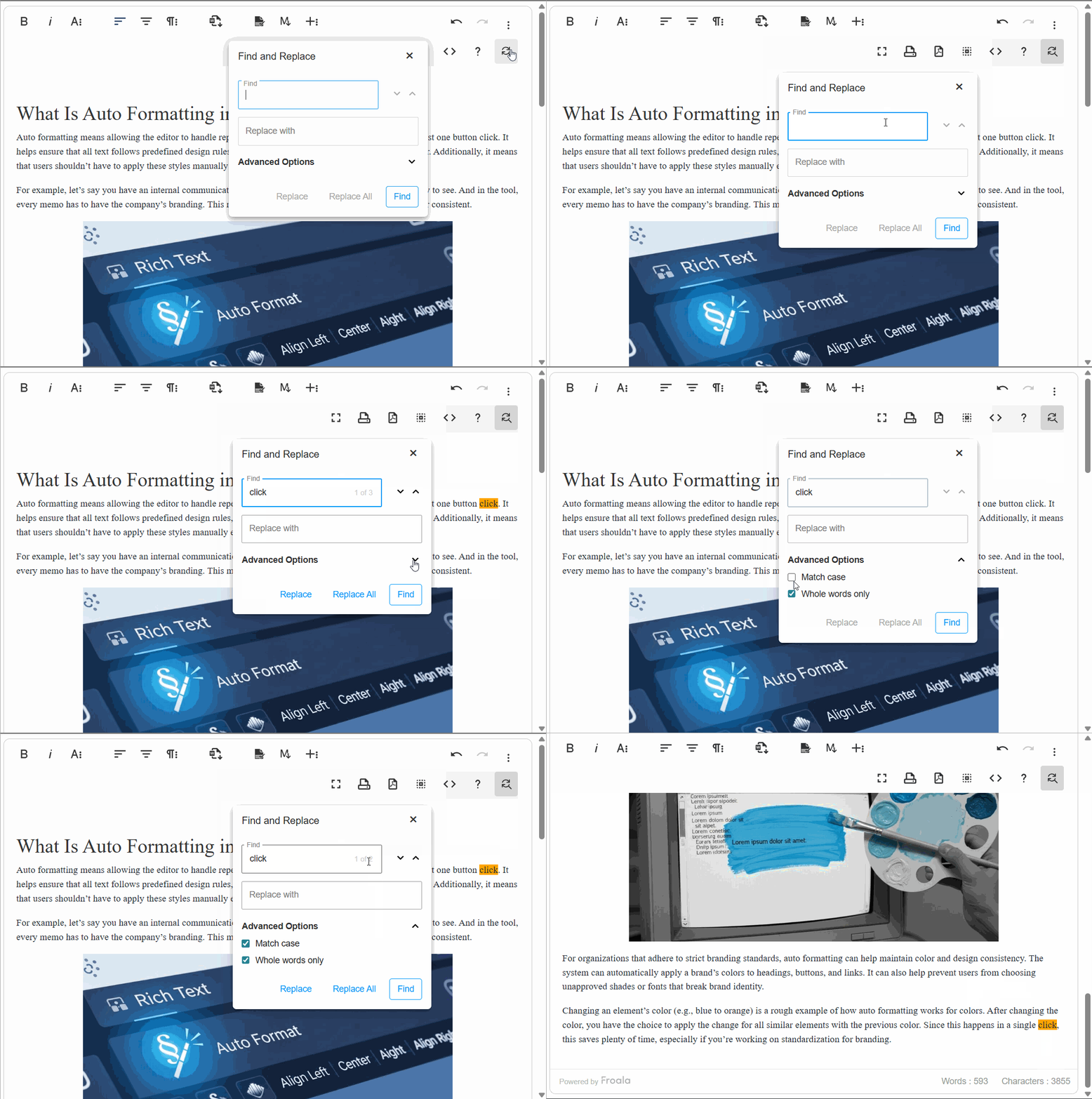
Community

Let us know what you think about our latest release! Join us and our product managers in our GitHub Community to talk about all things Froala.

Froala V4.0.6โ€”The Most Powerful WYSIWYG HTML Editor

Froala Version 4.0.6, emphasizing the latest updates and features.

Froala is back with some big news! ๐ŸŽ‰

The all-new Froala Editor V4.0.6 ย has arrived, bringing the most performant version of our market-leading WYSIWYG editor to our global developer community.

Because of you, Froala has become the most Powerful HTML Editor! The feedback loop you maintain with our team enables us to turn around quality releases packed with the features and enhancements you require in ever-shorter release cycles. Your suggestions were given top priority in the development of this best-ever version of Froala’s Powerful HTML Editor.

If youโ€™re using Froala in your development, weโ€™re positive youโ€™re going to love V4.0.6. Thereโ€™s a lot to unpack with this new versionโ€”read on to see the amazing things you can do with Froalaโ€™s latest user-centric release!

How Version 4.0.6 Empowers Users

1. Plugins:

In Froala editor version 4.0.6 latest release, our developers fixed nineteen issues, all focused on stability and performance. That includes numerous improvements for the core editor, as well as for the following plugins:

If you are loading plugins individually from a CDN on your code, make sure you updated these plugins to the last version. For example, for the colors plugin:

<!-- Colors plugin script -->
https://cdn.jsdelivr.net/npm/froala-editor@4.0.6/js/plugins/colors.min.js
<!-- Colors plugin stylesheet -->
https://cdn.jsdelivr.net/npm/froala-editor@4.0.6/css/plugins/colors.min.css

Find the Javascript and stylesheet links for each plugin by selecting the plugin name from our plugins page.

If you are using the following editor packaged links for your site, all plugins will be included:

<!-- Froala editor script -->
https://cdn.jsdelivr.net/npm/froala-editor@4.0.6/js/froala_editor.pkgd.min.js
<!-- Froala editor stylesheet -->
https://cdn.jsdelivr.net/npm/froala-editor@4.0.6/css/froala_editor.pkgd.min.css

2. Deep-Dive of Froala Editor V4.0.6ย ย 

The release of the Froala Editor V4.0.6ย  was a huge breakthrough. Letโ€™s take a closer look at some of the main improvements in the Froala editor V4.0.6 release.

ย  ย  ย  (i). Issues related to the editor API

The Froala WYSIWYG HTML editor came with a powerful JavaScript API that allows developers to easily customize and interact with the editor through its different options, methods, and events.

ย ย ย ย ย ย ย ย ย ย ย a). Enter option:

For example, you can change the HTML output produced when the user hits the Enter key just by setting the โ€œenterโ€ option of your editor:

// CODE EXAMPLE
new FroalaEditor('.selector', { enter: FroalaEditor.ENTER_BR });

The default value for the โ€œenterโ€ option is FroalaEditor.ENTER_P, which will wrap the new text within the HTML <p> tag.

But if you set it to FroalaEditor.ENTER_DIV, the editor will wrap the new text within the HTML <div> tag.

And if you set it to FroalaEditor.ENTER_BR, which is the third and final value for this option, the editor will insert only the <br> HTML tag when the Enter key is clicked.

This is a powerful feature that allows you to customize the editorโ€™s HTML output based on your application, but it wasnโ€™t working as expected in some cases when it was set to ENTER_DIV or ENTER_BR. This affected the HTML output when the html.getSelected() method is used, so our developers fixed this issue and tested it to make sure it always returns the expected HTML output.

Try it now.

ย  ย  ย  ย  ย  ย  b). Paste from Notepad

Two powerful API options are:

pastePlain, which if enabled, removes the text formatting of the content pasted into the rich text editor but keeps the content’s structure.

And htmlUntouched, which if enabled, applies no special processing to the HTML inside the editor except HTML cleaning.

Enabling both options was causing an issue related to the font size of the content pasted from a notepad, but this also has been fixed.


// CODE EXAMPLE 
new FroalaEditor('.selector', { 
   pastePlain: true,
   htmlUntouched: true,
});

ย  ย  ย  ย  ย  ย  c). MIME typeย 

Froala File Options API controls how and what files users can upload through the editor.

One of these options is fileAllowedTypes, which is an array of file types that are allowed to be uploaded.

Some users had an issue when uploading .msg files even after configuring the correct MIME type. This has now been fixed.

// CODE EXAMPLE 
new FroalaEditor('.selector', {
 fileAllowedTypes: ['application/msg', 'application/msword']
});
ย ย  ย  ย 

ย  ย  ย  (ii). Issues related to the Video feature

Inserting videos in your content is a popular feature nowadays since users prefer to watch videos over reading articles. Froala makes this very easy for you and allows you to control the default width, alignment, display mode, maximum size, whether it is draggable and much more.

When you try to insert a new video in the Froala editor, the video popup has an autoplay option. This wasn’t working with YouTube videos, but our developers fixed this issue.

Specific features or functionalities in the Froala Editor

Try it here

3. What Else is New in V4?

In case you missed the original release, V4 ushered in the next generation of WYSIWYG Editing by introducing some of our userโ€™s most highly-requested features. When you upgrade to V4, you get access to:

Track Changes

This feature allows users to keep track of all the changes they make inside the editor. Edits to text, images, tables, styles, formatting, and more will be tracked followed by accepting and rejecting the changes accordingly through easy access to โ€œAccept or Rejectโ€ a โ€œSingle or Allโ€ changes via accessible buttons in the toolbar.

Markdown Support

Format words & phrases in our rich text editor using code shortcuts through predefined markdown syntax.

Users can markdown Heading, Bold Text, Italic, Blockquote, Ordered list, Unordered list, Code, Fenced code block, Horizontal rule, Link, Image, Table, Footnote, Strikethrough and Task list.

4. Why Should I Upgrade to V4?

  • Upgrading Froala is super easy and takes less than five minutes, read about it in the next section.
  • Upgrading Froala will not break your products; most of the editor’s functionality is covered by unit tests.
  • If you are on an active perpetual plan, once it ends you will be able to use the last version of Froala that was available for a lifetime, so it is better to always update to the latest version.
  • Get benefit of the Track changes and Markdown features which were highly requested by our users.
  • Get the latest editor fixes and improvements.

Read this blog post for more details about why you should upgrade to V4.

5. How Do I Upgrade to V4?

Upgrading Froala is super easy. It is just a matter of four steps or less to upgrade from version 3 to version 4:

For the full instructions, follow this simple guide which describes each of the above points in detail to upgrade your editor to V4 in less than five minutes.

6. Technical Support

We strive for the highest quality with each of our updatesโ€”if you have a technical question, you can check to see if it has already been answered at our help center. If not, contact our Support team.

Let us know what you think about our latest release! Join us and our Product Managers in our Github Community to talk about all things Froala.


Froala v4.0 โ€”The Next Generation of WYSIWYG Editing

Thumbnail for a blog post on Next-Generation WYSIWYG Editing, focusing on advanced editing features.

The latest and greatest milestone update for Our Best Wysiwyg HTML Editor, Froala Editor v4.0, was released today. The HTML Editor has undergone numerous changes and improvements, which you will learn about as you read this post.

What’s newย in Version 4.0โ€”Empowering Usersย 

The feedback loop that you maintain with our team allows us to turn around quality releases with an emphasis on your needs. To that end, weโ€™ve been laser-focused on making the top-requested features of our users a reality.

With Track Changes, Markdown Support, and many other enhancements added to our Editor, thereโ€™s a lot to unpack with this releaseโ€”read on to see the amazing things you can do with Froala Editor 4.0!


Animated GIF displaying various features of Froala Editor, showcasing its dynamic capabilities

Track Changes

This feature enables Froala Editor to keep track of all the changes users make to their text, images, tables, styles, formatting, and more, followed by accepting and rejecting the changes accordingly through easy access to โ€˜Accept or Rejectโ€™ a โ€˜Single or Allโ€™ changes via accessible buttons in the toolbar. Additionally track addition and deletion of text, images, tables. Additionally, styling and formatting changes to text, images, tables.

Track Changes feature includes the following functionalities:

  • Enable / Disable track changes – Users can enable and disable the track changes feature on Froala editor.
  • Show / Hide tracked changes – Users can show or hide the changes made on the Froala editor.
  • Accept / Reject Single change – Users can track and ACCEPT or REJECT the single / last change that is made on the editor.ย 
  • Accept / Rejectย  ALL changes –ย  Users can track and ACCEPT or REJECT ALL changes that are made on the editor.

Try it yourself:

Track Changes makes WYSIWYG HTML editing awesome.

Track changes is a Froala Editor Plugin where we can track the new text, deleted text as well as various styling and format changes.

HTML

<div id="froala-editor">

ย ย <h3>Track Changes makes WYSIWYG HTML editing awesome.</h3>

 ย <p>Track changes is a Froala Editor Plugin where we can track the new text, deleted text as well as various styling and format changes.</p>

</div>

JAVASCRIPT

<script>

ย ย new FroalaEditor('div#froala-editor', {

ย ย ย ย toolbarButtons: ['bold', 'italic', 'underline', 'fontFamily', 'color', 'paragraphStyle', 'trackChanges']

ย ย })

</script>

The Track Changes feature in Froala Editor, highlighting collaborative editing tools.

Intuitive UI for Changeย Tracking: As with all our features, the UI for tracking changes will be simple and intuitive โ€” aligned with the text editing usage everyone is most familiar with. With Track Changes enabled, any text or image additions are shown with a yellow highlight, and changes that are intended to be deleted are highlighted in red with a strikethrough.


Markdown Support :ย 

Markdown support provides the required formatting of words & phrases within the editor through code shortcuts.ย 

With this new feature Froala Editor users can easily add Markdown syntax to their text to indicate which words and phrases need to be formatted. The words and phrases can be formatted through code shortcuts through easy-to-use Markdown syntax.

When in markdown mode, the Froala Editor provides an easy split-screen view so users can see the changes in real-time.

Displaying Markdown editing capabilities in Froala, showcasing text formatting and structure.

Users can markdown Heading, Bold Text ,Italic, Blockquote, Ordered list , Unordered list, Code, Fenced code block, Horizontal rule, Link , Image, Table, Footnote , Strikethrough and Task list. Please find the list of Markdown Syntax provided by Froala under 4.0 release.ย 


Element Markdown Syntax (Code)
Heading # H1

## H2

### H3

Bold **bold text**
Italic *italicized text*
Blockquote > blockquote
Ordered List 1. First item

2. Second item

3. Third item

Unordered List – First item

– Second item

– Third item

Code `code`
Horizontal Rule
Link [title](https://www.example.com)
Image ![alt text](image.jpg)
Table | Syntax | Description |

| ———– | ———– |

| Header | Title |

| Paragraph | Text |

Fenced Code Block “`ย 

{

ย ย “firstName”: “John”,

ย ย “lastName”: “Smith”,

ย ย “age”: 25

}

“`

Footnote Here’s a sentence with a footnote. [^1]

[^1]: This is the footnote.

Heading ID ### My Great Heading {#custom-id}
Definition List term

: definition

Strikethrough ~~The world is flat.~~
Task List – [x] Write the press release

– [ ] Update the website

– [ ] Contact the media

For example, to denote a heading, users can add a hashtag before the word (e.g. #Heading1, #Heading2). Or to italicize text, *italic text*. Users can also mark down Bold Text, Blockquotes, Ordered or Unordered lists, Code blocks, Images, Task lists, and many more!

Highlighting Markdown support in Froala Editor, focusing on ease of content creation

Try it yourself:

Markdown support makes WYSIWYG HTML editing awesome.

Markdown plugin in Froala editor provides flexible rich text and markdown content creation options for authors, and also provides robust, reliable markdown output for developer projects.

HTML

<div id="froala-editor">

 ย <h3>Markdown support makes WYSIWYG HTML editing awesome.</h3>

 ย <p>Markdown plugin in Froala editor provides flexible rich text and markdown content creation options for authors, and also provides robust, reliable markdown output for developer projects.</p>

</div>

JAVASCRIPT

<script>

ย ย new FroalaEditor('div#froala-editor', {

 ย ย ย toolbarButtons: ['bold', 'italic', 'underline', 'fontFamily', 'color', 'paragraphStyle', 'markdown']

ย ย })

</script>


New Patch Release: Froala Editor v3.2.7

a person using a laptop computer

The Editor 3.2.7 patch release focuses on the stability, quality, and security of Our Froala WYSIWYG HTML Editor, addressing 40+ customer-reported tickets in the new patch release. This includes improvements for formatting, image alignment, event focus, copying & pasting content across Word, Onenote, etc. 3.2.7 is planned as the last 3. x release, in advance of our upcoming major version release.ย 

Editor 3.2.7 also includes enhancements focused on providing an even more robust user experience on mobile devices, paving the way for our next major upcoming release, which will introduce Track Changes and Markdown support.


Next Major Version Release Plansย 

The next major version release, 4.0, will introduce our top customer-requested features. Previously previewed as 3.3, version 4.0 introduces Track Changes and Markdown Support to Froala Editor:ย 

  • Track Changes
    • Keep track of all the changes users make to their text, images, tables, styles, formatting, and more.
  • Markdown Support
    • Allows users to easily add Markdown syntax to their text to indicate which words and phrases need to be formatted.


*Features are not committed until completed and GA released.

Froala Editor 3.2.6 SDK and Frameworks Release is Available

text

The Froala team continually strives to improve the quality and features of the products we provide to our community.ย  Today, weโ€™d like to announce the release of Froala 3.2.6 SDK and Frameworks for all our customers on maintenance.ย 

This release focuses on the stability and quality of Froala HTML Editor version 3.x, addressing 45+ customer reported tickets related to the SDK and integration frameworks.

Froala 3.2.6 specifically addresses tickets related to the following development kitsโ€”Node JS SDK, Python Flash SDK, Rail SDK, Java SDK, .NET SDK, and Ruby SDK.ย 

Froala 3.2.6 brings improvements in uploading images and files and effective use of plugins across the SDK framework . Additionally, there are significant formatting enhancements across all the frameworks as well as improved usability in WordPressย ย 

Froala Editor has over 30+ plugins for multiple development frameworks to ease the editorโ€™s integration into web applications. This release improves the development framework integrationย  for widely used frameworks such as WordPress, Cake PH3, GatsbyJS, Django, Meteor, Aurelia, React, Angular 2, and more.ย 

Download this version

For a complete list of improvements and to download this version, refer to the Froala Editor 3.2.6 Change Log for details.

Try Froala WYSIWYG Editor

Havenโ€™t tried the latest version of Froala Editor yet? The free trial provides complete access to all the Editor features. Powerful customization options, 30+ out-of-the-box plugins, and many features to enhance any type of editing experience.ย 

Get your 7-day FREE Trial Today

Froala Editor 3.3 Sneak Preview

a laptop computer sitting on top of a table

Oh, what a year 2020 has been! Even though the turmoil, the Froala team continued to work hard to deliver exciting new products like the HTML Editor and feature-rich releases to our community. So we are mighty proud of that ๐Ÿ˜Š. If you missed some recent announcements, hereโ€™s a quick recap:ย 

  • We introduced Froala Charts, a brand new data visualization product allowing Froala users to seamlessly incorporate charting capabilities into their apps.
  • Froala Pages, the easy-to-use design and editing tool, just got completely free for our community. Same great functionality, but at zero cost!
  • We have enhanced the Froala free tools portfolio. Check out the many free tools you have at your disposal (Online HTML Editor, Froala Whiteboard, Design Blocks, and more!)
  • We launched the new Froala Platinum Support Plan.ย ย 

Thereโ€™s so much coming in 2021 from the Froala team, and we are looking forward to a great year ahead ๐Ÿ˜. Froala 3.3 release is around the corner, so hereโ€™s a sneak preview of the new features that are coming in this release.*

* Features are not committed until completed and GA released.

Support for Tracking Changes

This feature enables Froala Editor to keep track of all the changes users make to their text, images, tables, styles, formatting, and more. This includes support for track changes for newly added and deleted text, as well as various styling and text formatting changes.ย 

With an easy button on the main panel, Froala users can easily โ€˜Enable or Disable Trackingโ€™.ย 

We are also introducing the ability to view or hide all tracked changes, through an easy button on the panel. Users can either show or hide tracked changes by simply toggling the โ€˜Show/Hide Tracked Changesโ€™ button.

The tracking feature allows easy access to โ€˜Accept or Rejectโ€™ a โ€˜Single or Allโ€™ changes via accessible buttons on the panel.ย 

Intuitive UI for Change Tracking

As with all our features, the UI for tracking changes will be simple and intuitive โ€” aligned with the text editing usage everyone is most familiar with. With Track Changes enabled, any text or image additions are shown with a yellow highlight and changes that are intended to be deleted are highlighted in red with a strikethrough.

Markdown Support

Markdown support will allow Froala Editor users to easily add Markdown syntax to their text to indicate which words and phrases need to be formatted.ย 

For example, to denote a heading, users can add a hashtag before the word (e.g. #Heading1, #Heading2). Or to italicize text, *italic text*. Users can also markdown Bold Text, Blockquotes, Ordered or Unordered lists, Code blocks, Images, Task lists, and many more!

When in markdown mode, the Froala Editor provides an easy split screen view so users can see the changes in real-time.ย 

Are you excited about Froala 3.3?

We really are, and look forward to getting Froala Editor 3.3 in your hands. Stay tuned for the official release announcement! In the meantime, try out our newest product, Froala Charts or download the free Froala Pages tool.ย ย 

Eager to provide feedback to our product team?ย  Check out the Froala product idea board, where you can vote on other usersโ€™ feature suggestions or suggest features youโ€™d like to see.ย 

If you have any other questions, get in touch with our team.ย 

Announcing v3.2โ€”the New Froala Editor

graphical user interface, text, application, email

Today marks the release of Froala Editor v3.2, the latest and greatest milestone update for Our Best WYSIWYG HTML Editor with the new features, updates, and improvements on v3.2.

You may check the customer reviews about Froala on why it is a market-leading WYSIWYG editor.ย 

Version 3.2โ€”Continuing to Put Customers First

The feedback loop that you maintain with our team allows us to turn around quality releases with an emphasis on your needs. To that end, weโ€™ve focused all of our efforts this release towards bringing our customerโ€™s top-requested features to life.ย 

Between the all-new advanced image uploading capabilities, new and seamless integrations, and updated Editor SDKs, thereโ€™s a lot to unpack with this releaseโ€”read on to see the amazing things you can do with Froala Editor 3.2!

Advanced Image Manager


Far and away the most highly requested feature our customers had for us was an improved file upload systemโ€”in this new version weโ€™ve equipped users with a completely overhauled file upload manager, capable of handling multiple images, video uploads, folders, and more.ย 


While building this new image manager, we put special care toward ensuring that the UI was intuitive with seamlessly incorporated drag and drop, browse, and multi-upload functionality, allowing your users to upload and manipulate their files of most popular formats all in one place.

Gone are the days of uploading the same file multiple times in different locations of the editorโ€”with these new image uploading capabilities, your users can easily work with multiple image and video files inside a single editor, providing highly-requested improvements to workflow.


What Else Has Been Improved?

The new file & image manager may be the main event, but itโ€™s just the tip of the icebergโ€”version 3.2 of our WYSIWYG editor has plenty more in store including:

  • New Image Uploading Capabilities: You can now easily work with multiple files inside the editor, providing a much improved workflow. The key new image upload features added in 3.2 include:
    • Uploading multiple images and videos at once thus saving a lot of time from doing repeat tasks
    • Manage all files (images and videos) in one place
    • Ability to perform the following actions under a single window before inserting them to the editor.
      • Browse and Upload Filesย 
      • View Filesย 
      • Edit Filesย 


  • Enhancements to the editor, with a strong focus on image upload capabilities
  • Editor SDKs updated for 3.2 to ensure that Froala works with the latest versions of the following development environments:
    • Rails SDK
    • Node JS SDK
    • Python SDK
    • Java SDK
    • .Net SDK
    • PHP SDK
  • Seamless integrations have been implemented and improved for:
    • Ext JS
    • Symphony
    • Cake PHP
    • Knockout
    • Ember
    • Django
    • Meteor
    • Yii
    • Vue
    • Angular
    • React JS
    • Rails


3.2 is Available Now

Enough talking, itโ€™s time to dive on in.

Once youโ€™re done reading the full extent of features and enhancements brought by 3.2 in our changelog, you can jump straight in by heading over to our download page.

As always, we value and appreciate your feedbackโ€”let us know what other features you would like to see introduced or enhanced in future releases, and weโ€™ll be sure to keep them in mind.

We canโ€™t wait to show you whatโ€™s next for Froalaโ€”in the meantime, we hope you enjoy v3.2!

Announcing V2.9.7 Release

A group of working professionals gathered around one man working on a laptop with text editing tools around them.
At Froala, our mission has always been about pushing web editing beyond its conceived limitsโ€”this vision has served as the guiding philosophy for all Froala releases from Version 1.x to Version 3.x

Last V2 Release – Meeting our Customerโ€™s Needs

Additionally, listening to our usersโ€™ needs and delivering high-quality releases that meet their needs has also been a cornerstone of our success. With this in mind, weโ€™re doing the unconventional and delivering one last release to cater to our users who are still dependent on jQuery. 2.9.7 is a huge improvement for v2 and includes numerous bug fixes, performance enhancements, and extra goodies. Read below and if youโ€™re still hesitant to jump to the non-jQuery version, this version is for you!ย 

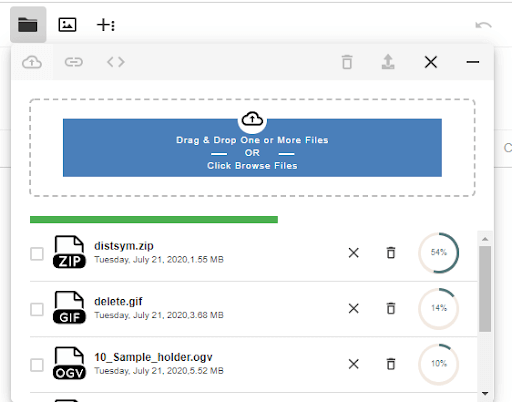
2.9.7 Changelog

The feedback loop from our v2 users has made this latest release possible; our development team has been hard at work updating the 2.x version of Froala Editor with the most highly-requested critical bug fixes missing, including:

  • Improved Document Ready mode functionalities and alignment improvements, such as:
    • iFrame styling parity.
    • Improved alignment and displaying inline images.
    • Improved Toolbar alignment and placeholder in Document Ready mode.
  • Enhanced copy and paste capabilities, including:ย 
    • Style / format maintained in lists and tables when pasted into the editor.
    • Improved copying, pasting lists, creating indentation and styling.
  • Improved content editing functionalities, such as adding descriptive text, dragging, select, delete and copy/paste formatted text inside the editor.ย 
    • Users can now designate whether content is editable.
  • Enhanced superscript and subscript textย  editing feature.
  • Improved Font awesome icons.
  • Improved text inside table feature.
  • Hitting backspace wonโ€™t delete the line break anymore.
  • Improved video upload and embedding features in iOS and alignment issues in safari browser
  • Improved embedly integration.
  • Improved dropdown in android.
  • Enhanced captioning and resizing in feature images.
  • Improved alignment of toolbar over the text areas.
  • More minor bug fixes like HTMLallowed,ย  enhanced read property of โ€˜nextSiblingโ€™ defined, improved enter/return Key behavior and resolved tab issues inside <BR>tag.

2.9.7 is Available Now

Enough talking, letโ€™s get our hands dirty.ย 

Once youโ€™re done reading the full extent of enhancements brought by 2.9.7 in our changelog, you can jump straight into the action by heading over to our Github repo branch for v2.

Though this might be the last version update for Froala Editor 2.x, we always appreciate your feedback. Let us know what features you would like to see polished in future releases to help them perfectly fit your needs.

Announcing Froala Editor V3.1

A man with a blue collard shirt and black hair looking into six monitors at his work desk.

Froala Editor V3.1 has officially arrived, and we hope youโ€™re ready because itโ€™s about to take your editing experience to a whole new level.

When we released V3.0 back in June, heavy emphasis was placed on overhauling the Froala WYSIWYG HTML Editor user experience as a whole. Between the removal of jQuery ๐Ÿ‘‹, revamping our UI, and introducing new features like the smart toolbar and compatibility with custom-made SVG icons, we introduced a number of your most highly requested features. V3.1 is here to keep the good times rolling.

If V3.0 was characterized by the massive quantity of new features that it introduced, then V3.1 can be characterized by the highly-requested features and performance enhancements it introduces. Our development team has worked tirelessly to ensure this new version upholds our reputation as the top WYSIWYG Editor on the market, always keeping their eyes on what really matters mostโ€”to youโ€” our users.

We could go on for hours about the great ways that V3.1 of our Editor is going to make your life easier, but weโ€™re sure that youโ€™re eager to dive into the latest version, so weโ€™ll just keep it to the highlights. For the full list, check out our changelog.

Letโ€™s get into it.

Ctrl+C, Ctrl+V

WYSIWYG exists to simplify the editing process as much as possible; what could be simpler than copying & pasting? V3.1 introduces enhanced Word processor support that ensures your content is formatted exactly as it should be. When you drop content (text boxes, numbered lists, tables, captioned images or absolutely anything) into the Froala Editor from a Word document or another editor, it will be as simple as Ctrl+C, Ctrl+V.

iFrame Joins the Par(i)ty

Minimalist and professional webpage layout design

Our goal at Froala is to provide our users with a best-in-class editing experience from start to finish; which is exactly why weโ€™ve opted to bring iFrame to parity with the rest of our editing experience. As of version 3.1, weโ€™ve expanded our iFrame support to offer an iFrame editing experience that acts and feels like the native Froala Editor.

Edit Your Way

As incredible as the Froala Editor is, weโ€™re aware that it may not do all of the heavy-lifting in an average JavaScript application. With this in mind, the Froala dev team went the extra mile to ensure that our editor seamlessly integrates with the top JavaScript frameworks out there.

Developers utilizing nearly any tech stack (from Ext JS, to Angular, or ReactJS))can harness the full power of our best ever version without missing a beat.

At the end of the day, Froala Editor was built for developers, and our mission is to provide the right tools to ensure that devs of all skillsets are armed with the most powerful WYSIWYG Editor on the market. With Version 3.1, the Editor SDKs for popular development environments have been updated to support their latest versions.

What’s Next?

Now that you know what weโ€™ve been up to, weโ€™re sure youโ€™re wondering whatโ€™s next.

Providing features that greatly improve developer usability and productivity is what gets us out of bed in the morning. To that end, weโ€™ve already jumped right back into developing future updates.

If you have any thoughts on the current release or suggestions for future releases, we would love to hear them.

Join Us January 30th

Share your thoughts by joining us during our upcoming Froala Editor-focused webinar on January 30th at 10a.m. CST. You might even be the lucky winner of a $25 Amazon Gift Card ๐Ÿ˜‰.

[Register]

Donโ€™t wait, give Froala version 3.1 a spin. Get Started now!

As always, all of our Pricing Plans are available at https://awsstage.froala.com/wysiwyg-editor/pricing.

Love Froala? Write us a review on G2.

Sign up

Download the code by signing up for our newsletter

Sign up

Download the code by signing up for our newsletter

Note: By registering, you confirm that you agree to the processing of your personal data by Froala, Inc. - Froala as described in the Privacy Statement. Froala, Inc. - Froala is part of the Idera group and may share your information with its parent company Idera, Inc., and its affiliates. For further details on how your data is used, stored, and shared, please review our Privacy Statement.