

6 Essential HTML Code Writer Plugins for Enhanced Editing Experience

Wherever content is, HTML code writers follow. These tools, also known as WYSIWYG HTML editors, let users craft web-based content and see the result in real time. Using an HTML code writer, users can make blog posts, create webpages, share content, and more without necessarily writing code.
Plugins are extensions or add-ons that enhance the capabilities of an HTML editor. These plugins help make implementing usually complex editor features faster, cleaner, and more maintainable for developers. For end users, such as authors or marketers, they make editing less intimidating by automating technical steps behind the scenes.
By integrating the right HTML editor plugins, you can achieve cleaner code, better performance, and improved scalability, while delighting users with amazing features. This guide explores six essential plugins for HTML code writers, highlighting how each can improve your and your users’ workflow. So, before you explore solutions or build your own editor, read on below to learn about some of today’s best editor plugins.
Key Takeaways
- Plugins enhance speed, accuracy, and maintainability in developing HTML code writer experiences.
- Syntax highlighting, code view, code beautification, and auto-completion improve code readability and reduce errors in HTML editors.
- AI plugins significantly boost efficiency in both coding and writing.
- Custom rich text editor plugins let teams tailor functionality to project needs.
- Some built-in editors allow both custom plugins and various ready-to-use ones.
1. Syntax Highlighting in HTML Code Writers
HTML code writers are just as helpful for developer end users as they are for marketers and content creators. They help developers collaborate on, share, and edit entire codebases (think GitHub’s editor).
The best HTML code writers support syntax highlighting, which assigns different colors and styles to HTML elements, attributes, and text. For example, tags might appear in blue, attributes in red, and text in black. This color-coding makes spotting patterns, locating specific elements, and understanding structure easier at a glance.
Syntax highlighting helps developers catch errors quickly. If a user forgets to close <div> tags, the code’s color pattern will look “broken,” alerting them to potential problems. This works similarly to traditional code editors but works right in the browser without requiring heavy IDEs or complex setups.
This means that marketers, designers, content managers, and developers can make safe, accurate HTML edits without having deep coding expertise.
By providing immediate visual feedback, syntax highlighting reduces the learning curve and improves collaboration among teams. Hence, having an editor that supports syntax highlighting plugins can significantly boost productivity for both your developers and users.
Tip: If the WYSIWYG HTML editor allows it, customize the UI so that the colors don’t cause eye strain. Some editors also allow you to choose themes that help reduce cognitive load.
2. Code View for HTML Editors
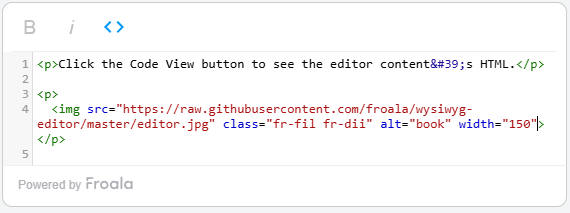
Code view plugins, also known as HTML live preview, allow users to switch from a visual HTML editor to raw HTML and back. This is essential for when users need to tweak something that the visual interface can’t handle precisely. For example, if users need to test inline styles, edit alt attributes, or add custom scripts, they need code view.
A code view plugin also enables users to promote transparency by letting them see the underlying HTML. It reveals how formatting decisions in the WYSIWYG view translate into actual code, making catching unnecessary tags or overly complex structures easier.
For mixed-skill teams, having an editor with a code view plugin offers versatility. Advanced users can make direct changes to the HTML, while beginners can stay in the WYSIWYG view and benefit from clean output. This is why in content management systems (CMS), users can opt for manual coding, using a WYSIWYG interface, or both.
3. HTML Code Beautification
An HTML code beautification plugin enables WYSIWYG editors to display code in a cleaner, more aesthetic manner. It does so by organizing HTML with consistent indentation, line breaks, and spacing. This improves readability, especially in long documents with nested elements.
Additionally, a consistent format from a code beautifier plugin makes collaboration easier. When every team member works with the same style, there’s less friction in understanding each other’s code. This becomes even more important in larger projects, where dozens of people may touch the same codebase.
Beautified code is also easier to debug. Misaligned or compressed code makes locating missing brackets or misnested tags easier. With a clean structure from a code beautification plugin, you help avoid these issues and make maintenance easier.
4. Auto-Completion and Tag Suggestions
Modern editing tools would never feel the same without auto-completion and tag suggestions. Auto-completion, like the ones in traditional code editors and even communication tools, predicts what users type in real time. This is invaluable for developer end users and content creators alike.
For example, a developer could switch into code view and start typing <p>, and the plugin can instantly add the closing </p>. It can also suggest attributes like class=”” or alt=”” for elements, saving time and reducing typos.
By handling repetitive typing, auto-completion lets developers focus on layout and structure rather than memorizing every HTML rule. This reduces errors like forgetting to close a tag or misnaming an element.
When paired with syntax highlighting, auto-completion plugins create a faster, smoother workflow. Some code view plugins even come with both syntax highlighting and auto-completion in one bundle.
For content creators, marketers, and other users, auto-completion is also possible through the use of AI or machine learning (ML). As the user types, the editor can suggest possible words depending on the context of the content. For example, Gmail uses ML in their Smart Compose feature to help users draft emails easily or faster.
5. Embedded AI Tools for HTML Editing

AI has done a great deal of improvements for HTML code editors. For instance, AI-enhanced HTML editor plugins can detect and suggest improvements to the editor’s content as users type. This convenience, efficiency, and innovation has made AI one of the must‑have features in an HTML code writer today.
Developers can use an AI-powered editor to get useful insights on their code. The in-editor AI can suggest best practices, such as replacing <b> tags with semantic <strong> ones for better SEO and accessibility.
Some AI tools can predict potential issues before deployment, like most CMS do. For example, they can flag missing alt text in images, suggest more descriptive link text, or identify unused CSS classes. This proactive approach prevents costly fixes later on.
AI also boosts productivity by automating repetitive edits. Imagine the tedium of updating the same attribute across hundreds of elements. AI can do it in seconds, resulting in a cleaner, more accessible, and more maintainable HTML.
For writers of blog articles, social media posts, and other content, AI helps improve readability, grammar, and syntax while speeding up the writing process. No matter the field of content creation, AI has turned into a versatile assistant that bridges the gap between technical accuracy and creative expression.
By integrating an AI plugin into HTML code writers, teams reduce manual effort and enable an efficient HTML code‑writing workflow. Granted, not all editors contain a built-in AI assistant. Thankfully, some editors allow you to create and customize your own plugins, including AI-powered ones.
Note: To promote content quality and originality, clarify that users should use AI only to generate ideas and improve, enhance, and correct content. Furthermore, you should make it clear to users that not everything that AI generates is correct or updated.
6. Custom Plugins for Ready-Made HTML Code Writers
The best HTML code writers let developers create and customize their own plugins. Custom plugins extend the functionality of editors to match your users’ exact workflow. For example, LMS (learning management systems) might use a plugin that inserts pre-styled quiz templates directly into a lesson page.
Custom plugins also give your editor and platform better scalability. As your project grows, you can add or remove plugins to keep your editor lightweight and relevant. This adaptability ensures you’re not overloaded with unused features.

Some prebuilt editing solutions can also save hours of development time while offering plenty of features and plugin customization. Instead of writing new tools from scratch, teams can use existing editors as a foundation, customizing them only as needed. Let’s quickly explore some popular ones in the next section.
Popular Examples of HTML Editors & Plugins for 2025
Several modern HTML editors support some or most of these plugins. Currently, some of the most popular editors include Froala, TinyMCE, and CKEditor. Here’s what makes each one stand out:
Froala Editor
Froala’s refined WYSIWYG editor is lightweight, feature-rich, intuitive, and easy to customize. It contains features that go beyond simple rich text, such as file management, SEO-ready content, and Markdown, among many others. In terms of plugins, it has:
- Code view
- Syntax highlighting
- Code beautification
- Embedded AI
- Plugin customization
- Embedly (embedding any content from the web to the editor)
- File and media management
- FontAwesome for icons
- Markdown
- Spelling and grammar checker
TinyMCE
TinyMCE is a popular solution, especially in CMS, that offers a free editor with basic features and advanced features from paid plans. Its features include both basic and advanced formatting options, plugins and customization options, and themes. Its plugins include:
- Code view
- Syntax highlighting
- Dark or light mode display
- Embedded AI
- Table of contents
- Plugin customization
- Image editing
- Insert date/time
- Markdown
- Spelling and grammar checker
CKEditor
CKEditor is a flexible and modern editor that emphasizes structured content editing and robust customization options. Like Froala and TinyMCE, its modular architecture and extensive plugin ecosystem allow developers to tailor it based on their needs. Here are some of its plugins:
- Code blocks
- Syntax highlighting
- Div container manager
- List block
- YouTube plugin
- AI assistant
- Block quotes
- Image editing
- Markdown
- Word count
Each of these platforms balances performance, customization, and ease of use differently. Ultimately, the best choice depends on your team’s workflow, project scale, and technical expertise, along with your users’ needs.
Conclusion
An HTML code writer becomes exponentially more powerful when you pair it with the right plugins. From auto-completion to AI-driven optimization, each feature works toward producing clean, efficient, and scalable code and content.
Choosing the optimal plugins reduces errors, speeds up repetitive tasks, and bridges the skill gap between technical and non-technical contributors. They also help maintain a consistent code or writing style, which is critical for long-term collaboration. It’s safe to expect that in this year and the next ones, we’ll see more innovative plugins like AI-powered real-time collaboration, smart templates, and more.
In the end, selecting the right set of plugins isn’t about having the most features. Instead, it’s more about having the right features for you and your users’ workflow. So, carefully discern your project requirements, choose between a built-in or from-scratch editor, and select the plugins that make the most sense for your use case.





No comment yet, add your voice below!