
Modern Web Development Trends with React: Froala Rich Text Editor

As we move through 2025, the way we create and interact with digital content continues to evolve, driven by powerful frameworks like React. Originally developed by Facebook, React remains at the forefront of modern web development, enabling developers to build fast, interactive user interfaces with reusable components.
Its influence has reshaped how websites and applications are structured, making it easier to create scalable, responsive experiences. Alongside this evolution, tools like the Froala Rich Text Editor are gaining traction by simplifying rich text editing, supporting accessibility, and seamlessly integrating with modern React-based workflows.

React in 2025: Changing How Websites Are Made
React is playing a big role in four important things:
- Component-Driven Architecture and Design Systems
- Accessibility as a Priority
- Performance Optimization and Progressive Web Apps (PWAs)
- Server-Side Rendering (SSR) and Static Site Generation (SSG)
These trends will shape how websites look and work. Let’s see how React fits into these important changes in how we make websites.
1. Component-Driven Architecture and Design Systems
Using small building blocks called components is now a big part of making websites. In 2025, it’s even more important, as developers increasingly reuse these modular components to build scalable and maintainable interfaces.
React fits seamlessly into this approach—it’s built entirely on reusable components. Developers can create a consistent UI by combining these components with a design system that defines shared styling and behaviors.
For example, here’s how a Froala Rich Text Editor could be wrapped into a reusable TextEditor component that aligns with a design system:
// components/TextEditor.jsx

// Importing React and Froala WYSIWYG editor component
import React from 'react';
import FroalaEditorComponent from 'react-froala-wysiwyg';

// Importing necessary Froala Editor styles for proper visual formatting
import 'froala-editor/css/froala_style.min.css';
import 'froala-editor/css/froala_editor.pkgd.min.css';

// Importing custom CSS to match the design system of the app
import './TextEditor.css'; // Applies border, padding, and margin to the editor wrapper

// TextEditor component accepts `value` (text content) and `onChange` (update function) as props
const TextEditor = ({ value, onChange }) => {
  // Configuration object for Froala Editor
  const config = {
    placeholderText: 'Start typing...', // Sets placeholder text when editor is empty
    toolbarButtons: ['bold', 'italic', 'underline', 'formatOL', 'formatUL'], // Defines visible toolbar options
    heightMin: 200, // Sets minimum height for the editor
  };

  return (
    <div className="editor-wrapper"> {/* Wrapper div for styling */}
      <FroalaEditorComponent
        model={value} // Sets the current value of the editor
        onModelChange={onChange} // Updates the parent component when the content changes
        config={config} // Applies the defined configuration
      />
    </div>
  );
};

// Exporting the component for use in other parts of the application
export default TextEditor;
Explore the full working example in this GitHub repository.
This approach lets teams:
- Reuse the editor across multiple pages
- Apply consistent styling via a design system
- Maintain cleaner, modular code
Tools like Froala integrate well into these ecosystems, enhancing productivity while maintaining design consistency.
2. Accessibility as a Priority
Making websites accessible to everyone has become more important lately and will stay important in 2025 and beyond. It’s crucial to create websites that everyone can use.
React, a tool for building websites, is committed to this idea. It has features like ARIA attributes and practices that make it easier for people with disabilities to use websites. This is important to ensure everyone can access and use the internet.
Froala’s LTS SDK for React is in line with this idea by having special features in its React rich text editor that focus on accessibility. This helps developers create content that’s easy for everyone to use, ensuring no one is left out when using websites.
3. Performance Optimization and Progressive Web Apps (PWAs)
Making websites work faster is important, especially now that more people use phones and tablets. React helps with this by using a clever way to handle how things show up on the screen. It makes websites run faster.
Also, PWAs are becoming more popular. They’re like websites that feel and work like phone apps. React is good at helping make these kinds of websites, which is why it’s a great choice for building them.
Froala’s LTS SDK for React goes well with these trends that focus on making websites faster. It provides a text editing tool that works quickly and lets users interact smoothly.
4. Server-Side Rendering (SSR) and Static Site Generation (SSG)
More people want websites to load faster, so methods like SSR and SSG are making a comeback. React can use these methods, which keeps it important. Websites want to show up better in search engines and work faster, so more websites might start using SSR and SSG in 2025.
React Rich Text Editor works smoothly with setups like SSR and SSG. This means developers can easily add awesome text editing features to websites. It doesn’t matter if the websites are already built or still being made; this tool fits right in!
Step-by-Step Integration of Froala as a React Rich Text Editor
React is popular for making cool web apps. It works great with Froala’s Rich Text Editor, giving React developers a good way to edit text that’s easy to use and keeps things safe. Making Froala work with React apps is made to be simple:
Using the React Froala WYSIWYG Editor
Step 1: Install from NPM
To start using the React Froala WYSIWYG editor, you’ll first need to install it from the NPM package registry. Use the following command in your terminal or command prompt:
npm install react-froala-wysiwyg froala-editor --save
This command will download and install the React Froala WYSIWYG editor package into your project.
Step 2: Import the Component and Stylesheets
Next, you’ll need to import the necessary stylesheets to ensure the editor’s proper appearance. Include these lines in your React component where you’ll use the editor:
import FroalaEditorComponent from 'react-froala-wysiwyg';
import 'froala-editor/css/froala_style.min.css';
import 'froala-editor/css/froala_editor.pkgd.min.css';
import './TextEditor.css';
These lines import the required Froala Editor stylesheets and the React Froala WYSIWYG editor component into your React project.
Step 3: Use the Editor Component
Now, you can use the editor component within your React application. Place the <FroalaEditorComponent /> tag where you want the editor to appear in your JSX code. For instance:
<FroalaEditorComponent tag='textarea' config={this.config} />
This line creates the editor component, specifying the HTML tag to be used (in this case, a textarea) and passing a configuration object (this.config) to customize the editor’s behavior and appearance according to your requirements.
These steps will enable you to integrate and use the React Rich Text Editor within your React application effortlessly. Adjust the configurations as needed to tailor the editor to your specific needs.
Step 4: Preview the Editor
Users can also experience a preview of the Froala Editor integrated with React.
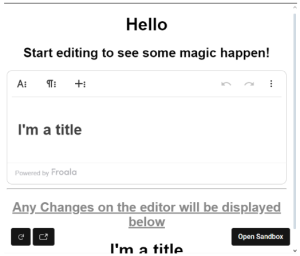
Check out the full step-by-step instructions available in this GitHub repository.
Explore our full documentation for integrating the Froala WYSIWYG Editor with React JS.
Pitfalls to Avoid When Using React WYSIWYG Editors
While integrating a React WYSIWYG editor like Froala Rich Text Editor offers many advantages, developers may face a few common challenges. Here are key pitfalls to watch out for:
Version Incompatibility
Froala may have peer dependencies that are not immediately compatible with the latest version of React (e.g., React 19). Use the –legacy-peer-deps flag during installation or align versions carefully to avoid installation errors.
SSR Compatibility Issues
When working with Server-Side Rendering (SSR) frameworks like Next.js, WYSIWYG editors can sometimes throw errors during server rendering due to their browser-only dependencies. Make sure to dynamically import the editor or load it conditionally (only on the client).
Missing Policy & Signature for Advanced Features
When using Froala with Filestack or similar services for advanced features like image tagging, forgetting to generate the required policy and signature can break functionality. Always configure security settings properly before calling API endpoints.
Styling Conflicts
Froala injects its own styles, which may conflict with custom design systems. Use scoped CSS or apply overrides carefully to maintain consistent branding across your UI.
Conclusion
As modern web development continues to evolve in 2025, React remains a powerful and flexible framework at the core of building fast, accessible, and scalable web applications. Developers are increasingly embracing tools that align with React’s component-driven architecture and performance-first philosophy—and the Froala Rich Text Editor is a prime example.
Designed for seamless integration, the Froala Rich Text Editor offers a lightweight, fast, and highly customizable experience that fits perfectly into React-based workflows. Whether you’re building dynamic content management tools, enhancing accessibility, or optimizing performance with SSR and PWAs, using a robust React WYSIWYG editor like Froala can significantly boost your development efficiency and end-user experience.
By combining the strengths of React and Froala, developers can confidently build modern, interactive interfaces that meet today’s design standards while keeping code clean and modular. If you’re looking to implement a professional-grade rich text editing solution in your next React project, Froala’s React SDK is an excellent place to start.







No comment yet, add your voice below!