
Rich Text Editor HTML: What Are Its Properties And Rules?

Users may sometimes encounter difficulties using and making the most of the rich text editor HTML apps are integrated with. This is especially true if they are unaware of the tool’s properties and rules. One of the problems users encounter when they use rich text editors is the inability to navigate thoroughly. Because of this, they won’t be able to (or won’t want to) use all the features of the editor. The result? Users will find your editor and application confusing or complicated. The cause? The developers most likely had an insufficient understanding of rich text editors’ properties and rules, leading to poor intuitiveness.
Therefore, it’s just as important for developers to learn about the properties and rules of rich text editors. This article shows the problems and gives you the solution: all rich text editors follow the same principles. So, you should learn these principles before you start implementing a rich text editor in your application. Because the better you know an editor’s inner workings, the better your users’ experience will be.
What do we mean by “rich text”?
Rich text refers to a type of text or document that supports visual enhancements, such as styling and formatting features. Nowadays, we encounter rich text on a daily basis. For example, whenever you see bold, italic, underlined, indented, or centered text (among many others), you see rich text.
Related: Rich Text vs. Plain Text
People commonly use different types of word processors, such as Microsoft Word, to create rich text. However, you usually can’t open or display rich text created in these word processors and saved using their native format properly in other word processors. That’s why we have the more generic Rich Text Format (RTF).
What exactly is the Rich Text Format (RTF)?
The Rich Text Format is a file format that allows users to create, edit, and view rich text. What’s special about it is that rich text can be processed regardless of the word processor or operating system. Introduced by Microsoft in 1987 (and developed further until 2008), RTF allows rich text to be standardized and cross-platform. This, in turn, makes rich text editing more convenient for users. Speaking of which, it’s also worth learning about the importance of text editing today.
Let’s take a look at an example of the usefulness of the rich text format. You can create a Microsoft Word file (.DOCX) and open it with Google Docs or other word processors or editors. RTF makes it so that text style and format are preserved regardless of which word processor or editor you’re using.
What is an HTML rich text editor?
An HTML rich text editor, or WYSIWYG (what you see is what you get) editor, is a powerful editing tool. It allows users to format and style text, upload files, and more for web content. It does so using its two major components, a toolbar and an editing space. Furthermore, it makes editing easy because users won’t have to know how to code to make changes to a website. This makes HTML editors the most convenient choice for non-technical users or developers who want to save more time. And for those who prefer writing code, the best of these editors also have an HTML mode feature.
The vast majority of HTML rich text editors are accessed via web browsers. Let’s explore more of its WYSIWYG aspect. It lets users see how the changes they make in the editor will look once published while they’re editing. This low-code feature makes it popular among blogs, Content Management Systems (CMS), and other frequently updated and content-heavy sites. While HTML rich text editors should not be directly compared to standard HTML text editors, they do provide faster content creation. They can even be used as website or template builders. So, we can say that one of the greatest advantages of WYSIWYG editors is their customizability and flexibility.
How customizable are rich text editors?
Most modern rich text editors on the market allow for in-depth customization. This includes customizing the toolbar and button placements, creating your own buttons, and styling the editor to match your theme. Some even allow you to initialize the editor inside other HTML elements, such as iframes (off-page editing, anyone?). The editing possibilities are endless when you customize your rich text editor.
Customization plays an important role in design and general productivity. Without it, there will be less diversity among the text editors across different applications. What that could mean for your app is that it would become less unique. It also means that users will be stuck with the same features for as long as you don’t have customization. And what if your editor has plenty of features that your users don’t need yet? Customization provides a way for you to hide or exclude them.
What are the properties of an HTML rich text editor?
An HTML rich text editor’s properties, also known as options, directly dictate its editing experience. They are somewhat like a set of instructions or configurations you’ll add to your editor before you deploy your application. These properties tell the editor which features to include or not. Are these properties like editor customization? Pretty much so, because they affect an editor’s visible or enabled features as well as the logic behind them. Learning about and understanding the most important properties of a rich text editor is key to improving the overall user experience. Let’s continue below to get to know some of these properties.
Editor mode properties
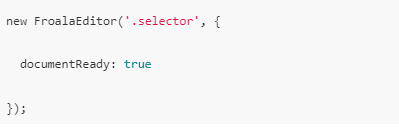
You can modify how the editor generally appears using editor mode properties. These modes include document-ready, inline, full page, classic textarea, and more. With these properties, you can easily pick the perfect editor mode for your application. For example, if you’re making an online word processor like Google Docs, then you should use the document-ready mode.
Saving
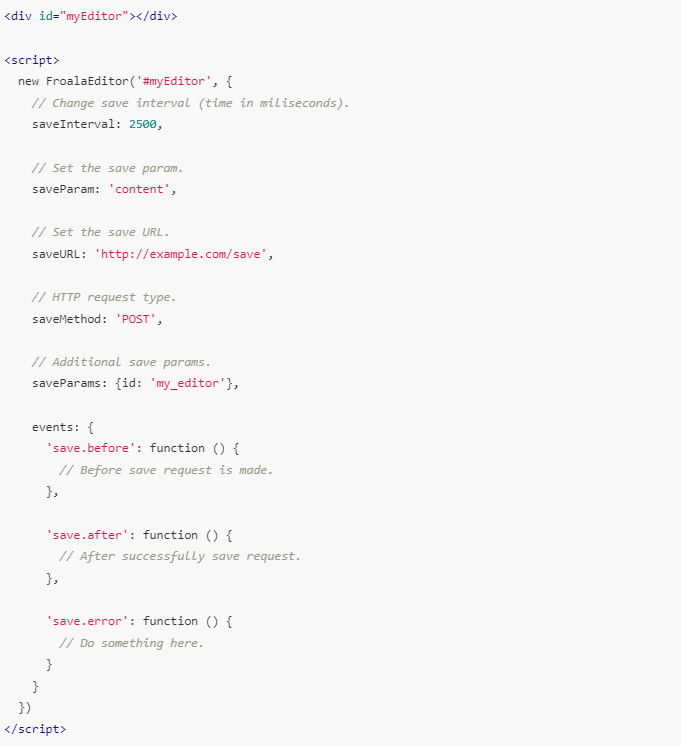
The most advanced rich text editors allow you to configure their saving capabilities and behavior. Modern editors usually allow for auto saving and manual saving by both AJAX (Asynchronous JavaScript and XML) and form submissions. Hence, you’ll only need to choose which saving methods you prefer and then configure the saving properties. These properties usually include the interval (auto save), method (e.g., post), parameters, and URL (where the content is saved).
Default properties
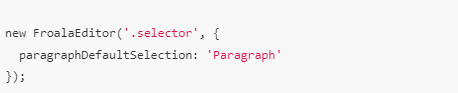
Having default values for your editor elements is greatly beneficial because it sets a standard. Let’s check out a simple example. If you have an editor where users can only input code, you won’t want them to have headings and titles. And if your users are mostly writers, then you should choose “Paragraph” as the default instead.
File properties
The ability to customize how your editor interacts with files is also helpful in building a better editing environment. The allowed file types, upload methods, size limitations, cloud upload options, and so on are all part of this.

Styling
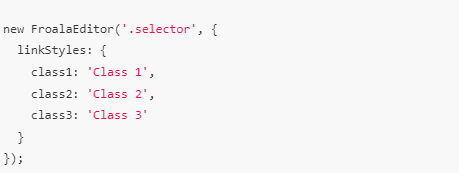
The best rich text editors have styling properties for multiple elements, such as tables, images, links, paragraphs, and so on. That’s because the more styles there are, the more you can make your editing experience and interface unique and beautiful. For instance, you can customize the appearance of links in your editor with a link style property. From colors to thickness, it gets rid of plain-looking links and easily replaces them with those that fit your theme.
Rules for Rich Text
The rules of rich text are overwhelmingly numerous, to say the least. They cover important areas such as syntax, conventions, and contents. To see the full list of rich text rules, check out this RTF specification page. If you’re making your own rich text editor, then it’s definitely worth learning all these rules. However, if you’re planning to use a ready-made editor, then you don’t have to learn and read through every rule. In fact, you’ll only have to integrate it in a matter of seconds, configure it to your liking, and you’re good to go.
Conclusion
The properties and rules of a rich text editor (HTML) tell you the best way you should approach any editing tool. You should always consider these whenever you plan to implement a rich text editor in your app. Whether you’re making your own editor or integrating a third-party tool, these rules will guide your decisions.






No comment yet, add your voice below!