
HTML Comments: Why They’re More Useful Than You Think

HTML Comments: Why They’re More Useful Than You Think
If there’s another must-have skill for developers besides coding and critical thinking, it’s knowing how to properly write HTML comments. Should you skip writing comments or write messy, unclear, or lengthy ones, you could cause problems in development and maintenance. For instance, a lack of comments makes other developers confused and lost, especially when reading thousands of lines of code. Furthermore, those who read unclear or incorrect information in comments might make unwanted changes, possibly breaking the application.
Related: Online HTML Editor
Thus, we should always think twice before saying “I won’t forget what this code does” or “I’ll write comments later”. As you’ll see in this article, these comments can contribute to coding efficiency and quality.
What are HTML comments?
HTML comments are a way of explaining code sections in HTML. Without them, developers would have to read lines of code or documentation to find out what the code does. And the longer the code, the more difficult it would be to understand. So, developers often write comments for their sake and for others who would have to maintain the code.
Comments in HTML are elements wherein any code written between their opening and closing tags are not displayed in browsers. These comments are written inside the <!– and –> tags; for example:
<!– This is a comment in HTML. This will be highlighted green in most code editors and won’t be shown on browsers –>
Now, let’s see where and when you should use comments in the next section below.
When are HTML comments used?
Comments are a huge part of a developer’s life because they help us clearly keep track of our progress. Thus, we need to learn when, where, and for which purpose we can use them.
When you need better communication with your development team
There is no one way of writing code. Everyone has their own preferences. Because of this, developers might find it difficult to review, edit, or integrate someone else’s code. For example, let’s say we have a newly hired developer with a different code writing style and standards. And let’s say that their first task is to fix some bugs of an application. The developer would have to go to the line(s) with error using a console. Afterwards, they must figure out what the adjacent lines of code mean (e.g., what the function with the line(s) of error does). What if those lines are complicated, in the thousands, and/or messy? That would be very troublesome and time-consuming for the new developer.
Thankfully, developers can write comments. By writing well-placed and well-written comments, members of a development team can make their codes a lot more understandable. In our example earlier, let’s say that other developers had placed comments in their codes before the new developer arrived. When it’s time for the new developer to find bugs, they would find it easier to do. Instead of finding a mess of a code, they’d find brief and clear explanations of what each code section does. Therefore, adding comments to existing code can greatly improve communication and understanding between developers.
When you need to revisit old codes
As developers, we also have the duty of maintaining previously deployed applications. This includes revisiting old codes to fix bugs, improve features, reusing functions/methods, or add new functionality. When you check on an old code with tens of thousands of lines after a year or two, would you still remember what each section does? Probably not. You’d have to spend hours to days of just reviewing code before you could start with the actual refactoring work. With comments, on the other hand, you would know what each section or block of code is right away. This lets you gain familiarity with old code a lot quicker, letting you focus on your tasks.
When you’re making a code/library publicly available
What if you want to make source code public, as in the case of open-source libraries and plugins? You need to make sure that your users won’t have a hard time learning it. So, aside from writing good documentation, you can also leave out comments in your source code. Comments in source code help users understand how your library/plugin works. Through them, you can explain concepts in a more engaging and practical way. This lets your users have an easier time to get started using your code for their projects. Additionally, they let you clearly define your license terms.
Now that we know when we should comment in HTML code, let’s discuss the ways we can add them.
How do you add HTML comments?
Single-line comments
This comment type involves writing a comment in a single line that doesn’t contain any other HTML elements alongside it. The image below shows usage of single-line comments:
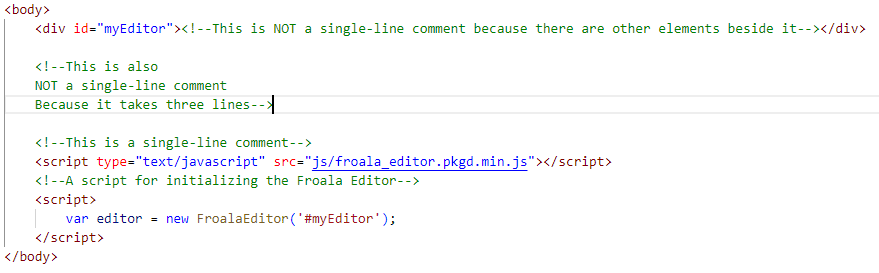
As you can see from the image, there are two single-line comments, one for each script. These comments effectively serve as labels or brief descriptions for a section of code (e.g., like how they appear above the script tags above).
Inline comments
These comments refer to those that are beside or enclosed in other HTML elements. The following image shows an example of inline comments:
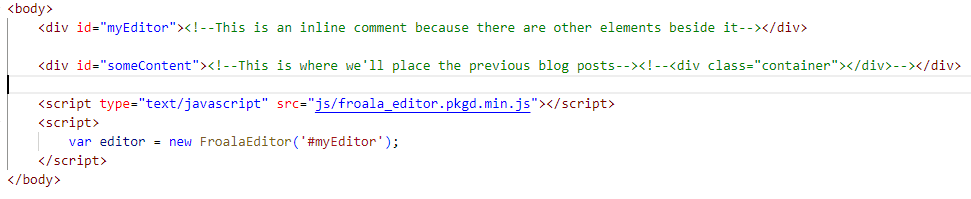
The code snippet above shows two inline comments. As demonstrated, we can use inline comments to describe tags to denote areas of future development (e.g., maintenance/refactoring). They can also be used to disable some elements that are still being tested or yet to be added.
Multiline comments
Finally, we have multiline comments, which are comments that span multiple lines. Here’s how they look in action:
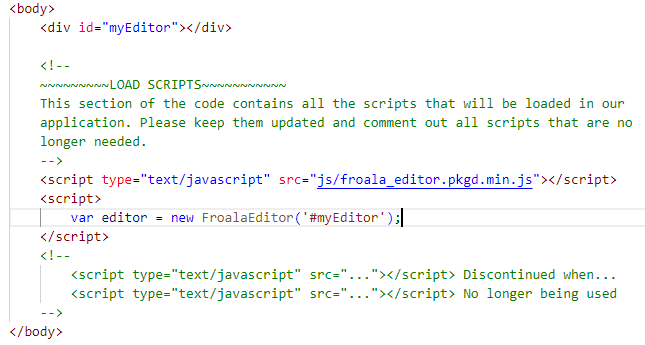
In the code snippet, we can see that multiline comments are used for both explaining and disabling lines of code.
So, what do you think? It seems that comments are more useful than they appear. That’s why experienced developers recommend adding comments to your code. Besides, no one wants to debug lengthy code without having comments to guide them. However, it’s not enough to simply add comments. You must also do so in a way that’s clear, concise, and sensible. We’ll go through that in the next section.
What are some best practices to follow when writing HTML comments?
Avoid rewriting the contents of your code
Comments summarize your code to make it a lot easier to read and understand. So, you should never just translate your code to English or a high-level language. Doing so will make it seem like you’re writing pseudocode, which leaves readers in the same place as they were. Instead, ask yourself what the key variables and events are and briefly write them down.
For example, you can list down a function’s input, process, and output. You can write: “This function takes two integers as an input and returns their sum”. That’s a lot better compared to: “This is the function named add(num1, num2). We then write sumNum = num1 + num2. Then, we write the code return sumNum.” Now, imagine that but for a more complicated function.
Keep HTML comments short and sweet
Comments that aim to explain code shouldn’t take too many lines. You’re not writing a documentation or dissertation, after all. By keeping them short, you can ensure that your readers will get the gist of your code right away. This prevents them from being distracted.
Don’t include everything
It’s wise to remember that comments, while hidden on browsers, can be viewed by anyone by viewing the page source. So, you should avoid leaving comments with sensitive information or leaving any development-related comments on your live sites.
Maintain HTML comments together with code
Code isn’t the only thing you should maintain. Whenever you refactor or add code, you should also update its comments to avoid future problems.
Conclusion
In this article, we’ve explored HTML comments and their use cases, usage, and best practices. They are a great and important skill for developers to learn. Paying close attention to them could save your app from plenty of changes in code or personnel in the future.
Froala is a powerful, elegant, and affordable WYSIWYG editor that supports Code Mirror. With this feature, users can toggle between editor and HTML views. This means that your users can edit content directly through HTML and even leave out comments for collaboration and updates. You can try it for free by clicking here.






No comment yet, add your voice below!