
Font Family
When using the font_family.min.js plugin it is possible to add your own fonts to be used inside the WYSIWYG HTML editor.
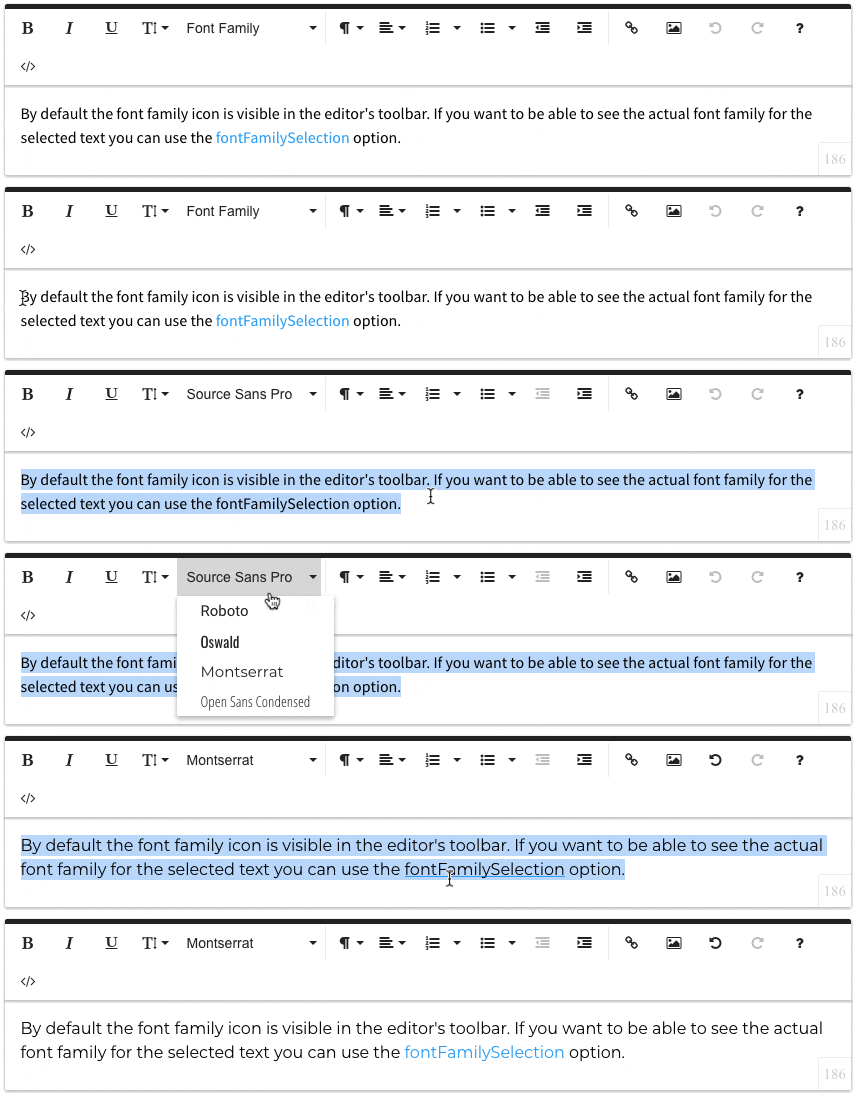
Try it yourself:
By default the font family icon is visible in the editor's toolbar. If you want to be able to see the actual font family for the selected text you can use the fontFamilySelection option.
First you have to include the font on your webpage. In this example we are adding 4 Google fonts: Roboto, Oswald, Montserrat and Open Sans Condensed. Then you have to define the fonts that should appear in the Font Family dropdown using the fontFamily option. This option is an Object where the key represents the font name (just the way you would pass it to the font-family CSS rule e.g. font-family: 'Roboto', sans-serif;) and its value is the font name that appears in the dropdown list e.g. Roboto.
HTML
<div id="froala-editor">
  <p>By default the font family icon is visible in the editor's toolbar. If you want to be able to see the actual font family for the selected text you can use the <a href='../docs/options#fontFamilySelection' title='fontFamilySelection' target='_blank'>fontFamilySelection</a> option.</p>
</div>
CSS
<!-- Include the fonts. -->
<link href='https://fonts.googleapis.com/css?family=Roboto:400,300,300italic,400italic,700,700italic&subset=latin,vietnamese,latin-ext,cyrillic,cyrillic-ext,greek-ext,greek' rel='stylesheet' type='text/css'>
<link href='https://fonts.googleapis.com/css?family=Oswald:400,300,700&subset=latin,latin-ext' rel='stylesheet' type='text/css'>
<link href='https://fonts.googleapis.com/css?family=Montserrat:400,700' rel='stylesheet' type='text/css'>
<link href='https://fonts.googleapis.com/css?family=Open+Sans+Condensed:300,300italic,700&subset=latin,greek,greek-ext,vietnamese,cyrillic-ext,cyrillic,latin-ext' rel='stylesheet' type='text/css'>
JAVASCRIPT
<!-- Include the plugin file. -->
<script src="../js/plugins/font_family.min.js"></script>

<script>
  $(function() {
    $('div#froala-editor').froalaEditor({
      fontFamily: {
        "Roboto,sans-serif": 'Roboto',
        "Oswald,sans-serif": 'Oswald',
        "Montserrat,sans-serif": 'Montserrat',
        "'Open Sans Condensed',sans-serif": 'Open Sans Condensed'
      },
      fontFamilySelection: true
    })
  });
</script> 
