

Looking For The Best WYSIWYG Editor? Froala Vs. Maqetta

A WYSIWYG editor is a must-have tool for any developer or professional web designer. WYSIWYG is the popular short form for “What You See is What You Get.” What this means, is that WYSIWYG editors provide a user-friendly and easy way for anyone to create HTML webpages and content with graphics and media that look the same when published as they do in development/ The best thing is they do it without you having to write any actual HTML code.
Some key features of WYSIWYG editors include text editing using the standard word processing options, letting users input HTML code and visualize the output, and integrating the editor with the software you use to print and publish content.
If you are an individual developer or a member of a team looking for a WYSIWYG editor, you are already aware that there are numerous options available. There are so many to choose from that it can be overwhelming. such as Froala’s HTML Editor, but you need to consider the features, what it can do for you, and much more..
Fortunately, G2.com has made it easy to choose the best platform. Based on reviews from various users, the following grid shows that Froala is the leading WYSIWIG editor on G2. Read on in this article as we compare the two WYSIWYG editors: Froala & Maqetta.
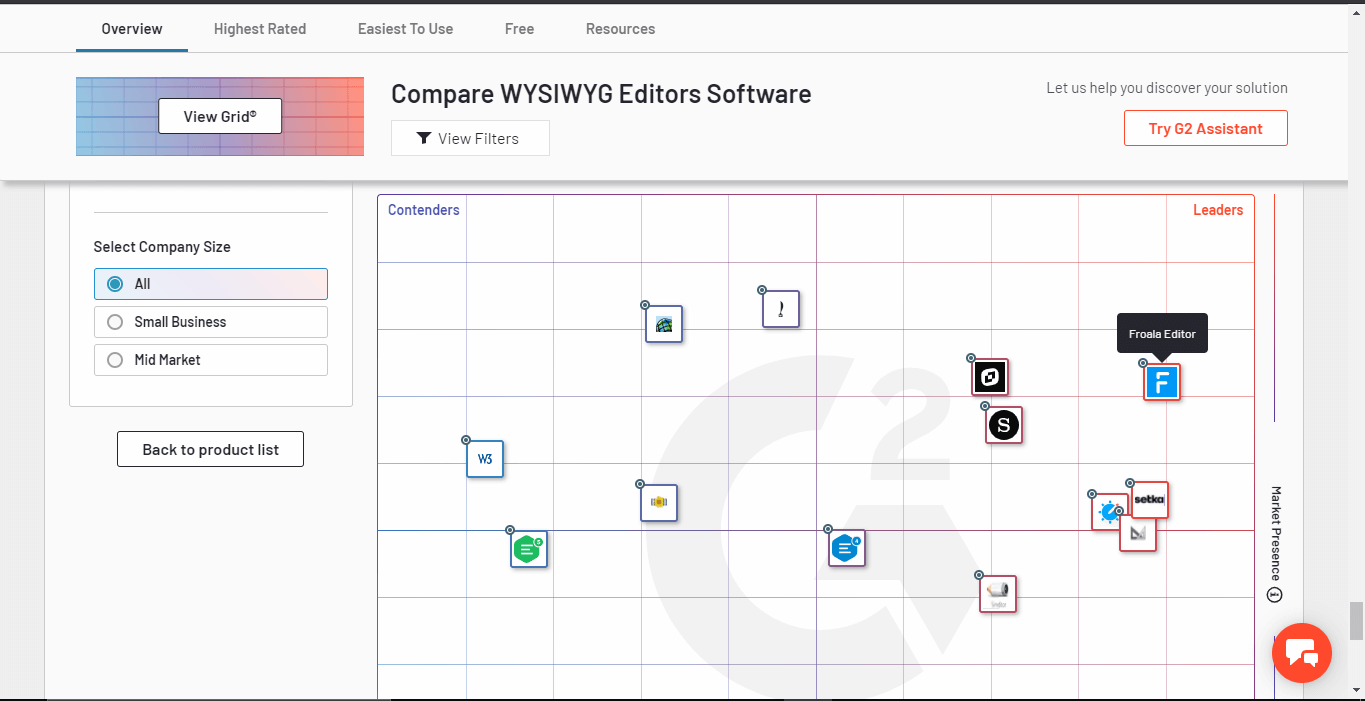
In this post, we’ll draw a comparison between Froala and another WYSIWYG editor called Maqetta, which is also shown in the grid above. We’ll show why Froala is the number one choice in WYSIWYG editors, with top 155 reviews on G2. Maqetta on the other hand has only 44 reviews on G2.
What are the Costs and Subscription Plans?
Froala offers various subscription plans at very reasonable rates and prices. It also has a perpetual license option, which is very attractive if you want to go for a one-time license. Here are the various subscription plans and prices for Froala :
|
Froala |
||
| Plans |
$ per year |
Perpetual license per product |
| Free trial |
0 |
|
| Basic |
199 |
499 |
| Pro |
899 |
1,299 |
| Enterprise |
1,999 |
2,999 |
| Enterprise + |
Custom |
Custom |
Along with these subscription plans, Froala offers the option of a free trial to all prospective users. It has an online editor, which is free to use from anywhere at any time. Froala also offers 170+ Bootstrap-based responsive design blocks, which are free and open source.
Maqetta is an open-source platform whose development came to a halt in May 2013. In February 2014, Maqetta also stopped hosting its free online services at maqetta.org.
While Maqetta does not cost anything to install, no new features have been added to it since 2013. On the other hand, Froala offers very reasonable prices with up-to-date features. When it comes to costs and subscription plans, this is how we rate the two editors:
| Feature |
Froala |
Maqetta |
| Subscription plans
and costs |
 |
|
What are the Various Supported Editor Features?
Any WYSIWYG editor is expected to have a standard set of features. The table below draws a comparison between the features of Froala and Maqetta:
| Feature |
Froala |
Maqetta |
| Basic text editing
(bold, italic, superscript, subscript etc.) |
✔ |
✔ |
| Alignment and indents |
✔ |
✔ |
| Tables |
✔ |
✔ |
| Embed media
(images + videos) |
✔ |
✔ |
| Markdown support |
✔ |
x |
| Integrate 3rd party plugins
in editor |
✔ font awesome, spell or grammar check, math editor, etc.) |
✔ (allows widgets) |
| Drag and drop |
✔ |
✔ |
| Undo-redo |
✔ |
✔ |
From the table, you can see that both Froala and Maqetta provide almost the same set of editor features except for Markdown support. Unfortunately for Maqetta, with the popularity of Markdown language for writing documents, it is a feature many content creators require.
In terms of editor features, this is how we rate the two platforms:
| Feature |
Froala |
Maqetta |
| Editor features | |
 |
What are the Functional Features?
Here is a comparison between Froala and Maqetta based on functional features:
| Feature |
Froala |
Maqetta |
| Cross-platform support |
✔ |
✔ |
| Cross-browser support |
✔ |
✔ |
| Collaborative editing |
✔ |
✔ |
Both Froala and Maqetta are designed for cross-browser and cross-platform support. They also allow collaborative editing between various users. In terms of functional features, this is our overall rating for the two platforms:
| Feature |
Froala |
Maqetta |
| Functionality | |
|
What are the Features for Developers and Designers?
The table below shows various features available for developers and designers. With Froala, users can try out a free online editor, along with different APIs using JSFiddle. There are also over 170 responsive design blocks that can be downloaded by web designers and used for building websites. The table below compares both editors with respect to features for developers and designers:
| Feature |
Froala |
Maqetta |
| APIs support for integrating the editor in an app |
✔ |
x |
| Free online HTML editor |
✔ |
x |
| Try out code via JSFiddle |
✔ |
x |
| Free interactive design blocks |
✔ |
x |
| Themes and templates |
✔ |
✔ |
In this case, especially when it comes to API support and the JSFiddle, Maqetta shows its age. The table below shows our overall ranking in terms of features for developers and designers:
| Feature |
Froala |
Maqetta |
| Features for developers and
designers |
|
 |
What is the Quality of Documentation and Support?
Froala has online easy-to-follow tutorials and examples on its website. Unfortunately, since active development on Maqetta stopped in 2013, there is no online support or help. The table below is related to online documentation, support, and software updates.
| Feature |
Froala |
Maqetta |
| Online Documentation |
✔ |
x (Need to install Maqetta to access documentation) |
| Free online HTML editor |
✔ |
x |
| Online demos and examples |
✔ |
x (Need to install Maqetta to a access documentation) |
| Free updates with license |
✔ |
Development stopped. No new updates |
This is our overall ranking in terms of documentation, support, and software updates:
| Feature |
Froala |
Maqetta |
| Documentation, support and
updates |
|
|
In terms of documentation and support this is how we rate the two editors:
What is the Overall Rating?
The table below shows a summary of the overall ratings of Froala and Maqetta.
| Feature |
Froala |
Maqetta |
| Subscription plans
and costs |
|
|
| Editor features | |
|
| Functionality | |
|
| Features for developers and
Designers |
|
|
| Documentation, support, and updates | |
|
Which WYSIWYG Editor Is The Winner?
Looking at the comparison between Froala and Maqetta, Froala is the obvious winner in terms of editor features, functionality, support for developers and designers, and documentation and updates. The zero cost of Maqetta comes at the cost of outdated features and zero development support.
Froala on the other hand provides over 100+ features for licensed users, a free online editor, and free open-source design blocks. All this coupled with its being lightweight, well structured, and blazing fast, makes it the number one choice among developers and web designers.
Integrate the best WYSIWYG editor on G2 in your products today.
Download Froala today and get started!






No comment yet, add your voice below!