
Multilingual Capabilities Every WYSIWYG Editor Should Have

Everyone loves to use WYSIWYG editors. They are easy to use as well as convenient. In addition to that, you don’t need to be able to code to get beautiful results. However, not all editors are created equally, especially when it comes to their multilingual capabilities. As a result of this, if you regularly use more than one language, you will face issues integrating them with your web application. There is, however, a simple solution to your problems — the Froala Editor. Froala comes with multilingual capabilities so, you can change the language of your content in no time.
In this post, you will find all the details about Froala’s WYSIWYG Editor and why you should use Froala.
What is Froala?
Froala is a feature-rich WYSIWYG HTML editor. It is built using the latest technologies, including jQuery and HTML5. As a result, Froala provides your users with an outstanding editing experience. Better yet, you can quickly and easily integrate it into any kind of project. All you need is basic HTML and JavaScript knowledge. Froala is also a platform-independent Javascript editor. This means you can use it flawlessly on many different types of devices including smartphones, tablets, and PCS. As if that wasn’t enough, Froala is one of the few editors that also supports Retina Ready flat design.
Froala: Is it multilingual?
Froala’s default language is English. However, it is a multilingual editor. Right now, it supports over 38 different languages:
- Arabic
- Bosnian
- Chinese (China)
- Chinese (Taiwan)
- Croatian
- Czech
- Danish
- Dutch
- German
- Greek
- English (Canada)
- English (United Kingdom)
- Estonian
- Finnish
- French
- Hebrew
- Hungarian
- Indonesian
- Italian
- Japanese
- Korean
- Kurdish
- Montenegrin
- Norwegian
- Persian
- Polish
- Portuguese
- Brazil
- Portuguese
- Portugal
- Romanian
- Russian
- Serbian
- Slovak
- Spanish
- Swedish
- Thai
- Turkish
- Ukrainian
- Vietnamese
How to Change the Language in Froala
The process of changing languages in Froala is extremely straightforward. For example, let’s say that you are working in English and you want to change the language to Spanish. All you need to do to make the change is include the JavaScript file for your specific language. once you have done that, create a function to set the language to Spanish. Take a look at this example:
HTML
<div id="edit"></div>
JavaScript
<!-- Include the language file. -->

<script src='../langs/es.js'></script>

<script>
$(function() {
$('div#froala-editor').froalaEditor({
// Set the language code.
language: 'es'
})
});
</script>
Does Froala offer RTL support?
RTL support is very important for any WYSIWYG HTML editor, especially if you have an international audience. With RTL you can deliver a proper experience to all of your users, whether their language utilizes a script that reads right-to-left or left-to-right. For example, unlike English, the Arabic language is read from right to left.
This means that because of the Froala editor’s full RTL support, people of all countries and languages will have a great experience using the WYSIWYG editor.
You can also configure the RTL support very easily. You just need to set the direction field to ‘rtl.’ Let’s take a look at this example:
HTML
<div id="froala-editor">

<p>The rich text editor has full RTL support. Set the <a href="../docs/options#direction" title="direction option" target="_blank">direction</a> option to rtl and writing in Arabic or Farsi will feel naturally.</p>

</div>
JavaScript
<script>
new FroalaEditor('div#froala-editor', {
direction: 'rtl'
})
</script>
Once you have specified the direction as ‘rtl,’ the text will read from right to left.
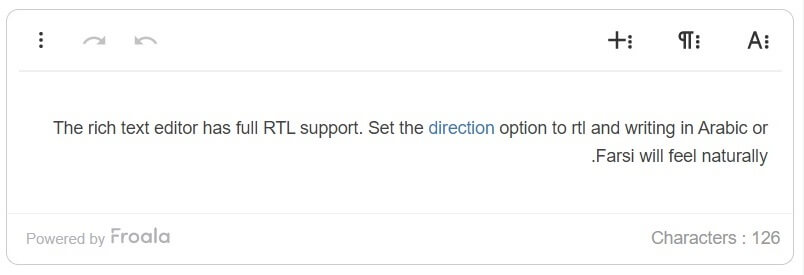
You can play with the source codes at JSFiddle.
Why should you use Froala?
There are plenty of reasons to pick Froala as your editor of choice. Firstly, Froala is an amazing editor that everyone loves to use. Second, it supports inline editing, so what you see is actually what you get. Thirdly, Froala supports cross-browser and cross-platform functionalities. Finally, Froala is easy to upgrade and integrate with projects your projects.






No comment yet, add your voice below!